• Which the release of FS2020 we see an explosition of activity on the forun and of course we are very happy to see this. But having all questions about FS2020 in one forum becomes a bit messy. So therefore we would like to ask you all to use the following guidelines when posting your questions:

    • Tag FS2020 specific questions with the MSFS2020 tag.
    • Questions about making 3D assets can be posted in the 3D asset design forum. Either post them in the subforum of the modelling tool you use or in the general forum if they are general.
    • Questions about aircraft design can be posted in the Aircraft design forum
    • Questions about airport design can be posted in the FS2020 airport design forum. Once airport development tools have been updated for FS2020 you can post tool speciifc questions in the subforums of those tools as well of course.
    • Questions about terrain design can be posted in the FS2020 terrain design forum.
    • Questions about SimConnect can be posted in the SimConnect forum.

    Any other question that is not specific to an aspect of development or tool can be posted in the General chat forum.

    By following these guidelines we make sure that the forums remain easy to read for everybody and also that the right people can find your post to answer it.

MSFS20 What is the best solution: XML gauge or HTML/JS ingamepanel

Lagaffe

Resource contributor
Messages
994
Country
france
Hi,

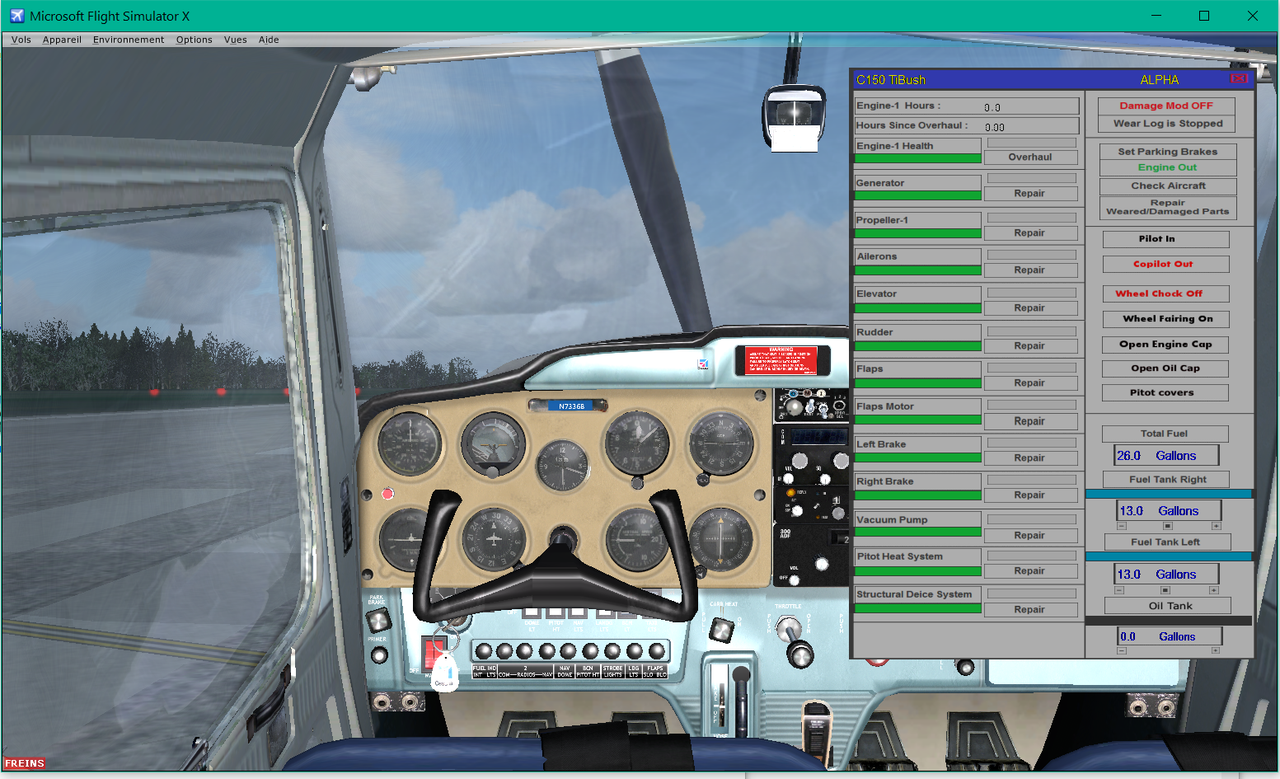
On one of my previous projects, I had adapted Ismail Hakki Güzel's Damage Mod to my C150K TiBush (2014).
Tibush-Damage-Mod.png

It was composed by a set of XML gauges which calculated the wear of the elements and which via a 2D panel allowed to display the state of the plane, and even to repair the damaged elements.
The display of the maintenance panel was a 2D panel called by the SHIFT+Fx keys. This panel allowed to influence the state of the elements (failure => repaired) by inter action with the mouse.
Local variables storage was managed via the sound gauge of Doug Dawson (a *.gau for FSX and a *.dll for P3D/64b).

When I wanted to port this development to MSFS, I was confronted with a big problem : 2D panels are no longer managed by MSFS so we have to find another display mode. I want to try to describe in this post all my researches, tests and conclusions to this problem, at least I hope so.

Storage management for local variables can only be done via JS script and for the display, there are two possibilities:
- create a 3D element in the VC on which we display an XML gauge via the VCockpit0x tag
or
- add via the toolbar at the top of the interface an icon that would call an InGamePanel, which would be managed by HTML/JS code

At first, I chose the HTML/JS solution via an ingamepanel because it was easier to call the persistent data storage script directly via the display module.
To add a icon on the toolbar, first I have use a template found on : https://github.com/bymaximus/msfs2020-toolbar-window-template.
This one provide a "MSFS Project" structure, with you can compile a SPB file and join an icon which be display by MSFS in the toolbar and the files structure managed by HTML/CSS to display an additional window . This HTML code call the JS script to manage datastorage for persistent local variables between two flights (if you finish cleanly your flight using "QUIT TO DESKTOP" functionnality and not by cancelling MSFS with X icon).

Instead of going back and forth between the editor and MSFS, and after reading this MoMadenU thread: https://www.fsdeveloper.com/forum/threads/getting-started-with-fs2020-html-gauges.449513, I begin to build a local test environment, which recreates a "MSFS's VFS system" structure.
To do this, in a working directory you need to :
- copy all the directories and files present under ...Microsoft Flight Simulator\Content\Packages\fs-base-ui\html_ui (331Mb) which is in the launcher part of MSFS (Store version)
- copy in a directory at the same level the HTML/CSS/JS files
- modify in the HTML file, the paths allowing to reach the JS directory in the VFS
Before:
<script type="text/javascript" src="/JS/coherent.js"></script>
<script type="text/javascript" src="/JS/common.js"></script>
<script type="text/javascript" src="/JS/dataStorage.js"></script>
<script type="text/javascript" src="/JS/buttons.js"></script>
After:
<script type="text/javascript" src="../JS/coherent.js"></script>
<script type="text/javascript" src="../JS/common.js"></script>
<script type="text/javascript" src="../JS/dataStorage.js"></script>
<script type="text/javascript" src="../JS/buttons.js"></script>
As this when you clic on the HTML file, you can obtain in a web browser, the display of that you have programmed since calls to included files like basic JS scripts and HTML templates can be resolved without error.

(to follow ...)
 
Last edited:
I was interested in this solution because it allowed me to use a large number of utilities already written by Asobo to manage their interface. This would have allowed to be homogeneous in terms of graphics and to learn something new. However, it is quite complicated because of the lack of documentation. A lot of people have mentioned it on the Dev&Support but it doesn't seem to be planned for the next months.

In the Menestrel HN-433 and the Canso PBY-5A, I have yet use a "iPad" in order to manage chocks, refuel operations and various functions.
This solution will offer me the possibility to enhance functions without modifying the existing iPad and separate the management of wear and tear from the management of basic functions in order to have the possibily to create a separate module for upgrading other aircrafts.
If it is possible to call such one, I will take a glance on this link.

[EDIT]
After a quick read of the mod, it seems that it is possible:
- to call a gauge in a VCockpitXX without having to use a particular texture (option texture = NO_TEXTURE )
- on the other hand some JS scripts have been obfuscated so impossible to understand.

It's not too penalizing since it corresponds to the datastorage part that I already understood while studying the Bonanza G36 Improvement Mod (https://github.com/50North4West/MSFS-G36-Improvement-Mod)
 
Last edited:
I'm just going to put this here in case someone finds out and needs to know.

MSFS can now store L:vars at the end of a flight automatically.

In the systems.cfg you can add a [LocalVars] section such as this:

Code:
[LocalVars]
LocalVar.1 = winjeel_pilot0_type
LocalVar.2 = winjeel_pilot0_visibility
LocalVar.3 = winjeel_pilot1_visibility
LocalVar.4 = winjeel_pilot2_visibility

The local variables will be saved to either:

C:\Users\[username]\AppData\Local\Packages\
Microsoft.FlightSimulator_8wekyb3d8bbwe\LocalCache\SimObjects\Airplanes\
[aircraft-package-name]\state.cfg

or

C:\Users\[USERNAME]\AppData\Roaming\Microsoft Flight Simulator\SimObjects\
Airplanes\[aircraft-package-name]\state.cfg

In my case it's the first location. The SDK says it should be the second location.
 
Don't trust it. MSFS saves the variables just fine but it's not guaranteed to load them again. We had just such a problem with the fuel selectors in the PILOT'S Boeing B-314; Asobo admitted there was a bug in the read code and provided a custom template to specifically work around that problem. PILOT'S aren't the only ones to have found the load problem either; I can't recall who did the Boeing 247 but they had it too and reported it.
 
Hi,
Thanks for the information.

As usual the new features put forward by Asobo are ... questionable. The idea was probably very good but it still needs to be done properly.

Otherwise by continuing to study the different solutions and see the + and -
1 - tablet modeled and managed as a 3D element: the code that manages is one or more conventional gauges (like on FSX) but the buttons must be managed on 3 dimensions: location X,Y but also the support (Z) => complexification on the 3D side and more animations to produce :confused:

2 - 3D modeled tablet with a $texture to manage the functions as an instrument glass cockpit: easy modeling and simpler management of functions via HTML/JS gauges => it is the simplest solution :cool:

3 - Toolbar/UI window : we don't have to take into account the 3D aspect and the management is still done in HTML/JS => if you have understand as you can add an icon on the toolbar and how to call others function, it is a good solution => but you have to master the various classes and functions integrated in the MSFS UI and this is not very easy :confused:

When the first MSFS-compatible aircraft appeared, solution n°1 seems to have been the choice of several editors, then later choice n°2 was more and more used because it was easier to implement and therefore less expensive.

I think solution n°2 will win but I will still try solution n°3 to learn more and see if it is really possible ... learning new solutions is one of the joys of freeware development ;)
 
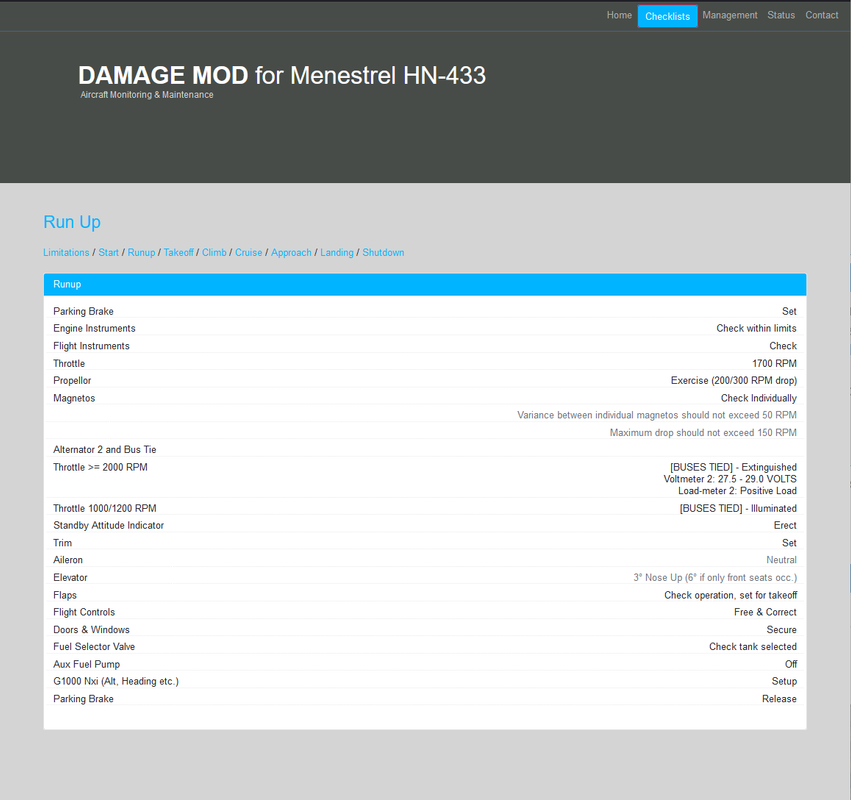
My work begin to give some interesting things :
- a new icon has been added to the toolbar UI
- a clic on this icon send the display of some HTML pages in order to display several panels
- two javascript for the datastorage are in debug ...

This Damage Mod is written to be easily used on others aircrafts ;)


Damage-mod-for-HN-433-bis.png
 
Last edited:
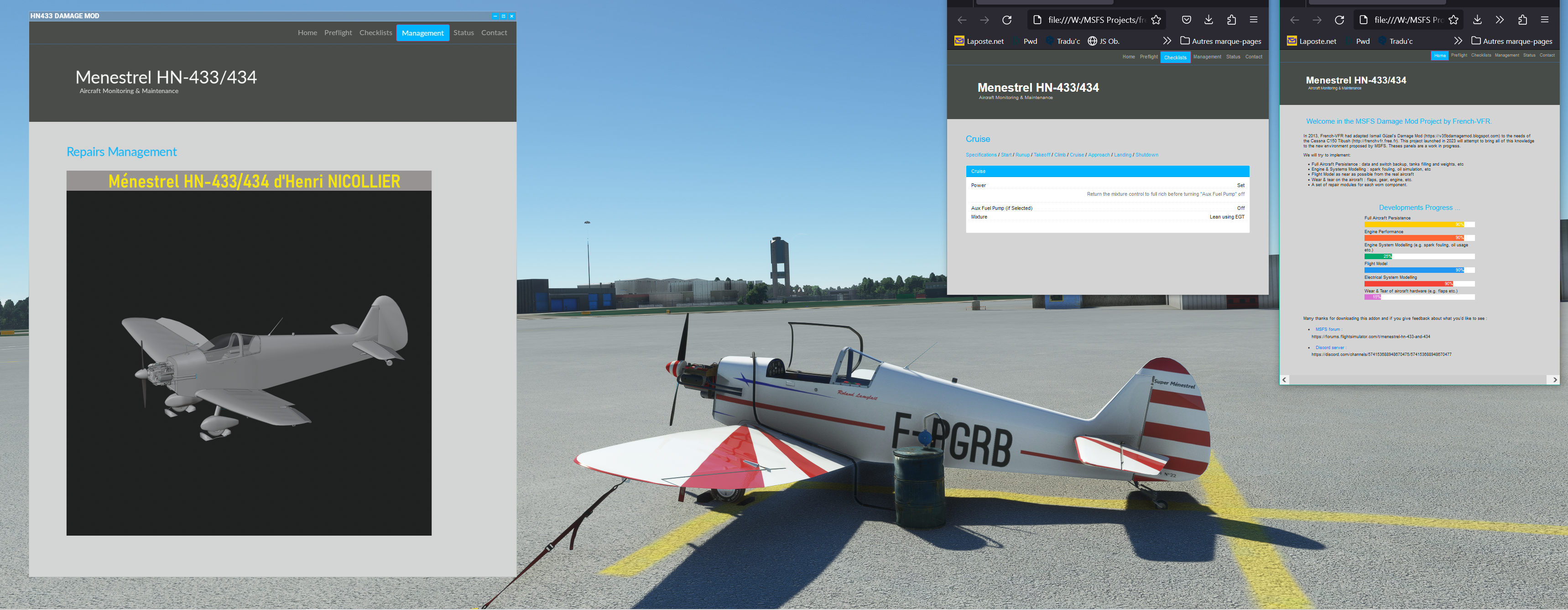
After some works, here you can see the result (this screenshot is composed by 2 Firefox and 1 MSFS snapshot):
- from right to left: HOME page then CHECKLIST/CRUISE and REPAIRS MANAGEMENT (not completed)


Damage-mod-for-HN-433-ter.png


I have now to add mouse clic zone (HTML/JS) on REPAIRS MANAGEMENT and PREFLIGHT windows ...
 
Hello,

First I wanted to thank Anthony and Kronzsky (http://www.kronzky.info/fs) for their writings that helped me a lot 👌

Well, I have just taken over this project "left on a shelf" for nearly a year to adapt it to an aircraft being created: a Super Stearman.
Already it took me more than 2 weeks to reread all my notes on the subject and read a lot of documentation on the subject: HTML5, CSS3 and JavaScript ... because I forgot a lot of knowledge in a year without practice on this subject.

On the previous post, the various interface windows presented are essentially based on:
- the creation of an icon in the toolbar, this icon and its algorithm which displays the first page is quite simple: search on github how to "create a toolbar icon" (enter theses magic words "github msfs maximus" in Google ;) ), you can find several projects to solve this question:
- then when this icon and the SPB file are created, it is possible to display simply a web page like the screens above this post.
To manage the various menus, I used several pages HTML and a special CSS library: bootscrap.css page and some JavaScript code.

A tip suggested by Anthony31 suggested a few months ago:
As it is long and tedious to launch each MSFS test to see the changes made, it is possible to create locally in a directory a "speudo virtual machine VFS" which will contain copies of the files essential that you can find in your mSFS installation : ...\Microsoft Flight Simulator\Content\Packages\fs-base-ui\html_ui
With this method, you can display with a simple browser you stuff without spending times in launching MSFS.

1714723497373.png

Then you copy your pages under InGamePanels folder and don't forget to adapt the path of your include to take in account the new localiszation:

1714723788162.png

PS: I was forced to comment on the "SCSS/common.css" line which prevented the viewing of test pages with a simple browser ... perhaps due to a conflict with other libraries?

After 3 weeks of work, most of the project was adapted to my last aircraft but it came to me an other idea that I wanted to realize: create a preflight page as we see on the aircrafts released in recent months.
The idea is to have a schematic view above the aircraft and to visualize a fictitious path all around this plane. Then the user must be able to either click on pre-determined points and switch the MSFS view on this chosen point or via two buttons to increment a counter that will advance the view to the next point or back (simpler method).
The view switchover in MSFS can be done via the two settable variables that are A:CAMERA VIEW INDEX AND TYPE and A:CAMERA VIEW INDEX AND TYPE:1.
Of course, you have to create all camera views necessary in the camera.cfg :cool:

As for the aircraft's diagram and the path all around, yesterday while browsing sites dealing with JavaScript I found the following site:
=> https://developer.mozilla.org/en-US/docs/Learn/JavaScript/Client-side_web_APIs/Drawing_graphics
If you read this site carefully, you will see that using the Canvas library and JavaScript code allows you very simply to display images in an HTML pages and then draw over figures or display text. With HTML/CSS/JavaScript is also possible to create "butons" or "click areas" in order to control the display of the desired view.
 
Back
Top