• Which the release of FS2020 we see an explosition of activity on the forun and of course we are very happy to see this. But having all questions about FS2020 in one forum becomes a bit messy. So therefore we would like to ask you all to use the following guidelines when posting your questions:

    • Tag FS2020 specific questions with the MSFS2020 tag.
    • Questions about making 3D assets can be posted in the 3D asset design forum. Either post them in the subforum of the modelling tool you use or in the general forum if they are general.
    • Questions about aircraft design can be posted in the Aircraft design forum
    • Questions about airport design can be posted in the FS2020 airport design forum. Once airport development tools have been updated for FS2020 you can post tool speciifc questions in the subforums of those tools as well of course.
    • Questions about terrain design can be posted in the FS2020 terrain design forum.
    • Questions about SimConnect can be posted in the SimConnect forum.

    Any other question that is not specific to an aspect of development or tool can be posted in the General chat forum.

    By following these guidelines we make sure that the forums remain easy to read for everybody and also that the right people can find your post to answer it.

FSXA Cannot exclude airport background

Messages
13
Country
argentina
I'm about to throw the computer out the window. I spent 1 hour making the airport and 2 hours trying to figure out why I cannot exclude the stock airport background! I'm going crazy :eek:

What did I do:
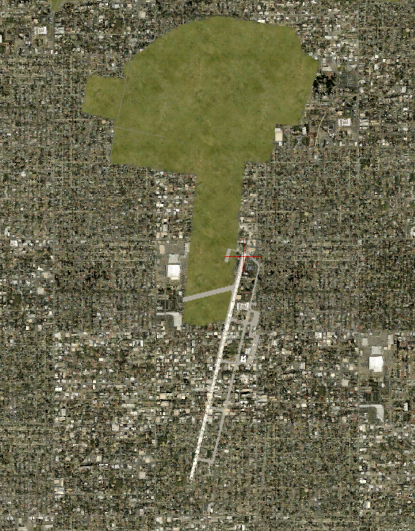
But FSX completely ignores me. Not only the old background doesn't disappear but the new polygon doesn't show at all:

ADE SADM.PNG


The grey polygon is: Exclude general / Airport background
The green polygon is: Flatten Mask Class Map ExcludeAutogen

Result in FSX:
FSX SADM.PNG


The green patch is the background I want to exclude. The new airport is to the south, but it doesn't have its new background. Aircraft position in both pictures is synchronized.

Any ideas? Am I so dumb I cannot do this right?:(
Thanks in advance for any help.
 
The grey polygon is: Exclude general / Airport background

The Exclude must be

Type = Exclude Specific
Tag = Airport Backgrounds Flatten MaskClassMap Autogen

The green polygon is: Flatten Mask Class Map ExcludeAutogen

The new airport grass should be

Type = Airport BackGround
Tag= Flatten Mask Class Map ExcludeAutogen

and be sure to set the altitude for the airport Flatten Mask Class based on what the ground elevation is set at.

Also be sure and copy the cvx.bgl and the airport bgl (2 files) to a active scenery folder.

Tutorial at this link

http://www.fsdeveloper.com/forum/threads/tutorial-land-class-visibility.430559/
 
Last edited:
Hi jvile,

Thanks for your reply! I changed the exclude to be Type: Exclude Specific and Tag: Airport Backgrounds Flatten MaskClassMap Autogen. The new airport grass was already exactly what you suggested.

What do you mean by "based on what the ground elevation is set at"? Where do I set ground elevation? The airport altitude (in Airport > Properties) is set at 29.870m (stock altitude, I didn't change it). Exclude polys don't have an altitude setting I can change. Terrain polygon is at 29.87m, runway at 29.87m.

The two bgl files (SADM_ADEX_DRC.bgl -- 6KB and SADM_ADEX_DRC_CVX.bgl -- 1KB) are in the \Addon Scenery\DRC SADM v1\scenery folder, which corresponding area is placed first (priority 1) in the Scenery Library.

I followed that tutorial as well, I didn't notice anything out of the ordinary of what I did. I changed the display mesh setting to minimum and maximum and nothing changes. I don't have any landclass polygons or anything weird.

I compiled again and the result is exactly the same o_O

I'm attaching the original project here in case anyone wishes to compile it and finds that it works for them. You'll find that it's not a big thing yet, just a couple aprons and a runway, nothing else. Maybe it's something wrong with my FSX?

EDIT: By the way, I'm using ADE v01.61.5298 Pro.
 

Attachments

Hi,

Looks fine to me, the default polygon is excluded and your polygon shows up just fine.

But my default polygon looks *nothing* like that round shape that you have in your picture. The airport consists of a bare runway, and the polygon is a long thin rectangle that just fits the runway. So you are trying to exclude something other than the default polygon.

Default airport and your airport images attached.

sadm_orig.jpg


sadm_new.jpg


Hope this helps,
 
Wow, thanks a lot, Tom! I see now there is something wrong with my FSX installation. I have FTX Global and FTX Global Vector, I guess the airport background I'm trying to exclude comes from one of those, but it's strange it is so badly positioned. What a nightmare this will be... :(
 
Last edited:
Confirmed, thanks! The problem was a conflict with a previous scenery from a different author which covers the entire Buenos Aires area and in which the SADM airport area is drawn off position so it matches the default FSX SADM
 
Back
Top