• Which the release of FS2020 we see an explosition of activity on the forun and of course we are very happy to see this. But having all questions about FS2020 in one forum becomes a bit messy. So therefore we would like to ask you all to use the following guidelines when posting your questions:

    • Tag FS2020 specific questions with the MSFS2020 tag.
    • Questions about making 3D assets can be posted in the 3D asset design forum. Either post them in the subforum of the modelling tool you use or in the general forum if they are general.
    • Questions about aircraft design can be posted in the Aircraft design forum
    • Questions about airport design can be posted in the FS2020 airport design forum. Once airport development tools have been updated for FS2020 you can post tool speciifc questions in the subforums of those tools as well of course.
    • Questions about terrain design can be posted in the FS2020 terrain design forum.
    • Questions about SimConnect can be posted in the SimConnect forum.

    Any other question that is not specific to an aspect of development or tool can be posted in the General chat forum.

    By following these guidelines we make sure that the forums remain easy to read for everybody and also that the right people can find your post to answer it.

FSX Landclass Poly's

Messages
15
Country
us-florida
I'm trying to lay a desert rock poly over the top of a mangrove poly but mangrove poly stays on top of the rock. I've tried moving the mangrove to the back and rock to front in ADE, but it seems to have no effect.

Any suggestions would be appreciated.

Thanks

Jan Claus
jclaus1@tampabay.rr.com
 
Mangrove does not grow on rock. So I guess you have to either remove the mangrove or the rock:).
Seriously though, mangrove LC will have priority on rock LC so the only way to have rock somewhere in the mangrove is to shape the mangrove texture poly so as not to overlap the rock one.
Another way of doing it would be to add a gp poly with a rock texture but the rocks would be flat terrain or not show up at all if no flatten is underneath.

PS: your putting the mangrove poly to the back in ADE is only for the purpose of making it easier to select and see what it is like in ADE but does not influence the outcome in FS.
 
As Roby says, the order of placement of land class in ADE does not reflect the order of display in FS. I am not sure I know what the ordering of land class is - if someone knows then I can include that in ADE.
 
Mangrove does not grow on rock. So I guess you have to either remove the mangrove or the rock:).
Seriously though, mangrove LC will have priority on rock LC so the only way to have rock somewhere in the mangrove is to shape the mangrove texture poly so as not to overlap the rock one.
Another way of doing it would be to add a gp poly with a rock texture but the rocks would be flat terrain or not show up at all if no flatten is underneath.

PS: your putting the mangrove poly to the back in ADE is only for the purpose of making it easier to select and see what it is like in ADE but does not influence the outcome in FS.

WHOAAaaa Podner, Let me put my hands over my Chia Pets ears.

This morning when I loaded FSXA, after having brought rock to front and mangrove to rear, the rock is now on top. Go Figure.
Yesterday I wasn't restarting FSXA just removing the scenery files from the active list and reloading after compiling, maybe it's not removing all files from memory unless restarting FSX.

Thanks

JRC
 
Oops, you are right, rock does show up on top of mangrove (logical because as said, mangrove does not grow on rock:)).
It means rock landclass has a higher priority (layer order ) than mangrove LC.
It has nothing to do though with your bringing the rock to the front and mangrove to the back in ADE!
From the SDK:
renderpriority:
:
If there are overlapping areas the lowest priority textures are rendered first, and the highest priority textures are rendered last, and are therefore most likely to appear.

(mangrove = 72, rock = 130)

Very confusing, I know.
 
Last edited:
Oops, you are right, rock does show up on top of mangrove (logical because as said, mangrove does not grow on rock:)).
It means rock landclass has a higher priority (layer order ) than mangrove LC.
It has nothing to do though with your bringing the rock to the front and mangrove to the back in ADE!

Unfortunately you are right, wouldn't that be a wonderful thing if you could.
 
I wouldn't, I was referring to being able to designate at what level/layer an item, be it object or poly would lay, therefore being able to .....well you know.
 
Jon,

As far as I can tell landclass ordering is controlled by terrain.cfg. I have done some experimentation with a few landclasses. I found that if you just overlay a landclass polygon onto another then the landclass on top has to be before the underlying landclass in the terrain.cfg file in order for it to show. Otherwise you have to create one landclass polygon that surrounds the other.

Ed
 
o_OWhy would you want mangrove to grow on rock?:confused:
Jon,

As far as I can tell landclass ordering is controlled by terrain.cfg. I have done some experimentation with a few landclasses. I found that if you just overlay a landclass polygon onto another then the landclass on top has to be before the underlying landclass in the terrain.cfg file in order for it to show. Otherwise you have to create one landclass polygon that surrounds the other.

Ed
Well that's interesting to know.
 
As Roby says, the order of placement of land class in ADE does not reflect the order of display in FS. I am not sure I know what the ordering of land class is - if someone knows then I can include that in ADE.

Hi Jon:

It would be interesting to see this info listed / available for use in ADE. :scratchch

This attribute is referenced in FSX Terrain SDK as a 'Property' with the name "RenderPriority" in a table at:

http://msdn.microsoft.com/en-us/library/cc526967.aspx#texture.n

Inspection / parsing of the info inside the [FSX install path]\Terrain.Cfg with attention to the "RenderPriority" listing for each entry might prove rather informative. ;)


Hope this helps ! :)

GaryGB
 
In 2011, when I wrote the chapter 14 (Terrain Elements) for the German ADE-Manual I stumbled over the behaviour of the "Mask Class Map" polygones (they are the "tags" of the Airport Background "types").

properties.jpg

Fig. 1: Terrain „Type“ and „Tag“


Their behaviour was for me totally unexpected

When a LandClassPolygon is lying over such a MaskClassMap, some of the landclasses are totally obscured, some only partially and only 32 of the total 123 available landclasses are completely visible.

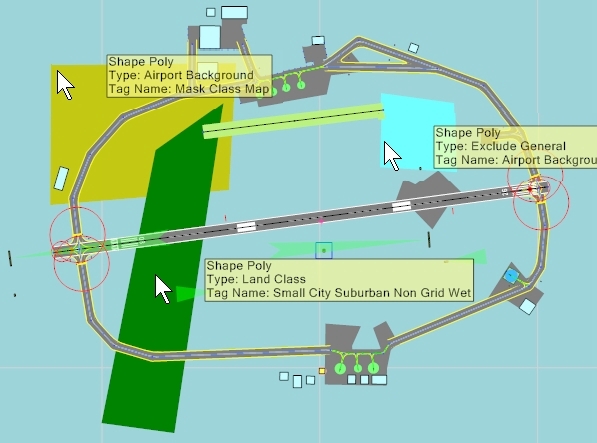
In Fig. 2 my test setup is shown.
Testsetup.jpg

Fig. 2: Test Setup

In this picture there are the following polygones (colour: type => tag)

- lightblue:....... ExcludeGeneral => Airport Background
- yellow: :... ....AirportBackground => MaskClassMap
- green: :..... .. Landclass => varoius tags (my test objects)

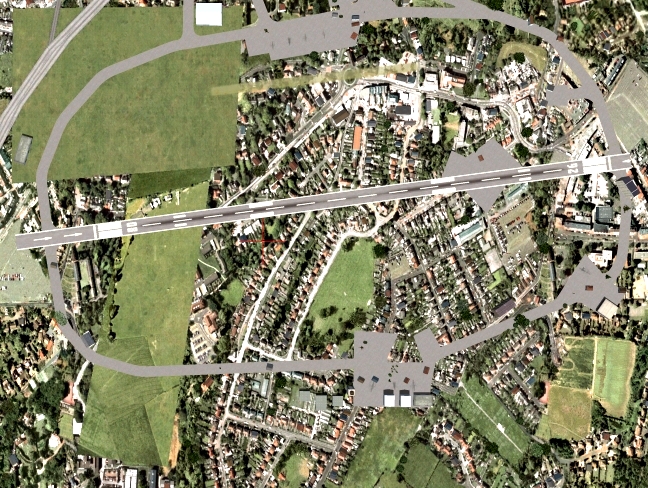
The following pictures show the above mentioned behaviours.

halbverdeckt.jpg

Fig. 3: The landclass „ Sand Desert“ is partially obscured by the poly „MaskClassMap“

verdeckt.jpg

Fig.4: the landclass „Broadleaf Crops“ is totally obscured by the poly „MaskClassMap“

sichtbar.jpg

Fig. 5: the landclass „SemiDesertSage“ is visible over the poly „LandClassMap“

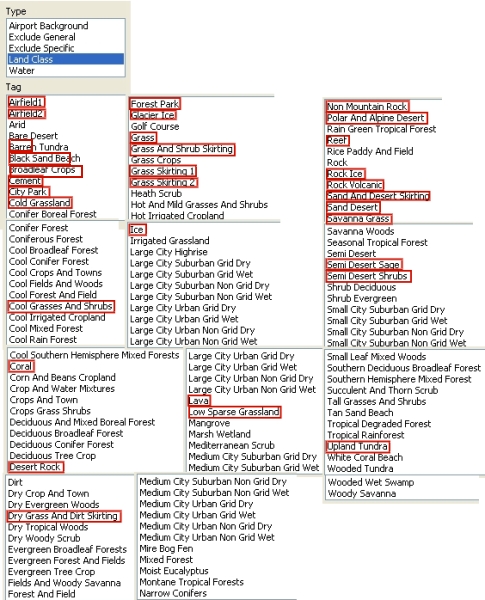
In the following table of all 123 „Landclass“-tags the only 32 totally visible tags are marked in red.

Tabelle.jpg


This experiment demonstrates that for Terrain Elements not only the sequence of layering is important, but also the selection of the polygones, because they react in a very unexpected way, which is not documented anywhere.
Before such a documentation is generated, I can only promote an advice, which Jim Vile gave me (together with a reference to the theoretical background, which is very complex):
........................................Don't overlap

Helli
 
Back
Top