• Which the release of FS2020 we see an explosition of activity on the forun and of course we are very happy to see this. But having all questions about FS2020 in one forum becomes a bit messy. So therefore we would like to ask you all to use the following guidelines when posting your questions:

    • Tag FS2020 specific questions with the MSFS2020 tag.
    • Questions about making 3D assets can be posted in the 3D asset design forum. Either post them in the subforum of the modelling tool you use or in the general forum if they are general.
    • Questions about aircraft design can be posted in the Aircraft design forum
    • Questions about airport design can be posted in the FS2020 airport design forum. Once airport development tools have been updated for FS2020 you can post tool speciifc questions in the subforums of those tools as well of course.
    • Questions about terrain design can be posted in the FS2020 terrain design forum.
    • Questions about SimConnect can be posted in the SimConnect forum.

    Any other question that is not specific to an aspect of development or tool can be posted in the General chat forum.

    By following these guidelines we make sure that the forums remain easy to read for everybody and also that the right people can find your post to answer it.

Little Navmap flight planner - beta released

Hi Alex;

I'm still experimenting your great work, and love it :)

2 things i find;

1= in Navmap/Tools/ Flight simulator connection...

How can i delete some Hostename or IP Adress ; by experimenting i add 5 or 6 adresse and want to delete some.


2 = how can i see other Aircraft when i'm flying (on private server ) some time we can be up to 20 or more connected and are Inside 100nautical milles (i see my plane on the map but no one else)


Oldguy
 

Attachments

  • ScreenShot008.jpg
    ScreenShot008.jpg
    34 KB · Views: 635
Hi Oldguy,
sorry, currently you cannot delete these entries in the graphical user interface. I'll add that in the next major release.
But you can delete them in the configuration file:
* Go to the about dialog. There is a link to the "little_navmap.ini" file.
* Click on the link. That will open the file in a text editor.
* Important: Close Little Navmap now.
* Go back to the text editor and search for a line that starts with "RemoteHosts="
* Delete this line. That's it.

About 2: Currently there is no support for display of other aircraft. Will be added in the next major release.

Alex
 
Hi All,

Version 1.0.4.beta released:
  • Fixed scenery reading errors.
  • Reading scenery library now continues if errors occur.
  • Problem loading PFPX plans solved.
  • Fixed errors loading scenery.cfg when using Scenery Config Editor.
  • Solved some problems recognizing flight simulator paths.
  • Fixed some map drawing errors.
  • Added binary for Apple macOS.
This is most likely the last beta. The final release will not be much different, except changes to the manual. Then development will move on to more functionality.

Download for Windows: LittleNavmap-1.0.4.beta.zip

Download for Apple macOS: LittleNavmap-1.0.4.beta.dmg

Alex
 
Hiya,

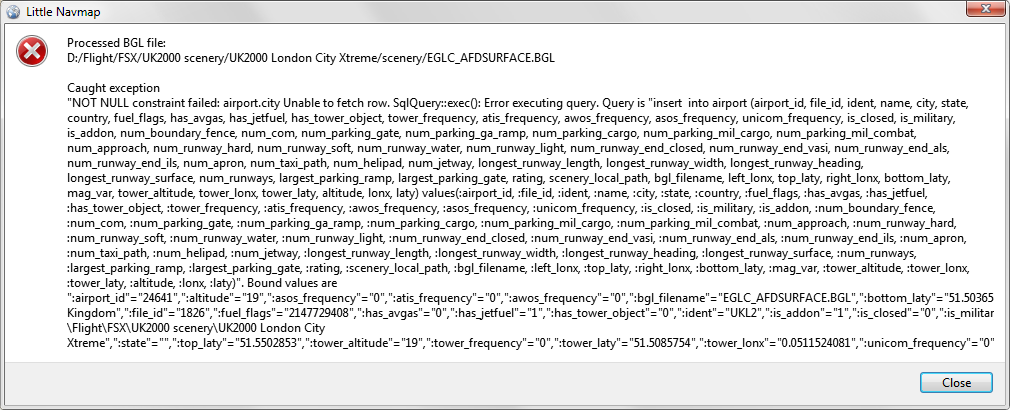
Have some problems in creating the scenery database, UK2000 EGLC nil-pointer...
little-error.png


Marcel
 
Marcel, can you send me the log file after running the loading process using PM or e-mail.
E-Mail on on my profile page: https://github.com/albar965

Edit: You can find a link to the log file in the about dialog.

Alex
 
Last edited:
Testing v1.04 beta. I saw strange airways (both victor an jet). Nav DB rebuilt with v1.04.

qN6XtpM.png


These strange lines start in EKMAR (south of Portugal) and finish in different waypoints in Deustchland.

It's possible add a simple VNAV calculator which gives a TOD?
 
Hi Carlos,

known problem with the FSX database. You can see them in the FSX map too but they are hard to spot because FSX doesn't clip properly and the lines disappear from the map when zooming in.
What happens is that there are a lot of airways with waypoints that are 100 to 800 nm apart which can't be correct. I had to add a workaround in the flight plan calculation to avoid these long distances.

Maybe I add another workaround to omit these long segments until I can load AIRAC data.

I'll add a simple TOD indication in the 1.2 release.
Later on even an editor for aircraft performance profiles.

Alex

Bildschirmfoto vom 2016-10-11 11-28-31.png
 
Hello,

Thank you for your great (and not so Little) Navmap :)

A suggestion for a future release : I like your "Show AddOn Airport" and intent to use it widely to build flight plans to discover them.
But I am using FTX Vector which just change Altitude to a lot of airports, thus creating "false positives".

I don't know if it is possible, but would be nice to avoid to mark them as AddOn.

Regards - Gérard
 
Looks like a nice utility, but I am unable to get anything other than the base map to load. After running the database manager for FSX/Accel, when I click on the top icons that control the viewing of airports, Navaids, Airways, ILS symbols, etc. I get nothing. Just a blank map, useless. Also, Is LittleNavConnect required or is it only necessary if you are connecting several computers to the main program? I loaded it last evening and for a few seconds I could see my airplane, but then it disappeared and there was a notice in the box saying it was "Connected. Waiting for an update". . . .what update?
 
Hello,
Thank you for your great (and not so Little) Navmap :)
A suggestion for a future release : I like your "Show AddOn Airport" and intent to use it widely to build flight plans to discover them.
But I am using FTX Vector which just change Altitude to a lot of airports, thus creating "false positives".
I don't know if it is possible, but would be nice to avoid to mark them as AddOn.
Regards - Gérard

Hi Gérard,
you can do that in the options dialog on the tab "Scenery Library Database". Add the FTX vector path to the lower box "Select paths to exclude from add-on recognition". Then all airports in this directory will *not* be considered add-on airports. Let me know if that works for you because I found a bug in that functionality yesterday.

Edit: Forgot: You need to reload the scenery library after this change.

Looks like a nice utility, but I am unable to get anything other than the base map to load. After running the database manager for FSX/Accel, when I click on the top icons that control the viewing of airports, Navaids, Airways, ILS symbols, etc. I get nothing. Just a blank map, useless. Also, Is LittleNavConnect required or is it only necessary if you are connecting several computers to the main program? I loaded it last evening and for a few seconds I could see my airplane, but then it disappeared and there was a notice in the box saying it was "Connected. Waiting for an update". . . .what update?

Hi falcon409,

The Navconnect is not required. It is needed only for the moving map when you want to see your FSX airplane. But if you want to see your FSX airplane you need it, even if everything is running on one computer.

Regarding crashes:
What happens when you load the scenery library? Does it finish or does it CTD? Does the dialog show any number of airports?

The best would be to load the scenery library and - if it does not CTD while doing that - send me the log file and the scenery.cfg, if you don't mind.
That would help me a lot to identify any problem.

Regards,

Alex
 
Last edited:
... "Connected. Waiting for an update". . . .what update?
Missed that one. This message means that it is linked to Navconnect which is also linked (via SimConnect) to FSX but the simulator did not send any aircraft position yet.

That can happen if you still on the FSX opening screen.

Alex
 
Hi Gérard,
you can do that in the options dialog on the tab "Scenery Library Database". Add the FTX vector path to the lower box "Select paths to exclude from add-on recognition". Then all airports in this directory will *not* be considered add-on airports. Let me know if that works for you because I found a bug in that functionality yesterday.

Edit: Forgot: You need to reload the scenery library after this change.

Thank you for your quick answer.
The first (quick) check shows what I expected.
Gérard
 
Hi falcon409,
The Navconnect is not required. It is needed only for the moving map when you want to see your FSX airplane. But if you want to see your FSX airplane you need it, even if everything is running on one computer.

Regarding crashes:
What happens when you load the scenery library? Does it finish or does it CTD? Does the dialog show any number of airports?
The loading of the scenery library goes as it should, all airports load, all navaids, everything shows as completed. There has not been any CTD during that process. The CTD comes about 10 minutes into a flight (with "navconnect" running, no aircraft symbol showing and the "Connected, waiting for update" message in the box). So even with navconnect running, I don't see my airplane and navconnect is waiting for an update.

falcon409 said:
... "Connected. Waiting for an update". . . .what update?
Missed that one. This message means that it is linked to Navconnect which is also linked (via SimConnect) to FSX but the simulator did not send any aircraft position yet.
That can happen if you still on the FSX opening screen.
Alex
Regards,
Alex
It would seem, that since I was in the middle of a flight, with navconnect running, there are other times when that message can be displayed.

I will send you the log and scenery.cfg file
 
Hi Alex, I have just stumbled across this little utility and am liking what I see. One thing I would like to ask is this. Based on each aircraft's profile would it be possible to be able to program into the flight plan the calculation of TOC/BOD? The only flight planner I have seen this in so far has been FSNav. Payware planners like FSTramp and FSCommander were devoid of this utility. Although there are some calculators out on the net I liked it better when you could see on the flight plan where these points were.

Cheers
Pat
 
Hi Alex, I have just stumbled across this little utility and am liking what I see. One thing I would like to ask is this. Based on each aircraft's profile would it be possible to be able to program into the flight plan the calculation of TOC/BOD? The only flight planner I have seen this in so far has been FSNav. Payware planners like FSTramp and FSCommander were devoid of this utility. Although there are some calculators out on the net I liked it better when you could see on the flight plan where these points were.

Cheers
Pat
Hi Pat, that is planned for future releases. I'd like to have this too.

All of these items have been corrected.

I replied at SOH. Here is my reply. Let's continue the discussion here to avoid confusion.:)
The simulator in the Scenery loading dialog is not synchronized with the simulator selection in the menu. I think this can be confusing because sometimes you don't reload what you see.
The program keeps separate scenery databases for each simulator and you can switch between them on the fly.
If one of them is not loaded you won't see anything when switching to the wrong one. I will synchronize the dialog and the map in the future.

About the CTD: I (rarely) had some in the past that were caused by the background updates in the "Flight Plan Elevation Profile" dock window. Close that window, that will end all background updates for elevation data which also might save some FPS. Maybe that helps.
A wrong IP address should not cause any crash, only an error message. Although the error message can show up to a minute later in some cases.
When running all on the same computer simply use "localhost" to connect.

About flight plan building: The logic depends on the menu item you used to add an airport:
If you use "Set as Departure/Destination" the new airport always *replaces* the current departure or destination
If you use "Add to flight plan", the airport (or waypoint) is added to the nearest route leg or waypoint. So this might be added before the departure or it can be appended to the route after the destination.
The drag and drop editing mode on the map is explained in the manual here.

About stutters: I'm running all on my old and trusty Core i7 975 at 4 GHz, FPS externally locked to 60 (with low settings in FSX) and only get the usual FSX stutters from time to time.
I'm quite sure the stutters are an affinity mask/priority problem. I'll post my settings when I'm at my flying computer.
You can also try to decrease the update interval in Navonnect.

Alex
 
Well, I was going to make a few suggestions on things I found a bit cumbersome, that is until just prior to landing at an airport, after a short flight the Sim suddenly stopped, I got the opening FSX screen with a message stating:
"Thank you for trying Flight Simulator X, your trial period has expired. Please register your program to continue flying".

This may not be connected to your program, but it's also too much of a coincidence that in all the years I've been flying FSX (since it's release about 10years ago) this problem never surfaced until using your program.

That being said, I'm not interested in discussing what other problems might have caused it. I have FSTramp, which runs much smoother, runs inside the program (so no sound drop when moving from the map to the sim) and the only thing missing is the flight plan function, which I have learned to do without. That was the only reason I wanted to try this program. I won't take any more of your time. Thank you.
 
I have no idea what can cause this :(. First time I get this reported.

I hope at least you were able to register again.
Sorry it is not working for you.

Alex
 
Hi All,

Little Navmap stable version 1.0.5 released

A big thank-you to all the people supporting me throughout the beta phase, sending me their log files, screen shots, friendly messages, ideas and more.

There is no new functionality compared to the last beta version. New features will be added in the next development cycle.

Fixed since the last beta 1.0.4:
  • Scenery reading errors for airports without city name.
  • Errors reading scenery.cfg file.
  • Exclude options did not work for some scenery paths.
  • Wrong order of flight plan when adding waypoints.
  • Overview overlay loosing background image.
  • Valid start position in flight plan not recognized.
  • Display of narrow and closed taxiways.
Improved:
  • Disabling aircraft tracking on double click and other actions.
  • Simulator selection in loading dialog now synchronized with map.
  • Smoothed user aircraft movement a bit.
  • Added help button to various dialogs.
  • Many additions and clarifications in the manual.
Download LittleNavmap-win-1.0.5.zip for Windows
Download LittleNavmap-macOS-1.0.5.dmg for Apple macOS

Little Navconnect stable version 1.0.1 was released too
Download LittleNavconnect-1.0.1.zip

Alex
 
Back
Top