

WebSimConnect
Resource contributor
- Messages
- 154
I am pleased to announce the release of WebSimConnect 2.1 software framework for FSX/P3D add-ons. Major changes compared to 2.0 version are the following:
added Prepar3D V4 x64 support
Installation program that setup the engine and installs the examples.
WebSimXML, a new component that allows to render HTML5 content as an CustomDraw Element in the XML gauge allowing to build XML gauges with some HTML5 content. It also enables the developers both to write in XML some JavaScript code executed on the HTML5 element, and write XML statements in JavaScript. The HTML5 element can also be interactive and responsive to mouse events.
WebSimSocket, a new component that enables bi-directional communication between FSX/P3D and a web page opened on external browser. You can manipulate HTML5 content using either XML or C++ and from JavaScript you can execute XML code or call your C++ functions. All communication is done using websocket protocol. No more http. Web page is listening to events coming from the sim rather than querying it like in http.
updated WebSimData component allowing to use the framework with no C++ coding.
The new architecture is depicted below:
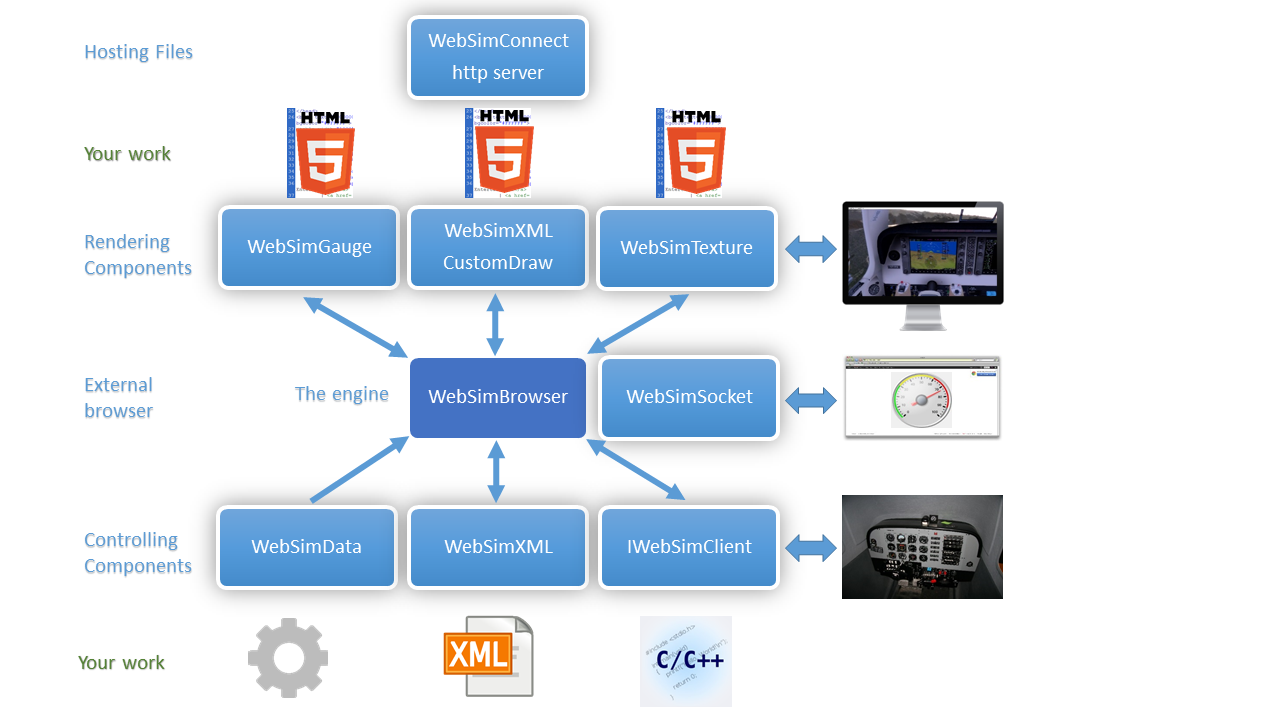
and detailed overview is in the attached PDF file or can be downloaded from here:
https://www.dropbox.com/s/l44x8ta23kx33k0/WebSimConnect Overview v2.1.pdf?dl=0
DOWNLOAD SECTION:
WebSimBrowser setup - the engine of the framework:
https://www.dropbox.com/s/9yvq0xf9axtr8r7/WebSimBrowser_Setup.zip?dl=0
WebSimConnect examples setup:
https://www.dropbox.com/s/fzywklytxa6qe4j/WebSimConnect_Example_Setup.zip?dl=0
SDK (binaries, documentation, examples, source code of examples, config files)
https://www.dropbox.com/s/3vjc3i1kq5410cl/WebSimConnect 2.1.6.zip?dl=0
The software requires simconnect RTM version. It is included in FSX and for P3D it can be installed in P3D from .\redist\Interface\FSX-RTM\retail\lib
The examples include:
Opaque 2D gauge window with HTML5 content
Transparent 2D gauge window
3D embedded gauge in VC
HTML5 content as an element in the XML gauge
Manipulating HTML5 content through C++ code
Manipulating HTML5 content through XML code
Using WebSimData configuration to send data from the Sim to HTML5
Using WebSimData to send data from the Sim to externally browsed HTML5 content
Using WebSimSocket channel and executing XML command from the JavaScript code.
Using WebSimTexture to render dynamic textures with HTML5 content.
The details how to run the examples are in the attached overview document. With the installation programs it is now easy to see the demo in action. Just run it and select Beech Baron 58 (WebSimConnect) aircraft. All examples runs well on FSX, P3D V2, V3, V4, with exception that WebSimTexture is not supported on FSX (it uses P3D PDK and DX11)
The framework is free for non-commercial use.
Enjoy, Marcin
added Prepar3D V4 x64 support
Installation program that setup the engine and installs the examples.
WebSimXML, a new component that allows to render HTML5 content as an CustomDraw Element in the XML gauge allowing to build XML gauges with some HTML5 content. It also enables the developers both to write in XML some JavaScript code executed on the HTML5 element, and write XML statements in JavaScript. The HTML5 element can also be interactive and responsive to mouse events.
WebSimSocket, a new component that enables bi-directional communication between FSX/P3D and a web page opened on external browser. You can manipulate HTML5 content using either XML or C++ and from JavaScript you can execute XML code or call your C++ functions. All communication is done using websocket protocol. No more http. Web page is listening to events coming from the sim rather than querying it like in http.
updated WebSimData component allowing to use the framework with no C++ coding.
The new architecture is depicted below:
and detailed overview is in the attached PDF file or can be downloaded from here:
https://www.dropbox.com/s/l44x8ta23kx33k0/WebSimConnect Overview v2.1.pdf?dl=0
DOWNLOAD SECTION:
WebSimBrowser setup - the engine of the framework:
https://www.dropbox.com/s/9yvq0xf9axtr8r7/WebSimBrowser_Setup.zip?dl=0
WebSimConnect examples setup:
https://www.dropbox.com/s/fzywklytxa6qe4j/WebSimConnect_Example_Setup.zip?dl=0
SDK (binaries, documentation, examples, source code of examples, config files)
https://www.dropbox.com/s/3vjc3i1kq5410cl/WebSimConnect 2.1.6.zip?dl=0
The software requires simconnect RTM version. It is included in FSX and for P3D it can be installed in P3D from .\redist\Interface\FSX-RTM\retail\lib
The examples include:
Opaque 2D gauge window with HTML5 content
Transparent 2D gauge window
3D embedded gauge in VC
HTML5 content as an element in the XML gauge
Manipulating HTML5 content through C++ code
Manipulating HTML5 content through XML code
Using WebSimData configuration to send data from the Sim to HTML5
Using WebSimData to send data from the Sim to externally browsed HTML5 content
Using WebSimSocket channel and executing XML command from the JavaScript code.
Using WebSimTexture to render dynamic textures with HTML5 content.
The details how to run the examples are in the attached overview document. With the installation programs it is now easy to see the demo in action. Just run it and select Beech Baron 58 (WebSimConnect) aircraft. All examples runs well on FSX, P3D V2, V3, V4, with exception that WebSimTexture is not supported on FSX (it uses P3D PDK and DX11)
The framework is free for non-commercial use.
Enjoy, Marcin
Attachments
Last edited:


