• Which the release of FS2020 we see an explosition of activity on the forun and of course we are very happy to see this. But having all questions about FS2020 in one forum becomes a bit messy. So therefore we would like to ask you all to use the following guidelines when posting your questions:

    • Tag FS2020 specific questions with the MSFS2020 tag.
    • Questions about making 3D assets can be posted in the 3D asset design forum. Either post them in the subforum of the modelling tool you use or in the general forum if they are general.
    • Questions about aircraft design can be posted in the Aircraft design forum
    • Questions about airport design can be posted in the FS2020 airport design forum. Once airport development tools have been updated for FS2020 you can post tool speciifc questions in the subforums of those tools as well of course.
    • Questions about terrain design can be posted in the FS2020 terrain design forum.
    • Questions about SimConnect can be posted in the SimConnect forum.

    Any other question that is not specific to an aspect of development or tool can be posted in the General chat forum.

    By following these guidelines we make sure that the forums remain easy to read for everybody and also that the right people can find your post to answer it.

FSXA Animation does not export

jtanabodee

Resource contributor
Messages
3,924
Country
thailand
Hi,
I don't know what I did wrong, but the animation that I did in FSX gmax does not export. The service bus does not move even though I does move in Gmax.
I put tick18_ prefix thing in already. I check the box "export animation" but nothing change. What could be wrong? BTW, searching in FSX sdk is quite difficult because I cannot find what I want in the document. It is in Web Base style. When I search for something in it, it always search in google and give me the result of the whole world not just in SDK.
 
There is an animation tool in the fsx gamepack, you have to set an ambient i think. I only use fs9 gamepack :D
 
There is an animation tool in the fsx gamepack, you have to set an ambient i think. I only use fs9 gamepack :D
I read about that in SDK but don't understand at all. Somebody please help.
Export in FSX style can benefit from specular especially the car moving around, so I'd like to export in FSX (if I can understand it). There is a animation tool in the menu of Gmax but I don't know what to do with that.
 
With your object selected...
...open the Animation Manager

Click Update Objects
Type in Start and Stop times (e.g., 0 100)
Select animation tag (e.g., "Ambient")
Click Create

Done!
 
I did all the things you said:
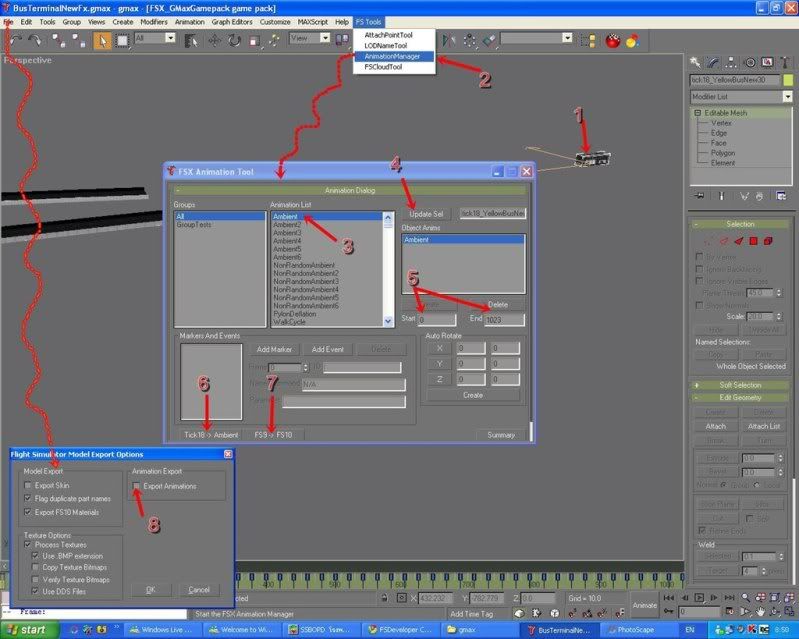
1. Select what animation I want prefixed that object with tick18_
2. Open animation manager
3. click on ambient,
4. click on update select. tick18_object will get in the box
5. Enter the frame from start to end
6. click on Tic18->Ambient
7. click on FS9->FS10
8. Export check on Export animation
Looking at this picture, I tried to summarize thing in a single picture.
ExportAnimationFSX.jpg


My shuttle bus still there waiting for passengers, does not move at all !!!!

What did I do wrong?????:confused:
 
3. click on ambient,
4. click on update select. tick18_object will get in the box
5. Enter the frame from start to end
6. click on Tic18->Ambient
7. click on FS9->FS10

8. Export check on Export animation

Forget about #6 and #7 above... They don't work at all, but ACES never bothered to clean up the interface dialog.

4. click on update select, tick18_object will get in the box
5. click on (one of the) Ambient tags in the list
6. click on the CREATE button just above the Start keyframe box!
7. Export check on Export animation
 
Thanks a lot n4gix. That helps a lot.
Am I the only one who have this problem? I read in SDK many time and do not find the way to do it at all.
 
Ok, that works. But doing this wreck up my animation. It looks like the method add some keyframe in or something that make my bus not turn as it should. Should we do this animation before we do animation or after complete all the animination?
 
Ok, that works. But doing this wreck up my animation. It looks like the method add some keyframe in or something that make my bus not turn as it should. Should we do this animation before we do animation or after complete all the animination?

The AnimationManager Tool is NOT doing any animation at all! It is simply associating a "tag" which is used to apply the script from modeldef.xml file TO your animated part.

It does NOT affect animation at all. If your animation is "messed up," then you've done something wrong in Max or GMax... :D
 
The AnimationManager Tool is NOT doing any animation at all! It is simply associating a "tag" which is used to apply the script from modeldef.xml file TO your animated part.

It does NOT affect animation at all. If your animation is "messed up," then you've done something wrong in Max or GMax... :D

Really!!.
When I pushed the button "create", it seem to me that it added some key frame to my animation and my bus turned the other way around. I had to adjust my animation again. May be ResetX form should help that before animation manager.
 
Are you certain that your axis was properly set to "World Coordinates" before you did the keyframe animation?

If not, then in the sim odd things will happen, such as you've described.
 
Thanks n4gix, I got you.
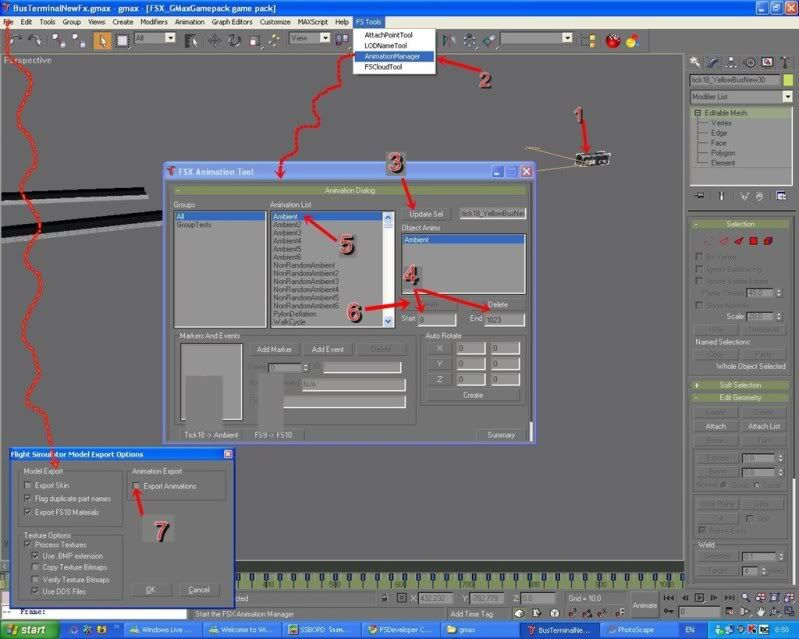
I'd like to summarize what we should do tho export animation in FSX to benefit others. Please correct me if I'm wrong:
1. Select on what you want or you have animated.
2. Click on Animation Manager Tool.
3. Click on update selection if you are not sure it has been in the box.
4. Enter the key frame in the box
5. Select Ambient on the list box
6. Click "Create" button just above the keyframe box you just entered.
7. You are done with the animation manager don't forget the last part before exporting. If you want to select a new tick18_ object, choose it first. Then click on update selection No3, the name will appear on the box. You need to delete old ambient out first by clicking delete above the keyframe box (if key frame are the same, nothing to do in keyframe). Then go back to number 5, select "Ambient" on the list box->click create -> select another tick_18 object->delete ambient and repeat step 5 and 6 again until you select all the animated object. You have to remember to enter keyframe first before click "create".
ExportAnimationFSX-1.jpg

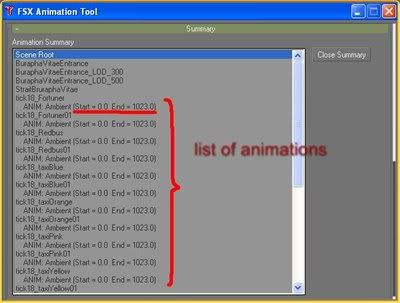
One last thing, you can check on you animations by click on "Summary" button. It will look like this.

Listofanimation.jpg


Make sure that all of them are tag with the number of frames that you want.
 
Last edited:
Back
Top