• Which the release of FS2020 we see an explosition of activity on the forun and of course we are very happy to see this. But having all questions about FS2020 in one forum becomes a bit messy. So therefore we would like to ask you all to use the following guidelines when posting your questions:

    • Tag FS2020 specific questions with the MSFS2020 tag.
    • Questions about making 3D assets can be posted in the 3D asset design forum. Either post them in the subforum of the modelling tool you use or in the general forum if they are general.
    • Questions about aircraft design can be posted in the Aircraft design forum
    • Questions about airport design can be posted in the FS2020 airport design forum. Once airport development tools have been updated for FS2020 you can post tool speciifc questions in the subforums of those tools as well of course.
    • Questions about terrain design can be posted in the FS2020 terrain design forum.
    • Questions about SimConnect can be posted in the SimConnect forum.

    Any other question that is not specific to an aspect of development or tool can be posted in the General chat forum.

    By following these guidelines we make sure that the forums remain easy to read for everybody and also that the right people can find your post to answer it.

FSXA Volume shadow cause the default shadow disappear.

jtanabodee

Resource contributor
Messages
3,924
Country
thailand
Hi,
I'm making a jetway in WMKK and I think I can set some parts of the jetway to cast shadow on the jetway itself. I apply volume shadow material to those parts and they cast shadow nicely. However I found that the main shadow of material that is not volume shadow disappear as well.
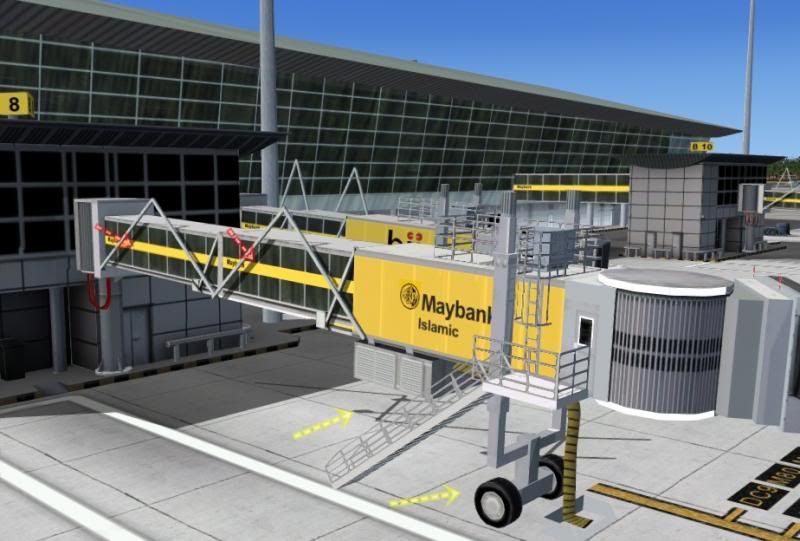

The red arrow is volume shadow. The yellow arrow is where the main jetway should cast shadow on the ground.


Do you know how to cure this? I change the whole thing to volume shadow but more problem comes up. The top surface flickering all the time. May be from the material that has reflection.

Regards,
 
Last edited:
I think volume shadow is flawed; it's best not to use it like most developers!

This is odd though, I know that ground shadows sometimes flicker on ground polys, but some are showing.

Why don't you bake the textures?
 
I cannot bake texture to have shadow. Since both jetways have different advertising on it. I need 6 pieces of texture for both jetway. It will decrease the size of the letter and become blurry. Other thing, the shadow will change with time, which is better than baked shadow on texture.

By the way, I'd like to find some new way to make shadow. If it works, it will save a lot of time making baked texture.
 
Last edited:
OK, I did a quick experiment on volume shadow.

The first picture is the default shadow. No cast shadow on other object. However the shadow and shading are perfect. Not too dark and not too faint.


The second picture I apply volume shadow to almost all the objects except the box. The box is still the default texture without volume shadow. The default shadow become disappear. Please notice that the shading of what volume shadow apply on is not great. The shading is so dark and not smooth as default. Especially on the sphere and cylinder.


The third picture. I separated the box as another file and export separately. The compile them together in one place. The result is much better. You can get perfect shadow of both. BTW, the volume shadow show much darker in the default shadow.


So, my simple experiment has given me the answer.
You can choose the one that suit you.
To my opinion, I think if I want some cast shadow I would separate those object out and export as another MDL. Then compile them together as one.
 
Last edited:
No the whole story is not done yet!
I slew around and found that if you have other object that does not use volume shadow you will get this:


The object shadows penetrate through the other object to the other side.

If the whole object is volume shadow this will not happen.


So, it is understandable that the shadow from volume shadow is darker so it will be seen through the default shadow. If the every objects are volume shadow, the shading of the opposite side is much darker than the default shadow. So cast shadow will blend with the shading side of the object.
 
Last edited:
OK, I give up using volume shadow. The benefit from that does not worth it. The shading will be too dark, I can barely see the texture on the shade side.
 
Yup, that's pretty much what I think. The shadow falls on the face which is dark already, and pretty much becomes way too dark! Pity, it could be very good if it worked!
 
I think if they tone down the volume shadow to be the same as default would be nice.
 
Yup, that's pretty much what I think. The shadow falls on the face which is dark already, and pretty much becomes way too dark! Pity, it could be very good if it worked!

Check assume vertical normal when using volume shadows! :)
 
Check assume vertical normal when using volume shadows! :)

I know that you success in using that. But I don't quite understand how assume vertical normal help. It will remove all the shading out. What about the shadow? I will try that and see if it helps.
May be it decrease the shading, leaving only volume shadow. So the darkness is decreased.
 
Last edited:
Hi mskhan1991,
Thanks for your comment. I think I got it now. I change the mapping on my object to see the effect on colors.
As you said, I check on Vertices Normal and check on No base material then all the shading gone. But it does look better since the shading is not too dark. The shadow from volume shadow takes control all the shading and shadow on the ground now.


The only downside is, if you turn the shadow off from FSX menu, all the shadow and shading of the wall gone.


Conclusion
If you want to use volume shadow:
1. The model has to be manifold, watertight model no open face or missing polygon.
2. You need to have the whole model using volume shadow material, or the default shadow will be turn off.
3. You need to check on these options together.
Assume vertical normal
Volume shadow
No base material specular (this is not necessary if you use specular texture, it will be no base specular automatically)
4. You need to turn on your shadow in FSX all the time, unless your model will be toy like object. No shading at all. So, this is the limitation that I think it is advisable to be use in small, medium airport. Not for large complex airport with hundreds of objects, since your computer suffered from these already.
 
Last edited:
Hi,
Just to tell my progress of experiment.
I tried to convert my models to be manifold. I choose border and cap every hole on those models. It should work fine, I thought.

But I'm wrong. It seems to me that my models keep flickering with volume shadow. I don't know why.

However the models that were made with primitive box, cone, cylinder without deleting the polygon out seem to work fine.

Capping the open model does not work, I don't know why.

Any ideas, mskhan1991.
 
Last edited:
Oh my!
I found that what causes this flickering but I'm not sure.
When I export the model with P3D and get mdl file into MCX then I save as .3ds file. After that I import into Gmax and export to MDL again, flickering disappear.
P3D export does not support volume shadow?
 
Last edited:
Hey guys! I think you might want to take a look at these shadow.

You can see how how the building casts shadow on the jetway. The fence below casts shadow on the concrete platform.


The shadow of the light pole cast on the main building and the bridge connecting to the jetway.


I still have some problem with flickering but only the top surface. May it cause by the closed two polygons.

Penalty is considerable. Previous model has fps at around 20, drop to 14. I think I will pass this on to some next projects at smaller size airport.
 
Last edited:
There's no denying that those shadows look great, nicely done Tic. :cool:

For the roof flickering- After you sealed the geometry to be manifold, did you go back and visit the UVW's and ensure each part has unique space? Just a thought as I'm sure you probably already did.. I assume that the UV's are important when planning to use volume shadows??

Nice to see it can be done but there aren't very many FSX pilots with ground scenery shadows enabled.... which is the biggest hurdle in my humble opinion.
 
I agree with you VAEjonp. The penalty on the fps is terrible too.
So, I dropped it out from my project but it has its own potential for a small airport. I will try that again in a smaller project.

About UVW, I think it is not an issue at all. All the polygons have their own area of texture.

I did a research on this.

I export this model from Gmax then:
I export just the roof of the model, no flickering.
I export just the fence, no flickering.
I export the building only, no flickering.
When I export the whole thing, just the roof flickering.

When I export the whole thing from 3dsMax using P3D, the whole thing flickering, the wall, the roof, and the fence.

It is so much time consuming but it is fun. :D

So I dropped this out because of the problem of flickering and the fps hits.
Go back to texture baking again, ha ha ha................
 
Last edited:
Back
Top