

- Messages
- 572
- Country

From Aerofly user Nabeel https://www.aerofly.com/community/f...vation-scenery-editor/&postID=71902#post71902
I've been working on a small side project this week as I've had some spare time and my goal was to create a scenery/cultivation editor for AFS2 with emphasis on easy to use (as I know it can be very difficult modifying/adding cultivation in the right places).
This does require you to have some knowledge on how to load cultivation (you'll need to have an airport .tsc file that refers to the cultivation file).
Here are the current features:
- Add buildings, plants and lights,
- Buildings are color scaled depending on type (residential, commercial or industrial),
- An indication of floors on the buildings when in 3D mode,
- Modify any property by right clicking > edit properties (i.e. floors, light color, plant group),
- Set default properties through the settings cogwheel, I've put in some sensible defaults for now.
- Ability to move, transform and rotate buildings.
- Ability to delete any model.
- Visualize buildings in 3D (can be toggled on/off).
- Tooltip information (can be toggled on/off).
- Multiple layers of raster tile sources (Google, Bing, OSM and CartoDB - use Bing sparingly as it uses an API key for map load requests).
- Load and save files as .TOC.
Hotkeys for adding a model (they will be highlighted if selected):
- Q for building,
- W for plant
- E for light
- D for zooming out
- F for zooming in
- Escape to cancel all current actions (drawing, editing, etc).
When in draw mode (either through the toolbar on the left or the hotkeys):
- Plant and Light models are created by just double clicking anywhere
- Building is created by clicking once to start the rectangle and then clicking again to finish
- If you made a mistake you can right click and delete/edit.
- AFS2 only supports rectangular buildings, so make sure they look somewhat rectangular, (they'll end up being rectangular anyhow).
- Hold right mouse to shift your view at an angle
There's no mass selection, state save and so on right now. Every time you refresh you'll be placed near London (loading a .toc file will take the center of the cultivation data present and put you there).
You are able to load any .toc file or alternatively just add buildings, plants and lights and save from scratch. If you want to give it a test run, I suggest loading the scenery by drassaud (such as Autogen Switzerland South Beta 0.1.0 and opening ch/places/Autogen ch South/fl_8-8 46-1_00.toc) or you can use myexample.toc and load that (just a few buildings, plants and lights).
Anyhow, without further ado, here's the link: AFS2 Cultivation Editor. The editor itself runs locally so it will depend on your resources (CPU/GPU) to process and render. Moreover I've only tested this on the latest Google Chrome (Firefox was a bit sluggish and I had issues zooming, other browsers untested).
Looking forward to feedback! I can extend this to parse and work with .tsc files as well and add support for other things such as airports, xrefs, parking positions, runways, helipads, etc.
Edit:
I've added zoom functionality via keybinds (D and F) as well as a zoom slider as Firefox doesn't seem to want to zoom via scroll wheel.
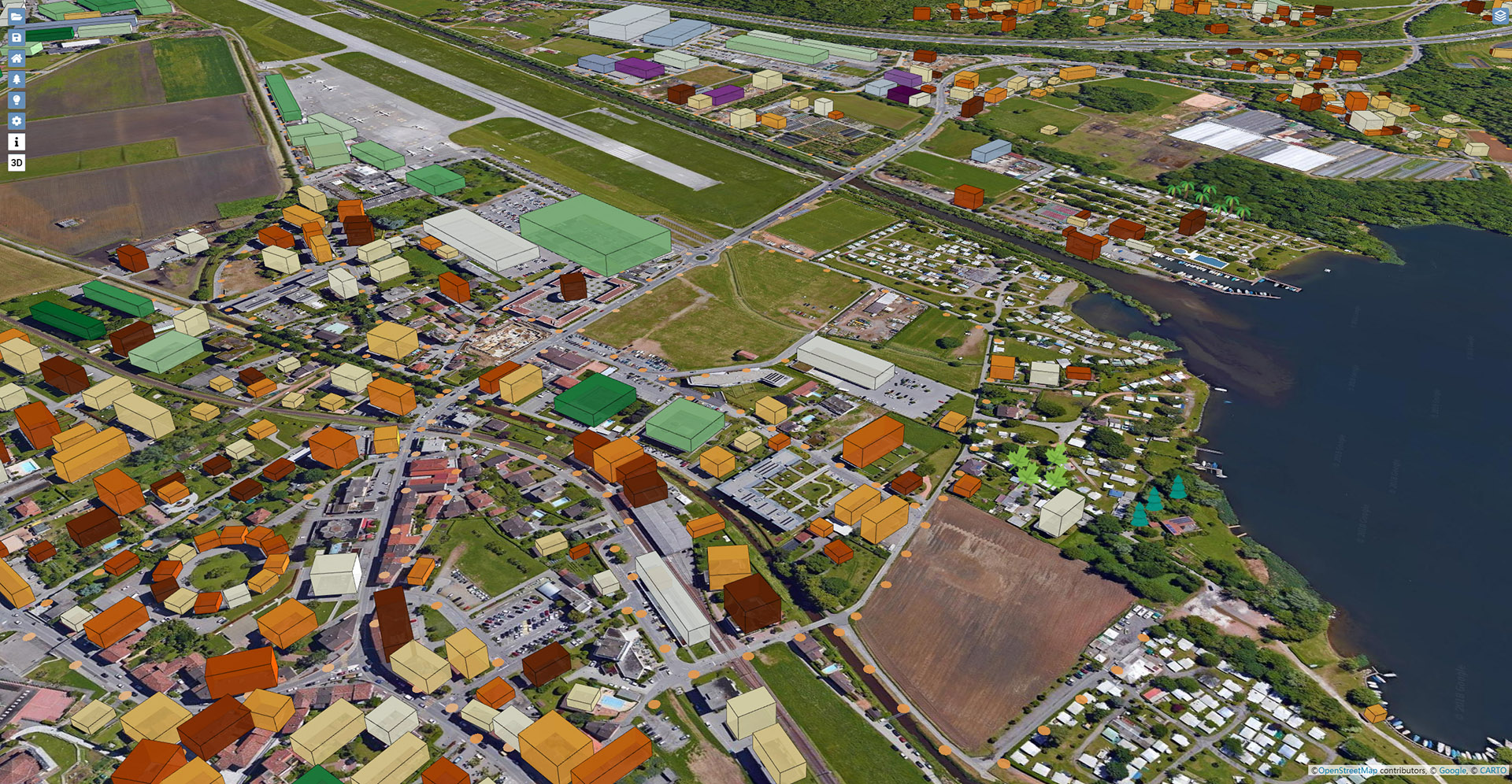
I've been working on a small side project this week as I've had some spare time and my goal was to create a scenery/cultivation editor for AFS2 with emphasis on easy to use (as I know it can be very difficult modifying/adding cultivation in the right places).
This does require you to have some knowledge on how to load cultivation (you'll need to have an airport .tsc file that refers to the cultivation file).
Here are the current features:
- Add buildings, plants and lights,
- Buildings are color scaled depending on type (residential, commercial or industrial),
- An indication of floors on the buildings when in 3D mode,
- Modify any property by right clicking > edit properties (i.e. floors, light color, plant group),
- Set default properties through the settings cogwheel, I've put in some sensible defaults for now.
- Ability to move, transform and rotate buildings.
- Ability to delete any model.
- Visualize buildings in 3D (can be toggled on/off).
- Tooltip information (can be toggled on/off).
- Multiple layers of raster tile sources (Google, Bing, OSM and CartoDB - use Bing sparingly as it uses an API key for map load requests).
- Load and save files as .TOC.
Hotkeys for adding a model (they will be highlighted if selected):
- Q for building,
- W for plant
- E for light
- D for zooming out
- F for zooming in
- Escape to cancel all current actions (drawing, editing, etc).
When in draw mode (either through the toolbar on the left or the hotkeys):
- Plant and Light models are created by just double clicking anywhere
- Building is created by clicking once to start the rectangle and then clicking again to finish
- If you made a mistake you can right click and delete/edit.
- AFS2 only supports rectangular buildings, so make sure they look somewhat rectangular, (they'll end up being rectangular anyhow).
- Hold right mouse to shift your view at an angle
There's no mass selection, state save and so on right now. Every time you refresh you'll be placed near London (loading a .toc file will take the center of the cultivation data present and put you there).
You are able to load any .toc file or alternatively just add buildings, plants and lights and save from scratch. If you want to give it a test run, I suggest loading the scenery by drassaud (such as Autogen Switzerland South Beta 0.1.0 and opening ch/places/Autogen ch South/fl_8-8 46-1_00.toc) or you can use myexample.toc and load that (just a few buildings, plants and lights).
Anyhow, without further ado, here's the link: AFS2 Cultivation Editor. The editor itself runs locally so it will depend on your resources (CPU/GPU) to process and render. Moreover I've only tested this on the latest Google Chrome (Firefox was a bit sluggish and I had issues zooming, other browsers untested).
Looking forward to feedback! I can extend this to parse and work with .tsc files as well and add support for other things such as airports, xrefs, parking positions, runways, helipads, etc.
Edit:
I've added zoom functionality via keybinds (D and F) as well as a zoom slider as Firefox doesn't seem to want to zoom via scroll wheel.