• Which the release of FS2020 we see an explosition of activity on the forun and of course we are very happy to see this. But having all questions about FS2020 in one forum becomes a bit messy. So therefore we would like to ask you all to use the following guidelines when posting your questions:

    • Tag FS2020 specific questions with the MSFS2020 tag.
    • Questions about making 3D assets can be posted in the 3D asset design forum. Either post them in the subforum of the modelling tool you use or in the general forum if they are general.
    • Questions about aircraft design can be posted in the Aircraft design forum
    • Questions about airport design can be posted in the FS2020 airport design forum. Once airport development tools have been updated for FS2020 you can post tool speciifc questions in the subforums of those tools as well of course.
    • Questions about terrain design can be posted in the FS2020 terrain design forum.
    • Questions about SimConnect can be posted in the SimConnect forum.

    Any other question that is not specific to an aspect of development or tool can be posted in the General chat forum.

    By following these guidelines we make sure that the forums remain easy to read for everybody and also that the right people can find your post to answer it.

Changing Elevation Vectors

Messages
1,267
Hi,
In Google Earth Pro, when the Terrain box is checked, you'll notice that, depending on where you place the mouse, it indicates the elevation at the bottom right. But what I want to know is that is the elevation accurate and correct? Another thing that I've noticed is that you get a different elevation at the same spot, or location, when switching from 3D view to 2D view by checking and unchecking the 3D box, and I'm not sure which view is correct or if either is accurate. In the Fly Tampa TFFJ scenery, the road vector at TFFJ, or the Barth airport that some of you may be familiar with, is 20 feet too high. But I want to get a satellite view with elevation data that will give me an accurate data, and I wonder if Google Earth provides that or do I need to download another tool?

Ken.
 
Hi Ken:

Google Earth elevations are nearly always sourced from low resolution SRTM data, so if you wish to achieve greater accuracy, you need to use another data source.

Specifically, if you intend to achieve a match for "Fly Tampa TFFJ scenery, the road vector at TFFJ, or the Barth airport", you could use that same elevation data set as a reference source via CvxExtractor, to create an equivalent custom elevation data set for use exclusively on your own computer.

Is this project intended to be loaded / rendered by FSX ...or by P3D ?

GaryGB
 
Last edited:
Hi Ken:

If you explain what you wish to achieve, I may be able to direct you to more pertinent info.

Your inquiry in the OP above cites Altitude as a criteria, but you also refer to Imagery.

Are you trying to make the roadway more accurate at this airport ? :scratchch


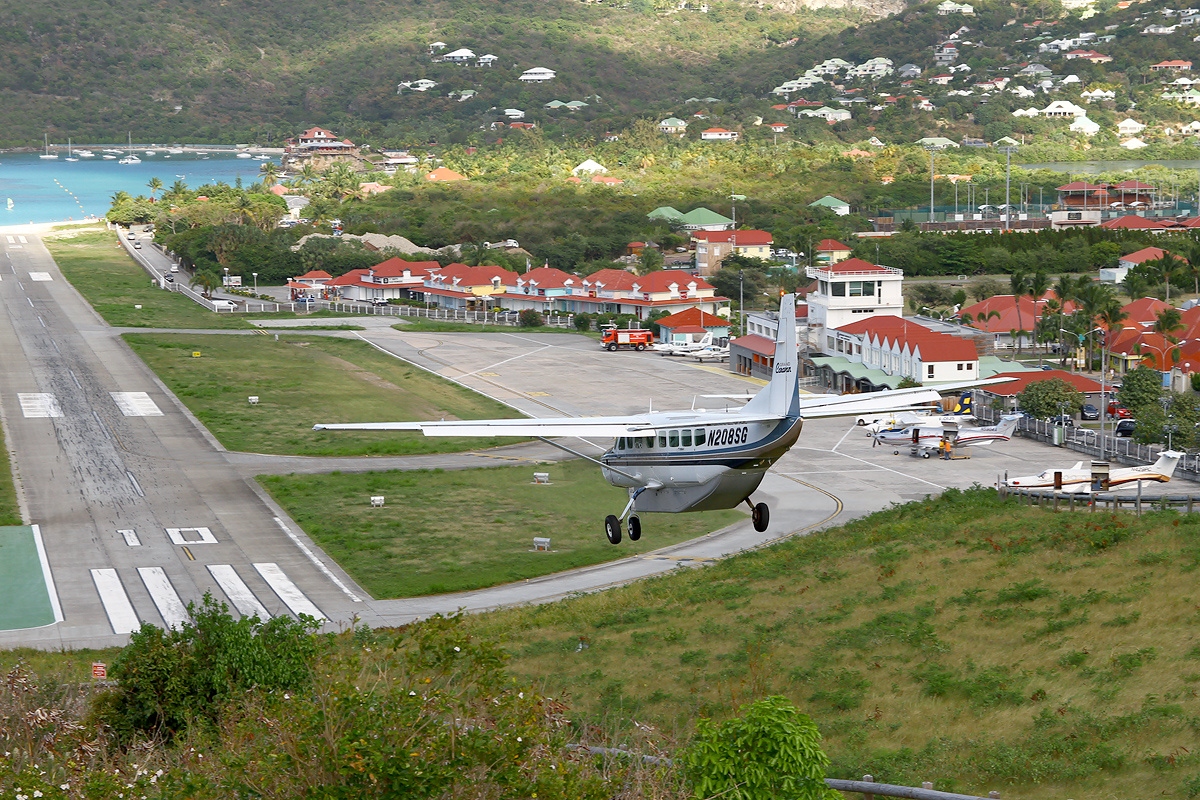
Gustaf III Airport[3] (IATA: SBH[3], ICAO: TFFJ[1]), also known as Saint Barthélemy Airport, Rémy de Haenen Airport, sometimes as St. Jean Airport (French: Aérodrome de St Jean[1]), is a public use airport located in the village of St. Jean on the Caribbean island of Saint Barthélemy.

If so, you could utilize existing terrain mesh and CVX vector data via CVX extractor ...from FSX / P3D default with- or without- addons.

Then, you could modify that derived CVX vector data further as desired via an "Append" into SBuilderX.

If needed, you may also be able to utilize ADE or other FS utilities.

BTW: What numeric version(s) of P3D do you have installed ? :scratchch:

GaryGB
 
Last edited:
Hi Ken:

If you explain what you wish to achieve, I may be able to direct you to more pertinent info.

Your inquiry in the OP above cites Altitude as a criteria, but you also refer to Imagery.

Are you trying to make the roadway more accurate at this airport ? :scratchch

Hi Gary,

I guess I didn't really explain what I wanted to do. The road is not really important and I'm not trying to make the road more accurate. It's the altitude of the hill above runway 10 that I was referring to. What I want to do is, if the hill is too high, I want to lower it to the correct altitude. According to Google Earth, it's 20 feet too high. Of course, I would prefer a data source that would indicate an accurate elevation data but I'm not sure where to find it.

The photo below shows a screenshot of the airport as I'm about to dive in for runway 10.

Untitled.jpg


Planes fly very close to the ground as they fly over that busy intersection and they literally have to push the yoke forward and dive in for the runway, and you don't have but 2,119 feet to land and stop, and it can be a very wild ride. This scenery is the FlyTampa St. Martteen that also comes with this scenery, as well as 2 other islands. Some of the trees in the scenery are also way too tall and I'm going to remove them because they are in the way and they do not exist in the real world.

Here's a screeshot of the DeHavilland DHC-6 that lands at this airport quite often:

Untitled 1.jpg


In the screenshot below, I'm sitting on runway 10, and the elevation shows 9.3 feet above sea level.

Untitled 2.jpg


When I come in to land, I have to literally slam the airplane on the runway, but they don't always have to do that. I've seen them come in and make the second taxiway entrance on the right, and that's never hardly achieved in the simulator. I'm just estimating here and I'm having to make these exaggerated maneuvers in order to get the plan on the ground, and I think it's because the hill is too high, and makes it steeper than what it really is. Just about everything in the simulator is way over exaggerated compared to what it is in the real world. And I can tell you the the flight controls are way too sensitive to what the real plane is. I've flown them and compared them.

I think I understand how to use the CVX Extractor and as I understand it, it extracts it so that I can use it in SbuilderX. Am I correct?


BTW: What numeric version(s) of P3D do you have installed ? :scratchch:

It's the latest version, 4.5.14.34698


Ken.
 
Google Earth is 6 Feet lower than SRTM 1-Arc Second (30 Meter) V3+ elevation for the TFFJ RWY-10 approach at the turn-about on the hilltop.

FSX shows 95 Feet, which is already 42 Feet below the SRTM elevation for that location. :pushpin:

fsx_tffj_rwy-10_approach_turn-about_on_hill-jpg.73180


gm_srtm_v3-_30m_world_imagery_tffj_rwy-10_approach_turn-about_on_hill-jpg.73181


FYI: IIUC, that location was rendered as a 3D model by FlyTampa, and IMHO may best be replaced by a 3D modeled CVX vector TIN, and would likely end up raising further, the Altitude of the TFFJ RWY-10 approach ...if you intend to fly that challenge as IRL. ;)

https://ww2.jeppesen.com/wp-content/uploads/2020/06/TFFJ.pdf


Although there is a French elevation data set for Saint Barthélemy derived from 2 Meter LiDAR, AFAIK, it has not yet been released.

I will check on the status of the forthcoming data set for TFFJ again soon, as it was reportedly due out in Spring of 2021.


BTW: Which specific version of the DHC-6 Twotter are you using (ex: freeware or payware author, livery etc.) ...as you fly the TFFJ RWY-10 approach ? :scratchch

I think I understand how to use the CVX Extractor and as I understand it, it extracts it so that I can use it in SbuilderX. Am I correct?

Ken.

Yes.

Since the hill and associated AI / Ground Traffic by FlyTampa is rendered by a 3D model, you may have to edit a derived copy of the FS default CVX vectors in SBuilderX to replace the FlyTampa hill scenery object(s).

GaryGB
 

Attachments

  • FSX_TFFJ_RWY-10_approach_turn-about_on_hill.jpg
    FSX_TFFJ_RWY-10_approach_turn-about_on_hill.jpg
    666.3 KB · Views: 390
  • GM_SRTM_V3+_30m_World_Imagery_TFFJ_RWY-10_approach_turn-about_on_hill.jpg
    GM_SRTM_V3+_30m_World_Imagery_TFFJ_RWY-10_approach_turn-about_on_hill.jpg
    435.9 KB · Views: 375
Last edited:
Hi Ken:

If you get past the most difficult part of a TFFJ approach (trying to not look at the charming lady at the top of the hill :yikes:), here's how to do it:


Depending on which FS aircraft you are flying, it may need a tweak of the Aircraft.Cfg scalar that increases Parasitic Drag and/or Induced Drag to offset "floating" imposed by 1 or more other scalars (IIUC, originally intended to make the aircraft appear more powerful in the sim ?) ;)

That said, TFFJ continues to be one of the most challenging approaches in the world, whether IRL ...or in FS.

I also 'almost' went off the RWY end in a DHC-6 Twotter IRL at another nearby Caribbean island 'airstrip' the government called an "airport". :rotfl:

GaryGB
 
Last edited:
Back
Top