
-
Which the release of FS2020 we see an explosition of activity on the forun and of course we are very happy to see this. But having all questions about FS2020 in one forum becomes a bit messy. So therefore we would like to ask you all to use the following guidelines when posting your questions:
- Tag FS2020 specific questions with the MSFS2020 tag.
- Questions about making 3D assets can be posted in the 3D asset design forum. Either post them in the subforum of the modelling tool you use or in the general forum if they are general.
- Questions about aircraft design can be posted in the Aircraft design forum
- Questions about airport design can be posted in the FS2020 airport design forum. Once airport development tools have been updated for FS2020 you can post tool speciifc questions in the subforums of those tools as well of course.
- Questions about terrain design can be posted in the FS2020 terrain design forum.
- Questions about SimConnect can be posted in the SimConnect forum.
Any other question that is not specific to an aspect of development or tool can be posted in the General chat forum.
By following these guidelines we make sure that the forums remain easy to read for everybody and also that the right people can find your post to answer it.
You are using an out of date browser. It may not display this or other websites correctly.
You should upgrade or use an alternative browser.
You should upgrade or use an alternative browser.
MSFS20 Coding xml SIDs/STARs/Approaches - A small tutorial
- Thread starter mottoth
- Start date


- Messages
- 3
- Country

Are your constraints for altitude working properly?Hi everyone, thanks for this tutorial that helped me a lot to start creatinng my own procedures when they does not exist for some airports.
By the way, I have a question: I was wondering how to add speed constraints. Sometimes when activating constraints in A320 we can see speeds written in purple next to some waypoints and the ATC will ask to maintain this speed or below. I know how to add altitude constraints but no options for speeds in any Leg elements.

Sure, they appear as constraints in the flight plan and are displayed on ND. I just need to add speed constraints to appear also on ND, but no option for that in the Leg element...Are your constraints for altitude working properly?

- Messages
- 14
- Country

Hello, I'm working on ZUUU and I don't quite understand how to make the approach. Do you know how to make an approach with more waypoints like ZUUU's ILS-Z 02R?<ApproachLegs> <Leg type="IF" fixType="TERMINAL_WAYPOINT" fixRegion="ZG" fixIdent="NN520" recommendedType="LOCALIZER" recommendedRegion="ZG" recommendedIdent="IXU" theta="228" rho="12.0N" altitudeDescriptor="I" altitude1="727M" altitude2="727M"/> <Leg type="CF" fixType="TERMINAL_WAYPOINT" fixRegion="ZG" fixIdent="FF005" flyOver="FALSE" recommendedType="LOCALIZER" recommendedRegion="ZG" recommendedIdent="IXU" theta="228" rho="7.9N" magneticCourse="48" distance="4.1N" altitudeDescriptor="A" altitude1="727M"/> <Leg type="CF" fixType="RUNWAY" fixRegion="ZG" fixIdent="RW05" flyOver="TRUE" recommendedType="LOCALIZER" recommendedRegion="ZG" recommendedIdent="IXU" theta="228" rho="1.7N" magneticCourse="48" distance="6.0N" altitudeDescriptor="A" altitude1="127.1M"/> </ApproachLegs>
To be honest, both MSFS base and Navigraph got up to date navaids for ZUUU. The only problem with the auto generated airport is that runways are not named correctly, especially runway 02L/20R. You just need to pay attention that your runways are correctly named as 02L/20R and 02R/20L (and not 2R or 2L) by selecting the option in the SDK to get the 0 in front of the runway number. In the XML file into the markings line you should have leadingZeroIdent="TRUE". Then MSFS will automatically "connect" SIDs, STARs and approaches to all runways of your airport.Hello, I'm working on ZUUU and I don't quite understand how to make the approach. Do you know how to make an approach with more waypoints like ZUUU's ILS-Z 02R?
Navigraph already said that developers should not create navaids for airports that already have those, even if they do not appear because runway naming problem. Just create runways as they are named in real life and it will be perfect !
Amorisia

- Messages
- 46
Hey guys does anyone have an idea on how to create a transition between STAR and APPROACH? Please check this link: https://www.fsdeveloper.com/forum/t...ions-between-star-and-approach-fs2020.457013/
Our STAR and approach work fine when used individually, but once you combine STAR and RNAV approach for example, STAR changes and gets simplified for some reason.
Our STAR and approach work fine when used individually, but once you combine STAR and RNAV approach for example, STAR changes and gets simplified for some reason.

- Messages
- 13
- Country

Hello,
I have a question on old-school SIDs and STARs that are dependant on two different courses but there are no DME distance defined from the VOR.
To visualize it, how do I create the leg from OH with a course 350 until it intercepts with the course 318 from KST? (I know from another chart that this point has a distance of 9 NM from the DME) I would like to avoid to add a waypoint there as RNAV was not really a thing at the time.
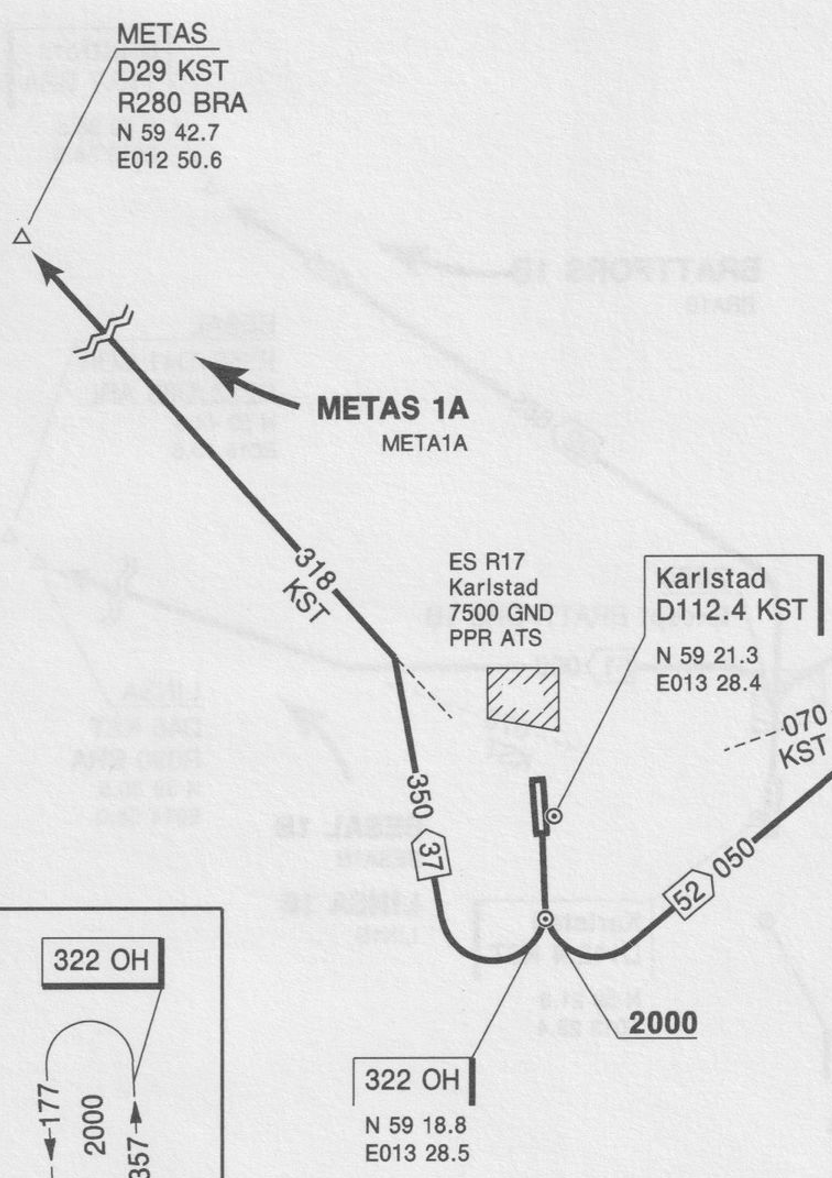
At the moment I try using CR but that seem not to work.
Edit: Missed the following tags <CommonRouteLegs/> and <EnrouteTransitions/> withing the <Departure> tag.
I also have issues with the following, not sure how I should handle a race-track on the approach.
This is the approach I have:

I suspect the issue is the HF or the CF?
I have a question on old-school SIDs and STARs that are dependant on two different courses but there are no DME distance defined from the VOR.
To visualize it, how do I create the leg from OH with a course 350 until it intercepts with the course 318 from KST? (I know from another chart that this point has a distance of 9 NM from the DME) I would like to avoid to add a waypoint there as RNAV was not really a thing at the time.
At the moment I try using CR but that seem not to work.
XML:
        <Departure name="META1A">
            <RunwayTransitions>
                <RunwayTransitionLegs number="18" designator="NONE">
                    <Leg type="TF" fixType="NDB" fixRegion="ES" fixIdent="OH" flyOver="true" magneticCourse="177.0" altitudeDescriptor="+" altitude1="2000.0F"/>
                    <Leg type="CR"  recommendedType="VOR" recommendedRegion="ES" recommendedIdent="KST" theta="318.0" magneticCourse="350.0" distance="9.0N"/>
                    <Leg type="CF" fixType="WAYPOINT" fixRegion="ES" fixIdent="METAS" flyOver="TRUE" magneticCourse="318"/>
                </RunwayTransitionLegs>
            </RunwayTransitions>
        </Departure>
Edit: Missed the following tags <CommonRouteLegs/> and <EnrouteTransitions/> withing the <Departure> tag.
I also have issues with the following, not sure how I should handle a race-track on the approach.
This is the approach I have:
I suspect the issue is the HF or the CF?
XML:
<Approach type="VOR" runway="18" fixType="VOR" fixRegion="ES" fixIdent="KST" altitude="2000.0F" heading="176.3" missedAltitude="2000.0F">
            <ApproachLegs>
                <Leg type="IF" fixType="VOR" fixRegion="ES" fixIdent="KST"/>
                <Leg type="HF" fixType="VOR" fixRegion="ES" fixIdent="KST" turnDirection="R" magneticCourse="172" time="3.0" altitude1="2000.0F"/>
                <Leg type="CF" fixType="RUNWAY" fixRegion="ES" fixIdent="RW18" flyOver="TRUE" theta="0" rho="0.0N" magneticCourse="172" distance="1.3N"/>
            </ApproachLegs>
            <MissedApproachLegs>
                <Leg type="CA" magneticCourse="172" altitudeDescriptor="+" altitude1="1500.0F"/>
                <Leg type="DF" fixType="VOR" fixRegion="ES" fixIdent="KST" flyOver="TRUE"/>
            </MissedApproachLegs>
            <Transition transitionType="VOR" fixType="VOR" fixRegion="ES" fixIdent="BRA" altitude="3000.0F">
                <TransitionLegs>
                    <Leg type="IF" fixType="VOR" fixRegion="ES" fixIdent="BRA"/>
                    <Leg type="VI" magneticCourse="251"/>
                    <Leg type="CF" fixType="VOR" fixRegion="ES" fixIdent="KST" flyOver="FALSE" theta="0" rho="0.0N" magneticCourse="172" distance="0.0N"/>
                </TransitionLegs>
            </Transition>
        </Approach>
Last edited:

- Messages
- 18
- Country

In this regard, I was going to try to complete the deficiencies of my scenery project by examining the examples given for ZGNN airport, but an airport named ZGNN is not in my MSFS2020. Has the icao code of this airport changed?
Attachments

Last edited:
Hello ,
First, thank for this tuto. Ths SDK has no much explanation !
I try to create an approach on a missing airport.
Just a question :
We have
- Enroute transition to join the approach routes from the general airways (If I understand correctly)
- After "Arrival", we have the approach legs to go from the previous points to the airport.
But what is the purpose of the transitions legs in the "approach" tag ?
In others words, I don't understand very weel the different steps
Thank for help
First, thank for this tuto. Ths SDK has no much explanation !
I try to create an approach on a missing airport.
Just a question :
We have
- Enroute transition to join the approach routes from the general airways (If I understand correctly)
- After "Arrival", we have the approach legs to go from the previous points to the airport.
But what is the purpose of the transitions legs in the "approach" tag ?
In others words, I don't understand very weel the different steps
Thank for help
Last edited:
Learning step by step, I understand better now.
But I've a problem, if anyone passes by here and can help me :
When I create an approach to LFTH, in my example, the result seem not to be the expected result.
the software seems not to take into account all the approach points. (Or my be I'm wrong with the colored roads, green, pink and grey)
Below, a screen of the approach in MSFS and my xml
<Arrival name="CUERS">
<EnrouteTransitions>
<EnrouteTransitionLegs>
<Leg type="IF" fixType="WAYPOINT" fixRegion="FR" fixIdent="CUERS" altitudeDescriptor="B" altitude1="4500F" altitude2="4500F"/>
<Leg type="TF" fixType="WAYPOINT" fixRegion="FR" fixIdent="TLN32" flyOver="FALSE" magneticCourse="0.0" altitudeDescriptor="B" altitude1="4000F" altitude2="3000F"/>
<Leg type="TF" fixType="WAYPOINT" fixRegion="FR" fixIdent="TH406" flyOver="FALSE" magneticCourse="0.0" altitudeDescriptor="B" altitude1="3000F" altitude2="2500F"/>
<Leg type="TF" fixType="WAYPOINT" fixRegion="FR" fixIdent="TH404" flyOver="FALSE" magneticCourse="0.0" altitudeDescriptor="B" altitude1="2600F" altitude2="2000F"/>
</EnrouteTransitionLegs>
</EnrouteTransitions>
<CommonRouteLegs/>
<RunwayTransitions/>
</Arrival>
<Approach type="ILS" runway="05" fixType="TERMINAL_WAYPOINT" fixRegion="FR" fixIdent="FTH05" altitude="2000F" heading="51.5" missedAltitude="2000F">
<ApproachLegs>
<Leg type="IF" fixType="WAYPOINT" fixRegion="FR" fixIdent="PALME" recommendedType="LOCALIZER" recommendedRegion="FR" recommendedIdent="LFTHI" theta="1" rho="1.0N" altitudeDescriptor="I" altitude1="2000F" altitude2="2000F"/>
<Leg type="CF" fixType="TERMINAL_WAYPOINT" fixRegion="FR" fixIdent="FTH05" flyOver="FALSE" recommendedType="LOCALIZER" recommendedRegion="FR" recommendedIdent="LFTHI" theta="1" rho="1.0N" magneticCourse="51.4" distance="8.4N" altitudeDescriptor="A" altitude1="2000F"/>
<Leg type="CF" fixType="RUNWAY" fixRegion="FR" fixIdent="RW05" flyOver="TRUE" recommendedType="LOCALIZER" recommendedRegion="FR" recommendedIdent="LFTHI" theta="1" rho="1.0N" magneticCourse="51.5" distance="4.5N" altitudeDescriptor="A" altitude1="3.95F"/>
</ApproachLegs>
<Transition transitionType="FULL" fixType="TERMINAL_WAYPOINT" fixRegion="FR" fixIdent="TH404" altitude="2000F">
<TransitionLegs>
<Leg type="IF" fixType="TERMINAL_WAYPOINT" fixRegion="FR" fixIdent="TH404" altitudeDescriptor="+" altitude1="2000F"/>
<Leg type="TF" fixType="WAYPOINT" fixRegion="FR" fixIdent="PALME" flyOver="FALSE" magneticCourse="51" altitudeDescriptor="A" altitude1="2000F"/>
</TransitionLegs>
</Transition>
</Approach>
</Airport>
But I've a problem, if anyone passes by here and can help me :
When I create an approach to LFTH, in my example, the result seem not to be the expected result.
the software seems not to take into account all the approach points. (Or my be I'm wrong with the colored roads, green, pink and grey)
Below, a screen of the approach in MSFS and my xml
<Arrival name="CUERS">
<EnrouteTransitions>
<EnrouteTransitionLegs>
<Leg type="IF" fixType="WAYPOINT" fixRegion="FR" fixIdent="CUERS" altitudeDescriptor="B" altitude1="4500F" altitude2="4500F"/>
<Leg type="TF" fixType="WAYPOINT" fixRegion="FR" fixIdent="TLN32" flyOver="FALSE" magneticCourse="0.0" altitudeDescriptor="B" altitude1="4000F" altitude2="3000F"/>
<Leg type="TF" fixType="WAYPOINT" fixRegion="FR" fixIdent="TH406" flyOver="FALSE" magneticCourse="0.0" altitudeDescriptor="B" altitude1="3000F" altitude2="2500F"/>
<Leg type="TF" fixType="WAYPOINT" fixRegion="FR" fixIdent="TH404" flyOver="FALSE" magneticCourse="0.0" altitudeDescriptor="B" altitude1="2600F" altitude2="2000F"/>
</EnrouteTransitionLegs>
</EnrouteTransitions>
<CommonRouteLegs/>
<RunwayTransitions/>
</Arrival>
<Approach type="ILS" runway="05" fixType="TERMINAL_WAYPOINT" fixRegion="FR" fixIdent="FTH05" altitude="2000F" heading="51.5" missedAltitude="2000F">
<ApproachLegs>
<Leg type="IF" fixType="WAYPOINT" fixRegion="FR" fixIdent="PALME" recommendedType="LOCALIZER" recommendedRegion="FR" recommendedIdent="LFTHI" theta="1" rho="1.0N" altitudeDescriptor="I" altitude1="2000F" altitude2="2000F"/>
<Leg type="CF" fixType="TERMINAL_WAYPOINT" fixRegion="FR" fixIdent="FTH05" flyOver="FALSE" recommendedType="LOCALIZER" recommendedRegion="FR" recommendedIdent="LFTHI" theta="1" rho="1.0N" magneticCourse="51.4" distance="8.4N" altitudeDescriptor="A" altitude1="2000F"/>
<Leg type="CF" fixType="RUNWAY" fixRegion="FR" fixIdent="RW05" flyOver="TRUE" recommendedType="LOCALIZER" recommendedRegion="FR" recommendedIdent="LFTHI" theta="1" rho="1.0N" magneticCourse="51.5" distance="4.5N" altitudeDescriptor="A" altitude1="3.95F"/>
</ApproachLegs>
<Transition transitionType="FULL" fixType="TERMINAL_WAYPOINT" fixRegion="FR" fixIdent="TH404" altitude="2000F">
<TransitionLegs>
<Leg type="IF" fixType="TERMINAL_WAYPOINT" fixRegion="FR" fixIdent="TH404" altitudeDescriptor="+" altitude1="2000F"/>
<Leg type="TF" fixType="WAYPOINT" fixRegion="FR" fixIdent="PALME" flyOver="FALSE" magneticCourse="51" altitudeDescriptor="A" altitude1="2000F"/>
</TransitionLegs>
</Transition>
</Approach>
</Airport>
Attachments

Last edited:

ILS approaches are the most difficult thing to code in every airport I've ever created, both for FSX and FS2020. The sim is extremely picky about how approaches are coded in the airport XML file; the slightest spelling error or missing value will cause a compiler error, and 7 times out of 10, even if I have gotten a "good" build with no compiler errors, when I try to fly the approach, the autopilot in my aircraft won't capture the localizer or glide slope. The VOR gauge needles behave properly, and you can manually fly the ILS, but the autopilot won't lock on to them. So, the only way I have ever found to get ILSA approaches to function - most of the time - is to follow this procedure:
1 Build all of the airport scenery in FS2020 Dev Mode, including the ILS, Edit the localizer, glide slope, and DME positions as you prefer in the Scenery Editor. Save the scenery, then Build it. If there are compiler errors, fix them and keep re-building until you get a clean Build with no compiler errors.
2. In Windows File Explorer, navigate to the source XML file for your airport, then right-click on it and select "Open with Airport Design Editor". This assumes you have ADE20 installed. ADE20 should open, and load your airport scenery. If it doesn't open, and you get this error message "Object Reference Not Set To An Instance of an Object", there's something in your XML file that ADE doesn't like; forget about trying to load your SDK airport into ADE this way, you could beat your brains out for hours and never figure out what the problem is. If this happens, create a new project in ADE30 and re-create your runway, but not any of the other scenery - all you are interested in are the ILS Approaches and Approach Waypoints that ADE will create.
3. Once you have either imported your existing XML file from the FS20 SDK, or created a new runway in ADE20 at the correct lat/long, with the correct altitude, heading, and magvar values, create the ILS for that runway. ADE20 will automatically create the descent and missed-approach waypoints for the ILS approach. If you have ILS's at both ends of the runway, create both of them.
4. Don't bother with building the airport in ADE20 - depending on what version you have, it might not even build, there's some issue with the bglcomp.exe file in some versions. What you want to do is click on "Tools > Export XML". This will export an XML file that contains the data that defines the runway, the ILS(s), the Approach Legs, and the Approach Waypoints. NOTE: for each Waypoint, you will need to add this line, [waypointRegion="xx"], just above the [waypointType] line. Do not type the brackets, but you must place the region code in parentheses as shown. Without this line, the SDK compiler will generate an error and the build will fail. Apparently, this is new requirement in the SDK that wasn't known to Jon Masterson (Scruffy Duck), when the last version of ADE20 was released in 2022. If you don't know the region code for your airport, there is a WikiPedia article on ISO 3166 country and region codes at: https://en.wikipedia.org/wiki/List_of_ISO_3166_country_codes. All of the region codes throughout your XML file have to be the same, check and make sure they are, as this is a common cause of compiler crashes. Also, you need to be aware that Jon has "retired", and never did finsh ADE20 beyond the Alpha test stage; it works, kind of, but the built-in compiler is busted, and some features are missing.
5. Once you have the exported XML file from ADE20, open it in a text editor alongside the XML file for your airport that the FS2020 SDK generated. What you want to do is extract, copy, and paste the Approach, Approach Leg, and Approach Waypoint data from the ADE20 XML file into the SDK XML file. You might have to do some manual editing, to make sure the Approach data references in the ADE20 data match the Runway number, magvar, and heading data for the SDK runway.
When you've done this, save the SDK XML file, boot up FS2020 in Dev Mode, Load the Project, turn on the Console window, and click "Build All". Wait a few seconds, and the Console window will report the status of the Build using your Hybrid XML file. If the Build didn't go smoothly, and there are red highlighted errors, look at the XML file and try to figure out what went wrong and fix it. It's usually something like a missing "/>' at the end of a section, or some other small glitch like that.
6. When you finally get a clean build, no errors in the Console window, exit FS2020 back to the desktop, copy the package to your Community folder, re-load FS2020, and start a flight in an aircraft that has a Garmin 1000 autopilot. The Cessna 172 G1000, the Cessna 208, or the Cub Crafter NX Cub are good choices for a test flight - they have low approach speeds, are easy to fly, and programming the correct radio frequency for NAV1 is simple. Avoid the jet airliners with FMS computers until you test this with a simple propeller plane.
6 If you were very careful in merging the ADE20 and SDK data in the hybrid XML file, and you have a little luck, the ILS at your new runway will be fully functional: the VOR indicators for ILS, DME, and Glide Slope will function as expected, and the autopilot will capture the Localizer and Glideslope and fly your plane right to the touchdown point pretty as you could ask for. If the Approach, Approach Leg, and Approach Waypoint Data have anything wrong, your autopilot will refuse to capture the localizer or glideslope, in which case, you are in for possibly a miserable time trying to de-bug that data. Sometimes, I have had to simply give up on that XML file, and start over from scratch; I have had a couple of airport projects where the ILS Approaches simply refused to work, even after 10 hours spent trying to figure out where the bug(s) in the XML code were. I am really annoyed that the SDK doesn't provide tools to create these Approaches and Waypoints natively, or if the tools are there, I haven't found them. Good luck!
1 Build all of the airport scenery in FS2020 Dev Mode, including the ILS, Edit the localizer, glide slope, and DME positions as you prefer in the Scenery Editor. Save the scenery, then Build it. If there are compiler errors, fix them and keep re-building until you get a clean Build with no compiler errors.
2. In Windows File Explorer, navigate to the source XML file for your airport, then right-click on it and select "Open with Airport Design Editor". This assumes you have ADE20 installed. ADE20 should open, and load your airport scenery. If it doesn't open, and you get this error message "Object Reference Not Set To An Instance of an Object", there's something in your XML file that ADE doesn't like; forget about trying to load your SDK airport into ADE this way, you could beat your brains out for hours and never figure out what the problem is. If this happens, create a new project in ADE30 and re-create your runway, but not any of the other scenery - all you are interested in are the ILS Approaches and Approach Waypoints that ADE will create.
3. Once you have either imported your existing XML file from the FS20 SDK, or created a new runway in ADE20 at the correct lat/long, with the correct altitude, heading, and magvar values, create the ILS for that runway. ADE20 will automatically create the descent and missed-approach waypoints for the ILS approach. If you have ILS's at both ends of the runway, create both of them.
4. Don't bother with building the airport in ADE20 - depending on what version you have, it might not even build, there's some issue with the bglcomp.exe file in some versions. What you want to do is click on "Tools > Export XML". This will export an XML file that contains the data that defines the runway, the ILS(s), the Approach Legs, and the Approach Waypoints. NOTE: for each Waypoint, you will need to add this line, [waypointRegion="xx"], just above the [waypointType] line. Do not type the brackets, but you must place the region code in parentheses as shown. Without this line, the SDK compiler will generate an error and the build will fail. Apparently, this is new requirement in the SDK that wasn't known to Jon Masterson (Scruffy Duck), when the last version of ADE20 was released in 2022. If you don't know the region code for your airport, there is a WikiPedia article on ISO 3166 country and region codes at: https://en.wikipedia.org/wiki/List_of_ISO_3166_country_codes. All of the region codes throughout your XML file have to be the same, check and make sure they are, as this is a common cause of compiler crashes. Also, you need to be aware that Jon has "retired", and never did finsh ADE20 beyond the Alpha test stage; it works, kind of, but the built-in compiler is busted, and some features are missing.
5. Once you have the exported XML file from ADE20, open it in a text editor alongside the XML file for your airport that the FS2020 SDK generated. What you want to do is extract, copy, and paste the Approach, Approach Leg, and Approach Waypoint data from the ADE20 XML file into the SDK XML file. You might have to do some manual editing, to make sure the Approach data references in the ADE20 data match the Runway number, magvar, and heading data for the SDK runway.
When you've done this, save the SDK XML file, boot up FS2020 in Dev Mode, Load the Project, turn on the Console window, and click "Build All". Wait a few seconds, and the Console window will report the status of the Build using your Hybrid XML file. If the Build didn't go smoothly, and there are red highlighted errors, look at the XML file and try to figure out what went wrong and fix it. It's usually something like a missing "/>' at the end of a section, or some other small glitch like that.
6. When you finally get a clean build, no errors in the Console window, exit FS2020 back to the desktop, copy the package to your Community folder, re-load FS2020, and start a flight in an aircraft that has a Garmin 1000 autopilot. The Cessna 172 G1000, the Cessna 208, or the Cub Crafter NX Cub are good choices for a test flight - they have low approach speeds, are easy to fly, and programming the correct radio frequency for NAV1 is simple. Avoid the jet airliners with FMS computers until you test this with a simple propeller plane.
6 If you were very careful in merging the ADE20 and SDK data in the hybrid XML file, and you have a little luck, the ILS at your new runway will be fully functional: the VOR indicators for ILS, DME, and Glide Slope will function as expected, and the autopilot will capture the Localizer and Glideslope and fly your plane right to the touchdown point pretty as you could ask for. If the Approach, Approach Leg, and Approach Waypoint Data have anything wrong, your autopilot will refuse to capture the localizer or glideslope, in which case, you are in for possibly a miserable time trying to de-bug that data. Sometimes, I have had to simply give up on that XML file, and start over from scratch; I have had a couple of airport projects where the ILS Approaches simply refused to work, even after 10 hours spent trying to figure out where the bug(s) in the XML code were. I am really annoyed that the SDK doesn't provide tools to create these Approaches and Waypoints natively, or if the tools are there, I haven't found them. Good luck!