
-
Which the release of FS2020 we see an explosition of activity on the forun and of course we are very happy to see this. But having all questions about FS2020 in one forum becomes a bit messy. So therefore we would like to ask you all to use the following guidelines when posting your questions:
- Tag FS2020 specific questions with the MSFS2020 tag.
- Questions about making 3D assets can be posted in the 3D asset design forum. Either post them in the subforum of the modelling tool you use or in the general forum if they are general.
- Questions about aircraft design can be posted in the Aircraft design forum
- Questions about airport design can be posted in the FS2020 airport design forum. Once airport development tools have been updated for FS2020 you can post tool speciifc questions in the subforums of those tools as well of course.
- Questions about terrain design can be posted in the FS2020 terrain design forum.
- Questions about SimConnect can be posted in the SimConnect forum.
Any other question that is not specific to an aspect of development or tool can be posted in the General chat forum.
By following these guidelines we make sure that the forums remain easy to read for everybody and also that the right people can find your post to answer it.
You are using an out of date browser. It may not display this or other websites correctly.
You should upgrade or use an alternative browser.
You should upgrade or use an alternative browser.
Creating your own panel...
- Thread starter mdm248111
- Start date


n4gix
Resource contributor
- Messages
- 11,674
- Country

No, none of them. But you can get Gimp for free as an alternative to PSP, and you don't need FS Panel Studio to arrange the gauges. You can edit the cfg files in notepad instead.
I would suggest you read the relevant FS9 or FSX SDKs on panel design and go from there.
Si
If you are a masochist that is...

Seriously, you cannot possibly spend a better $30 than to invest in FS Panel Studio if you plan to do any serious panel design.
For one thing, FSPS also has the ability to extract/reinsert bitmaps in compiled gauges, which allows some limited "customization" (for your own use!), and also has a fairly nice XML script editor allowing you to customize and/or create XML gauge scripts.
FS Panel Studio for me has some problems. A lot of gauges I've written have code but no graphics, and it doesn't understand them at all, so it ignores them so it throws up errors and doesn't write them to output cfg. And it has no coencept of the FSX Rotorcraft folder. So I am much more comfortable with manually editing the cfg by hand.
Si
Si
n4gix
Resource contributor
- Messages
- 11,674
- Country
FS Panel Studio for me has some problems. A lot of gauges I've written have code but no graphics, and it doesn't understand them at all, so it ignores them so it throws up errors and doesn't write them to output cfg. And it has no coencept of the FSX Rotorcraft folder. So I am much more comfortable with manually editing the cfg by hand.
Si
What version are you using? Have you updated to the latest build?
Nov 15/2007 Build 20340 is the latest...
Also, I always include at least a 2x2 transparent bitmap in all C gauges or a 2x2 vector box in XML script "gauges" that're "code only." This eliminates the error of FSPS not "seeing them."
As you can see, I have absolutely no problem loading a panel from the FSX Rotorcraft folder...

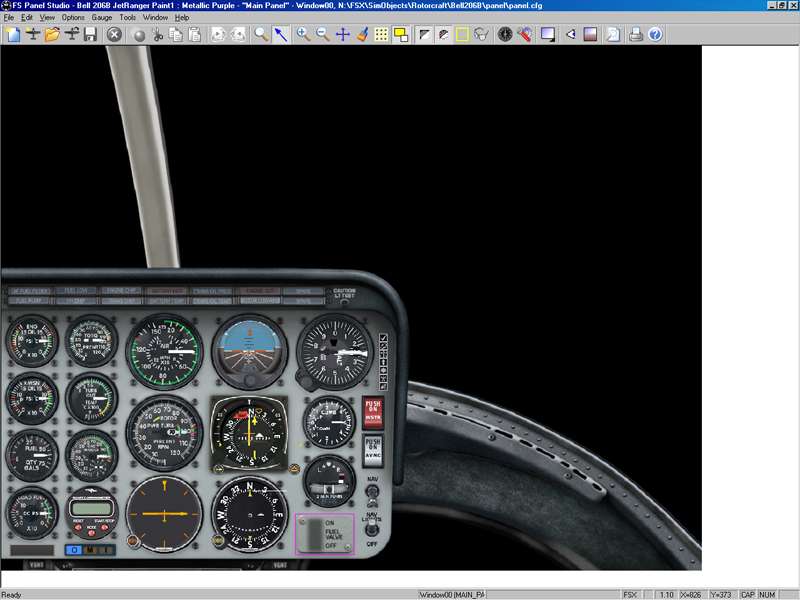
Last edited:

- Messages
- 1,269
- Country

umm...
1: I dont have a credit card so my parents would have to order it for me (I'm only 15)
2: It's just for my own personal use, not anything really serious.
3:Where can I get "Gimp"?
PS...see what I would need it for under "M11 Executive Transport Jet" in the modelling forum----just check it out (its my first plane in gMax)
1: I dont have a credit card so my parents would have to order it for me (I'm only 15)
2: It's just for my own personal use, not anything really serious.
3:Where can I get "Gimp"?
PS...see what I would need it for under "M11 Executive Transport Jet" in the modelling forum----just check it out (its my first plane in gMax)

- Messages
- 10,158
- Country

At small corner stores and at Walmart, you can purchase Visa cash cards, then you can order things online, such as FSPS.

(I wish I had known that in my younger days when I didnt have a Visa for a while.... arrghh).
Make sure its a card where you can use it to purchase things online if you do get one.
Bill
(I wish I had known that in my younger days when I didnt have a Visa for a while.... arrghh).
Make sure its a card where you can use it to purchase things online if you do get one.
Bill
As you can see, I have absolutely no problem loading a panel from the FSX Rotorcraft folder...
I know it can load them, but you have to browse, as it only seems to recognise the simobjects/aircraft folder by default.
I think it has problems with other C gauges I've written that include directsound or simconnect client code in them. But it's a while since I checked.
Si
- Messages
- 10,158
- Country
Michael,
I do not believe you can edit GAU gauges. These are in C++ format and are also encrypted. If the gauges are in a CAB folder, you can unzip that (its basically like a zip file) and then go in and adjust,edit,change the XML gauges. But GAU format gauges are in C++ and locked.
Some, they say, have found ways into them, but its difficult.
There are tons of XML code though. Probably far more then C++. Some of the other airliners are in CAB folders and can be disected and changed to what you need, like the Boeing 747. (I am talking stock FS aircraft. If you were to ever possibly use a private party's gauge, make sure you get permission to use it. Or you could have a possey coming after you).
Bill
I do not believe you can edit GAU gauges. These are in C++ format and are also encrypted. If the gauges are in a CAB folder, you can unzip that (its basically like a zip file) and then go in and adjust,edit,change the XML gauges. But GAU format gauges are in C++ and locked.
Some, they say, have found ways into them, but its difficult.
There are tons of XML code though. Probably far more then C++. Some of the other airliners are in CAB folders and can be disected and changed to what you need, like the Boeing 747. (I am talking stock FS aircraft. If you were to ever possibly use a private party's gauge, make sure you get permission to use it.
Or you could have a possey coming after you).Bill

../\If you are a masochist that is...
Seriously, you cannot possibly spend a better $30 than to invest in FS Panel Studio if you plan to do any serious panel design.
For one thing, FSPS also has the ability to extract/reinsert bitmaps in compiled gauges, which allows some limited "customization" (for your own use!), and also has a fairly nice XML script editor allowing you to customize and/or create XML gauge scripts.
.//\\
//..\\
..||
..||
..||
What he said...
 always putting money into hobbies...
 ---->
---->  ---->
---->  only 240 days!!
n4gix
Resource contributor
- Messages
- 11,674
- Country
i downloaded the trial and Im hooked!
You will not regret the purchase of FS Panel Studio. AFAIK, it's an absolute necessity for anyone who wants to do any serious panel design or redesign.