• Which the release of FS2020 we see an explosition of activity on the forun and of course we are very happy to see this. But having all questions about FS2020 in one forum becomes a bit messy. So therefore we would like to ask you all to use the following guidelines when posting your questions:

    • Tag FS2020 specific questions with the MSFS2020 tag.
    • Questions about making 3D assets can be posted in the 3D asset design forum. Either post them in the subforum of the modelling tool you use or in the general forum if they are general.
    • Questions about aircraft design can be posted in the Aircraft design forum
    • Questions about airport design can be posted in the FS2020 airport design forum. Once airport development tools have been updated for FS2020 you can post tool speciifc questions in the subforums of those tools as well of course.
    • Questions about terrain design can be posted in the FS2020 terrain design forum.
    • Questions about SimConnect can be posted in the SimConnect forum.

    Any other question that is not specific to an aspect of development or tool can be posted in the General chat forum.

    By following these guidelines we make sure that the forums remain easy to read for everybody and also that the right people can find your post to answer it.

MSFS24 Failure exporting a simple Blender model to FS 2024 ModelLib (.bin and .gltf files not created)

Messages
8
Country
unitedstates
I have successfully developed and published a few free airport mods for MSFS2020 in the past, so I'm familiar with the SDK and creating models in Blender.

I am trying to start developing for MSFS2024, but I'm encountering an issue that I an very much stuck on. I am hoping someone here might be able to help.

As a test, I created a new model in Blender and exported it with the 2024 glTF exporter. I found that only the model's XML file is exported, there are no .bin or .gltf files exported.

This happens even with the simplest of models (the test model I reference in the attachment is just a cube, one LOD, one MSFS "Standard" Material with only a base color selected, no textures.

I've attached a PDF document with more details and the Blender and SDK Console messages associated with this test.

I am truly stuck and have been trying for a week to get over this issue so I can develop. I am guessing it is something simple I am doing wrong, and I appreciate any advice you can share with me.

Best regards,
MEmoryC (Marty)
 

Attachments

Zip up the .blend file of a cube, and attach it to a post if you can.
 
Zip up the .blend file of a cube, and attach it to a post if you can.
Sorry...should have included that! Attached find BASICCUBE.zip, which includes the .blend file in question, along with a screencap of my enabled Add-ons in Blender, including the glTF extension.

Thank you.

Best regards,
MEmoryC (Marty)
 

Attachments

Try this attached zip. It exports the textures and the glTF and BIN to the same folder of the .blend file. It's just how I export, so the files are all together. I then copy them to the right PackageSource folders for the sim.
 

Attachments

Thank you for the suggestion.

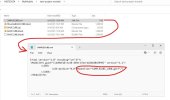
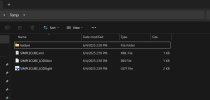
I tried an export using your .blend and settings you suggested. Still no .bin or .gltf files exported, only the SIMPLECUBE.xml file (see attached).

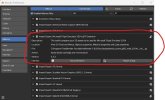
I'm wondering...your screenshots of the Blender glTF exporter Settings and Objects screens are a bit different from mine. Are we using the same glTF exporter? I attached the details of the plug-in that I'm using to this post. I'd be interested in the details of what you are using.

Thank you! I'm starting to think there may be a bug in the Asobo Multi-Export plugin.

Marty
 

Attachments

  • Screenshot 2025-06-04 125216.jpg
    Screenshot 2025-06-04 125216.jpg
    71.6 KB · Views: 163
  • Screenshot 2025-06-04 124854.jpg
    Screenshot 2025-06-04 124854.jpg
    84.5 KB · Views: 149
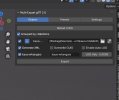
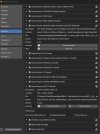
I am using the same exporter and can confirm that the exporter works. I can get the xml. bin and gtlf file along with the texture xml files. My problem is that I get an error message when I try to build it using the FS2024 fspackagetool. I also used the exporter for H88 an airport that I just finished but it was a FS2020 project that got converted. From the info I've found, you must also have the Import-Export: glTF 2.0 enabled as well. You can also have ver 1.3.3 of the exporter installed as well but not both enabled at the same time. I'm attaching pics of my exporter settings that may help.
 

Attachments

  • blend4.jpg
    blend4.jpg
    309.8 KB · Views: 150
  • blend3.jpg
    blend3.jpg
    84.5 KB · Views: 146
  • blend2.jpg
    blend2.jpg
    44.6 KB · Views: 133
  • blend1.jpg
    blend1.jpg
    144 KB · Views: 137
I just exported your simple cube and got all three files. I using Blender 3.6.22 LTS
 

Attachments

  • cube1.jpg
    cube1.jpg
    33.4 KB · Views: 118
I don't think the ver will matters - the docs say 3.6LTS, so any ver should work. I got my copy from the Microsoft store. If the upgrade don't work, I would uninstall and delete all blender directories from the computer. You preference is sored in \AppData\Roaming\Blender Foundation\Blender\3.6, make a copy an delete,- I would also clean out \AppData\Local\Temp
 
I don't think the ver will matters - the docs say 3.6LTS, so any ver should work. I got my copy from the Microsoft store. If the upgrade don't work, I would uninstall and delete all blender directories from the computer. You preference is sored in \AppData\Roaming\Blender Foundation\Blender\3.6, make a copy an delete,- I would also clean out \AppData\Local\Temp

I don't think the ver will matters - the docs say 3.6LTS, so any ver should work. I got my copy from the Microsoft store. If the upgrade don't work, I would uninstall and delete all blender directories from the computer. You preference is sored in \AppData\Roaming\Blender Foundation\Blender\3.6, make a copy an delete,- I would also clean out \AppData\Local\Temp
Thank you. It's worth a try!
 
Sorry. I had the 2020 exporter. This attached is with the 2024. The idea is the same. export all to the .blend folder.
 

Attachments

TLDR: Resolved by removing and re-installing MSFS2024, Blender, and SDK clean.

More detail:
Nothing I did, despite the good suggestions from @danielsjam and @rhumbaflappy, resolved the issue...same result....no matter what I tried. I was bashing my metaphorical head against the wall.

Ultimately, in desperation, I removed all traces of MSFS2024, the SDK and Blender from my PC. I then re-installed Blender latest LTS (3.6.22), MSFS2024 and the latest SDK.

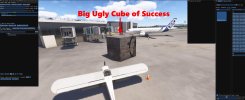
Created a project from scratch, added a simple cube with a texture (albedo-only), and SUCCESS! In this case, success came in the form of the "Big Ugly Cube of Success".

Thank you for your help, guys. I am so glad I found this forum!

Best regards,
Marty
 

Attachments

  • BigUglyCubeofSuccess.jpg
    BigUglyCubeofSuccess.jpg
    294.8 KB · Views: 164
Back
Top