

- Messages
- 34,551
- Country

In MSFS 2024 the level of detail (LOD) system has been changed. As specified in the SDK, based on the number of vertices in the level of detail representation there is a minimum minimum size value that is allowed in MSFS 2024. This means that objects with a certain amount of vertices will disappear at a certain distance and if there is no level of detail representation below it.
In ModelConverterX I have now implemented a number of changes that will help you to work with this new system more efficiently. It should be noted that ModelConverterX does show the FSX/P3D LOD values in the different forms and not the minimum size value that MSFS uses. On export to MSFS formats this is automatically converted.
Continue reading...
In ModelConverterX I have now implemented a number of changes that will help you to work with this new system more efficiently. It should be noted that ModelConverterX does show the FSX/P3D LOD values in the different forms and not the minimum size value that MSFS uses. On export to MSFS formats this is automatically converted.
- The glTF writer has an option now called “Limit MinSize based on vertex count”, when enabled (which is the default value) this logic will modify the LOD value of the object to match with the table of the SDK based on the number of vertices in the object.
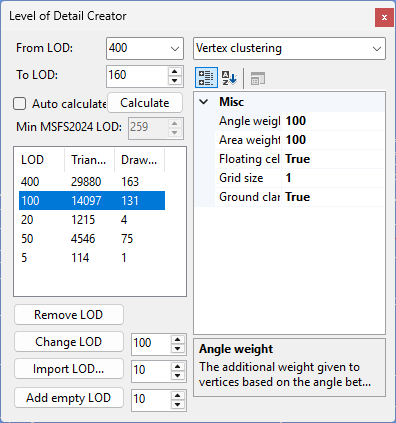
- In the LOD Creator form you can now see what the minimum LOD size is that MSFS 2024 supports based on the complexity of the object. So that helps you to select the best value and also gives an indication when you would need to add additional LOD. In the screenshot below you see an object that has LOD 100 in FSX, but given the 14097 vertices in the LOD MSFS 2024 would allow a LOD value of 239 as minimum value.
Continue reading...