

Hi there,
Just a question about the normal map creation from the FSDev wiki article and the P3D SDK.
https://www.fsdeveloper.com/wiki/index.php?title=Normal_map_creation
http://www.prepar3d.com/SDKv4/sdk/modeling/3ds_max/modeling/texturing_aircraft_models.html#Texture Map Types
Both say go from a grayscale height map to the directx normal map format using the nvidia plugin.
Then there's some tweaking to get it into the FS format. Contradictions in bold
FSDev Wiki says:
The P3D SDK (I can't find an FSX one) says:
The Normal maps used in the rendering engine reassign the Red channel as an Alpha channel and leave the Green and Blue components unchanged.
It says to use the imagetool to go straight from nvidia normal map to dds
imagetool -nobeep -dxt5 -RedInAlpha -dds -nodither <path/filename>
Where has the invert the green channel and make the blue channel white come from?
I did a test here, after running the image through the command above the red channel goes to the alpha, the red channel does indeed go black.
But the green and blue channels are untouched.
*I inverted the alpha for this demonstration on the after image otherwise the alpha preview (full alpha transparent is shown in red) would block the other letters.*
Look at the little channel previews on the side (sorry they're small).

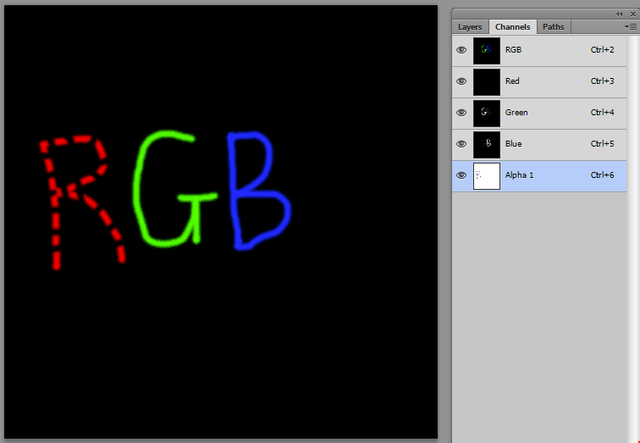
Has the process changed for P3D4? I believe they're still trying for backwards compatibility so I wouldn't have thought so.
Cheers,
Nick
Just a question about the normal map creation from the FSDev wiki article and the P3D SDK.
https://www.fsdeveloper.com/wiki/index.php?title=Normal_map_creation
http://www.prepar3d.com/SDKv4/sdk/modeling/3ds_max/modeling/texturing_aircraft_models.html#Texture Map Types
Both say go from a grayscale height map to the directx normal map format using the nvidia plugin.
Then there's some tweaking to get it into the FS format. Contradictions in bold
FSDev Wiki says:
- Copy the content of the red channel to the alpha channel
- Make the red channel black
- Invert the green channel
- Make the blue channel white
The P3D SDK (I can't find an FSX one) says:
The Normal maps used in the rendering engine reassign the Red channel as an Alpha channel and leave the Green and Blue components unchanged.
It says to use the imagetool to go straight from nvidia normal map to dds
imagetool -nobeep -dxt5 -RedInAlpha -dds -nodither <path/filename>
Where has the invert the green channel and make the blue channel white come from?
I did a test here, after running the image through the command above the red channel goes to the alpha, the red channel does indeed go black.
But the green and blue channels are untouched.
*I inverted the alpha for this demonstration on the after image otherwise the alpha preview (full alpha transparent is shown in red) would block the other letters.*
Look at the little channel previews on the side (sorry they're small).
Has the process changed for P3D4? I believe they're still trying for backwards compatibility so I wouldn't have thought so.
Cheers,
Nick
Last edited:


