

- Messages
- 34,548
- Country

Although the scenProc tool is mainly used to create autogen files, it is also capable to produce BGL files using BGLComp. A processing step to place library objects this way has been available for quite a while. Today I have added another step that uses the BGLComp exporter, it can be used to place effect files.
This new CREATEXMLEFFECT step takes almost the same attributes at the CREATEXMLLIBOBJ step. The only difference is that instead of a GUID you provide the effect name. And of course you can specify the effect parameters to control when the effect is active in FS.
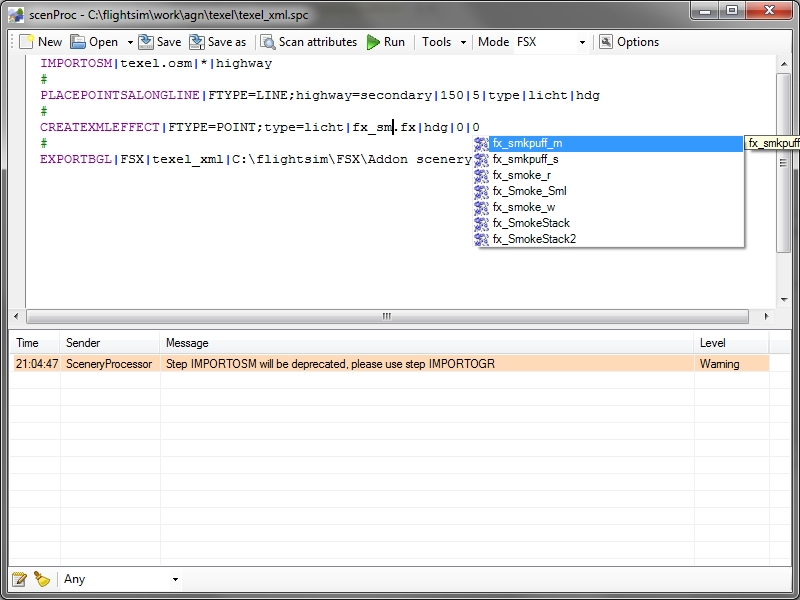
In the scenProc GUI to auto completion will show you all effects that are available in your FS installation, so that makes it easy to pick the right one. The screenshot below shows the auto completion and also shows a very basic configuration where I place XML effects (I generated the points to place my effects using the PLACEPOINTALONGLINE step).
Continue reading...
This new CREATEXMLEFFECT step takes almost the same attributes at the CREATEXMLLIBOBJ step. The only difference is that instead of a GUID you provide the effect name. And of course you can specify the effect parameters to control when the effect is active in FS.
In the scenProc GUI to auto completion will show you all effects that are available in your FS installation, so that makes it easy to pick the right one. The screenshot below shows the auto completion and also shows a very basic configuration where I place XML effects (I generated the points to place my effects using the PLACEPOINTALONGLINE step).
Continue reading...


