• Which the release of FS2020 we see an explosition of activity on the forun and of course we are very happy to see this. But having all questions about FS2020 in one forum becomes a bit messy. So therefore we would like to ask you all to use the following guidelines when posting your questions:

    • Tag FS2020 specific questions with the MSFS2020 tag.
    • Questions about making 3D assets can be posted in the 3D asset design forum. Either post them in the subforum of the modelling tool you use or in the general forum if they are general.
    • Questions about aircraft design can be posted in the Aircraft design forum
    • Questions about airport design can be posted in the FS2020 airport design forum. Once airport development tools have been updated for FS2020 you can post tool speciifc questions in the subforums of those tools as well of course.
    • Questions about terrain design can be posted in the FS2020 terrain design forum.
    • Questions about SimConnect can be posted in the SimConnect forum.

    Any other question that is not specific to an aspect of development or tool can be posted in the General chat forum.

    By following these guidelines we make sure that the forums remain easy to read for everybody and also that the right people can find your post to answer it.

Prop Animation

Messages
35
Country
us-connecticut
Can anyone give me a heads up on how to setup the various animation states for a FSX propeller using 3DS MAX?

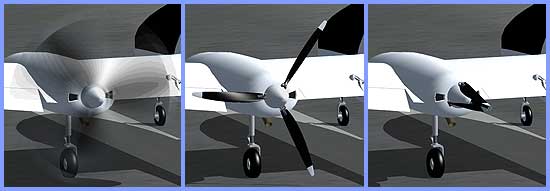
I made three props for my aircraft:


  • a still feathered state
  • a version with solid blades that I rotated 360 degrees
  • a blurred state with a transparent prop disk that I also rotated 360 degrees

Using the FSX Animation Tool I assigned keyframe animations 0-100 to each prop using the following tags:

  • prop0_still
  • prop0_slow
  • prop0_blurred

When I view my aircraft in FSX I see all three states at once. Any tips on how to set this up so that I get just one prop state at a time?
 
Using the FSX Animation Tool I assigned keyframe animations 0-100 to each prop using the following tags:

  • prop0_still
  • prop0_slow
  • prop0_blurred

When I view my aircraft in FSX I see all three states at once. Any tips on how to set this up so that I get just one prop state at a time?

NOTE: Reposted from my reply at AVSIM.com...

You must also use the Attachpoint Tool to add the "Visibility" conditions for each of the prop0_xxx parts, using the picklist, then click on "Attach to Mesh"

BTW, prop0_still should also be rotated 360 degrees...

Be sure to add a keyframe at 90, 180, and 270 degrees (keyframes 25, 50, and 75) as well...
 
Ahh ha! That's what the Attachpoint Tool is for. Very cool thank you once again Bill.

Here's the result...

prop_states.jpg
 
Back
Top