• Which the release of FS2020 we see an explosition of activity on the forun and of course we are very happy to see this. But having all questions about FS2020 in one forum becomes a bit messy. So therefore we would like to ask you all to use the following guidelines when posting your questions:

    • Tag FS2020 specific questions with the MSFS2020 tag.
    • Questions about making 3D assets can be posted in the 3D asset design forum. Either post them in the subforum of the modelling tool you use or in the general forum if they are general.
    • Questions about aircraft design can be posted in the Aircraft design forum
    • Questions about airport design can be posted in the FS2020 airport design forum. Once airport development tools have been updated for FS2020 you can post tool speciifc questions in the subforums of those tools as well of course.
    • Questions about terrain design can be posted in the FS2020 terrain design forum.
    • Questions about SimConnect can be posted in the SimConnect forum.

    Any other question that is not specific to an aspect of development or tool can be posted in the General chat forum.

    By following these guidelines we make sure that the forums remain easy to read for everybody and also that the right people can find your post to answer it.

Satellite image different color

Messages
19
Country
iran
Hello to everyone
I hope all of u can help me because this problem is confusing me.
i download the satellite image from FSET and now when i look to my picture there is a problem.
as u can see in this picture the area number 1 seems have a good condition but the area number 2 doesnt have good condition relative to number 1.
how can i match these different color?
i tried every solution on photoshop but i cant reach to logical solution to trust that.
how can i solve this problem?
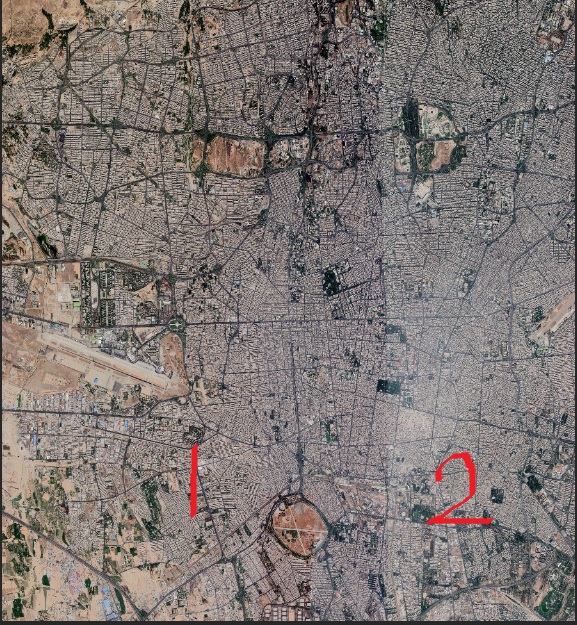
Untitled.jpg
 
You could make a selection of "Area 2", overhanging slightly on "Area 1" - duplicate it and adjust brightness/contrast to match "area 1" as close as possible - you can then use a rubber tool with low opacity to rub down the "line" between the 2 areas.
 
Aviasim thanks for your reply but i dont know how should i start your procedure.
can u say me this procedure step by step?
and does your procedure work with any satellite images?
thaanks
 
Back
Top