• Which the release of FS2020 we see an explosition of activity on the forun and of course we are very happy to see this. But having all questions about FS2020 in one forum becomes a bit messy. So therefore we would like to ask you all to use the following guidelines when posting your questions:

    • Tag FS2020 specific questions with the MSFS2020 tag.
    • Questions about making 3D assets can be posted in the 3D asset design forum. Either post them in the subforum of the modelling tool you use or in the general forum if they are general.
    • Questions about aircraft design can be posted in the Aircraft design forum
    • Questions about airport design can be posted in the FS2020 airport design forum. Once airport development tools have been updated for FS2020 you can post tool speciifc questions in the subforums of those tools as well of course.
    • Questions about terrain design can be posted in the FS2020 terrain design forum.
    • Questions about SimConnect can be posted in the SimConnect forum.

    Any other question that is not specific to an aspect of development or tool can be posted in the General chat forum.

    By following these guidelines we make sure that the forums remain easy to read for everybody and also that the right people can find your post to answer it.

Subtracting features

arno

Administrator
Staff member
FSDevConf team
Resource contributor
Messages
34,536
Country
netherlands
Image2014-02-04-2128.26.430-279x300.jpg
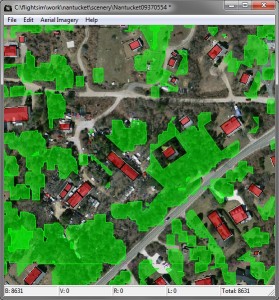
One of the issues with creating autogen is that vegetation polygons might suppress buildings. When the vegetation overlaps the building the building will not be shown. This can be a bit annoying, since you would like the building to suppress the vegetation normally.

To work around this problem I have added a new step to scenProc. With this step you can subtract features from each other. So this allows you to subtract the buildings from the vegetation polygons. That way both of them will show up correctly in the autogen. As you can see on the picture the step also allows you to add a small buffer zone that removes vegetation that is near the building.

The syntax of the step is as shown below. The first argument is the filter to select the polygons you want to subtract from. In this case I’m selecting forest polygons. The second attribute is the filter to select the features that should be subtracted. In this case I select my buildings. The third argument is the scaling that should be applied to the features that are subtracted. So in this case I double their size to get a buffer area. The last argument is optional. If you provide MINAREAPOLY there the algorithm will subtract the minimum area polygon of the feature (the best fitting rectangle), instead of the feature itself. For buildings that is often what you want, since the autogen buildings are created from this minimum area polygon as well.

SUBTRACTFEATURES|type=forest|type=building|2.0|MINAREAPOLY

Continue reading...
 
Back
Top