

jtanabodee
Resource contributor
- Messages
- 3,924
- Country

Hi,
Regarding this thread :http://www.fsdeveloper.com/forum/threads/volume-sha.dow-cause-the-default-shadow-disappear.427439/#post-650660
There are rules for this volume shadow:
1. The model has to be manifold, water tight.
2. Vertices have to be normalized, no shading just only volume shadow.
3. No base material specular.
I still fighting with volume shadow because I think it will be good for the hangar that the airplanes and stuffs inside will have shadow by the hangar. I need not to do texture baking.
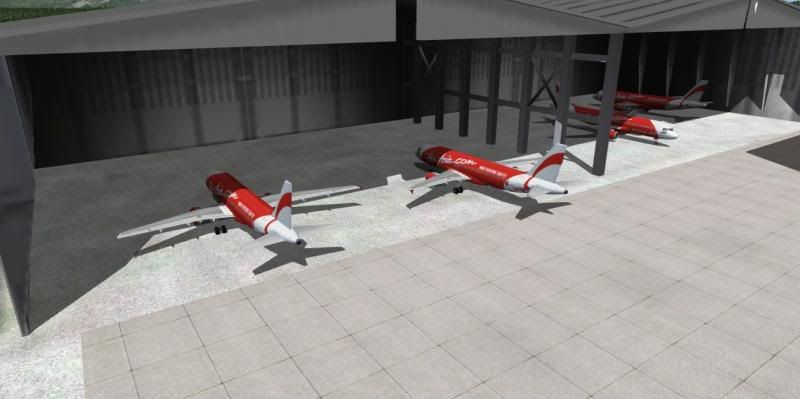
Here it is how it looks in the hangar. The shadow casts nicely over those Air Asia A320.
I didn't plan at first to use volume shadow, so I detach polygons separately and extrude then cap the hole to make it like a box for each polygon. Yes, it is manifold objects but the shadow keeps flickering. You can see at those arrows. It is flickering so much.
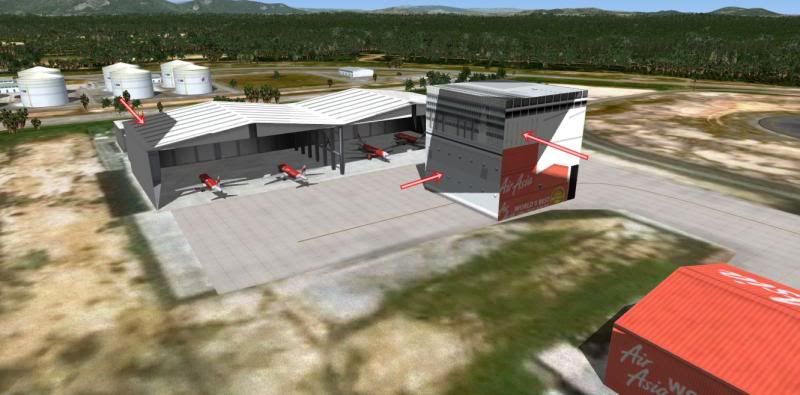
Then I make a box on the same scene (same gmax file) but it is still fickering. The box is on the right side of the hangar. So it is not a manifold problem since that box is ABSOLUTELY manifold.
Oh man! It is heartbreaking. I need to do it again all over.
So I tried to make a simple box to test in another file and export as a separate mdl and bgl. The flickering disappear.
I copied the same box and export again, this time contain 2 boxes in the scene.
Those two boxes has no flickering. You can see at this picture, the box was imported from the previous file. So those three boxes are identical.
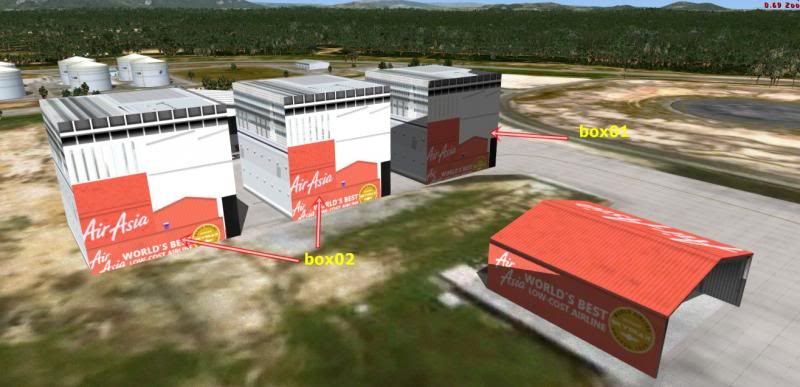
So to my conclusion, I think if you need volume shadow, you need to do it by primitive box, cylinder. If you make a plane, extrude the polygon and cap the hole, this is not working. Moreover if you have only one piece in the same file doing without primitive boxes, it will ruin the other manifold models to get flickering too.
I will come up again when the things get done and I will have a conclusion for Volume Shadow for scenery.
Regarding this thread :http://www.fsdeveloper.com/forum/threads/volume-sha.dow-cause-the-default-shadow-disappear.427439/#post-650660
There are rules for this volume shadow:
1. The model has to be manifold, water tight.
2. Vertices have to be normalized, no shading just only volume shadow.
3. No base material specular.
I still fighting with volume shadow because I think it will be good for the hangar that the airplanes and stuffs inside will have shadow by the hangar. I need not to do texture baking.
Here it is how it looks in the hangar. The shadow casts nicely over those Air Asia A320.

I didn't plan at first to use volume shadow, so I detach polygons separately and extrude then cap the hole to make it like a box for each polygon. Yes, it is manifold objects but the shadow keeps flickering. You can see at those arrows. It is flickering so much.

Then I make a box on the same scene (same gmax file) but it is still fickering. The box is on the right side of the hangar. So it is not a manifold problem since that box is ABSOLUTELY manifold.
Oh man! It is heartbreaking. I need to do it again all over.
So I tried to make a simple box to test in another file and export as a separate mdl and bgl. The flickering disappear.
I copied the same box and export again, this time contain 2 boxes in the scene.
Those two boxes has no flickering. You can see at this picture, the box was imported from the previous file. So those three boxes are identical.

So to my conclusion, I think if you need volume shadow, you need to do it by primitive box, cylinder. If you make a plane, extrude the polygon and cap the hole, this is not working. Moreover if you have only one piece in the same file doing without primitive boxes, it will ruin the other manifold models to get flickering too.
I will come up again when the things get done and I will have a conclusion for Volume Shadow for scenery.
Last edited:


