• Which the release of FS2020 we see an explosition of activity on the forun and of course we are very happy to see this. But having all questions about FS2020 in one forum becomes a bit messy. So therefore we would like to ask you all to use the following guidelines when posting your questions:

    • Tag FS2020 specific questions with the MSFS2020 tag.
    • Questions about making 3D assets can be posted in the 3D asset design forum. Either post them in the subforum of the modelling tool you use or in the general forum if they are general.
    • Questions about aircraft design can be posted in the Aircraft design forum
    • Questions about airport design can be posted in the FS2020 airport design forum. Once airport development tools have been updated for FS2020 you can post tool speciifc questions in the subforums of those tools as well of course.
    • Questions about terrain design can be posted in the FS2020 terrain design forum.
    • Questions about SimConnect can be posted in the SimConnect forum.

    Any other question that is not specific to an aspect of development or tool can be posted in the General chat forum.

    By following these guidelines we make sure that the forums remain easy to read for everybody and also that the right people can find your post to answer it.

What is the highest resolution photo scenery achievable

http://www.fsdeveloper.com/forum/th...-photo-scenery-achievable.440912/#post-781139

I noted today when I open PSP (I am using X2) that I am getting a small window offering me the latest version at 75% off ($A32). I recently got the same offer (75% off) for the latest version VideoStudio Pro Ultimate X10 (I have X6 Pro) and it seems that Corel is trying to entice owners of older versions a cheap upgrade. Maybe I should get PSP 2018 Ultimate although X2 does everything I currently want from an image editor. What version do you have?

Although I have used various PSP versions over the years (PSP was- and still is for some FS developers- a favorite graphics application), I now only use Corel PhotoPaint and CorelDraw.

BTW: You could use the free (old) JASC PaintShop Pro version 5 in Windows-7 64-Bit for this task, believe it or not ! ;)


When I open my image (from the work folder) it does not show any more layers than the 'background' layer. If I select 'New Mask Layer' I am prompted for Hide All, Show All, or From Image; and when I select From Image it prompts for 'Source Luminance', 'Any Non-Zero Value', or 'Source Opacity' which mean nothing to me.

I have Googled 'adding mask layer' with PSP and following one link which stated to firstly duplicate the current (background) layer (and rename if required) then to flood fill it with pure white and then 'add mask layer' which I did but wasn't sure if I am on the right track. It seems to me that a mask layer is simply a layer of pure white with an edge of black 'painted' with the brush tool set at 50 to 75% hardness (which I saw in the video).

This would require more study to see what methods PSPx2 is using; I would 'Google' that topic further.

I suggest following parallel concepts in PSP that correlate with methods used in GIMP by the Tiberius et al tutorial cited here: :pushpin:


And of course GIMP is free to use also.

http://www.fsdeveloper.com/forum/th...-photo-scenery-achievable.440912/#post-780261:


Regarding a water mask. I am assuming all that does is allows the FSX default water to show through the photo scenery and therefore if there was no default water then nothing would show (I am thinking of say the tailings dams at the quarry). And if my photo scenery contained the edge of an existing water body in the default scenery then it would show through. Is that correct?

If there was no Hydro polygon underneath to display default Water Class, default Land Class would show instead.

[EDITED]

Those "Class" attributes pertain more to the texture image patterns that will be seen on the ground.

More specific to your question, however, is the fact that the Land-Water "Mask" is intended to be a 1-Bit Gray-scale containing only (2) "colors": White (RGB 255,255,255) for land, and Black (RGB 0,0,0).

[EDITED]

NOTE: Final output source file format for TIFF Masks must actually be 8-Bit gray-scale; see:

http://www.fsdeveloper.com/forum/th...-scenery-achievable.440912/page-4#post-789447

[END_EDIT]


Where that Black value (RGB 0,0,0) is applied, a default FS "Hydro" attribute will be seen on top of a Water Class texture if there is a "hydro" polygon underneath the custom photo-real aerial imagery ...that is allowed to show through by the Blend Mask.

Default FSX "hydro" attributes involve the "LivingWater.DLL", and attributes of wave-like patterns implemented via special raster files, specular attributes, as well as floating / bobbing and splashing of certain SimObjects.

These "hydro" attributes can be 'enabled' via CVX vector polygons and/or raster methods involving use of certain gray-scale "color" values in Land-Water masks or Blend Masks with default or custom land class scenery.

These "hydro" attributes are all distinct from shoreline "wave" Effects (wavecontroller *.Fx files) which are separately implemented via CVX vector poly-lines with associated Effect (*.Fx) files defined in Terrain.Cfg.


Where that White value (RGB 255,255,255) is applied, a default Land Class texture will be seen on top of the ground:

* if there is NOT a Hydro polygon underneath the custom photo-real aerial imagery

...and:

* if that default Land Class texture is allowed to show through by the Blend Mask.

[END_EDIT]

Are you referring to the SBuilderX dialog boxes for Seasonal and Night textures ? YES; I remember seeing it in the past but cannot find it now. Searched all the drop down menus in SBX and also the folder where all the SBX stuff is. It's annoying me as I have seen it before.

SBuilderX Menu > Help > {Search Tab} query string: Seasons

Also I have no idea what your (PC) system includes. Mine is an i7 3.4Ghz CPU and 8GB DDR3 memory.

If I create a 'map' in SBX at zoom level 19 it creates a BMP image around 700Mb or larger and I cannot do anything with it in PSP as it advises there is not enough memory. This I find strange as I have 8GB. Do you have any idea if adding another 8GB will overcome 'not enough memory'?

Maybe it's because PSP X2 is a 32 bit application (I understand that from X6 it was 64bit).
What do you think?

For larger image files one may need to use a 64-bit version to efficiently use masks, edge detection, etc., or to implement consistent color matching ...as this would otherwise be difficult if one worked with "partial image tile loading".

However, be aware that most aerial imagery presented as Zoom level 19 / 20 /21 may only be a digitally enlarged "MIPMAP" copy of the Zoom level 18 aerial imagery, and one may achieve a better result manually sharpening and adjusting graphical attributes for Zoom level 18 images in a graphics application than by using downloaded "fake" Zoom level 19 / 20 /21 images.

There is "some" true Zoom level 19 / 20 / 21 images on tile servers for certain Geographic areas, but one must always examine those zoom level images carefully to see if they are truly sharper, and to thereby avoid wasting system resources in the graphics application, SDK Resample task session, and USERVA within FSX / P3D on "empty magnification" images, when a lower resolution image could have been enhanced with less pixel burden.

[EDITED]

PS: You may wish to also review the info in this thread, which in addition to addressing color-matching, discusses other graphic tools for preparing aerial imagery to be used in FSX / P3D, and mentions a reported 'freely available' version of Adobe PhotoShop: :idea:

http://www.fsdeveloper.com/forum/threads/different-seasons.440791/#post-778855

[END_EDIT]

I will be traveling today, so my time will be rather limited until my return to a "real computer" tonight.:cool:

GaryGB
 
Last edited:
Thanks again Gary,

Although you are 'on the road' I will reply briefly and you can reply at leisure when you get home.

I have posted a question on the Corel forums website regarding the 'out of memory' and had some replies with suggestions none of which worked and I have also noted that using PSP I can actually DRAW on my large image AND SAVE it without any out of memory. It is ONLY when I try to add a layer. I have advised on the forum my finding but after trying the following I am thinking that the problem is related to my PSP X2 only being a 32bit application because -

I have GIMP and just downloaded and installed the very latest version. It obviously installed as a 64 bit application as it was installed to Program Files and not Program Files (x86).
I then loaded my large image and created a new layer WITHOUT any error.
I prefer to use PSP as I am very familiar with it but I guess creating masks using Gimp isn't too difficult.

(added later)
I have some replies to the thread I created on the PSP forum and found someone who has the same version as me (X2) as well as a much more recent version. He too had the same 'out of memory' error in X2 with a similar size image when trying to create a layer so it seems I should really upgrade although I guess I could use GIMP to create the masks after some learning.
Now this leads me onto something else. Sure a blend mask makes the photo realistic scenery blend into the default scenery so there is no noticeable hard 'lines' between BUT from observations already made the colors do not match very well between default scenery and satellite imagery eg the color of trees is noticably different. After watching a Youtube tutorial (
)


it appears that this is obtained by changing colors with an image editor as I have done in the past to get some grass to look similar in color to default FSX grass.

Also
jparnold said:
Are you referring to the SBuilderX dialog boxes for Seasonal and Night textures ? YES; I remember seeing it in the past but cannot find it now. Searched all the drop down menus in SBX and also the folder where all the SBX stuff is. It's annoying me as I have seen it before.
SBuilderX Menu > Help > {Search Tab} query string: Seasons

The reason I asked that was that I was thinking that this dialog box also contained the 'mask' image file. I now see after watching the same video tutorial mentioned above that this is achieved with the INF file (need to edit to add new [Sourcex] for each just like you do to add seasons and night). I'm getting there just need to put all this into action.

John
 
Last edited:
Hi John:

I made a few edits in my post immediately above:

http://www.fsdeveloper.com/forum/th...-scenery-achievable.440912/page-2#post-781163


BTW: When you fully populate the Season configuration within the SBuilderX dialog cited above, SBuilderX will output a Seasonal multi-source INF automatically when you compile a BGL. :wizard:


As stated elsewhere, that INF can be edited and compiled manually via a copy of FSX Terrain SDK Resample if desired.


Again all the above discussion merits repeated review of the information cited / linked in this post above:

http://www.fsdeveloper.com/forum/th...-photo-scenery-achievable.440912/#post-780261


[EDITED]

You may also wish to review the original PTSIM forum thread from which Luis Feliz-Tirado derived the content for tutorial package cited in the above linked post:

http://www.ptsim.com/forum/viewtopic.php?p=3435&sid=149d43d81037e5d3f796c9eca2a170dc


Another notable quote from that cited tutorial:

"To add blend masks or water masks to your custom ground, you can create them using the original image as a basis, and then save them with the same name, but using a suffix to indicate this. The files should be saved as TIF images, for example:

original image - L17X132735X132743Y90177Y90183.BMP
blend mask - L17X132735X132743Y90177Y90183_B.TIF
water mask - L17X132735X132743Y90177Y90183_W.TIF

Make sure that those files are in the SBuilderX\Tools\Work folder even if the original image is in another folder, and SBuilder X will automatically integrate the blend and/or water mask in the custom ground."


NOTE: Since SDK Resample will still require all pertinent parameters and values to be specified in the INF file, the above info means that if you provide all the Seasonal info within the Seasonal dialog box, and make certain you have all the required imagery files with the proper file name suffixes located within the:

[SBuilderX install path]\Tools\Work sub-folder

...SBuilderX will provide you with a multi-source INF file for compiling a BGL via SDK Resample.

[END_EDIT]

Hope this helps a bit more ! :)

GaryGB
 
Last edited:
Thanks Gary

I am undecided about upgrading my PSP as I have found that although the latest version (2018) has been offered very cheaply from Corel it is very resource hungry.
I am very familiar with PSP having used a variety of version from the first I started with up to X2 and therefore lean towards staying with it for most of my image editing. Maybe I will look for an older version but newer than X2 which won't work with large images.

I am now thinking I should save my money and persist with GIMP as all I am trying to achieve is water and blend masks via layers and Gimp will do that for me.

You may have forgotten but I am familiar with dropping the .INI file onto RESAMPLE and compile that way as I am familiar with editing the INI file to add sources.

It's now down to spending some time creating masks and I feel confident that I have enough information to do that.
 
http://www.fsdeveloper.com/forum/th...-scenery-achievable.440912/page-2#post-781267

You may have forgotten but I am familiar with dropping the .INI file onto RESAMPLE and compile that way as I am familiar with editing the INI file to add sources.

It's now down to spending some time creating masks and I feel confident that I have enough information to do that.

Hi John:

You can be assured that I have not forgotten you are familiar with dropping the .INI file onto RESAMPLE and compiling that way, and that you are familiar with editing the INI file to add sources.

When I state something such as:

"Again all the above discussion merits repeated review of the information cited / linked in this post above:"

http://www.fsdeveloper.com/forum/th...-photo-scenery-achievable.440912/#post-780261

...it is because I believe that any reader may benefit from doing so, and that is not intended to infer anything regarding you personally, because I also would be among those likely to have such tutorials on 2 or more of the monitors in my 4-monitor computer configuration, when I too, am "learning-by-doing". :scratchch :coffee:


BTW: When I take the time to post a reply in threads, I typically do so in a way that may be helpful to numerous other readers of threads here at FS Developer who are potentially new to a topic, and I often include content and/or links to content that might perceived as 'a review' by someone that I may otherwise have originally initiated a reply for within a thread.


I believe I also also have an accurate impression of whether someone is taking the time to study and understand a subject comprehensively, and/or when there are outstanding issues that they may further benefit from taking more time to learn about, so that they will have successful results on a more consistent basis.

But readers are not obliged to "read" or follow links posted on their behalf if they are not inclined to do so.

Think of it as an 'info buffet', and you are not obliged to try everything in the buffet. ;)

By the same token, I am not a 'private info chef' preparing things exactly as ordered (nor am I doing so under a contractual agreement that compensates me for my time). :p


FYI
: I posted the 'edited' extra info above on:

* configuring the Seasons dialog in SBuilderX

...and:

* being certain to include Land-Water Masks and Blend Masks with the proper file name suffixes within the same folder as the other aerial imagery source files and the INF file

...NOT to 'encourage' manual compilation, but rather, to 'save' you and others the extra work and trial-and-error frustrations that can occur when manually building a complex multi-source INF file, and then manually compiling.


When SBuilderX's own menus and dialog boxes are used with the above considerations as to Seasons and all source files in place with proper file naming, SBuilderX itself outputs a relatively complex multi-source INF file during compilation.

One then has a INF file that can be manually further modified and/or manually compiled ...if that is needed / desired.

One also has a BGL that may meet all one's needs without having 'tinkered under the hood' ...just by clicking a button. :wizard:

GaryGB
 
Last edited:
I should have thought that your replies are for the benefit of anyone else reading and that is exactly what this forum is for - for the benefit of all. Thanks for reminding me of that. You are a good man.
 
Thanks for the kind words, John. :)


BTW
: regarding the quarry area edge "thin white line" troubleshooting scenario you reported earlier in this thread:

http://www.fsdeveloper.com/forum/th...-photo-scenery-achievable.440912/#post-780237


...I "re-learned" something I had forgotten about using SBuilderX background images from one of the above cited tutorials:


http://www.ptsim.com/forum/viewtopic.php?p=3435&sid=149d43d81037e5d3f796c9eca2a170dc

"Making custom ground textures

by luisfeliztirado » Fri Jun 29, 2007 3:49 pm


SBuilder X will create custom ground directly from the background image. There are different methods:

1. A quick and simple method - SBuilder X will take the images in the present workspace and automatically convert them into a custom ground bgl.

The SBuilder X workspace is 1792 x 1280 pixels in size and that will be the extent of the custom ground, although the resolution will depend on the zoom level of the background.

SBuilder X will also apply a simple blend mask that will blend the custom ground into the default textures along a thin band on the edge of the image.

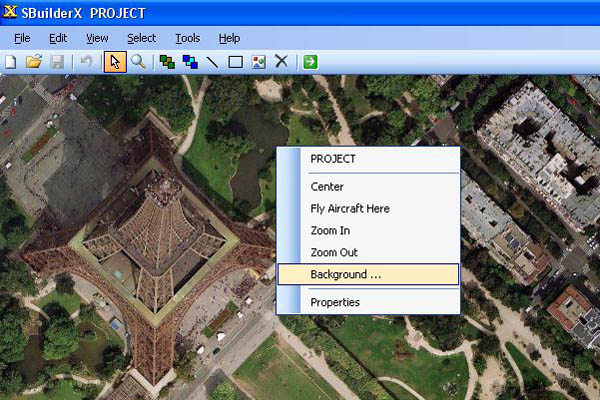
To create custom ground textures by this method, right-click on the SBuilder X workspace:


200762993610_04.JPG


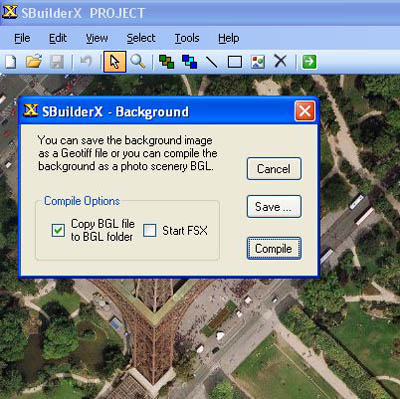
Select the "Background ..." option to get this window:


200762993659_05.JPG


You will have 2 options: either immediately compile the custom ground from the workspace, or save that workspace as a GeoTIFF image file;

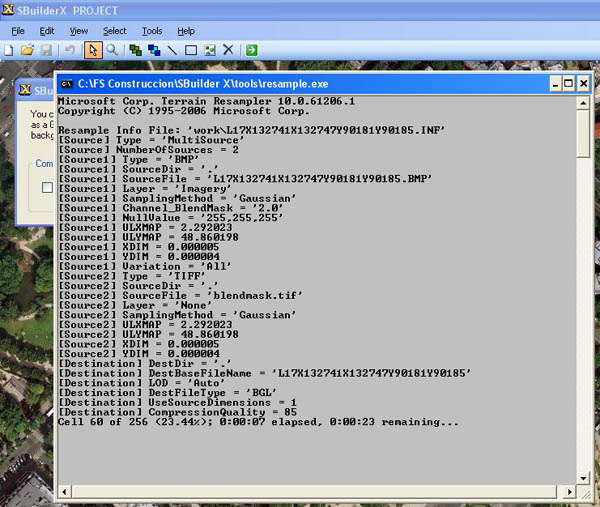
By selecting "Compile", SBuilder X will launch the Microsoft Resample program and create the custom ground bgl:

200762993754_06.JPG


Once your custom ground file has been created, you can change the name of the bgl to something more descriptive."

One might wonder whether your original scenario might have been more easily accomplished via the above referenced "Method #1" in SBuilderX ! :oops:

So, we all learn / 're-learn' something from "repeated review of the information cited / linked in this post above". :D

GaryGB
 
Thanks again Gary,

It is interesting about other uses of SBX such as making custom ground. Something else for me to experiment with.
[added later] I tried that method and it is quick. Not sure how you then go about adjusting say the brightness/contrast of the image as the result showed too washed out (result of satellite imagery I'm sure).

That begs another question. Where can I get server files (dll) for NOKIAIMAGERY in 64 bit? I watched a video tutorial on SBX and the author was saying that in his opinion it was the best satellite imagery. I have downloaded the lastest servers which include NOKIA but setting it in preferences NOTHING displays.
I can't get YAHOOSATELLITE to work either.

After watching yet another video tutorial which uses GIMP to create water and blend masks I have created a large MAP area of the west side of my lake and started to create a water mask with GIMP.

I also realise that the 'white lines' in the night view around the edges were the result of me 'erasing' (using the erasor tool in PSP) to remove unwanted parts around the edges with the erasor NOT set with a (hard) edge. When I did this again using a 'hard' edge the problem went away.
I will though be mindful of what you have replied.

ALSO (please tell me if I am wrong) I am thinking that using a blend mask instead of 'erasing' the way I did before will also result in NO thin white line as I had before.

In another video tutorial the 'presenter' uses a 50% 'brush' in a water mask along the edge (shoreline) to create the look of shallow water along the shore line. I have seen the effect of this and it looks good although I am not sure if this the the best or correct way to achieve this as a lot of my shorelines in real life are like this which would be good to reproduce. Here is an example -
shallow shoreline.jpg


I don't mean that I would like to create all the 'texture' in the shallows just the look of shallow water. I thought, though, that this could be achieved using photo real scenery by having the water mask ONLY for the deep water and using the satellite imagery for the look of the shallow water. Is that the best way? Could be a mismatch between color of water in the shallow and default FSX water. I am starting to get ahead of myself but just thinking ahead.

Better get on with it as I have less than 2 weeks at home before heading off overseas for 6 weeks.
 
Last edited:
http://www.fsdeveloper.com/forum/th...-scenery-achievable.440912/page-2#post-781356

Thanks again Gary,

It is interesting about other uses of SBX such as making custom ground. Something else for me to experiment with.
[added later] I tried that method and it is quick. Not sure how you then go about adjusting say the brightness/contrast of the image as the result showed too washed out (result of satellite imagery I'm sure).

That begs another question. Where can I get server files (dll) for NOKIAIMAGERY in 64 bit? I watched a video tutorial on SBX and the author was saying that in his opinion it was the best satellite imagery. I have downloaded the latest servers which include NOKIA but setting it in preferences NOTHING displays.
I can't get YAHOOSATELLITE to work either.

The fact that you have downloaded the latest tile server DLLs and that those two options can be selected without an error in the tile server pick-list likely means that aerial imagery is not available for your location of interest via SBuilderX.

Nokia had restructured its approach to licensing and distributing such imagery (most of which originally is from Digital Globe) via the "Here.com" online portal, which, AFAIK was a fee-based access method.


FYI: Nokia has entirely sold that business; so it is not clear what- if any- future functionality may ever be accessible via a 'Nokia' tile server in SBuilderX. :pushpin:

http://www.nokia.com/en_int/innovation


IIRC, Nokia also had been the intermediate licensor of imagery used by Yahoo Satellite imagery (IIUC, now discontinued), and MS Virtual Earth (aka "BING" maps) satellite imagery, and to the extent they may be making such imagery available, the MS tile server only has imagery up to lower Zoom levels.


However, one may occasionally find sharper and better color-corrected imagery for 'some' Geographic locations via the MS tile server.

More often, however, ESRI ArcGIS World Imagery tile servers have sharper and better color-corrected imagery for 'some' Geographic locations than the MS tile server.

And in general, Google api3 Satellite tile server more often has sharper and better color-corrected imagery for 'some' Geographic locations in North America than either the MS tile server or the ESRI ArcGIS World Imagery tile server.

But in the case of the Sechelt area, presently, IMHO, you will find that that the ESRI ArcGIS World Imagery tile server has sharper and better color-corrected imagery for that Geographic location. ;)

After watching yet another video tutorial which uses GIMP to create water and blend masks I have created a large MAP area of the west side of my lake and started to create a water mask with GIMP.

I also realize that the 'white lines' in the night view around the edges were the result of me 'erasing' (using the eraser tool in PSP) to remove unwanted parts around the edges with the eraser NOT set with a (hard) edge. When I did this again using a 'hard' edge the problem went away.
I will though be mindful of what you have replied.

ALSO (please tell me if I am wrong) I am thinking that using a blend mask instead of 'erasing' the way I did before will also result in NO thin white line as I had before.


As the SDK documentation and the tutorials cited above explain, the Water mask ONLY enables "Hydro" attributes to be displayed on top of the custom photo-real aerial imagery and/or default land class or water class textures.

A Blend Mask uses a gray-scale gradient to enable display of the custom photo-real aerial imagery and/or default land class or water class textures underlying any Hydro attributes as a function of variable "transparency".

Where the Blend Mask is pure White (RGB 255,255,255) one will only see the custom photo-real aerial imagery.

Where the Blend Mask is pure Black (RGB 0,0,0) one will only see the default land class or water class textures (and, if applicable, underlying any "Hydro" attributes that were separately enabled via a Water Mask) ...as a function of variable "transparency" enabled by the Blend Mask.

The technical transition point where one may see a more substantial "fade" of custom photo-real aerial imagery into underlying default land class or water class textures is 'approximately' mid-gray-scale (RGB 127,127,127).


BTW: Such a 'fade' of custom photo-real aerial imagery into underlying default land class or water class textures is also gradually accompanied by display of any Autogen annotations for any underlying land class textures which have been annotated (not all Land Class types have Autogen annotations, and AFAIK, no default Water Class AFAIK has any either).


Typically FS Developers fade the custom photo-real aerial imagery into underlying default water class textures at some distance that they consider realistic and/or practical, so that eventually, one see only the default FS water class with no visible part of the aerial imagery for the water area to be seen.

This is a function of how wide the 'extent' of the gray-scale gradient is made in the Blend Mask ...from the edge of the shoreline outwards into the water image area.


One may need to use a custom (wider) brush 'width' as an additional attribute aside from the brush 'hardness' in order to achieve the desired extent of the gray-scale gradient made in the Blend Mask ...from the edge of the shoreline outwards into the water image area.

Others may use a combination of the brush and air-brush tools to achieve a desired Blend Mask gradient extent. :idea:


These techniques are perhaps better visualized in the tutorial by Tiberius et al as cited above.

https://www.flightsim.com/vbfs/showthread.php?250762-How-to-create-photoreal-scenery-for-FSX


In another video tutorial the 'presenter' uses a 50% 'brush' in a water mask along the edge (shoreline) to create the look of shallow water along the shore line. I have seen the effect of this and it looks good although I am not sure if this the the best or correct way to achieve this as a lot of my shorelines in real life are like this which would be good to reproduce. Here is an example -
View attachment 36944

I don't mean that I would like to create all the 'texture' in the shallows just the look of shallow water. I thought, though, that this could be achieved using photo real scenery by having the water mask ONLY for the deep water and using the satellite imagery for the look of the shallow water. Is that the best way? Could be a mismatch between color of water in the shallow and default FSX water. I am starting to get ahead of myself but just thinking ahead.

Better get on with it as I have less than 2 weeks at home before heading off overseas for 6 weeks.

IMHO, rather than using a 'higher-Bit-ness' version of a Water Mask or a Blend mask, or using 'only' a Blend Mask instead of having both a Water Mask and a Blend mask, it is best to keep such 'masks' separated into (2) distinct functions via (2) separate mask files, each defined via "Channel" parameter values within a SDK Resample "multi-source" INF: :alert:

Water Mask: 1-Bit Black (RGB 0,0,0) and White (RGB 255,255,255) only {= (2)-'indexed colors'}

[EDITED]

NOTE: Final output source file format for TIFF Masks must actually be 8-Bit gray-scale; see:

http://www.fsdeveloper.com/forum/th...-scenery-achievable.440912/page-4#post-789447

[END_EDIT]

BlendMask
: 8-Bit gray-scale from Black (RGB 0,0,0) to White (RGB 255,255,255) {= (256)-'colors'}

GaryGB
 
Last edited:
Thanks again Gary,

Yes after trying the ArcGis tile server I agree that it appears a sharper image.

I WAS of the opinion that a water mask only enables Hydro attributes to be shown but I did see a video tutorial (which I can't find again) that had the presenter create a 'layer' for the water mask and then used a '50%' brush to brush over a bay which had shallow water and I assumed that he was doing that to simulate shallow water and I just wanted your opinion as it didn't seem correct.

I have only just started creating masks and are yet to compile and see how it looks.
I save another video tutorial which appears to use a blend mask where there was shallow water which I thought was to make the scenery show shallow water.
I was just trying to what the correct and best way to create shallow water near the shoreline.
I was thinking of just creating a water mask for the DEEP water and allow the satellite imagery to display shallow water and was wondering if that is the 'correct method'. That of course would mean that a 'shoreline' LINE would not be required in those areas and any wave line would need to be at the edge of the water mask and not the actual shore for correctness.
Just thinking out loud and passing my thoughts by you for correctness.

John
 
http://www.fsdeveloper.com/forum/th...-scenery-achievable.440912/page-2#post-781421

Thanks again Gary,

Yes after trying the ArcGis tile server I agree that it appears a sharper image.

I WAS of the opinion that a water mask only enables Hydro attributes to be shown but I did see a video tutorial (which I can't find again) that had the presenter create a 'layer' for the water mask and then used a '50%' brush to brush over a bay which had shallow water and I assumed that he was doing that to simulate shallow water and I just wanted your opinion as it didn't seem correct.

Hi John:

It is true that one can create a new layer within certain graphic file formats supported by FS / P3D SDK Resample.

In that scenario, one can add multiple Alpha channel as 'layers' to a TIFF or GeoTIFF (*.TIF), or Targa (*.TGA) file.

As with separate 1-layer files, Alpha channel 'layers' must be defined via Parameter values in a "Multi-source" INF.


BTW: Do you have a link to the video tutorial you are referring to ? :scratchch


I have only just started creating masks and (have ?) yet to compile and see how it looks.

I saved another video tutorial which appears to use a blend mask where there was shallow water which I thought was to make the scenery show shallow water.

I was just trying to what the correct and best way to create shallow water near the shoreline.

That is correct; a Blend Mask is used to allow the aerial imagery to show in specific areas, and then 'fade" into the underlying default Water Class (or Land Class) textures.


NOTE: If there is no Water Class polygon underneath the aerial imagery to provide the water texture pattern, a default Land Class texture pattern will be seen instead, but either 'class' texture pattern will have super-imposed "Hydro" attributes.


I was thinking of just creating a water mask for the DEEP water and allow the satellite imagery to display shallow water and was wondering if that is the 'correct method'. That of course would mean that a 'shoreline' LINE would not be required in those areas and any wave line would need to be at the edge of the water mask and not the actual shore for correctness.

Just thinking out loud and passing my thoughts by you for correctness.

John

The 'shoreline' associated 'wave' line is created as a CVX vector object (a poly-line) inside a CVX vector BGL; this would typically be super-imposed over the Water Class polygon intended to enable display of the Water Class texture pattern ...within the same CVX vector BGL.

You can create such polygon / poly-line objects and compile them into a CVX vector BGL ...in SBuilderX.

GaryGB
 
Thanks again Gary,

Thanks for the explanation on multiple alpha channels. I have yet to learn more about alpha channels and how they work, at present I just know what they do. Also I have wondered about .TIF files and what is different (than .BMP) about them. I have seen TIF images created in some video tutorials (rather than .BMP) and wondered what they do that is different (more to learn).
I have at last found the video tutorial where the author painted over a section of water to make it look like shallow water - actually he used the erasor tool set at 20% opacity.


Here is the url
. It is long but the part where he erases is at around 32 minutes into the tutorial if you want to skip everything else.
Have I missed something in the tutorial? It appears he is using only ONE mask which he calls a blend mask yet it appears to contain both the water mask data and the blend mask data and that he has 'erased' part of the water mask using a 20% (opacity?) eraser tool.

My scenery has a HYDRO poly to recreate the shorelines more accurately than the default FSX scenery (also exclude polygons to remove existing default FSX water and shorelines). I used satellite imagery to 'draw' the hydro polygon with lots of vertices to make the shorelines more lifelike.

My airport started using ADE (needs ADE for the actual airport and runways) and it started with hydro polys and shorelines as well as scenery objects (float plane docks, some roads, parking lot etc) and then I 'got into' SBX to create missing islands mainly as I couldn't work out how to do that with ADE and after creating a thread someone suggested I try SBX to do that. So I have a mixture of BGL files created with ADE and SBX for the area.

I found a nice tutorial (in parts as replies to a thread) on creating an entire airport and surrounding scenery starting with SBX to do most of it and then ADE to create the runways, taxiways etc. I used it to start creating my masks using GIMP (as the tutorial shows).
It starts at
https://www.flightsim.com/vbfs/showthread.php?250762-How-to-create-photoreal-scenery-for-FSX/page42
I haven't had a chance to read it all yet (you have to start at the above link at the bottom and then select previous pages to follow it. I could not find a link to the entire tutorial as a downloadable file so did a cut and paste to a WORD file to make it easier to read from start to finish. I tried contacting the author but his (Flightsim) inbox is full.
If you want a copy of the WORD file I created let me know. Maybe a private message in case of any possible copyright although I have tried to contact the author.

Also satellite images are noticeable sharper and the colors more life like using the ArcGisImagery server - thanks again for that tip. I had tried a few but not that one. Thankfully I haven't progressed too far creating my masks as I will now use an image produced with ArcGis.

[added later]
I have found some freeware/shareware scenery which shows exactly what I am trying to do. It is by Tiberius Kowalski (no email address supplied) and it is named fsx_MIDWAY_ATOLL_photo_realistic (maybe not with the fsx_ suffix). When you open it in FSX there is an area around the atoll which depicts shallow water AND there is wave action in that area (I used a float plane and moved onto it and you can see the wave action which makes me think it is part of a hydro poly).
Here are two screen shots one from satellite view and the other from 'outside' view.

midway jon satellite.jpg


midway jon outside.jpg
 
Last edited:
http://www.fsdeveloper.com/forum/th...-scenery-achievable.440912/page-2#post-781427

I have at last found the video tutorial where the author painted over a section of water to make it look like shallow water - actually he used the eraser tool set at 20% opacity.

Here is the url: (omitted in this quote)

It is long but the part where he erases is at around 32 minutes into the tutorial if you want to skip everything else.

Have I missed something in the tutorial? It appears he is using only ONE mask which he calls a blend mask yet it appears to contain both the water mask data and the blend mask data and that he has 'erased' part of the water mask using a 20% (opacity?) eraser tool.

IMHO, Land-Water vs. Blend Masks should be maintained as separate files.

Water Masks should define Hydro areas with pure Black (RGB 0,0,0) and Land as pure White (RGB 255,255,255).

Water Masks should be saved as 1-Bit 'Indexed Color' Black & White only TIFF files; any transparency will be lost.

[EDITED]

NOTE: Final output source file format for TIFF Masks must actually be 8-Bit gray-scale; see:

http://www.fsdeveloper.com/forum/th...-scenery-achievable.440912/page-4#post-789447

[END_EDIT]


Blend Masks should IMHO define default Land Class with pure Black (RGB 0,0,0) and transition into custom Land class (ex: photo-real aerial imagery) over the desired distance on ground via a gradient of progressively lighter gray-scale values and become pure White (RGB 255,255,255) in areas that one wishes to be fully visible in the custom area.

Blend Masks should be saved as 8-Bit 'gray-scale' TIFF files; any transparency will be rendered via a 256-step gradient.

Blend Masks can be "dithered" via ex: Floyd-Sternberg dithering methods to reduce "banding" in 8-Bit gray-scale gradients

My scenery has a HYDRO poly to recreate the shorelines more accurately than the default FSX scenery (also exclude polygons to remove existing default FSX water and shorelines). I used satellite imagery to 'draw' the hydro polygon with lots of vertices to make the shorelines more lifelike.

IIUC, you mean the 'shape' of the water bodies, as "shorelines" are separately created vector poly-line objects distinct from polygons that defines water body areas.


I found a nice tutorial (in parts as replies to a thread) on creating an entire airport and surrounding scenery starting with SBX to do most of it and then ADE to create the runways, taxiways etc. I used it to start creating my masks using GIMP (as the tutorial shows).
It starts (ends !) at:

https://www.flightsim.com/vbfs/showthread.php?250762-How-to-create-photoreal-scenery-for-FSX/page42

I haven't had a chance to read it all yet (you have to start at the above link at the bottom and then select previous pages to follow it. I could not find a link to the entire tutorial as a downloadable file so did a cut and paste to a WORD file to make it easier to read from start to finish.

That is the tutorial by "Tiberius et al" that I repeatedly cited and/or linked for you above; it starts at:

https://www.flightsim.com/vbfs/showthread.php?250762-How-to-create-photoreal-scenery-for-FSX

Glad to see you're finally reading it now ! :D

[added later]
I have found some freeware/shareware scenery which shows exactly what I am trying to do. It is by Tiberius Kowalski (no email address supplied) and it is named fsx_MIDWAY_ATOLL_photo_realistic (maybe not with the fsx_ suffix). When you open it in FSX there is an area around the atoll which depicts shallow water AND there is wave action in that area (I used a float plane and moved onto it and you can see the wave action which makes me think it is part of a hydro poly).

You are referring to:

https://www.flightsim.com/vbfs/fslib.php?searchid=58847940

"FSX - FSX Scenery FSX Midway Atoll (Midway Islands) Photoreal Scenery
[ Download | View ]
Name: diego_garcia-1.zip
Size: 18,063,760 Date: 11-17-2011 Downloads: 1,664


FSX Midway Atoll (Midway Islands) Photoreal Scenery. Midway Atoll - or Midway Islands as it is often called - is a tiny atoll at the northwestern end of the Hawaiian Islands chain. It lies halfway between Asia and North America which made it an ideal refueling stop on transpacific flights. Henderson Airfield on Sand Island has an 8000 foot runway which is ideal for all kinds of heavy metal. Texture resolution is 1m/pixel (LOD 15). Package comes with a simple runway and taxiways and basic airport autogen. By Tiberius Kowalski."


https://www.flightsim.com/vbfs/fsview.php?do=list&fid=160975

"Listing of diego_garcia-1.zip:
11-17-11 0
default.gif
MIDWAY_ATOLL/
11-17-11 586 MIDWAY_ATOLL/FILE_ID.DIZ
11-17-11 1,338 MIDWAY_ATOLL/read me.txt
11-17-11 0
default.gif
MIDWAY_ATOLL/scenery/
09-02-11 1,687
default.gif
MIDWAY_ATOLL/scenery/CVX_MIDWAY_HYDRO.BGL
11-07-11 830
default.gif
MIDWAY_ATOLL/scenery/CVX_MIDWAY_SHORELINES.BGL
09-02-11 687
default.gif
MIDWAY_ATOLL/scenery/CVX_MIDWAY_SHORELINES_EX.BGL
09-02-11 19,660,093
default.gif
MIDWAY_ATOLL/scenery/Midway.bgl
09-02-11 9,996
default.gif
MIDWAY_ATOLL/scenery/PMDY.BGL
11-17-11 0
default.gif
MIDWAY_ATOLL/texture/
09-01-11 728
default.gif
MIDWAY_ATOLL/texture/002020232330232an.agn
09-01-11 808
default.gif
MIDWAY_ATOLL/texture/002020232330233an.agn
09-01-11 112
default.gif
MIDWAY_ATOLL/texture/002020232330322an.agn
09-01-11 296
default.gif
MIDWAY_ATOLL/texture/002020232330332an.agn
09-01-11 472
default.gif
MIDWAY_ATOLL/texture/002020232332003an.agn
09-01-11 1,576
default.gif
MIDWAY_ATOLL/texture/002020232332010an.agn
09-01-11 1,320
default.gif
MIDWAY_ATOLL/texture/002020232332011an.agn
09-01-11 496
default.gif
MIDWAY_ATOLL/texture/002020232332012an.agn
09-01-11 184
default.gif
MIDWAY_ATOLL/texture/002020232332013an.agn
09-01-11 520
default.gif
MIDWAY_ATOLL/texture/002020232332100an.agn
09-01-11 384
default.gif
MIDWAY_ATOLL/texture/002020232332101an.agn
09-01-11 200
default.gif
MIDWAY_ATOLL/texture/002020232332110an.agn

TOTALS
19,682,313 22 file(s)"

Open the above RED CVX vector BGL files in SDK TMFVIewer; right-click poly-lines to see all vector IDs used. ;)

GaryGB
 
Last edited:
Hi Gary
Yes you did tell me about that tutorial. Once again though, as I mentioned, I 'cut and pasted' each reply ('part') into a contiguous (Word) document so that I could read it top to bottom instead of bottom to top (which is very difficult to do) and I can send a copy if you want.

I had forgotten that you did (advise me of that tutorial) as you did that so 'long' ago and there has been much discussion since then and so many things going into this old head of mine that it had slipped my mind.
At times I find it difficult to say that I was once an analyst/programmer and had no trouble getting my head around stuff and understanding new things far quicker than I now do. And then there's my eyes - I won't go there except to say that I now print off most things and read a hard copy rather than the screen even though I have upgraded to a 27" screen. Oh the joys of being in my 70's :censored:

Thanks for advising how to 'dissect' that (Midway) scenery to attempt to understand how they did it. I am not sure what the CVX_MIDWAY_SHORELINES_EX.BGL file is for though (the other two fully understand). I understand it is an exclusion vector but that is as far as it goes with me.

What is the reason you save water masks as TIF files. I had seen TIF files mentioned in docs and at first thought that somehow water mask files had to be in TIF format but then other authors saves as BMP. Is it merely because they are a smaller filesize?

Regarding that video tutorial where the author uses one image file for both masks and what I am trying to achieve (creating the look of shallow water along the edge of the water body).
If I want the waves action to show in all of my water body including the shallow areas should I be be creating a water mask to the very edge of the water body (covering the shallow area too) and then having the blend mask go to the edge between the shallow and deep water ie will the blended satellite imagery be placed OVER the edge of the water body produced by the mask?

Shorelines? YES to be technically correct (for FSX scenery) I meant the 'shape' of the water body. When I at the beach I call it a shoreline rather than the 'shape' of the water body and in FSX shorelines are vector lines :scratchch.

I love the result (of an image 'map') produced by the ArcGis tile server. Well t least for the area I am working on.
 
Last edited:
http://www.fsdeveloper.com/forum/th...-scenery-achievable.440912/page-2#post-781488

What is the reason you save water masks as TIF files. I had seen TIF files mentioned in docs and at first thought that somehow water mask files had to be in TIF format but then other authors saves as BMP.

Is it merely because they are a smaller file size?

Technically one can use BMP files in 24-Bit format as a source for Blend Masks and Land-Water Masks, as is seen in the Tiberius et al tutorial.

However, those 24-Bit format BMPs are un-necessarily large, and there are problems with some graphics applications converting them into a 1-Bit and 8-Bit "Windows BMP format" compatible with SDK Resample.

So AFAIK, latter documentation in FSX "ESP" edition SDK by ACES had worked examples instead that use TIFF or GeoTIFF files ...presumably to help eliminate risk for such BMP-associated problems in the SDK user community. :teacher:

https://msdn.microsoft.com/en-us/library/cc707102.aspx#ResampleExamples


Regarding that video tutorial where the author uses one image file for both masks and what I am trying to achieve (creating the look of shallow water along the edge of the water body).

If I want the waves action to show in all of my water body including the shallow areas, should I be creating a water mask to the very edge of the water body (covering the shallow area too), and then having the blend mask go to the edge between the shallow and deep water ie will the blended satellite imagery be placed OVER the edge of the water body produced by the mask ?

Yes ! :)


Maybe that is seen in the CVX VECTOR BGL files in the Midway scenery which I haven't looked at yet (early morning here and my eyes haven't fully woken up)

Open all files listed below in this order:

"Midway.bgl"
"CVX_MIDWAY_HYDRO.BGL"
"CVX_MIDWAY_SHORELINES.BGL"
"CVX_MIDWAY_SHORELINES_EX.BGL"

...then configure TMFViewer this way:

TMFViewer Menu > View Vector Data > Polygons > un-check "Fill"; leave all other items 'checked' ;)


GaryGB
 
Last edited:
Thanks again Gary

jparnold said:
Regarding that video tutorial where the author uses one image file for both masks and what I am trying to achieve (creating the look of shallow water along the edge of the water body).

If I want the waves action to show in all of my water body including the shallow areas, should I be creating a water mask to the very edge of the water body (covering the shallow area too), and then having the blend mask go to the edge between the shallow and deep water ie will the blended satellite imagery be placed OVER the edge of the water body produced by the mask ?

Yes ! :)

That is good as it seems to make it fairly easy to accomplish.
I just wasn't sure if satellite imagery could go over the top of water.
 
http://www.fsdeveloper.com/forum/th...-scenery-achievable.440912/page-2#post-781491

Thanks again Gary

jparnold said:
Regarding that video tutorial where the author uses one image file for both masks and what I am trying to achieve (creating the look of shallow water along the edge of the water body).

If I want the waves action to show in all of my water body including the shallow areas, should I be creating a water mask to the very edge of the water body (covering the shallow area too), and then having the blend mask go to the edge between the shallow and deep water ie will the blended satellite imagery be placed OVER the edge of the water body produced by the mask ?

Yes ! :)

That is good as it seems to make it fairly easy to accomplish.

If you do not want to use separate vector shoreline as poly-lines which have associated "wave" effects, assuming you allowed the "Modified Terrain.Cfg" to be installed when you were prompted during installation / setup of SBuilderX, you could draw poly-lines over the water body area a short distance offshore, parallel to the edge of your Sechelt water body, ...and use: :idea:

// wave effect without a shoreline texture, 387 in "Modified Terrain.Cfg"


// Wave Effect - No Texture
[Texture.387]
Name=Wave_Effect_No_Texture
Color=FFC0C000
guid={ABD41838-4644-4d3d-84DC-792F7C24712A}
Effect=wavecontroller
LandClassRemapType=none
ExcludeAutogen=Yes
RenderToTexture=No
Water=No


...via:

SBuilderX Menu > Tools > Line (draw poly-line} > select line, right-click > Properties >

In SBuilderX Line Properties dialog > {Vector Lines} tab > 225 - "Wave Effect - No Texture"; click [OK]


I just wasn't sure if satellite imagery could go over the top of water.

Actually, it appears a 'Hydro' attribute is super-imposed on top of the aerial imagery texture (...but it works anyway !) ;)

GaryGB
 
Last edited:
Thanks Gary

Actually I found shoreline vector lines with no texture a while ago for an island I have which doesn't have any sand or gravel on the 'shoreline' in real life and so used that. It is good NOT causing any texture just the (crashing/breaking) wave effect. Nice one.

Actually, it appears a 'Hydro' attribute is super-imposed on top of the aerial imagery texture (...but it works anyway !) ;)

I wasn't sure if I should use a blend mask on the ground 'texture' of the satellite imagery or do as 'K-MAN' did using a 20% opacity eraser on the edge of the water mask.

2245 where you are - time for bed? 1345 where I am.
 
http://www.fsdeveloper.com/forum/th...-scenery-achievable.440912/page-2#post-781495

I wasn't sure if I should use a blend mask on the ground 'texture' of the satellite imagery or do as 'K-MAN' did using a 20% opacity eraser on the edge of the water mask.

http://www.fsdeveloper.com/forum/th...-scenery-achievable.440912/page-2#post-781467

IMHO, Land-Water vs. Blend Masks should be maintained as separate files.

Water Masks should define Hydro areas with pure Black (RGB 0,0,0) and Land as pure White (RGB 255,255,255).

Water Masks should be saved as 1-Bit 'Indexed Color' Black & White only TIFF files; any transparency will be lost.

[EDITED]

NOTE: Final output source file format for TIFF Masks must actually be 8-Bit gray-scale; see:

http://www.fsdeveloper.com/forum/th...-scenery-achievable.440912/page-4#post-789447

[END_EDIT]

Even if the above cited video tutorial used transparency in a Water Mask derived from a ex: 24-Bit BMP source file, when it is converted to a 1-Bit 'Indexed Color' Black (RGB 0,0,0) & White (RGB 255,255,255) only TIFF image, the transparency will be lost.

The other problem in that scenario is that one may not be able to predict exactly where the "Indexed Color" algorithm for conversion of a 256-step gray-scale to only 2 'colors' will discard- versus retain- lighter or darker shades of gray on either side of the mid-gray-scale point of (RGB 127,127,127). :alert:

Far better IMHO, to use only B & W 'colors' with a hard brush to define Land-Water areas in a 'Mask'. ;)

PS: ZZZZZZ...

GaryGB
 
Last edited:
Disaster.
I thought that I created my water mask (layer) spending a lot of time around the edges of the water and some docks (which I don't want to use) saved and then found out later that I forgot to lock my background later and select my 'water' layer so all that work was saved to the original 'map'. Grrr!
Oh well that gave me a chance to include a little more area into my satellite imagery BMP.
BTW what is the largest photo BGL you have created and is there a maximum file size one should aim at?
 
Back
Top