I am not sure. May it be due to the baking process in Substance painter? When starting that process I bake in 4k since I was under the impression that the resolution could be adjusted later on and before exporting. But I am not sure...
I have not yet allocated much time to studying PBR methods in MSFS, and I do not use Substance Painter.
But "Baking" categorically in 3D modeling and working with texture Materials / Meshes, has some common procedures.
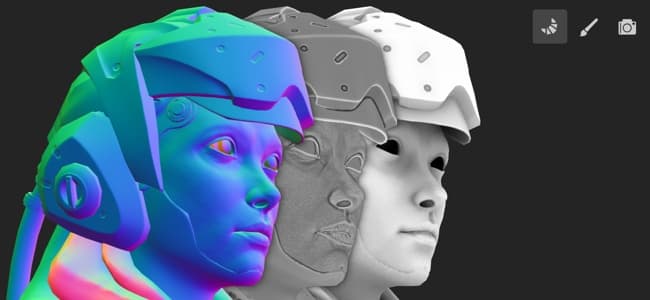
Unless some additional use is made of the Normal Map Texture Material at run time by MSFS rendering engine / DX12 shaders, do we even need to include the Normal Map Texture in the \Texture sub-folder of a package if its info has already truly been "Baked" into the 'Albedo' (visible image) texture Material ?
 https://experienceleague.adobe.com/en/docs/substance-3d-painter/using/baking/baking#
"Baking
https://experienceleague.adobe.com/en/docs/substance-3d-painter/using/baking/baking#
"Baking
Last update: March 9, 2026
Baking refers to the action of
transferring mesh-based information into textures. This information is then read by shaders and/or Substance filters to create advanced effects. For example, Smart Materials and Smart Masks rely on baked curvature and normal maps, alongside other baked information."
https://helpx.adobe.com/substance-3d-painter/using/baking.html
"Baking is the process of
saving information from a
3D mesh, to a
texture file (bitmap).
Most of the time, this process involves two meshes, a high poly mesh and a low poly mesh:
- A high poly mesh has many polygons (often millions) which means it can display high-resolution 3D detail.
- The low poly mesh has far fewer polygons (usually only a few thousand), so it is cheaper to store and render.
Baking textures allows you to get the best of both worlds: the high level of detail from the high poly mesh and the low performance costs of the low poly mesh. In the baking process, the information of the high poly mesh is transferred onto the low poly mesh and saved into a texture.
Substance Bakers read mesh properties and bake them down to a texture.
Image by Paolo Cignoni - CC BY-SA 1.0"
AFAIK, with more digging, a tutorial may explain if MSFS packages 'must' include Normal Map Material files
after baked.

This tutorial suggests "Baking" PBR
also involves info in files that is only seen after rendered by a
runtime rendering engine:
https://helpx.adobe.com/substance-3d-painter/using/export.html
"
Export Textures
Last updated on Jul 13, 2023
Learn how to export your creations.
Once you are satisfied with your work inside Substance 3D Painter, you can export your textures to bitmap files. You can use these bitmap files in almost any 3D software. Substance 3D Painter provides a powerful export dialog that lets you customize the format and settings of the exported files."
Export Textures
Last updated on Jul 13, 2023
Learn how to export your creations.
Once you are satisfied with your work inside Substance 3D Painter, you can export your textures to bitmap files. You can use these bitmap files in almost any 3D software. Substance 3D Painter provides a powerful export dialog that lets you customize the format and settings of the exported files.
Output Templates
The Output Templates tab is where you can manage your templates. Templates tell Painter how to organize your textures for export. Templates for most 3D applications are included to allow you to export your textures quickly, but you can also create your own.
Under Presets, you can see the list of templates available. Select a template to edit it, or use the + to start creating a template.
With a template selected, you can see a list of the files that the selected template exports under
Output maps. You can also see which maps are exported in each file.
Use the buttons next to
Create to add extra files to a template. Drag maps from
Input maps,
Mesh maps, and
Converted maps into channels of the available files to change which maps correspond with which channel.
NOTE:
The background colors of each file's channels corresponds with the colored squares in the lists of input maps. You can also hover over any channel to see which input maps are associated with that channel.
< I like the easy-to-follow dialog box design Adobe Substance has implemented here, instead of Blender's convoluted GUI.>

"
File Format & Bit Depth
Substance Painter exports to a wide range of file formats. Currently supported formats are:
Depending on the file format, you can change the bit depth. A higher bit depth provides a higher quality texture, but can increase file sizes dramatically.
Some applications don't support high bit depths, so a lower value may be required.
For PSD (Photoshop) files, each texture set from a project is exported as a single PSD file, containing the exported textures associated to the texture set."
BTW:
IIUC, if
*.PSD files were processed by MCX to read all PBR attributes MSFS requires, we might have a much easier workflow.

If MCX could output the COMP textures in ARM format that would also make for an easier workflow.
Of course, MCX might also be able to make our Normal / Bump Maps for us too.
Arno understands related FS SDK requirements, and IMHO could help us further.
https://www.scenerydesign.org/2007/03/some-normal-map-tricks/
But we may also consider some other workflows used to do this in Sketchup, Blender, Materialize and Substance.:
https://www.google.com/search?q=Ske...E8IHCDAuOS4yMi4yyAd-gAgA&sclient=gws-wiz-serp
Who says Sketchup can not "Bake" ?
 https://sketchucation.com/pluginstore?pln=normal_map_maker
https://community.sketchucation.com/post/1221899
https://www.leeland.info/sketchup-makenormalmap.html
...or as used in Blender
https://sketchucation.com/pluginstore?pln=normal_map_maker
https://community.sketchucation.com/post/1221899
https://www.leeland.info/sketchup-makenormalmap.html
...or as used in Blender:
https://3dmodels.org/blog/normal-maps-in-blender-guide/
I am curious if Substance Painter allows 'interactivity' / yields
sizes like "
Materialize" does ...in creating a PBR Normal Material:
https://www.boundingboxsoftware.com/materialize/
GaryGB




 And yes, I like the puddle-details as well. I really like the possibilities substancepainter gives with detailing.

 hmmm. The next logical reasons is indeed Loki