- Messages
- 16
- Country

Hey everyone!!!
I'm pretty close to completing MVY (Martha's Vineyard Airport) but am running into a few snags that I hope y'all can help me with.
I'll be posting a few pictures to go along with my explanation just so you can visualize what's going on.
1st Issue: Taxiway Light Rows (that I've custom placed) show up in DevMode while working on the project, but after building the package and placing in the Community folder and restarting the sim, only a few taxiway lights show up.
TXY1.png is from the DevMode editor while working on the airport. Notice all the taxiway lights are in place and show up correctly.

TXY2.png shows what it looks like after the file is closed and we are pulling from the Community folder data (which contains the latest updated information *even after sim restart this happens*). Notice that there are SOME taxiway lights, but not as many as I'd placed by hand. There is a huge disparity between what I'm placing in DevMode and what's actually appearing in the sim when loaded.

2nd Issue: Runway edge lights missing for the last 1/3 of crossing runway. In DevMode and out of DevMode makes no difference here. It's like the sim just doesn't want to populate the runway edge lights after the two runways cross. The main runway 6-24 does NOT have this issue. It's only with 15-33.
I've attempted deleting and re-adding the runway multiple times. I wonder if it's because of the layering between the crossing runways OR maybe because of the taxiway placement. I would add custom placed lights, but have no clue what or how to do that. Any ideas would be much appreciated!
RWY1.png: Looking at the last 1/3 of rwy 15/33. As you can see, the runway edge lighting is noticeably absent. (At the end is taxiway lighting).
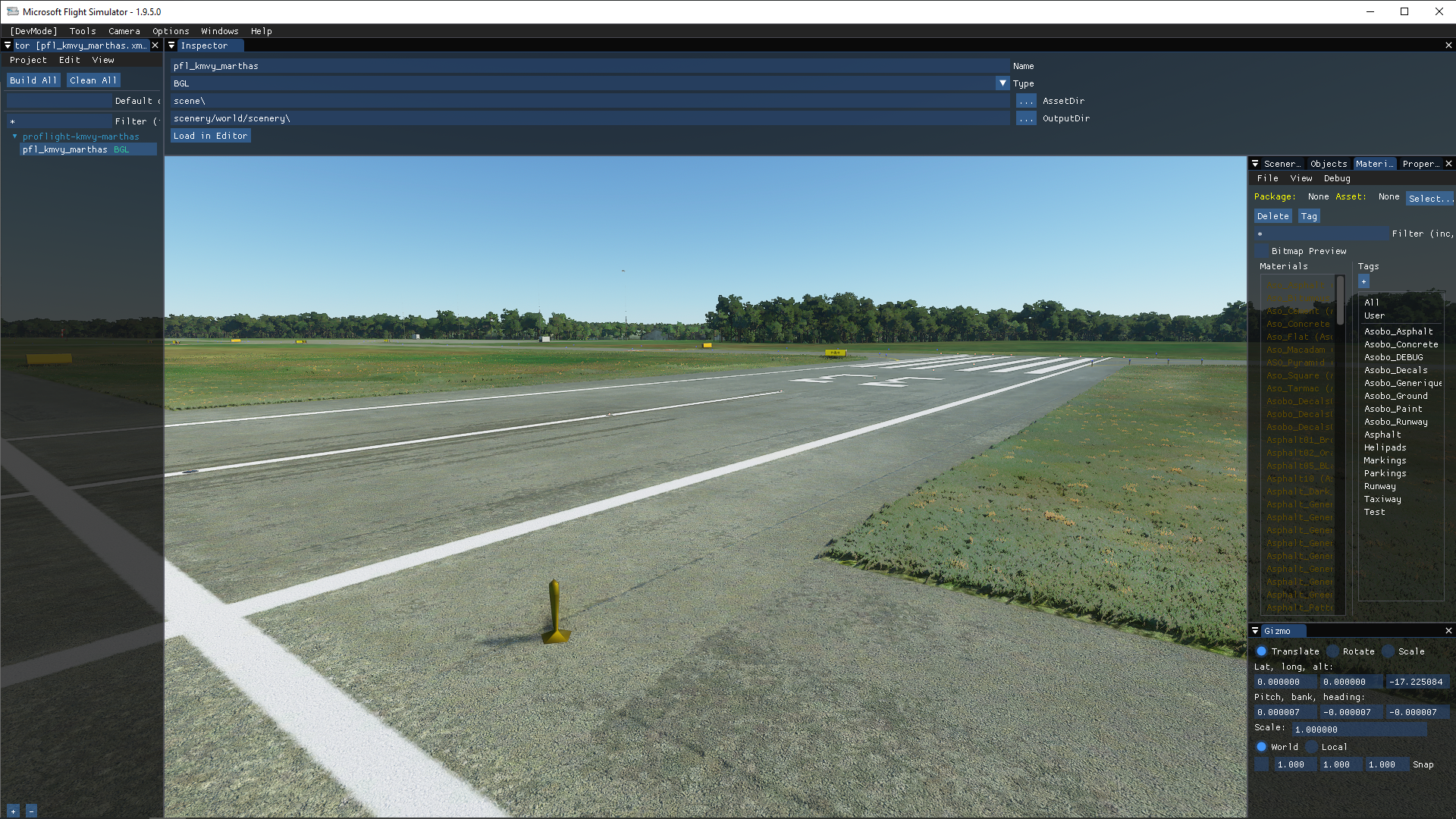
RWY2.png: This image is looking towards the 1st 3/4's of the runway. As you can see the lighting continues til the runway intersection.
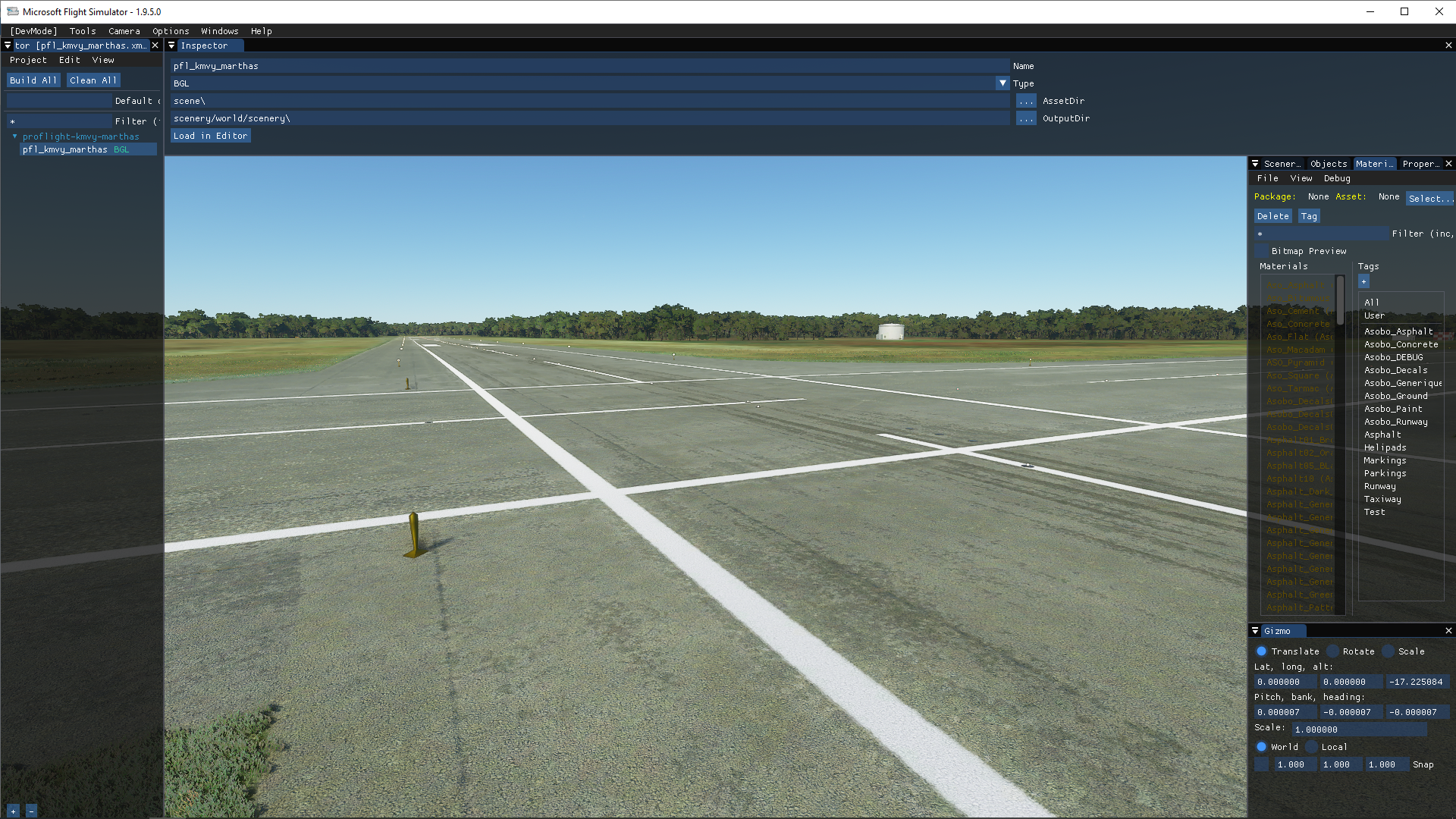
RWY3.png: Here is a look down the runway as a whole. As you can see there's a definitive stop after the runway intersection.

Thank you for any support that you can provide!!! After this, all I'll need to do is incorporate some parking lots, a few access roads, and perimeter fencing!!!
Regards,
Z
I'm pretty close to completing MVY (Martha's Vineyard Airport) but am running into a few snags that I hope y'all can help me with.
I'll be posting a few pictures to go along with my explanation just so you can visualize what's going on.
1st Issue: Taxiway Light Rows (that I've custom placed) show up in DevMode while working on the project, but after building the package and placing in the Community folder and restarting the sim, only a few taxiway lights show up.
TXY1.png is from the DevMode editor while working on the airport. Notice all the taxiway lights are in place and show up correctly.
TXY2.png shows what it looks like after the file is closed and we are pulling from the Community folder data (which contains the latest updated information *even after sim restart this happens*). Notice that there are SOME taxiway lights, but not as many as I'd placed by hand. There is a huge disparity between what I'm placing in DevMode and what's actually appearing in the sim when loaded.
2nd Issue: Runway edge lights missing for the last 1/3 of crossing runway. In DevMode and out of DevMode makes no difference here. It's like the sim just doesn't want to populate the runway edge lights after the two runways cross. The main runway 6-24 does NOT have this issue. It's only with 15-33.
I've attempted deleting and re-adding the runway multiple times. I wonder if it's because of the layering between the crossing runways OR maybe because of the taxiway placement. I would add custom placed lights, but have no clue what or how to do that. Any ideas would be much appreciated!
RWY1.png: Looking at the last 1/3 of rwy 15/33. As you can see, the runway edge lighting is noticeably absent. (At the end is taxiway lighting).
RWY2.png: This image is looking towards the 1st 3/4's of the runway. As you can see the lighting continues til the runway intersection.
RWY3.png: Here is a look down the runway as a whole. As you can see there's a definitive stop after the runway intersection.
Thank you for any support that you can provide!!! After this, all I'll need to do is incorporate some parking lots, a few access roads, and perimeter fencing!!!
Regards,
Z
Last edited: