• Which the release of FS2020 we see an explosition of activity on the forun and of course we are very happy to see this. But having all questions about FS2020 in one forum becomes a bit messy. So therefore we would like to ask you all to use the following guidelines when posting your questions:

    • Tag FS2020 specific questions with the MSFS2020 tag.
    • Questions about making 3D assets can be posted in the 3D asset design forum. Either post them in the subforum of the modelling tool you use or in the general forum if they are general.
    • Questions about aircraft design can be posted in the Aircraft design forum
    • Questions about airport design can be posted in the FS2020 airport design forum. Once airport development tools have been updated for FS2020 you can post tool speciifc questions in the subforums of those tools as well of course.
    • Questions about terrain design can be posted in the FS2020 terrain design forum.
    • Questions about SimConnect can be posted in the SimConnect forum.

    Any other question that is not specific to an aspect of development or tool can be posted in the General chat forum.

    By following these guidelines we make sure that the forums remain easy to read for everybody and also that the right people can find your post to answer it.

animating a spring...

Messages
407
Country
ca-britishcolumbia
Does anyone know a way to animate a spring that will compile into FSX? I have something working with bones, but it stretches the mesh as well as the overall length of the object. I think it would export to FSX although I haven't tried yet. Anyhow, before I spend too much time on this I thought I would ask if anyone knows the best way to do it.

I started out with the idea an animated spring would be crazy, but after modelling one, it isn't that many polygons. It is a fairly conspicuous part of the nose gear and a stretching cylinder rather than spring will be a bit of a compromise.
 
I think the deformation depends on the total elongation of the spring? And the number of vertices/segments on the spring...
 
What I can tell you is that scale animations don't work in FSX. You can only use location and rotation keyframes. (Just in case you used scale keyframes...)
 
I tried to do it with a "stretch to" constraint; it worked in Blender but not when compiled into FSX. I ended up using two telescoping cylinders instead, which really is more sensible given how close one has to be to actually see the details of a real spring.
 
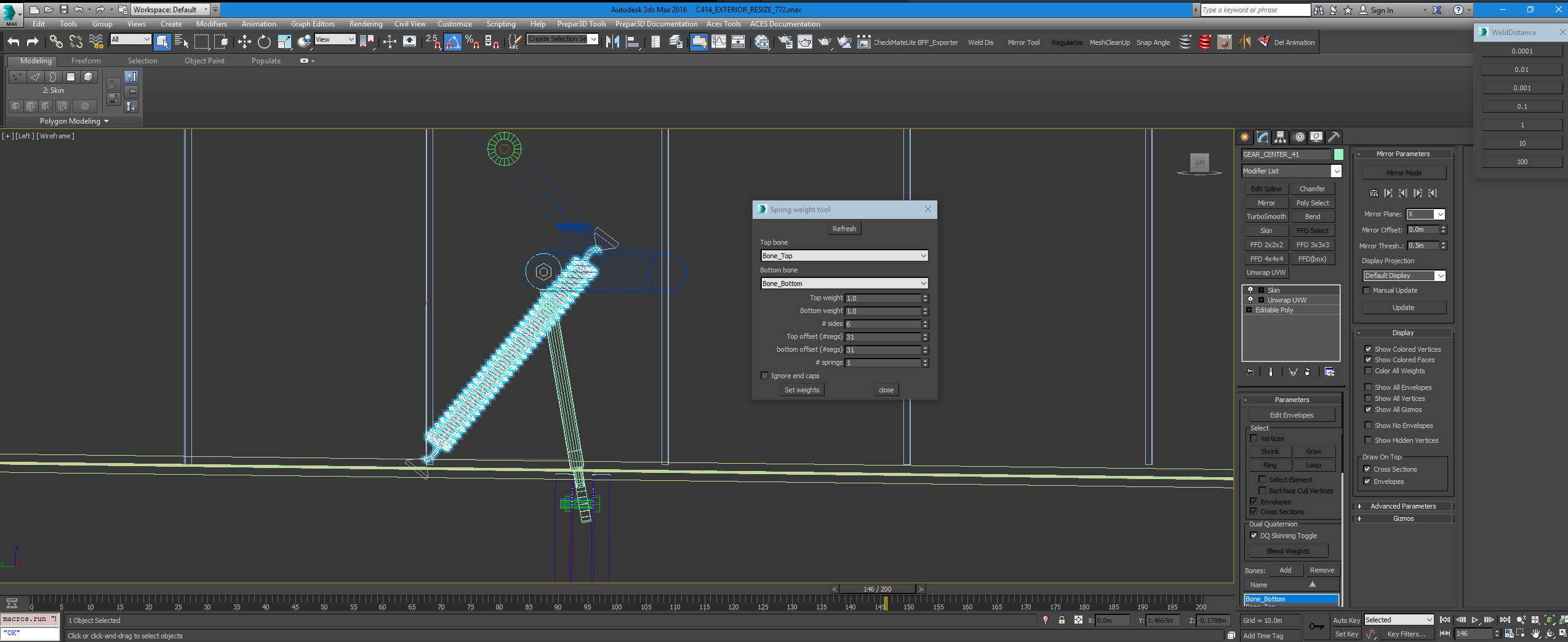
There is a spring script tool for 3DS MAX that only needs 2 bones. It uses weight that is distributed evenly which would take hours to set manually using vertices. You can also offset so the ends of the spring do not stretch. Enjoy!!!:teacher:

The tool is called Marijn &Tattoo Spring Weight Tool V2.
https://spintires.nl/marijn-tattoo-spring-weight-tool-v2-spintires-modding-resource/

Spring_Weight_Tool.jpg
 
Neat tool! Boing, Boing, Bong! :rotfl:

I used two bones to animate a coiled control cable connected to the yokes. These wires are used for the yoke mounted controls (AP, trim buttons, CWS, etc.).
 
Neat tool! Boing, Boing, Bong! :rotfl:

I used two bones to animate a coiled control cable connected to the yokes. These wires are used for the yoke mounted controls (AP, trim buttons, CWS, etc.).
I did the same for my bi planes since they have so many thin cables. I figure the coiled cables were not that thick as it will not stretch correctly without a specific weight distribution along the coil. But a thick large spring is not an easy object to stretch so love this tool.
 
Last edited:
Back
Top