

- Messages
- 34,536
- Country

Sometimes a very simple question on the forum can lead to interesting discoveries. In this case the question was why autogen buildings that look fine in Annotator are distorted in FS. Although the answer from an expert was that this is normal, I decided to have a look into this issue. In the end that gave me a better understand of how the autogen works, and I’ll try to write that down in this blog post. And I have also been able to improve scenProc now to automatically prevent this distortion.
Where does the distortion come from?
So where does the distortion actually come from? To understand that you need to know how autogen buildings are defined in the AGN file. Each building is defined using a corner coordinate, a direction vector and the size (length and width of the building).
If you look at the image below you see two buildings that are aligned correctly with the photo in Annotator (right side), while when viewed in FSX they have an heading offset (left side). This is the distortion issue that I was trying to understand.
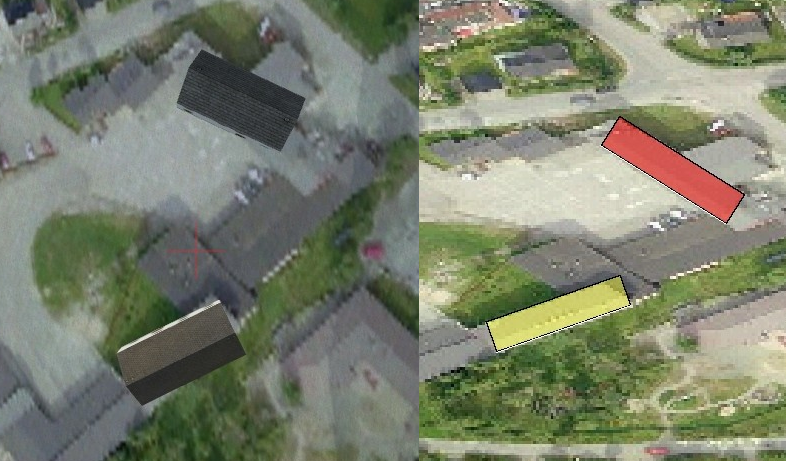
How much distortion there is depends on the latitude of your scenery and on the heading of the building. Building that are oriented either horizontal or vertical are not affected. Buildings with a 45 degree heading are most affected.
Each autogen tile has a fixed size in degrees (actually 0.0146484375 by 0.010986328125 degrees). But of course the closer you get to the poles of the earth each degree is equal to less meters in distance. So the autogen tiles are getting more narrow the closer you get to the poles. This is also what you see in the image above, this is some photo scenery in northern Norway and in Annotator you can see the distortion in the photo scenery.
Due to the size of the autogen tile in degrees they correspond to a square area in meters at a latitude of 41.41 degrees. So around this latitude you don’t notice the problem, at a lower of higher latitude you will notice some distortion.
But where does that distortion come from? In Annotator you draw the orientation of the building on a photo that is shown in degrees and this orientation is stored as a direction vector in the AGN file. But it turns out that FSX uses this orientation is used when drawing the building in meters. So what does that mean? Let’s assume you drew the orientation as shown below on the left in Annotator in degrees. So your object has a heading of around 45 degrees. But since you are at a high latitude if you would draw the same arrow in meters you would get a heading as shown on the right. As you can see this is more like 60 degrees.
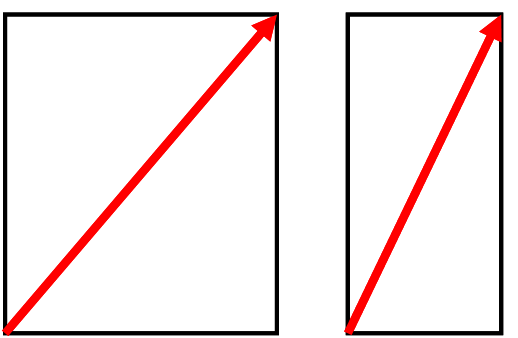
So this is the problem we are facing. Annotator shows the photo scenery in a different way and therefore you define the orientation wrong for the way that FSX later uses the information to render the autogen building. So actually it’s not an issue in FSX, it’s an issue in the Annotator tool.
The maximum heading offset you can get due to this problem is around around 20 degrees when you are at latitude 70 degrees. At latitude 41.41 there is no offset and at the equator there is an offset of around 8 degrees. These numbers apply to buildings at a 45 degree heading, for other headings the offset is less.
scenProc correction
So now that the cause of the heading distortion is understood, it was not so hard for me to alter the scenProc output to actually correct for this issue. So if you create the autogen with scenProc you shouldn’t encounter this anymore.
There is one “problem” with this correction however. When you look at your autogen in Annotator the objects will appear to have the wrong orientation. But once viewed in FSX everything is fine. This is shown in the image below.
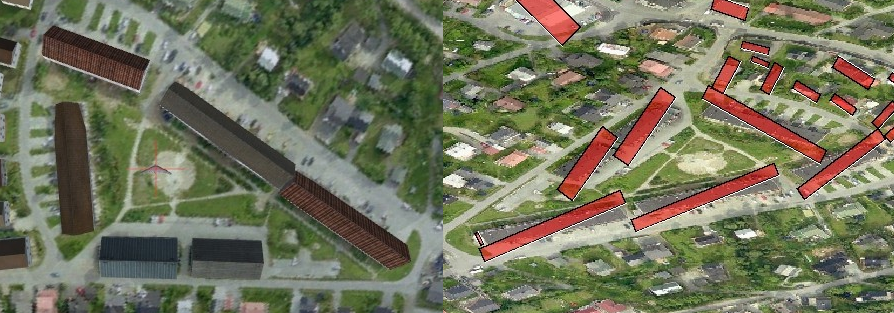
And if you are not using scenProc to make your autogen and drawing it manually in Annotator, I’m afraid the only solution for now is to manually draw the objects at a different heading. But since the exact offset depends on the orientation of the building as well, that can be quite tricky to get right.
Continue reading...
Where does the distortion come from?
So where does the distortion actually come from? To understand that you need to know how autogen buildings are defined in the AGN file. Each building is defined using a corner coordinate, a direction vector and the size (length and width of the building).
If you look at the image below you see two buildings that are aligned correctly with the photo in Annotator (right side), while when viewed in FSX they have an heading offset (left side). This is the distortion issue that I was trying to understand.
How much distortion there is depends on the latitude of your scenery and on the heading of the building. Building that are oriented either horizontal or vertical are not affected. Buildings with a 45 degree heading are most affected.
Each autogen tile has a fixed size in degrees (actually 0.0146484375 by 0.010986328125 degrees). But of course the closer you get to the poles of the earth each degree is equal to less meters in distance. So the autogen tiles are getting more narrow the closer you get to the poles. This is also what you see in the image above, this is some photo scenery in northern Norway and in Annotator you can see the distortion in the photo scenery.
Due to the size of the autogen tile in degrees they correspond to a square area in meters at a latitude of 41.41 degrees. So around this latitude you don’t notice the problem, at a lower of higher latitude you will notice some distortion.
But where does that distortion come from? In Annotator you draw the orientation of the building on a photo that is shown in degrees and this orientation is stored as a direction vector in the AGN file. But it turns out that FSX uses this orientation is used when drawing the building in meters. So what does that mean? Let’s assume you drew the orientation as shown below on the left in Annotator in degrees. So your object has a heading of around 45 degrees. But since you are at a high latitude if you would draw the same arrow in meters you would get a heading as shown on the right. As you can see this is more like 60 degrees.
So this is the problem we are facing. Annotator shows the photo scenery in a different way and therefore you define the orientation wrong for the way that FSX later uses the information to render the autogen building. So actually it’s not an issue in FSX, it’s an issue in the Annotator tool.
The maximum heading offset you can get due to this problem is around around 20 degrees when you are at latitude 70 degrees. At latitude 41.41 there is no offset and at the equator there is an offset of around 8 degrees. These numbers apply to buildings at a 45 degree heading, for other headings the offset is less.
scenProc correction
So now that the cause of the heading distortion is understood, it was not so hard for me to alter the scenProc output to actually correct for this issue. So if you create the autogen with scenProc you shouldn’t encounter this anymore.
There is one “problem” with this correction however. When you look at your autogen in Annotator the objects will appear to have the wrong orientation. But once viewed in FSX everything is fine. This is shown in the image below.
And if you are not using scenProc to make your autogen and drawing it manually in Annotator, I’m afraid the only solution for now is to manually draw the objects at a different heading. But since the exact offset depends on the orientation of the building as well, that can be quite tricky to get right.
Continue reading...


