

- Messages
- 34,537
- Country

That autogen objects have a distortion in their rotation is something we found out 6 years ago already. But until recently I was not aware that not only the rotation of the objects is distorted, also their sizes can be different then you would expect from looking at the objects in the Annotator tool. I guess most of use work in the zones around N40 and S40, where the distortion is minimal, so it took a developer who works outside of that area to inform me of a bug in scenProc that resulted in objects being rendered in the sim with wrong sizes.
So what I did is make a test photoreal scenery where I burned polygons with a known size in the photoreal. Next I placed autogen objects and tried different settings until I could get them to align correctly for each latitude where the objects are placed.
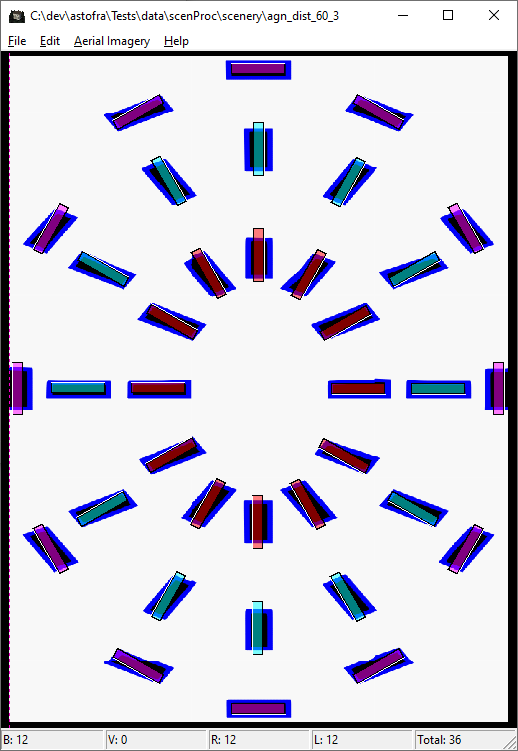
Below you see a screenshot of this test scenery at a latitude of 60 degrees, where you have quite some distortion already (around 41 degrees latitude the distortion is minimal, due to the way the autogen tile sizes are designed). As you can see for some polygons the rotation is off from what you see in the photoreal, but also the sizes of the objects need to be defined incorrect, to have them show correctly in the simulator. Some of the buildings need to be made longer and more narrow for example.
The good news is that you don’t have to apply this kind of rotation and size corrections by yourself. scenProc has been modified to do it automatically for you now. So with the latest development release you will find that the output generated should align more accurate with your photoreal scenery.
How does it work? In Annotator you are seeing your photoreal shown in a latitude and longitude projection. But the heading of the objects should actually be defined in the AGN file for flat earth projected version of the object. And for the size it is even weirder, the sizes are defined in degrees as if the object has a heading of zero. But even when the object does not have that heading, which means you need to provide an incorrect size in degrees to still get the correct size of your object in the simulator in the end.
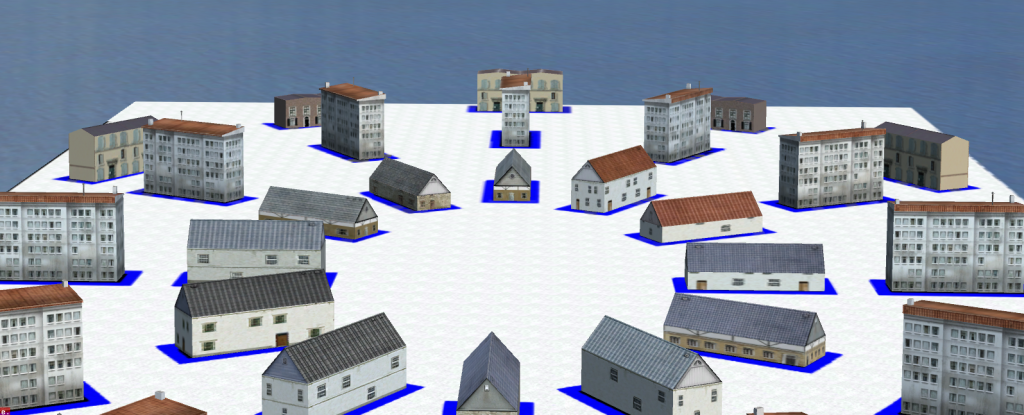
And just as the proof of the pudding, below is a screenshot of the test scenery in the simulator, where you see things align well.
Continue reading...
So what I did is make a test photoreal scenery where I burned polygons with a known size in the photoreal. Next I placed autogen objects and tried different settings until I could get them to align correctly for each latitude where the objects are placed.
Below you see a screenshot of this test scenery at a latitude of 60 degrees, where you have quite some distortion already (around 41 degrees latitude the distortion is minimal, due to the way the autogen tile sizes are designed). As you can see for some polygons the rotation is off from what you see in the photoreal, but also the sizes of the objects need to be defined incorrect, to have them show correctly in the simulator. Some of the buildings need to be made longer and more narrow for example.
The good news is that you don’t have to apply this kind of rotation and size corrections by yourself. scenProc has been modified to do it automatically for you now. So with the latest development release you will find that the output generated should align more accurate with your photoreal scenery.
How does it work? In Annotator you are seeing your photoreal shown in a latitude and longitude projection. But the heading of the objects should actually be defined in the AGN file for flat earth projected version of the object. And for the size it is even weirder, the sizes are defined in degrees as if the object has a heading of zero. But even when the object does not have that heading, which means you need to provide an incorrect size in degrees to still get the correct size of your object in the simulator in the end.
And just as the proof of the pudding, below is a screenshot of the test scenery in the simulator, where you see things align well.
Continue reading...