• Which the release of FS2020 we see an explosition of activity on the forun and of course we are very happy to see this. But having all questions about FS2020 in one forum becomes a bit messy. So therefore we would like to ask you all to use the following guidelines when posting your questions:

    • Tag FS2020 specific questions with the MSFS2020 tag.
    • Questions about making 3D assets can be posted in the 3D asset design forum. Either post them in the subforum of the modelling tool you use or in the general forum if they are general.
    • Questions about aircraft design can be posted in the Aircraft design forum
    • Questions about airport design can be posted in the FS2020 airport design forum. Once airport development tools have been updated for FS2020 you can post tool speciifc questions in the subforums of those tools as well of course.
    • Questions about terrain design can be posted in the FS2020 terrain design forum.
    • Questions about SimConnect can be posted in the SimConnect forum.

    Any other question that is not specific to an aspect of development or tool can be posted in the General chat forum.

    By following these guidelines we make sure that the forums remain easy to read for everybody and also that the right people can find your post to answer it.

MSFS24 bridges and simobjects

Messages
8
Country
france
Hello everyone,

I created a scene in MSFS 2020 with trains running on railway lines in France/Brittany, covering over 190 km. Everything works correctly in 2020, but I'm encountering a problem in 2024: in 2020, I created solid bridges on which my trains/objects run perfectly, but in 2024, the trains are crossing the bridges; they are no longer strong enough to allow them to pass. Have you ever encountered this problem with cars on bridges, for example, and how did you solve it? For those interested, I can explain how to do it with moving vehicles, but that would be a long tutorial!

Sincerely,

Pat
 
Hello everyone,

I created a scene in MSFS 2020 with trains running on railway lines in France/Brittany, covering over 190 km. Everything works correctly in 2020, but I'm encountering a problem in 2024: in 2020, I created solid bridges on which my trains/objects run perfectly, but in 2024, the trains are < NOT ? > crossing the bridges; they are no longer strong enough to allow them to pass. Have you ever encountered this problem with cars on bridges, for example, and how did you solve it? For those interested, I can explain how to do it with moving vehicles, but that would be a long tutorial!

Sincerely,

Pat

Hello:

This sounds like an interesting scenario, and I believe a number of us here would welcome an opportunity to learn how you do this.

We would be grateful for any tutorial you might post here when you get some time free, that explains your workflow. :)

I believe we would want to identify whether these are dynamic 3D models c/o "Living World", or 'Freeway Traffic' low-polygon types.


As for the troubleshooting issue with MSFS 2024 and trains crossing bridges:

You had observed that bridges "are no longer strong enough to allow them to pass".


I have noticed in both MSFS 2020 and 2024 some bridges are either the "fall through immediately" type, or "fall through eventually" type.

Others seem to have invisible spans of collision / hardened type that are not continuous across the entire bridge extent lengthwise.


I have not had time yet to test using a discrete 3D model with a "Platform" that has a "Road" attribute (Hardened / Concrete in FS2Kx).


FYI: Arno's ModelConverterX (aka "MCX") Attached Objects Editor can add a 'Platform' that lies in the plane of a surface Material.

Have you tested using that on 3D bridge models (not semi-automatic procedural bridge 3D models created by MSFS rendering engine) ?


Do you have an example bridge location we could inspect in MSFS 2024 (Geographic coordinates would be helpful to ID the structure) ?

GaryGB
 
Last edited:
Hi Gary, first of all, thank you for your reply. I'm going to try to create a tutorial on my method. It uses several Python scripts to place the entire scenery, as the distances are significant and manual placement is impossible. There are rectangles, polygons, rails, and scripts for train movements; everything is semi-automated using XML. I'm going to work on an application that will automate all of this once the scenery is initialized. I'll get to it, but not right away, as I need to completely finish my scenery first. There will certainly be improvements to make, so consider this work experimental for the time being. Currently, I find the rail placement in FS 2024 unstable, probably due to the terrain being too detailed and rugged? But we can discuss that here. The 3D bridges are my own creation. I hadn't noticed that you could add a solid plate under a building to make it a "landing platform" in MCX. I'll try it! I added concrete slabs under the decks of my bridges, and they're perfectly solid in FS 2020 for my SimObjects. The SimObjects don't fall through the bridges and roll perfectly on them. However, on the same bridges in FS 2024, the SimObjects/trains fall through and roll on the water! My bridges, on the other hand, can be "landed" by a plane without any problem in both games. I'm providing the bin, xml, and gltf files for one of my bridges, if that's enough, as well as the beginning of a script to move one of my trains, so you can check. Please let me know if you need anything else. I'm completely stuck… Pat.
 

Attachments

Last edited:
Hi Gary,

first of all, thank you for your reply. I'm going to try to create a tutorial on my method. It uses several Python scripts to place the entire scenery, as the distances are significant and manual placement is impossible. There are rectangles, polygons, rails, and scripts for train movements; everything is semi-automated using XML. I'm going to work on an application that will automate all of this once the scenery is initialized. I'll get to it, but not right away, as I need to completely finish my scenery first. There will certainly be improvements to make, so consider this work experimental for the time being.

Currently, I find the rail placement in FS 2024 unstable, probably due to the terrain being too detailed and rugged? But we can discuss that here. The 3D bridges are my own creation. I hadn't noticed that you could add a solid plate under a building to make it a "landing platform" in MCX. I'll try it!

I added concrete slabs under the decks of my bridges, and they're perfectly solid in FS 2020 for my SimObjects. The SimObjects don't fall through the bridges and roll perfectly on them. However, on the same bridges in FS 2024, the SimObjects/trains fall through and roll on the water! My bridges, on the other hand, can be "landed" by a plane without any problem in both games.

I'm providing the bin, xml, and gltf files for one of my bridges, if that's enough, as well as the beginning of a script to move one of my trains, so you can check.

Please let me know if you need anything else. I'm completely stuck… Pat.

Hi Pat:

Thanks for sharing your insight with this interesting MSFS option. :)


Please take your time with a reply in the form of a tutorial to what I feel will be a substantial interest in your fascinating project.


It is intriguing to read: :scratchch

"the MSFS 2024 SimObjects/trains fall through and roll on the water!"

...and that:

"My bridges, on the other hand, can be "landed" by a plane without any problem in both games."


Did you want me to try putting an Attached 'Platform" on a bridge somewhere via MCX to test this ?

If so, post some Geographic coordinates for an example bridge along the course / track of your provided exsmple SimObject.

I'll attempt to test and resolve that "falling through" scenario.

If I am unable to resolve it, I shall be "Off To Speak With The Wizard" Arno regarding what arcane FS code may work. :wizard:

GaryGB
 
Hi again:

I just did a Google search and found this:

https://devsupport.flightsimulator.com/t/erratic-behavior-of-simobjects-on-collision-meshes/10355


It looks like "Collision" attributes are gaining an expanded role in MSFS 2024.

Apparently I had an (incorrect) impression it was already in use for 2020.

But Asobo says this 2024-only 'Tag' does not port back to MSFS 2020.


I have checked the release Notes for MSFS 2024 SimUpdate 3 (aka "SU3") and found this Tag was added for both 3DSMAX and Blender:

https://www.flightsimulator.com/sim...RAM consumption used by company name textures

Exporter Blender

  • Added a new button to assign base texture set in material panel (albedo, comp, normal, emissive)
  • Added texture preview in material panel
  • MSFS2024 lights preview have been reworked and are now closer to in-game render.
  • Fixed export alpha cutoff only when blend mode is mask
  • Added emissiveDayMultiplier and emissiveNightMultiplier
  • Added support for multi selection in export hierarchy.
  • Export Properties can now be set on multiple items.
  • Fixed Primitive Collisions visible in Isolate mode
  • Reworked UI Hierarchy . Hierarchy now uses blender list preview template, enabling new options for filtering list , objects selection etc
  • Fixed export of packed image .
  • Added duplicate “preset” and “groups”
  • Fixed group path is not automatically past in presets
  • Fixed enable new layer children and update parent layers
  • Day/Night Cycle not supported in advanced lights
  • Added “ground” tag for collision. Sim objects will use them as ground elevation.
  • Fixed emissive material Animation
  • Fixed material animation on different material slot of same object

NOTE: Apparently whoever is using speech recognition is not checking their results, as this phrase is incorrect:

"Fixed group path is not automatically past in presets"

...should be (according to Google):

"Fixed group path is not automatically passed in presets"

https://www.google.com/search?q=site:+docs.flightsimulator.com+Fixed+group+path+passed+in+presets&sca_esv=f27198b4d2287e35&source=hp&ei=O7DxaePSG7jaruEPysHlwAQ&iflsig=AFdpzrgAAAAAafG-SwIdX36Je6pQ-O3FjU_XKHbG2m3E&ved=0ahUKEwij3Nz6wZKUAxU4rSsGHcpgGUgQ4dUDCBw&uact=5&oq=site:+docs.flightsimulator.com+Fixed+group+path+passed+in+presets&gs_lp=Egdnd3Mtd2l6IkFzaXRlOiBkb2NzLmZsaWdodHNpbXVsYXRvci5jb20gRml4ZWQgZ3JvdXAgcGF0aCBwYXNzZWQgaW4gcHJlc2V0c0jppgJQ0AdYg_8BcAF4AJABAJgBswGgAYQMqgEEMTQuM7gBA8gBAPgBAfgBApgCCaACrQioAgrCAiMQLhjHARjlAhjRAxiABBiKBRjnBhjqAhi0AhiKAxi3AxjUA8ICHRAAGIAEGIoFGNQDGOUCGOcGGOoCGLQCGIoDGLcDwgILEAAYgAQYigUYkQLCAhEQLhiABBiKBRiRAhjHARjRA8ICEBAuGIAEGIoFGEMYxwEY0QPCAhEQLhiABBixAxiDARjHARjRA8ICCxAAGIAEGLEDGIMBwgILEC4YxwEY0QMYgATCAg4QLhiABBixAxjHARjRA8ICDhAuGIAEGIoFGLEDGIMBwgIIEC4YsQMYgATCAggQABiABBixA8ICDhAuGIAEGMcBGK8BGI4FwgIOEC4YxwEYsQMY0QMYgATCAgUQABiABMICCBAuGIAEGLEDwgIKEAAYgAQYigUYQ8ICCxAuGIAEGMcBGNEDwgIEEAAYA8ICDhAAGIAEGIoFGLEDGIMBwgILEC4YrwEYxwEYgATCAgcQIRgKGKABwgIFECEYqwKYAxfxBbmxhJBAKsaOkgcFMy41LjGgB9xbsgcFMi41LjG4B5YIwgcFMy0zLjbIB7sBgAgB&sclient=gws-wiz


https://www.google.com/search?q=MSF...nB8IHBzItMi42LjHIB3KACAE&sclient=gws-wiz-serp


IIRC, Microsoft acquired rights to Dragon Naturally Speaking via Nuance years ago, but has not appropriated BestMatch technology ?

Nor has other software been used that is capable of verifying grammatical suitability of proposed word in the context of a word group within a phrase, such as is characteristic of the Grammatik component of Corel WordPerfect ?

Looks like a bad day in the text editor (maybe MS software was not even used ?); but it seems that spell-checking worked OK. :pushpin:


I will take a look at this and see if it requires an update in MCX for Attached Object 'Platforms' in MSFS 2024 by Arno. ;)

GaryGB
 
Last edited:
Thanks Gary for looking into my problem. Yes, I think Arno is the best person to study the update. I did what you told me in MCX; in the material editor, I set "True" for collision material and "road material" for my bridge ballast. This works perfectly in FS 2020, but unfortunately not in 2024. Please tell me if this is the correct procedure or if I've made a mistake!
Pat.
 
Hi Pat:

I started researching what ended up in the MSFS 2024 SDK docs regarding the "Ground" Tag.

Thus far is have found this:

https://docs.flightsimulator.com/msfs2024/html/2_DevMode/Material_Editor/The_Material_Editor.htm

In your web browser, search the above linked MSFS SDK Doc web page for:

"Creating A New Material"


Read down the page to this section (and then down the entire page as well):

The main editor shows a list of materials on the left, and a number of pre-created tags on the right that can be used to filter the list of materials. Currently there will only be materials that are used in the actual simulation listed here (these are colored brown and cannot be edited), so let's add a new material of our own to this list. For that, follow these steps:

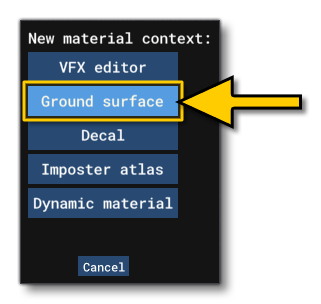
  • Go to the File menu and select the New option. You should then select the material context, which for this example should be Ground Surface:
    Selecting A Material Context


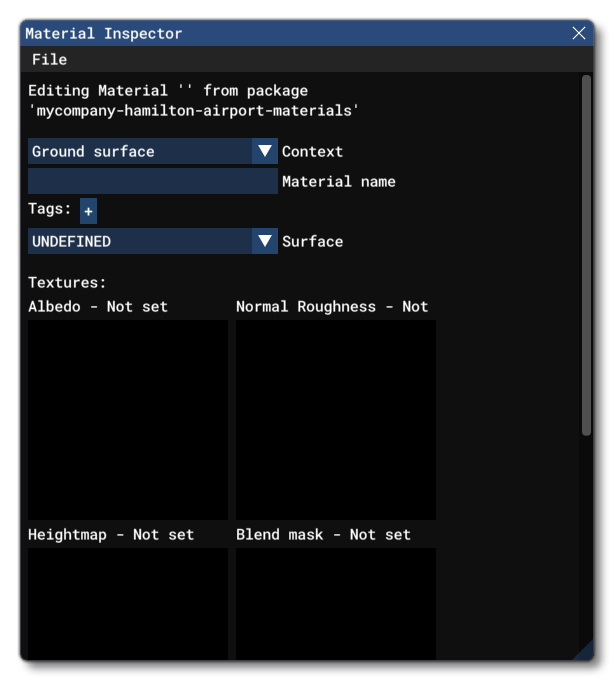
  • Here you need to give the new material a name and a type (you do not need to change the context if you already set it to Ground Surface). The name can be anything, but should be unique and easily identifiable, and the type should be "CODE_DIFFUSE" for now. This option is used to set how the material will be used by the engine and the type of textures it will require.

  • You should also select a Surface for the material. In this case we will use the ASPHALT surface. This option is for adding detail maps to the surface, as well as for editing how certain kinds of surface interact with the base scenery. If this option is not visible, then you may need to open the Scenery Editor, as the setting is specific only for materials being used by that tool. Note that if the surface is set to UNDEFINED, whatever is being drawn with this material will not override the surface material of whatever lies below it. This can be very useful for decals, for tire marks, etc...

  • Now you need to add the textures that are required by the material. By default , all available texture slots will be shown, but - depending on the type of material being created - you may only be required to use one or two of them. In this case we will be using the Albedo texture and the Normal Roughness Metal texture.
    NOTE: Only the Albedo texture is obligatory. All others are optional and can be omitted.

  • The textures themselves need to be added to the project folder before they can be added to the material, so you will need to browse to the Asset Directory in an explorer window, create a "textures" folder, and then copy the necessary textures there. To find the correct base directory, simply click on the asset group in the Project Editor, and then in the Project Inspector, you can see the asset directory "AssetDir", which has a button - Show In Explorer. Clicking this will open the file explorer on the location to add the textures:
    The Asset Directory For A Material In The Project Inspector


I have not yet tested this with a worked example, nor do I know yet whether another attribute is required related to 'Terrain'.

It seems Arno may not have checked in here at FSDEV since Saturday, so he may be traveling.

Usually he takes a few weeks off in August, but we have no certainty as to when he will check in here next.

So, AFAIK, we must study and test in the mean time until Arno returns, as there is nearly no documentation on this Ground Tag.


Do you have a 3D model of La Passerelle - Bridge for the Railroad at Lorient / Scorff ? :scratchch

If so, is it in one of the BGLs inside packages you have linked here thus far ?

I thought it might be a good test, as it is above the local terrain (water) surface to see if there is any 'falling through'.


GaryGB
 
https://transfert.free.fr/HOazm6r

Thanks for your research, Gary. It's a bit complicated, but I'll look into it. However, my bridge is solid in MSFS 2024; I can land a plane on it. I think it's the way FS 2024 handles SimObjects that's very different from FS 2020. FS 2024 prefers to route them along the ground rather than vertically and ignores the solid bridge deck. There might be an option to note or check somewhere for this. I noticed that on the bridge next to mine, some cars pass underneath over the water while others go perfectly over it, so perhaps there are different settings depending on the vehicle? I'll give you the source files for my Lorient bridge, and I've sent you a private message with the download link for my scenery if you want to see the problem in Lorient. Pat.
 

Attachments

  • Capture d'écran 2026-04-29 205948.png
    Capture d'écran 2026-04-29 205948.png
    1.6 MB · Views: 65
Hi Pat:

I do not see in MCX Attached Object Editor, a Platform with a Road Material attribute associated with the Lorient Railroad bridge in question above.

I shall study this further to ID status of the Ground tag, and will test this scenery in both MSFS 2020 and 2024.

Thanks again for providing a worked example to evaluate; I hope to have more feedback soon. :).

GaryGB
 
Hi Gary, and thanks for the info. I did that in MCX, but I don't know if it's correct and sufficient for SimObjects? The bridge is solid in 2020 and 2024. I landed on it in a plane! !
 

Attachments

  • Capture d'écran 2026-04-30 102158.png
    Capture d'écran 2026-04-30 102158.png
    1.1 MB · Views: 65
  • Capture d'écran 2026-04-30 162108.png
    Capture d'écran 2026-04-30 162108.png
    361.9 KB · Views: 54
Last edited:
Hi Pat:

I just installed and flew in MSFS 2024 at the Lorient Railroad Bridge.

I can also taxi an aircraft over the bridge without falling through.

Just before I began my taxi over the bridge, your (pre-programmed ?) train came across the bridge semi-partially submerged, and 'bounced' up onto what appears to be a second raised set of Rails (_RAILS_6) above the Railbed (-BALAST_8) and another set of Rails (RAILS_6) located lower down just above the Railbed (_BALAST_8).

So Lorient bridge at the time of my test flight, did not have the apparent second set of raised rails (_RAILS_6).

IIUC, the second (raised) set of Rails (_RAILS_6) seems to be what actually supports the Train ?

I wonder if this is what you may be testing at this time. :)

GaryGB

94035-0281b0f9fa92deebe3425dab5dde249d.jpg
 

Attachments

  • patibulaire_Lorient_Bridge_Second_Rails_Raised_Over_MSFS_2024_C152_Default.png
    patibulaire_Lorient_Bridge_Second_Rails_Raised_Over_MSFS_2024_C152_Default.png
    2.1 MB · Views: 70
Last edited:
Hi Gary, sorry for the late reply, I was off for a long weekend. I put a collision road on the ballast (_BALAST_8) and not on the rails (_RAILS_6), which are there for scenery, and a solid platform under the top of the bridge. It's solid enough for my trains scheduled for 2020 but not for 2024?
 
Back
Top