• Which the release of FS2020 we see an explosition of activity on the forun and of course we are very happy to see this. But having all questions about FS2020 in one forum becomes a bit messy. So therefore we would like to ask you all to use the following guidelines when posting your questions:

    • Tag FS2020 specific questions with the MSFS2020 tag.
    • Questions about making 3D assets can be posted in the 3D asset design forum. Either post them in the subforum of the modelling tool you use or in the general forum if they are general.
    • Questions about aircraft design can be posted in the Aircraft design forum
    • Questions about airport design can be posted in the FS2020 airport design forum. Once airport development tools have been updated for FS2020 you can post tool speciifc questions in the subforums of those tools as well of course.
    • Questions about terrain design can be posted in the FS2020 terrain design forum.
    • Questions about SimConnect can be posted in the SimConnect forum.

    Any other question that is not specific to an aspect of development or tool can be posted in the General chat forum.

    By following these guidelines we make sure that the forums remain easy to read for everybody and also that the right people can find your post to answer it.

Can't get environment map to work

Messages
407
Country
ca-britishcolumbia
I'm trying to finish the import of my VC into Blender and have run into a problem with the reflections on the glass cockpit gauges. I had this working correctly with the GMax model.

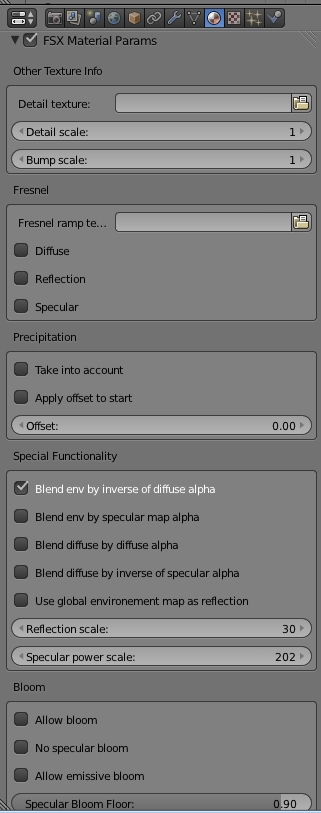
Is there some trick to getting it working with a Blender compiled model? The reflections aren't visible in the simulation. Here are my settings:

material.jpg
texture.jpg
 
Your settings seem correct to me. Give me some time to investigate this issue. I have never tried envmaps in the VC myself.
 
Thanks for the replies. The glass displays properly in the simulation. If I tick the "global environment" reflection box, that displays properly, but I can't get a custom map to work.
 
Hi Michael2,

I found the problem. In your settings (Texture context), under Influence>Diffuse, tick the Color checkbox. That condition is also checked on export. I may change that in the next release, as it serves strictly no purpose and just creates confusion.

Edit: I now remember why I had that condition checked. If you want to display the envmap in Blender, you have to tick that checkbox. So it's kind of "what you see is what you get". If you don't have the map display in Blender, then it won't display in the sim neither. Note: envmap format in Blender is different from FSX cube map format (refer to the manual, section "Texture maps").
 
Last edited:
Thanks for looking into this. That was the only thing I haven't been able to carry over from my GMax model or redo in Blender. So, it is it required to have a cube map in 3:2 proportions loaded into the Blender model for the FSX model to compile properly, or can I have any old placeholder file designated in Blender if I don't care how it displays in renders?
 
If you don't care for renders, then any placeholder should do it. Only the image's filename matters.
 
Back
Top