• Which the release of FS2020 we see an explosition of activity on the forun and of course we are very happy to see this. But having all questions about FS2020 in one forum becomes a bit messy. So therefore we would like to ask you all to use the following guidelines when posting your questions:

    • Tag FS2020 specific questions with the MSFS2020 tag.
    • Questions about making 3D assets can be posted in the 3D asset design forum. Either post them in the subforum of the modelling tool you use or in the general forum if they are general.
    • Questions about aircraft design can be posted in the Aircraft design forum
    • Questions about airport design can be posted in the FS2020 airport design forum. Once airport development tools have been updated for FS2020 you can post tool speciifc questions in the subforums of those tools as well of course.
    • Questions about terrain design can be posted in the FS2020 terrain design forum.
    • Questions about SimConnect can be posted in the SimConnect forum.

    Any other question that is not specific to an aspect of development or tool can be posted in the General chat forum.

    By following these guidelines we make sure that the forums remain easy to read for everybody and also that the right people can find your post to answer it.

Combined texture quality

Messages
350
Country
us-michigan
Is there any tricks on keeping good quality combined textures? I've done so in the past with smaller areas and they don't look too bad, but now that I'm trying to combine larger areas with windows they look really bad. It's nice to be able to combine textures so I can then make night textures easier. Any thoughts?
 
Hi Chris:

Are the Windows "Transparent" ?

If so, do not combine Transparent faces with coplanar non-Transparent faces, or you will lose / confuse texture Material Properties for both faces. :alert:

GaryGB
 
I turned the transparency off. Do I have to design my own window textures? For the most part it seems the larger the area the worse the combined texture looks.
 
Hi Chris:

You may wish to utilize texture images in a non-lossy graphic file format such as BMP, PNG, or TIFF rather than JPG which is inherently lossy, and which degrades the original image each time it is saved after any edit (including merging with adjacent co-planar images via the "Combine Textures" feature).


Also, you may wish to ensure that Sketchup is configured to display textures at maximum resolution via:

Sketchup menu > Window > Preferences > {System Preferences} Dialog > OpenGL

In OpenGL > "OpenGL Settings" section, 'Check':

* Use Hardware Acceleration

* Use Maximum Texture Size

* Use Fast Feedback


In OpenGL > "Capabilities" section, choose "#18 - True Color - High - Yes - 0x"


Additionally, you may wish to utilize Sketchup plugin Ruby scripts by Aerilius that substitutes the Sketchup lower quality default internal graphics engine with the higher quality "ImageMagick" external graphics engine ...for a number of graphics operations.

By first using Aerilius' Make Unique Texture++ plugin:

http://sketchucation.com/forums/viewtopic.php?p=367210#p367210

...to make texture image Materials mapped to each face "Unique" via the ImageMagick graphics engine, the resulting "Combined Textures" should maintain original image quality (provided they are in a non-lossy graphic file format).


FYI: The Make Unique Texture++ is reportedly also now consolidated into the "Texture Resizer" plugin

http://sketchucation.com/forums/viewtopic.php?p=360679#p360679


BTW: Generally speaking, it is preferred that one uses identical (or very close to identical) dimensions of texture pixels (aka "Texels") per Meter (aka "Texel density") for all texture Materials mapped onto each side / roof or other "surface" of a texture-mapped 3D model.

This facilitates accurate and fast calculation by the FS rendering engine at run time, of MIPMAP and LOD switching parameters for scenery objects (based on each objects on-screen pixel size at one's user aircraft camera viewing distance from those objects in the 3D world). :pushpin:


One 'partially' configures this via the Sketchup Material dialog {Edit} tab Texture Height and Width to establish what 'real world' 3D model size is to be mapped by specified Texels in the image file.

While this might factor the Texel density 'somewhat', it is ultimately imprecise, and the FS rendering engine may actually still be forced to 'synthesize' a MIPMAP with a required Texel density to more precisely match the displayed LOD at run time, thus adversely affecting performance. ;)

When textures are consolidated onto a 1-piece texture sheet /atlas via ex: Arno's MCX - Draw Call Minimizer, the size at which those individual source images of variable size are mapped onto the 3D model may still result in varying Texel density that is inconsistent with the overall scene LOD rendered at run time relative to nearby scenery objects as a function of distance from camera position in the 3D world, with run time performance issues as described above.


Although certain performance benefits may otherwise be achieved by implementing "Draw Call Batching" via MCX - Draw Call Minimizer, adjusting the mapped texture image size prior to mapping onto faces, and before textures are consolidated onto a 1-piece texture sheet /atlas, may merit consideration to achieve even greater performance. :idea:


A Sketchup plugin Ruby script which may help with this "Texel density" part of a comprehensive 3D model texture Material mapping work-flow is "Goldilocks" by Adam Billyard, author of the commercial "LightUp" photo-realistic rendering utility for Sketchup.

http://sketchucation.com/forums/viewtopic.php?p=281153#p281153


An additional feature of the Goldilocks plugin, is an appraisal of the geometry "Content Density".

If Goldilocks is run on a model, it can identify ex: Groups / Components with higher amounts of geometry per unit of space for that Component ...that is far higher than the rest of the 3D model.

NOTE: This is a separate consideration from that of Texel Density for faces relative to the the rest of the 3D model.

Note as well, that this is a separate consideration from that for:

* MIPMAPS

* Individual 3D model geometry for specific LODs within a MDL

* Effective LOD of a 3D model

...rendered at run time with nearby scenery objects as a function of distance from camera position in the 3D world.


PS: AFAIK, most FS developers do not use transparent windows, and instead use texture 'images' of window panes.

GaryGB
 
Last edited:
Hi Chris:

You may wish to utilize texture images in a non-lossy graphic file format such as BMP, PNG, or TIFF rather than JPG which is inherently lossy, and which degrades the original image each time it is saved after any edit (including merging with adjacent co-planar images via the "Combine Textures" feature).
The .jpg format does not degrade with each save, it simply isn't true to tell people this.

There has been much criticism of JPG as a "lossy" format. Lossy compression means that the image is allowed to change (degrade) in order to achieve smaller file sizes. How much does JPG compression degrade image quality? Well, it depends.

Much of the criticism of JPG compression is in fact a criticism of implementation choices by software authors. JPG is capable of remarkable compression with very little degradation in quality.

http://users.wfu.edu/matthews/misc/jpg_vs_gif/JpgCompTest/

I have done extensive image editing; resizing, reshaping and reformatting and I am here to say I have never experienced any sort of unanticipated data loss using .jpg images and the wide range of software that accommodates .jpg, more than any other format, makes it the "go to" choice for me to use and transfer images.

If you really want to learn about image formats and data storage, the article "JPG or lossless for image archives?" is very informative.
 
Hello...

The jpg format loss or degrade is specifically caused by the compression amount used... there is some loss. That's been the case since it's inception.
 
Hello. The article is quite specific on how loss, if any occurs and it goes into great detail. If you save a .jpg using any particular compression algorithm, you may lose some color or detail as compared to another compression algorithm. However to say that continual saves using the same algorithm will further degrade the image is simply not true.
While it does raise a fascinating point that fine regular details, like waves or rivet patterns might retain integrity into the .dds/.bmp phase of design, we'd need to remind ourselves of the relative cartoon nature of the render. Unless details are glaringly obvious, they are lost. In the article, Rick Matthews is talking about subtle differences in this image:

icdimq1.jpg


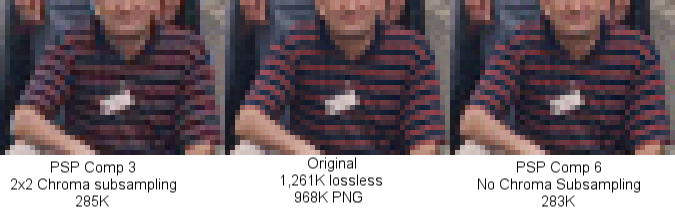
and these are his 3 examples:

All3zoom5.png


Ok, if my scenery texture covers a size and detail of the above image, it really won't matter which of the three shirt render compression algorithms I choose, in comparison to the things that really affect how this image looks in simulator scenery. We are talking about detail in an area less than 1/20th of the entire image. It is a flight simulator, not a microscope.
 
Hi Chris:

Just to clarify, the topic of your thread:

"Combined texture quality"

...is the basis for my replies above, and the information I posted for you was specific to troubleshooting your reported issues of perceived image degradation when using the Sketchup "Combine Textures" feature. :pushpin:


IMHO, the latter information posted by Rick may address JPG-related technicalities related to compression, and how certain types of edits to JPG images may not 'always' impart as much JPG image degradation as other types of edits.

IIUC, direct control over how and when compression may- or may not- be applied / re-applied to an image as a result of edits to a JPG, while technically possible in certain 3rd party graphics applications, may not be directly user-controlled via the Sketchup GUI, when the Sketchup internal default graphics engine is utilized to "Combine Textures".


While it is possible to directly control via a Sketchup GUI dialog slider setting, the amount of compression utilized for 2-D image exports from Sketchup, it may- or may not- be possible to directly control whether compression will be applied to the new 1-piece texture resulting from use of "Combine Textures", due to how the default Sketchup graphics functions internally process JPG texture image Materials.

It is for that particular reason I have recommended that you consider instead utilizing non-lossy texture image file formats as Materials, in addition to substituting the 'ImageMagick' graphics engine in Sketchup for the 'default' graphics engine when making Faces 'Unique', prior to using "Combine Textures" ...via the above-cited plugins by Aerilius. ;)


AFAIK, your Sketchup configuration settings, and your work-flow with how you "Combine Textures" may determine to what extent you may be able to minimize progressive image degradation when using JPG texture images for Materials.

Please let me know if you are unable to resolve your perceived progressive image degradation when using the Sketchup "Combine Textures" feature after implementing my suggestions above. :)

GaryGB
 
Last edited:
The OP has not posted in nearly 4 days, he likely has his answers. Just to clarify, I do not use the combine textures feature, because I usually make my own models. I endorse every aspiring artist to abandon the poor quality, shattered texture models that are typical of the free Warehouse. The actual fact is that those models are designed to a vastly different standard than what this sim platform represents. The standard procedure of assembling photographic images and remapped distortions of those original images, is entirely adequate in today's environment of gigabyte levels of instantly available memory. Who cares how many pieces an image has, we now have nearly infinite assembly power. This was not the case when FSX was created and the pipeline for assembling images is so far up into the core of the render, the software can NEVER take advantage of modern memory capacity. We see this and the occasionally effective patch, in other areas of the sim.
So now we are talking about taking someone else's art and modifying it to suit this sim particularly and I just don't see it as a productive way to steer ones development. If you want to convert these models for freeware use in Skyrim or The Sims, you probably don't have to combine textures. You almost certainly can't sell a model of which you combined textures, unless you made it yourself and in that case why would you not just do it properly, with a combined texture sheet, in the first place?

Do I have to design my own window textures?

His final question appears to be ignored by you. The answer is, "yes, sir, welcome to the club, glad to see you share this well worn path."

Please let me know if you are unable to resolve your perceived progressive image degradation when using the Sketchup "Combine Textures" feature after implementing my suggestions above. :)
GaryGB

I like the smilie. I'd really prefer to see more "we's" and fewer "me's."
 
IMO, if you have to use MCX - Draw Call Minimizer, you are already on an incorrect path. I prefer to size design for optimal texture sheet use.

David
 
This is what I'm getting. I have maximized the texture setting on sketchup. I have not looked into other options yet. Been a bit busy. Original textures are jpgs. The area I'm trying to combined is greater than 200 feet, so it's very wide. In the past I've made my own combined textures by zooming up on my desired face and snipping the screen. then I'd edit it on Gimp to fix any problems and to design night textures. This works fine for small areas. For large the resolution drops way down naturally when you zoom out to grab the texture
you want. It looks a little better than before, but still not my desired look that I'd like.
 

Attachments

  • Test_1.JPG
    Test_1.JPG
    111.3 KB · Views: 405
  • Test_2.JPG
    Test_2.JPG
    89.1 KB · Views: 421
Hi Chris:

I believe you should see further improvement in- / retention of- Material image quality when you convert your texture image file format to a non-lossy graphic file format. ;)


BTW: The Texel density and sharpness of the displayed image will always be lesser when a screen shot or Sketchup-exported 2-D image is used versus using "Combine Textures" with the original mapped texture image Materials. :pushpin:


PS: Be aware of the need to initially assign output image resolution in the "Make Unique Texture ++" plugin configuration dialog to prevent 'down-sampling' from occurring prior to then using "Combine Textures".

Also, be aware that 'down-sampling' may occur when the Sketchup default graphics engine is used with the default "Make Unique Texture" feature and "Combine Textures" ...instead of the "Make Unique Texture ++" plugin via the ImageMagick graphics engine.


NOTE: Aerilius' "Texture Resizer" plugin has more image options than his "Make Unique Texture++" plugin:

"Most of this has been merged into Texture Resizer with lots of more features".

http://sketchucation.com/forums/viewtopic.php?p=367210#p367210


screenshot_dialog-png.38487

http://sketchucation.com/forums/viewtopic.php?t=40720

GaryGB
 

Attachments

  • screenshot_dialog.png
    screenshot_dialog.png
    28.8 KB · Views: 905
Last edited:
Back
Top