
-
Which the release of FS2020 we see an explosition of activity on the forun and of course we are very happy to see this. But having all questions about FS2020 in one forum becomes a bit messy. So therefore we would like to ask you all to use the following guidelines when posting your questions:
- Tag FS2020 specific questions with the MSFS2020 tag.
- Questions about making 3D assets can be posted in the 3D asset design forum. Either post them in the subforum of the modelling tool you use or in the general forum if they are general.
- Questions about aircraft design can be posted in the Aircraft design forum
- Questions about airport design can be posted in the FS2020 airport design forum. Once airport development tools have been updated for FS2020 you can post tool speciifc questions in the subforums of those tools as well of course.
- Questions about terrain design can be posted in the FS2020 terrain design forum.
- Questions about SimConnect can be posted in the SimConnect forum.
Any other question that is not specific to an aspect of development or tool can be posted in the General chat forum.
By following these guidelines we make sure that the forums remain easy to read for everybody and also that the right people can find your post to answer it.
You are using an out of date browser. It may not display this or other websites correctly.
You should upgrade or use an alternative browser.
You should upgrade or use an alternative browser.
Crashtree - No Granularity Specified
- Thread starter Brother23
- Start date

Granularity
Hi,
yes the whole process runs fine until it comes to this shitty granularity.
The next step was to think on polygonal errors in the plane model.
So I instead used geometric primitives. A cube and a sphere.
But only with the same result. With this method, I think, I have proved
that not my model is the reason but another yet unknown fact of
XTOMDL.
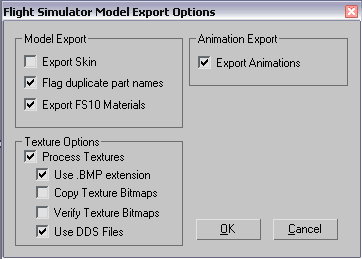
Can please someone show his onscreen dialogue when exporting from 3DSMAX?
Thats this screen with FS10 Materials, Skin Animation etc. Perhaps you
folks have the checkers on other points than me.
Greetings
Hi,
yes the whole process runs fine until it comes to this shitty granularity.
The next step was to think on polygonal errors in the plane model.
So I instead used geometric primitives. A cube and a sphere.
But only with the same result. With this method, I think, I have proved
that not my model is the reason but another yet unknown fact of
XTOMDL.
Can please someone show his onscreen dialogue when exporting from 3DSMAX?
Thats this screen with FS10 Materials, Skin Animation etc. Perhaps you
folks have the checkers on other points than me.
Greetings

Yeah...
...but I cant ignore with all my mighty power of the seven worldskies,
...
...that the resulting MDL File keeps -ZERO- in size.
So when the Crashtree can be ignored my error seems to be how I
access the MDL. I saw those tip for the SENT TO shortcut at AVSIM
but this doesnt work under my XP PROFFESIONELL. I have no SENT TO
at this location.
What do I have to do to get this shitty piece of microsoft software
to produce a usable MDL AIRCRAFT.
Please help!
Greetings
...but I cant ignore with all my mighty power of the seven worldskies,
...
...that the resulting MDL File keeps -ZERO- in size.
So when the Crashtree can be ignored my error seems to be how I
access the MDL. I saw those tip for the SENT TO shortcut at AVSIM
but this doesnt work under my XP PROFFESIONELL. I have no SENT TO
at this location.
What do I have to do to get this shitty piece of microsoft software
to produce a usable MDL AIRCRAFT.
Please help!
Greetings

- Messages
- 35
- Country

Sorry to hear you're having a hard time compiling your aircraft Brother23. Here's what I do...
I made the following folder & placed these files in it:
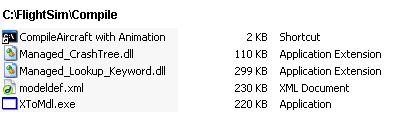
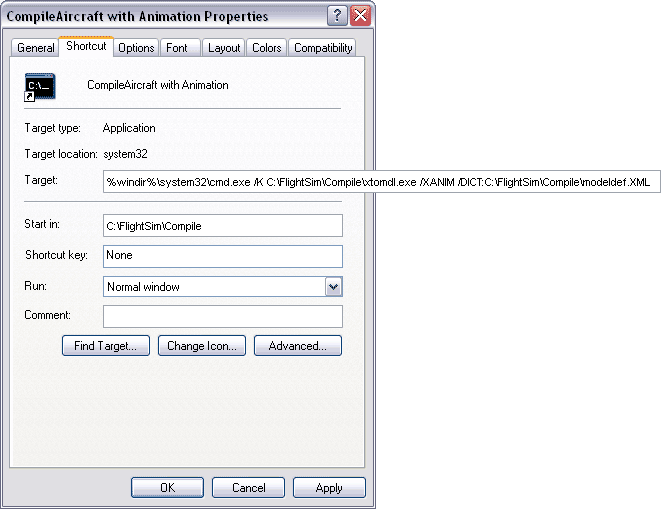
I created a shortcut named "CompileAircraft with Animation" using the following settings:
Next I export an X file from 3DS MAX into my Compile folder. As my aircraft has animation it also creates an XAMIM file but you don't need to do anything with that.
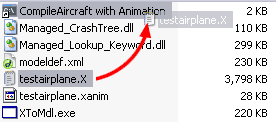
Next I Drag & Drop the X file onto my shortcut. I don't do the "Send To" thing:
This brings up a DOS window where I see my aircraft being compiled. I do get that silly Granularity message but I ignore it.
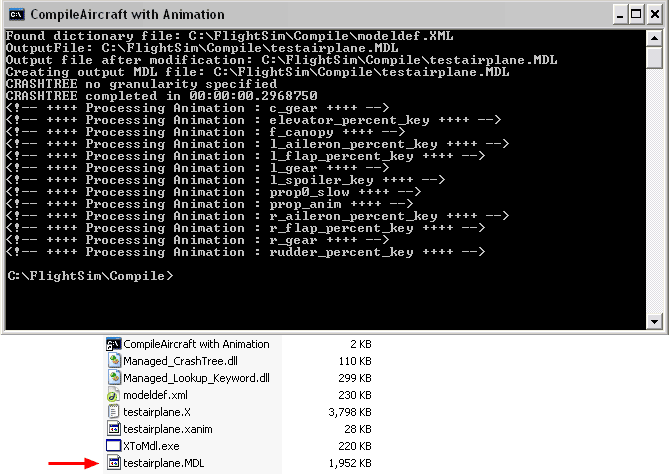
I end up with my MDL file that I copy to my aircraft's FSX model folder. Hope this helps.
I made the following folder & placed these files in it:
I created a shortcut named "CompileAircraft with Animation" using the following settings:
Next I export an X file from 3DS MAX into my Compile folder. As my aircraft has animation it also creates an XAMIM file but you don't need to do anything with that.
Next I Drag & Drop the X file onto my shortcut. I don't do the "Send To" thing:
This brings up a DOS window where I see my aircraft being compiled. I do get that silly Granularity message but I ignore it.
I end up with my MDL file that I copy to my aircraft's FSX model folder. Hope this helps.
Last edited:
Thank you very much Nodd!
I tried it...i doesn`t work. I had it already the same way.
Let overthink this.
I have the same C routine like you, from the deluxe FSX DVD.
Then I used a simple SPHERE PRIMITIVE to test. The X-File shows
fine in the DirectX-Preview.
But when I drag the File over the shortcut it produces only a File
with Size Zero.
There seems to be a subtle difference in our processing because
Xtomdl tells me everytime what attributes to use. There seems to
be a small error. But where.
Here is my SHortcut text...
%windir%\system32\cmd.exe /K C:\FSXAirCompiler\XToMdl.exe /DICT:C:\FSXAirCompiler\modeldef.xml
Its the same like yours, or?
Can it be the modeldef?
What DirextX Tools do you use?
Greetings
I tried it...i doesn`t work. I had it already the same way.
Let overthink this.
I have the same C routine like you, from the deluxe FSX DVD.
Then I used a simple SPHERE PRIMITIVE to test. The X-File shows
fine in the DirectX-Preview.
But when I drag the File over the shortcut it produces only a File
with Size Zero.
There seems to be a subtle difference in our processing because
Xtomdl tells me everytime what attributes to use. There seems to
be a small error. But where.
Here is my SHortcut text...
%windir%\system32\cmd.exe /K C:\FSXAirCompiler\XToMdl.exe /DICT:C:\FSXAirCompiler\modeldef.xml
Its the same like yours, or?
Can it be the modeldef?
What DirextX Tools do you use?
Greetings
- Messages
- 35
- Country
The only difference between our XtoMDL.exe shortcuts other than the compiler folder name & that I'm using the /XANIM flag is that you used both upper & lower case letters here & there:
Mine
%windir%\system32\cmd.exe /K C:\foldername\xtomdl.exe /DICT:C:\foldername\modeldef.XML
Yours
%windir%\system32\cmd.exe /K C:\foldername\XToMdl.exe /DICT:C:\foldername\modeldef.xml
I doubt that's the problem though.
I'm using DirectX 9.0c
I know some people edit their modeldef.xml file. I've not changed mine. Perhaps try reinstalling the SDK?
I'm no expert at this stuff sorry. Good luck & I hope you figure out the problem soon.
Mine
%windir%\system32\cmd.exe /K C:\foldername\xtomdl.exe /DICT:C:\foldername\modeldef.XML
Yours
%windir%\system32\cmd.exe /K C:\foldername\XToMdl.exe /DICT:C:\foldername\modeldef.xml
I doubt that's the problem though.
I'm using DirectX 9.0c
I know some people edit their modeldef.xml file. I've not changed mine. Perhaps try reinstalling the SDK?
I'm no expert at this stuff sorry. Good luck & I hope you figure out the problem soon.
