• Which the release of FS2020 we see an explosition of activity on the forun and of course we are very happy to see this. But having all questions about FS2020 in one forum becomes a bit messy. So therefore we would like to ask you all to use the following guidelines when posting your questions:

    • Tag FS2020 specific questions with the MSFS2020 tag.
    • Questions about making 3D assets can be posted in the 3D asset design forum. Either post them in the subforum of the modelling tool you use or in the general forum if they are general.
    • Questions about aircraft design can be posted in the Aircraft design forum
    • Questions about airport design can be posted in the FS2020 airport design forum. Once airport development tools have been updated for FS2020 you can post tool speciifc questions in the subforums of those tools as well of course.
    • Questions about terrain design can be posted in the FS2020 terrain design forum.
    • Questions about SimConnect can be posted in the SimConnect forum.

    Any other question that is not specific to an aspect of development or tool can be posted in the General chat forum.

    By following these guidelines we make sure that the forums remain easy to read for everybody and also that the right people can find your post to answer it.

Create GUI for batch commands

Messages
481
Hi,

Is there any software that we can create a simple gui to execute batch commands? I just need file copying, renaming and etc. Since I don't know any programming language, but can write simple batch commands, I would like to create a window where clicking a button would execute a command attributed to that button. It can be anything as simple as a white screen with the button or a little more jazzed up with a background image.

Kindly,

Blazer
 
What about good old text based menus?

Code:
:Menu
echo What do you want to do?
echo 1) Option 1
echo 2) Option 2
echo 3) Option 3
echo 4) Exit
echo.
choice /C:1234 /M Choice?

if ERRORLEVEL 4 (
goto :End
)

if ERRORLEVEL 3 (
goto :Option3
)

if ERRORLEVEL 2 (
goto :Option2
)

if ERRORLEVEL 1 (
goto :Option1
)


:Option1
:::: Do stuff here


:::: Return to menu
goto :Menu


:Option2
:::: Do stuff here


:::: Return to menu
goto :Menu


:Option3
:::: Do stuff here


:::: Return to menu
goto :Menu


:::: End of file. Pause and clean up
:End
echo.
echo Bye, bye!
echo.

pause

cls


When doing your batch scripts like this, make sure to use plenty of "go to" commands as scripts will otherwise simply run through from to to bottom.
 
Hello,

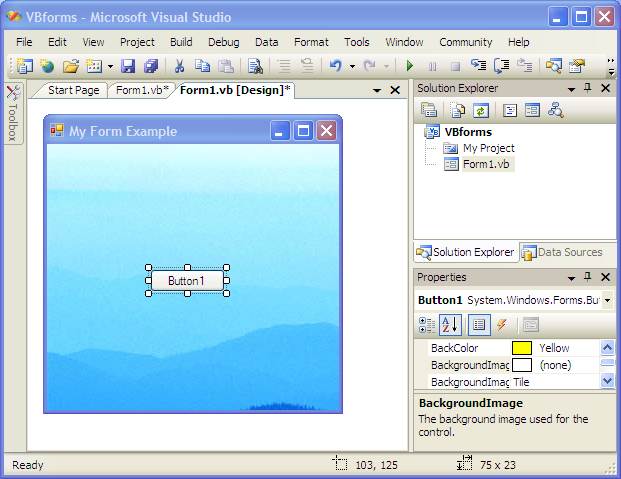
Thanks for your help. I'm looking for something like this visual basic window:

Visual_basic_form_background_image.jpg


When you click the "button 1", it'll execute a batch file, when you click "button 2", it'll execute a different batch file.
 
Yes I have, otherwise I would not have bothered creating a topic here

Also thanks for your link, but it's nothing like what I need, those are the kind of results you would get from a google search :) .
 
Last edited:
The example would require a programming langauge - Visual Basic

But is there something GUI oriented, like for example, FS code is a programming language, the ASM file, but we have a GUI to create it (3ds max/gmax). Is there some GUI that is the equivalent of 3ds max/gmax to a programming language?
 
Visual Studio partially caters to that, several other IDEs also do, like Eclipse or NetBeans.

But it's not as simple as "make a button launch bat"
 
But is there something GUI oriented, like for example, FS code is a programming language, the ASM file, but we have a GUI to create it (3ds max/gmax). Is there some GUI that is the equivalent of 3ds max/gmax to a programming language?

As we have explained those GUIs are all written a a coding langauge - most likely C/C++
 
Thanks everyone, so the answer to my question then is... No, there isn't any software that we can create a simple GUI to execute batch commands.
 
What's wrong with my text based menu solution?

Nothing at all, I've been using menus like that to call batch file "modules" for years now. Frankly I can't see where selecting a menu item to run a batch file is any different than clicking a button to run it. Here's another menu system BTW that uses "Set" rather than "Choice", you have to press Enter after you type your selection though:

Code:
@echo off
:menu
cls
echo.
echo.
echo  Select an option from the list below by pressing the
echo  corresponding number key on your keyboard followed
echo  by the Enter key:
echo.
echo.
echo  [1] Run batch file 1
echo  [2] Run batch file 2
echo  [3] Run batch file 3
echo  [4] Run batch file 4
echo  [5] Run batch file 5
echo  [6] Run batch file 6
echo.
echo  [7] Exit
set /p selection=

if %selection%==1 call bat1.bat
if %selection%==2 call bat2.bat
if %selection%==3 call bat3.bat
if %selection%==4 call bat4.bat
if %selection%==5 call bat5.bat
if %selection%==6 call bat6.bat
if %selection%==7 exit
goto menu
 
Nothing at all, I've been using menus like that to call batch file "modules" for years now. Frankly I can't see where selecting a menu item to run a batch file is any different than clicking a button to run it. Here's another menu system BTW that uses "Set" rather than "Choice", you have to press Enter after you type your selection though:
...

That works as well as long as you use different indexes or names for the selection variable in potential sub menus.
The errorlevel based solution is a bit more practical in that regard because it does away with a variable. It's also useful in if-then constructs.

Too bad that Batch is horribly ineffective for some tasks, otherwise I would enjoy doing scripts in it much more. (Batch's biggest advantage is that it's an out of the box solution, other than Python, Perl or whatever they're called. And PowerShell, well...no.)
 
Thanks everyone, so the answer to my question then is... No, there isn't any software that we can create a simple GUI to execute batch commands.

You can create a GUI using Windows Forms in PowerShell and have to PowerShell script run the bat file. Although, if you do it in PowerShell, you can make the PowerShell script run whatever you want the batch file to run.
 
That works as well as long as you use different indexes or names for the selection variable in potential sub menus.
The errorlevel based solution is a bit more practical in that regard because it does away with a variable. It's also useful in if-then constructs.)

Actually having the %selection% variable set can come in handy later on in the batch file (or a called batch file) at times. But yeah, I get what you're saying, I usually use pretty descriptive variable names, some I wouldn't post here. :)
 
Back
Top