• Which the release of FS2020 we see an explosition of activity on the forun and of course we are very happy to see this. But having all questions about FS2020 in one forum becomes a bit messy. So therefore we would like to ask you all to use the following guidelines when posting your questions:

    • Tag FS2020 specific questions with the MSFS2020 tag.
    • Questions about making 3D assets can be posted in the 3D asset design forum. Either post them in the subforum of the modelling tool you use or in the general forum if they are general.
    • Questions about aircraft design can be posted in the Aircraft design forum
    • Questions about airport design can be posted in the FS2020 airport design forum. Once airport development tools have been updated for FS2020 you can post tool speciifc questions in the subforums of those tools as well of course.
    • Questions about terrain design can be posted in the FS2020 terrain design forum.
    • Questions about SimConnect can be posted in the SimConnect forum.

    Any other question that is not specific to an aspect of development or tool can be posted in the General chat forum.

    By following these guidelines we make sure that the forums remain easy to read for everybody and also that the right people can find your post to answer it.

Creating graceful stripes ???

Messages
502
Country
unitedstates
Hi Folks,

I would consider myself a fairly experienced painter - over the years I've painted planes, trains, automobiles, buildings, weathering effects, ground textures, sky textures, and even people - etc etc etc...

One thing I've always had difficulty with is creating those thin graceful curvy stripes that seem so prevalent on aircraft today... I have no problems laying down the line using Biezer curves with vector graphics - - - but the line is blunt and of the same width - - - the part that always gives me fits is getting that smooth perfect graceful taper that seems to run the entire length of the line ending in that razor thin point...

I normally use PSP 9.X as it's what I am most familiar and comfortable with - but I've also used PS and Gimp on occasion...

The way I've been doing is to lay down my vector line as wide as the widest point of the stripe - then convert I to a raster layer - then go to work with the selection tool trying to shape and carve this blunt line into a gracefully tapered stripe ending in a point... It's less than ideal... Eventually I get something that is passable but not perfect - at least in my eye - and the process is a royal PITA...

Would anyone have a technique or tool to make this task easier ???

Thanks...

Regards,
Scott
 
Last edited:
Well, in GIMP, I create a path for the outline of the stripe, taper it at one end and then simply fill it. Getting the taper right requires a bit of trial & error to account for the paint's fade-out, but it usually works after a few tries.
 
Hi Bjoern,

Thanks for responding - I did some earnest looking for a solution today and came across a gem... I'm pretty certain my old and reliable Jasc 9.x PSP can't do it - so I started looking around... I came across "Inkscape" which is a free GNU vector Drawing application - and with the aid of the tutorial below - I was creating all kinds of stripes within a half hour or so... It's the easiest I've ever seen and you can use your own custom shapes to make all kinds of mods to the stripes... The possibilities seem endless... I'm pretty impressed after struggling with this for YEARS... I need to give it a real try now...

Regards,
Scott


Inkscape
https://inkscape.org/en/about/


Using Your Own Shapes

Step 1
The ellipse works well, but I've found a solution for tapered lines that I much more prefer (most of the time). To start out, use the Rectangle tool to draw a perfect square. Then, rotate it 45 degrees. With it still selected, head up to Path > Object to Path.

tapered-6.png

Step 2
Next, shrink it down nice and flat. Then grab the Nodes tool and select the two middle nodes so that we can Make selected nodes symmetric (which rounds them also). This is our new tapered shape that we'll be using.

tapered-7.png

Step 3
The easiest way to use this shape as our taper is to select it, copy it to your clipboard, and select Shape: From clipboard on either the Pencil tool or the Pen tool.

tapered-8.png

Step 4
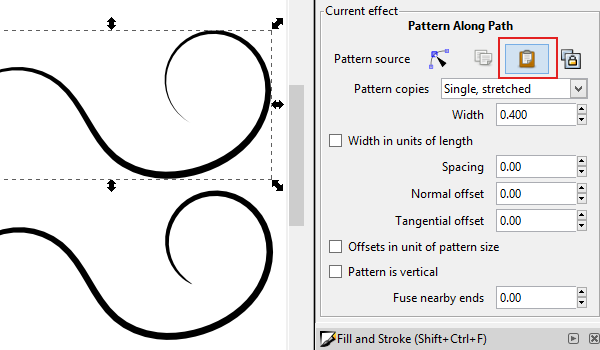
In order for me to compare my new tapered line with the ellipse line, I had to use a pretty neat feature. If your custom tapered shape is still copied to your clipboard, you can select any existing line, go to the Path Effect Editor, and click "Paste" by the Pattern source.

Now that I have two of the exact same paths with different shapes, we can compare. The top one is using my custom shape while the bottom one is the ellipse. Look at the end of the curl - the custom shape has such a sharp, gradual finish (which I love). The ellipse path is just a tad stubby on the ends. I know, this is pretty picky, but at least I got to show you how to use custom shapes, right?

tapered-9.png
 
Hi Folks,

Still a work in progress - but - I'm laying the easiest curves I've ever done... The back half of the stripe hasn't been placed yet...

upload_2016-11-22_20-8-19.png


Regards,
Scott
 

Attachments

  • upload_2016-11-22_20-7-36.png
    upload_2016-11-22_20-7-36.png
    350.8 KB · Views: 463
Hi Folks,

The source - need to change the N number - started painting it and realized N290CK is a freighter - fortunately N474AN used the same paint on a passenger version...

upload_2016-11-22_20-35-37.png


Regards,
Scott
 
PSP 9 can do that...you were on the right track but there is more to it. Instead of a single vector line you need to outline your stripe and have the fill color active. The stripes on this texture were done as vector lines using PSP X7, but the procedure is the same for PSP 9, which I used for years.

xls+_fuse_T.jpg
 
Hi Robert,

Thanks - maybe I'll have another go - I've tried that but as I shape the line - I've always had a hard time keeping one side matching the other... Obviously you've mastered the technique... That's a mighty fine looking texture you have there - can't wait to see what it wraps...
;)

Uggh - HAH -- I'll never give up my PSP 9.x - I guess I'm old school but paying a "subscription" for a graphics program just rubs me the wrong way... Anything light years better in the new versions ?

Best of luck with your little project - people (including me) - have been clamoring in the forums for a biz jet with a "working" FMC...
:)

Regards,
Scott
 
Hi Folks,

LOL - yeah - that's it - I thought Corel was doing it as well - I'll check that link out too - much obliged...

Hah - 26 bucks ?!?!? I remember spending hundreds on PSP 9...

Regards,
Scott
 
Inkscape is great (using it at work), but the UI is (sadly) quite clumsy in parts.
 
Hi Bjoern,

Yeah - I noticed - but I'm still throwing down the easiest stripes and curves I've ever made... It's GNU - so maybe it will get better with time ?
:)

Still very much a WIP... Need to redo the stripe yet again and the logo text...


N474AN_zpsb3lu8t5j.png


maxresdefault_zpshkw72a8r.jpg


Regards,
Scott
 
The interface is going to stay that way. It hasn't changed since 2010, when I first used it.
 
Back
Top