• Which the release of FS2020 we see an explosition of activity on the forun and of course we are very happy to see this. But having all questions about FS2020 in one forum becomes a bit messy. So therefore we would like to ask you all to use the following guidelines when posting your questions:

    • Tag FS2020 specific questions with the MSFS2020 tag.
    • Questions about making 3D assets can be posted in the 3D asset design forum. Either post them in the subforum of the modelling tool you use or in the general forum if they are general.
    • Questions about aircraft design can be posted in the Aircraft design forum
    • Questions about airport design can be posted in the FS2020 airport design forum. Once airport development tools have been updated for FS2020 you can post tool speciifc questions in the subforums of those tools as well of course.
    • Questions about terrain design can be posted in the FS2020 terrain design forum.
    • Questions about SimConnect can be posted in the SimConnect forum.

    Any other question that is not specific to an aspect of development or tool can be posted in the General chat forum.

    By following these guidelines we make sure that the forums remain easy to read for everybody and also that the right people can find your post to answer it.

FSX Creating winter photoscenery

Messages
78
Country
canada
Hi All,
I'm creating a lot of photosceneries with SBuilderX from Google images. Now I want to create winter textures from these images.
I used this simple method:
1. Reduce threshold of the image to about 80
2. Reverse colors
3. Lighten the colors
4. Combine the black and white image with the original.

In Gimp, the result gives this, which is exported to BMP (24 bit) and compiled with resample.exe
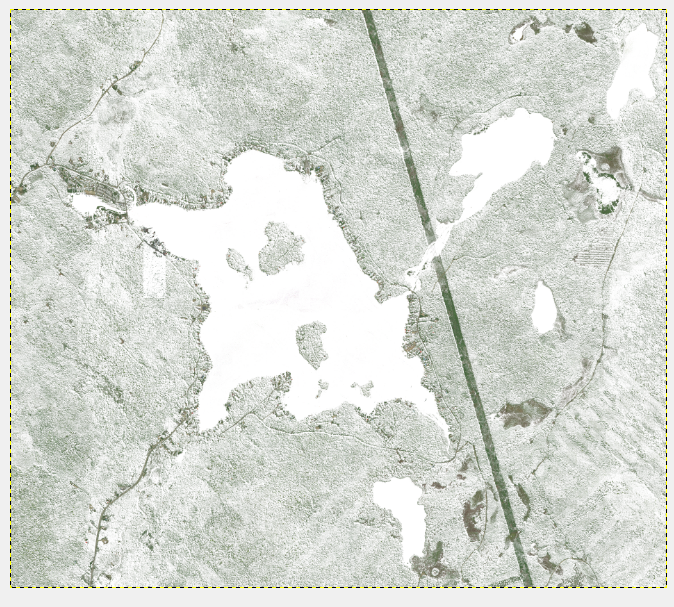
Final.png


Combining the two image is nice since you can keep some colors like this tenis court:

But in FSX, I get this result after compilation:
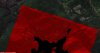
Any Idea of what happened ?? Thanks !!

This is my .INF file content, in case:

[Source]
Type = BMP
Layer = Imagery
SourceDir = "."
SourceFile = "L17X78804X78862Y92249Y92300_hiver.BMP"
Variation = January, February, March, April, December
NullValue = 255,255,255
SamplingMethod = Gaussian
ulyMap = 46.9568240160942
ulxMap = -71.7791748046875
xDim = 5.36441802978516E-06
yDim = 3.66314736883072E-06

[Destination]
DestDir = "."
DestBaseFileName = "Lac_sept-ile_Photo03_hiver"
DestFileType = BGL
LOD = Auto
UseSourceDimensions = 1
CompressionQuality = 85
 

Attachments

  • Final.png
    Final.png
    720.1 KB · Views: 494
  • Final_large.png
    Final_large.png
    370.6 KB · Views: 603
  • Result fsx.jpg
    Result fsx.jpg
    250.4 KB · Views: 730
Try this:

Code:
[Source]
Type = BMP
Layer = Imagery
SourceDir = "."
SourceFile = "L17X78804X78862Y92249Y92300_hiver.BMP"
Variation = January, February, March, April, December
ulyMap = 46.9568240160942
ulxMap = -71.7791748046875
xDim = 5.36441802978516E-06
yDim = 3.66314736883072E-06

[Destination]
DestDir = "."
DestBaseFileName = "Lac_sept-ile_Photo03_hiver"
DestFileType = BGL
LOD = Auto
UseSourceDimensions = 1
CompressionQuality = 85
 
So without:
NullValue = 255,255,255
SamplingMethod = Gaussian

Thanks Rhumba ! I'll try and report.

G
 
Yep, the null data is the problem. For some reason FSX renders parts with no data as red in some cases.
 
Ok, thanks guys. But I tryed recompiling by removing the null and the sampling, or just the null, and it doesn't make it. I still get the red weird result! :(
 
Hi,

Let me think, I had a similar issue a while ago. I think my problem was that pure white became the red in the output. And I fixed it by adding the NoData statement that you just removed.

Maybe you can try to alter your colours a bit, so that you don't get so close to pure white and make the output a bit more gray? Maybe that helps.
 
Ok Arno, I'm gonna try that. I had a feeling that going so white would be risky with FSX using some colors (white, black) for different purpose than just regular color.
I noted also that the BGL produced was 200 meg instead of the 89 meg from the regular summer BGL file (including the water mask). Maybe this indicates something...
 
Well, still doesn't work. I tryed with subbtle changes than darker mods like the one bellow and I still get the red result. I may try with another photo scenery to see if it changes.
Final_dark.png
 
Final_nearby.jpg
I got it to work with another area that deosn't has a lake, so I had not to reverse the colors to get a white lake instead of a black one. The merging of the back and white and the original colored file has not let pass any colors however.
 
You might try lowering the brightness and contrast on the imagery. What I do with any photoscenery (working with photoshop) is use the wand tool to highlight a bright white area, then click on similar and apply. Once you have all the "offending" white I usually lower the brightness -15 and the contrast -12. Hope it helps.
 
I would say you'd need to let us have the offending source image and INF, and see if we can reproduce the problem. That way we don't need to guess. Zip it up and attach it, or use a source like Google Drive or One Drive to give us access to the image.
 
Job keeping me busy this week, leaving me less time to test...

Hi annber, thanks for this tric, I'll test it today and see.

rhumbaflappy, thanks for offering to test the process. I've redone the image in Gimp with the simplier steps, providing a simple work flow with not so bad result (so the first try I did) and put it in a zip file in dropbox with the INI. Let me know if can't get access. https://dl.dropboxusercontent.com/u/21717119/Photo03_hiver.zip
 
I forgot to say that the easiest way to go see is by CSK5. It is just north east of the airfield.
 
I resampled the image you supplied with it's INF, and I had no red. This is in a default FSX:SE installation.

There is definitely something wrong at your end. Red indicates no texture found in FSX and the presence of the autogen trees indicates the BGL doesn't contain a solid texture.
 
Last edited:
Humm... Interesting ! Thanks very much Dick!
For the autogen (on my side if this is what you ment), these are new autogens that I produced with Scenproc and openstreetmap.
Still, I produced other sceneries just beside this one with the same method and it worked well.
Now I think I will use a reduced image quality for this specific area during winter (LOD15 instead of 16) to go around the issue, considering the winter converted images are less detailed so less LOD are needed.

Thanks again for all this help!!!
 
Wrong arrangement of months and the file name.

[Source]
Type = BMP
Layer = Imagery
SourceDir = "."
SourceFile = "L17X78804X78862Y92249Y92300_wi.BMP"
Variation = December, January, February, March, April
ulyMap = 46.9568240160942
ulxMap = -71.7791748046875
xDim = 5.36441802978516E-06
yDim = 3.66314736883072E-06

[Destination]
DestDir = "."
DestBaseFileName = "Lac_sept-ile_Photo03_hiver"
DestFileType = BGL
LOD = Auto
UseSourceDimensions = 1
CompressionQuality = 85


"name_wi.BMP"
Months must follow the actual order.December, January, February, March, April not
April, December

Slavi
 
Thanks Savi. It has been modified.

After some other test, I found some red spots on some areas of other sceneries. I guess there is a white tone to avoid...
 
Back
Top