

- Messages
- 247
- Country

Hello all,
I made this floodlight for use in one of my projects. It's modeled in Blender, textured in Substance painter, then exported to ModelConverterX for effect placement, and exported as a model from there for placement through ADE. The floodlight consists of two materials: one PBR material with mostly default settings for the pole and fixtures, and then a second one specifically for the little 'cage' up at the fixtures. This is also a PBR material, but this one is double sided using an alpha map to make some of the elements see-through.
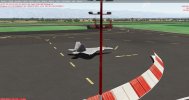
The thing is, this double-sided material seems to disappear whenever the material is viewed against terrain or sky above the horizon. If you look closely, you'll notice that where the 'cage' is in front of the pole or fixtures it still displays, but then is invisible against the mountain seen behind it.
I'm at a loss to why this happens... Any ideas?
I made this floodlight for use in one of my projects. It's modeled in Blender, textured in Substance painter, then exported to ModelConverterX for effect placement, and exported as a model from there for placement through ADE. The floodlight consists of two materials: one PBR material with mostly default settings for the pole and fixtures, and then a second one specifically for the little 'cage' up at the fixtures. This is also a PBR material, but this one is double sided using an alpha map to make some of the elements see-through.
The thing is, this double-sided material seems to disappear whenever the material is viewed against terrain or sky above the horizon. If you look closely, you'll notice that where the 'cage' is in front of the pole or fixtures it still displays, but then is invisible against the mountain seen behind it.
I'm at a loss to why this happens... Any ideas?



 I would highly recommend using Blender if you don't, it's very powerful and free!