• Which the release of FS2020 we see an explosition of activity on the forun and of course we are very happy to see this. But having all questions about FS2020 in one forum becomes a bit messy. So therefore we would like to ask you all to use the following guidelines when posting your questions:

    • Tag FS2020 specific questions with the MSFS2020 tag.
    • Questions about making 3D assets can be posted in the 3D asset design forum. Either post them in the subforum of the modelling tool you use or in the general forum if they are general.
    • Questions about aircraft design can be posted in the Aircraft design forum
    • Questions about airport design can be posted in the FS2020 airport design forum. Once airport development tools have been updated for FS2020 you can post tool speciifc questions in the subforums of those tools as well of course.
    • Questions about terrain design can be posted in the FS2020 terrain design forum.
    • Questions about SimConnect can be posted in the SimConnect forum.

    Any other question that is not specific to an aspect of development or tool can be posted in the General chat forum.

    By following these guidelines we make sure that the forums remain easy to read for everybody and also that the right people can find your post to answer it.

EcoRegions

rhumbaflappy

Administrator
Staff member
Resource contributor
Messages
6,514
Country
us-wisconsin
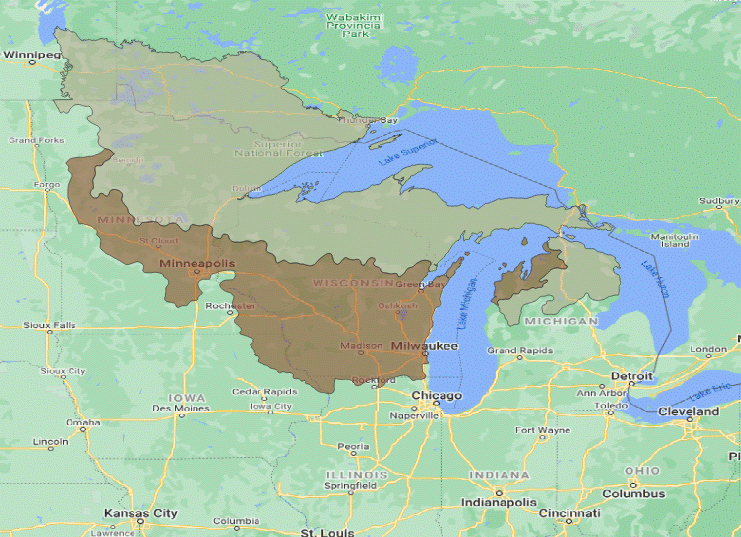
MSFS can use polygons to change EcoRegions. This is useful to change the vegetation type in an addon. Something I found was my home airport of C59 and the surrounding area was in a conifer forest ecoregion. I extracted the Upper Midwest forest-savanna transition EcoRegion shapefile from the WWF world ecoregions. I was able to produce a set of 7 polygons to cover an area covering 2/3 of Wisconsin, and 1/3 of Minnesota. I used level 0, and it changes the pines to deciduous trees and shrubs, and looks more like the real world. I also made a set for Northern Wisconsin and the Michigan UP as Western Great Lakes forests. They work as expected.

Before:
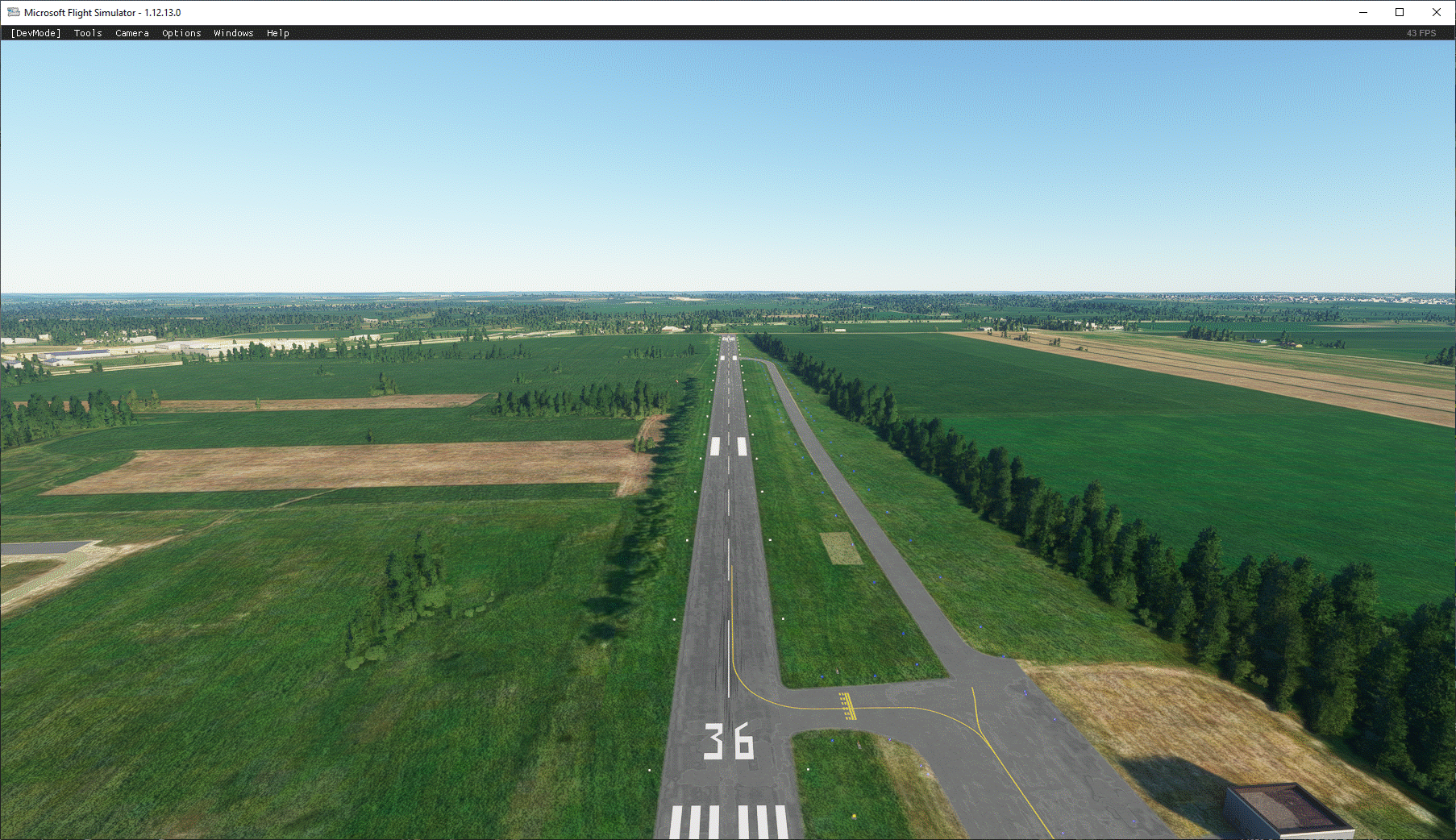
conifer.png


After:
deciduous.png


No apparent hit on FPS.

extents.png
 
Last edited:
Using the EcoRegions 2017 data, I get something a bit more MSFS compatible. The region names match up much better, and must be the source Asobo has used.

Untitled.png
 
Dick,

There is no standardized global ecoregion dataset. There are literally dozens of variants although the differences are generally minor. But it's good that you found one that was close to what Asobo used. This is also helpful if one wants to create more detailed season add-ons like Bijan's payware seasons that are available on on SimMarket. He changes the deciduous tree leaf colors in his Spring (brighter), Fall (more reds, oranges and yellows based on species), Winter ( brown deciduous tree leaves) and Hard Winter (all white).

Have you figured out how the urban ecoregions work?

Jay
 
Have you figured out how the urban ecoregions work?
Ha! I've barely figured out anything. I do think Asobo has messed up the way the regions are implemented in the standard biome XMLs. And there seems to be some hard-wired elements they are not describing.
 
I have found out that you can only use one shapefile per package. That's pretty restrictive. I merged the shapefiles for the above areas, and assigned them types of ecoregions, but not the same-named regions Asobo defined.

I'm not sure how Asobo places the default areas, although I do understand the default biomes XML. But that XML is not right in my experience. Large areas are assigned conifer, when in fact they would be deciduous. Large areas are mixed_cold when they should be cold_conifer. I do get why this happened as the descriptions of the Ecoregions2017 are a bit misleading. Altering the biomes is a bit of a hit or miss, and new polys seem to default to the original biomes... for me at least. I don't believe they used shapefiles to define regions.

So if I want a shapefile to represent deciduous, I just pick a random deciduous region... doesn't matter the name as they are all represented as the same Deciduous type. I'm unclear why they defined so many regions, but perhaps they planned to alter each region later... but if that's the case, they better get the placement and shape of the regions done correctly.
 
Here's a scenario. I want to have a specific biome for my project. I don't want to change the entire earth. It works, but the biome rule then becomes open to anyone if they have that biomerule in their community folder. I don't think there is any way to lock this to my package only.
Right now, should anyone use the biome rule from my package to build a polygon ( the rule is in the developer's community folder), and then later NOT have that rule in the enduser's community folder, the polygon is ignored. This could end up being a mess. It would seem the biome rule would need to be in everyone developer's project that would use it... but I'm sure some developer's will forget to include it in their package.

Attached is the closest to what I imagined. It has a biome rule set and shapefiles to broadly define the EcoRegions_2017 set of the US upper midwest area (parts of Minnesota, Wisconsin, Michigan, Illinois, Indiana)
 

Attachments

Hi Dick,
My name is Bijan; creator of season mods. I was referred to you here by Jay who responded to you earlier here.
I have had some experience with the xml and ecoregions since I have almost completely rewrote it to match trees based on the regions.
If you need help with specific area, perhaps I can guide you how to do in XXml. I think it's doable.

Best regards
Bijan
 
MSFS does use the nomenclature of EcoRegions2017 for their EcoRegions.
https://ecoregions2017.appspot.com/
EcoRegions2017 Shapefile

PNV (Potential Natural Vegetation) is gathered from these TIFFs:
https://dataverse.harvard.edu/dataset.xhtml?persistentId=doi:10.7910/DVN/QQHCIK

And it seems the default vegetation CGLs are located in MSFS' fs-base-cgl\CGL\BASE

There are 14 BiomeRules in MSFS:
Cactus
Conifer_Cold
Conifer_Warm
Date_Tree
Deciduous
Mixed_Cold
Mixed_Warm
Palm_Tree
Rain
Savanna
Scrub
Scrubs_Instead_of_Trees (Arizona Mountain Forests)
Semi-Desert
Semi_Tropical
Tropical

There are actually 15 biomes in Ecoregions2017:
BorealForests/Taiga
Deserts & Xeric Shrublands
Flooded Grasslands & Savannas
Mangroves
Mediterranean Forests, Woodlands & Scrub
Montane Grasslands & Shrublands
Rock and Ice
Temperate Broadleaf & Mixed Forests
Temperate Conifer Forests
Temperate Grasslands, Savannas & Shrublands
Tropical & Subtropical Coniferous Forests
Tropical & Subtropical Dry Broadleaf Forests
Tropical & Subtropical Grasslands, Savannas & Shrublands
Tropoical & Subtropical Moist Broadleaf Forests
Tundra

Additionally, the Ecoregions2017 divides the world into 7 Realms:
Palearctic (Europe, Asia, Mid-East and North Africa)
Afrotropic (Sub-Saharan Africa)
Indo-Malay (India and S E Asia)
Australasia (Australia PNG and New Zealand)
Oceaniaa (Oceania)
Nearctic (North America)
Neotropic (Central and South America)

There doesn't seem to be a 1:1 correspondence between the 2 biome sets, nor are the EcoRegions within those sets corresponding, nor is the placement of EcoRegions the same. So MSFS took the naming of the Ecoregions2017, and little else.

And that is where I'm at. I think Asobo screwed this up and should have stuck with the EcoRegions Biome sets, and their locations. What I don't know is if if MSFS uses the EcoRegions to define and place the default vegetation, or if they use the PNV tiffs to place vegetation. Or if PNV relates to offline uses of MSFS (landclass).

What I do know is these EcoRegions and Biomes (and perhaps dividing Biomes by Realms) can be replaced by biome XMLs and placed accurately by shapefiles using those new XML BiomRules.
 
Yes, they use the link you provided https://ecoregions2017.appspot.com/

But you're not limited to those 14 BiomeRules in MSFS
You can copy and paste it as a new one and name it whatever you want. You can have custom trees in cities or regions by using ecoregions names, not biome rules. You can choose what trees to use in what city or region.
I created many... and one for just los angeles city in the 15-asobo_biomes_cities.xml video:
 
Yes, you can make new rules, but the EcoRegions might be hard-coded. In the shapefiles DBF they are numerical.
 

Attachments

The names and numbers of the EcoRegions are hard-coded. They can be redefined, but the names and shapefile numbers are frozen.
With species, the Material names also appear to be hard-coded.

14 Known Material name entries:
<Material name="VEGETATION_CONIFERCOOL"/>
<Material name="VEGETATION_CONIFERBOREAL"/>
<Material name="VEGETATION_SEMITROPICAL"/>
<Material name="VEGETATION_PALMTREE"/>
<Material name="VEGETATION_JUNGLE"/>
<Material name="VEGETATION_DECIDUOUS"/>
<Material name="VEGETATION_DATETREE"/>
<Material name="VEGETATION_ACACIA"/>
<Material name="VEGETATION_CACTUS"/>
<Material name="VEGETATION_SHRUB"/>
<Material name="VEGETATION_SCRUB"/>
<Material name="VEGETATION_ORANGETREE"/>
<Material name="VEGETATION_OLIVETREE"/>
<Material name="VEGETATION_VINEYARD"/>

Species types can be created, but only using these 'materials'

default species types:
conifercool <Material name="VEGETATION_CONIFERCOOL"/>
coniferboreal <Material name="VEGETATION_CONIFERBOREAL"/>
semitropical <Material name="VEGETATION_SEMITROPICAL"/>
palmtree <Material name="VEGETATION_PALMTREE"/>
jungle <Material name="VEGETATION_JUNGLE"/>
deciduous <Material name="VEGETATION_DECIDUOUS"/>
deciduous_small <Material name="VEGETATION_DECIDUOUS"/>
datetree <Material name="VEGETATION_DATETREE"/>
acacia <Material name="VEGETATION_ACACIA"/>
cactus <Material name="VEGETATION_CACTUS"/>
shrub <Material name="VEGETATION_SHRUB"/>
scrub <Material name="VEGETATION_SCRUB"/>
scrub_big <Material name="VEGETATION_SCRUB"/>
scrubs_semitropical <Material name="VEGETATION_SEMITROPICAL"/>
orangetree <Material name="VEGETATION_ORANGETREE"/>
olivetree <Material name="VEGETATION_OLIVETREE"/>
vineyard <Material name="VEGETATION_VINEYARD"/>

(Simple Biome Sample)
big_cactus <Material name="VEGETATION_CACTUS"/>
conifercool_example <Material name="VEGETATION_CONIFERCOOL"/>

So we have 847 Ecoregions (and their corresponding ID numbers), and 14 Material names. From these we can create any number of Biomes and use 14 different types of vegetation altered to infinite variations of size, color, stiffness, etc...

So what if we want an apple orchard biome? How about using an altered orangetree species in a biomerule using Eastern Canadian forests ecoregion? Place it with a shapefile polygon. Make sure the starting number of the biome.xml is 30 or greater?
 
Last edited:
The representation of the populated areas in MSFS is complicated by a few factors. There are only 4 biomes in 15-asobo_biomes_cities:
Deciduous_Cities
Deciduous_Cities_Tropical
Conifer_Cold_Cities
Savanna_Cities

In a way, I get this, as urban areas usually have planted trees. But the default city trees in MSFS are giant, and are too dense. I don't know how the city areas are compiled or where those files are, or exactly how a city is defined.

In 15-asobo_biomes_cities.xml, we can re-arrange the EcoRegions within the 4 biome types, which helps... Delavan Wisconsin doesn't need coniferboreal trees. It's almost entirely deciduous, so I can move Central US forest-grasslands transition to Deciduous_Cities, for example. Then the town has small deciduous trees and some shrub and scrub. The town is still overwhelmed by tree density, so speciesInstancesPerHectar could be turned down to maybe 200, from 700, or even less.

Can we add more or different species? Yes, but we're still confined to the 4 types of cities. That's the nature of how the locations are compiled for the default cities. We can override individual cities with polygons (shapefiles) using higher-numbered biomes.

Can we change the species assigned to the cities via 15-asobo_biomes_cities.xml? Yes. Can we add custom species? I think so, but further testing is needed, and we are still confined to the default 14 Material types, as far as I know. The same is true of using higher numbered biome sets, and placed with polygons.
 
I was under impression you just wanted to change the type of trees used in the airport.
But if you want to create a whole new species, yes, that's hardcoded as you mentioned.

But what we have now, gives us many varieties.
You're not limited to 4 biomes in 15-asobo_biomes_cities. You can have 847. One for each region.

Example 1:
<BiomeRule name="Deciduous_Cities_north of japan" speciesInstancesPerHectar="300" onlyArtificialAreas="yes">
<SpeciesList>
<Species name="deciduous_small" spawnRatio=".3"/>
</SpeciesList>
<EcoRegionList>
<EcoRegion name="Taiheiyo montane deciduous forests"/>
</EcoRegionList>
</BiomeRule>


Example 2:
<BiomeRule name="Deciduous_Cities_south of japan" speciesInstancesPerHectar="300" onlyArtificialAreas="yes">
<SpeciesList>
<Species name="orangetree" spawnRatio=".3"/>
</SpeciesList>
<EcoRegionList>
<EcoRegion name="Taiheiyo evergreen forests"/>
</EcoRegionList>
</BiomeRule>

Also the 14 material can each have many shapes as well.
One conifer can have 6 different shapes. Here is just 3 of them.
 

Attachments

  • Microsoft Flight Simulator Screenshot 2020.12.29 - 23.55.03.79.png
    Microsoft Flight Simulator Screenshot 2020.12.29 - 23.55.03.79.png
    3.8 MB · Views: 431
  • Microsoft Flight Simulator Screenshot 2020.12.29 - 23.52.57.78.png
    Microsoft Flight Simulator Screenshot 2020.12.29 - 23.52.57.78.png
    3.5 MB · Views: 469
  • Microsoft Flight Simulator Screenshot 2020.12.29 - 23.46.53.35.png
    Microsoft Flight Simulator Screenshot 2020.12.29 - 23.46.53.35.png
    3.6 MB · Views: 372
Working with the cities:

Online before:
online_before.png


Online after:
online_after.png


This area has no photogrammetry. I usually don't have it on anyways...

The after image is a lot more like the actual town.
 

Attachments

I was under impression you just wanted to change the type of trees used in the airport.
But if you want to create a whole new species, yes, that's hardcoded as you mentioned.
What I'm interested in is all the aspects of the Species/Biome process. But for now, I'm thinking Asobo messed up the defaults, and is there a more simplistic method of improving it.

I'm coming to the conclusion that there won't be a global solution that will satisfy everyone. We can improve areas by using custom Species/Biome definitions and using polygons (shapefiles) to place those definitions. These areas can be relatively huge, or quite small as a developer chooses.

But what we have now, gives us many varieties.
You're not limited to 4 biomes in 15-asobo_biomes_cities. You can have 847. One for each region.
Does this still just change the cities? That would be good information, and that might be what the final solution will be for cities. Meanwhile, I try to figure out what Asobo used for city placement and see if I can derive shapefiles of that data... guessing it will be OSM data of some type.

My final goal would be to have a set of Species/Biome rules matching the EcoRegion2017 designations and locations... Asobo seems to have messed both designations and placements. The cities also seem to need some help. Those improvements could be either as a higher numbered set, or a replacement set (10-asobo_biomes, 10-asobo_species, 15-asobo_biomes_cities). A total replacement of the defaults might be a better solution, as an end-user can simply choose it or not as they desire, and it is global. If someone comes up with a better set, the end-user can choose that. And any addon packages using a higher numbered set would still work as intended if both biomes and species are included in the package.

If it turns out the actual shapes and locations of the default MSFS EcoRegions are different than those defined by EcoRegions2017, then we'll be forced to place those regions by polygons, to get closer to a real world image.

Meanwhile, it would be nice if Asobo would give us seasons, and perhaps a means to define the shapes and locations of those seasons... I know we can change coloring, but for now it would mean swapping out sets of biomes to do this.

One conifer can have 6 different shapes. Here is just 3 of them.
Can we define which shape of tree gets displayed? And where are those Materials located?
 
Asobo messed up the defaults
Couldn't agree more.

Does this still just change the cities?
If you use the file 15-asobo_biomes_cities.xml, it will change within cities. If you use the file 10-asobo_biomes.xml, it will change trees outside cities.
The cities also seem to need some help
Yes, I've been working on it for while now to have each region correct trees in them.
Can we define which shape of tree gets displayed?

Yes: Each species has several textureindex: 0, 1, 2, 3, 4 and so on.

<Species name="conifercool">
<Variations>
<Variation spawnRatio="1">
<Size min="15" max="20"/>
<Imposter stiffness="0.0" frames="10" textureIndex="0" relativeOffsetY="-0.075"/>
<MaskColor r="0.30" g="0.00" b="0.30" maxDistSquared=".1"/>
</Variation>
<Variation spawnRatio="1">
<Size min="17" max="22"/>
<Imposter stiffness="0.0" frames="10" textureIndex="1" relativeOffsetY="-0.075"/>
<MaskColor r="0.30" g="0.00" b="0.30" maxDistSquared=".1"/>
</Variation>
<Variation spawnRatio="0.5">
<Size min="20" max="25"/>
<Imposter stiffness="0.0" frames="10" textureIndex="2" relativeOffsetY="-0.1"/>
<MaskColor r="0.30" g="0.00" b="0.30" maxDistSquared=".1"/>
</Variation>
<Variation spawnRatio="0.5">
<Size min="25" max="30"/>
<Imposter stiffness="0.0" frames="10" textureIndex="3" relativeOffsetY="-0.1"/>
<MaskColor r="0.30" g="0.00" b="0.30" maxDistSquared=".1"/>


actual shapes
I think the actual shape of trees comes from a file: Asobo_Vegetation.BGL in the sim folder and it's not editable as far as I know.
 
I've made a shapefile of the world's EcoRegions_2017 with the added attributes for MSFS. It seems we can just add those to the DBF file. My first test took the fspackagetool 7 hours to compile. :rotfl:
I'm currently trying it again with some added attributes. The compiled polygon BGL was 224MB. Oddly, the sim doesn't seem to take longer to load, nor does this seem to affect framerates. And it does it's job as far as I can tell.

What this actually does is to force MSFS to use the placement and shape of the EcoRegions_2017, rather than their default placements. This gives the sim's ecoregions a proper location in the sim. If you know where your ecoregion is in the 2017 dataset, then you know where it is in the sim. Asobo went off the reservation concerning ecoregion locations, and who knows what or where they are placing the biomes.

None of this changes the biomes of the ecoregions. But we can change the default biomes to reflect the correct regions now. By replacing the 10-asobo_biomes we can have a good base for how the trees and shrubs are depicted, and we know where they are depicted... no more conifer forests in southeast Wisconsin. :)

As Bijan points out above, each region could have it's own distinct biome, or they could be grouped in a similar fashion as the EcoRegions_2017 set are grouped. If that is kept to the level 10 biomes as a replacement, then developers can easily override those for their specific areas using a higher level. Also the 15 level default city biomes will need to be reorganized.

I'm still puzzled why Asobo didn't use the EcoRegion placements and biome groupings.
 
Last edited:
Just an update. I found geometry errors in the EcoRegions_2017 shapefile, so I'm working on that. Also, It seems like the MSFS compiler doesn't like mulitpart shapefiles, so That requires converting them to single parts. That, in turn requires making 61905 UUIDs. I found out powershell can do this.

Code:
Add-Content .\guid.txt (1..61905 | % { [System.Guid]::NewGuid().ToString('b') })

Makes a text file with 61905 GUIDs with brackets. For example: {adc00deb-3755-4afe-b801-b58e87ff8061} Takes only a second to generate.
 
I seem to have finally made a usable EcoRegions_2017 shapefile for MSFS. I also roughed-in an alpha version of a new world biome (10-asobo_biomes.xml).

I found some things out about this process:
It takes a lot of time for MSFS to build the shapefile to a polygon package. Almost 8 hours my case, and any revision will take another 8 hours. 61905 polygons covering the world. But only a few hundred polys covering the world take the same amount of time. SO it is the conversion of shape to QMID11 polygons that takes so long. TMFViewer for FSX will show the coverage.

world.png

world-detail.png


The shapefiles from EcoRegions_2017 need some help to produce the region polygons. They need to be wgs84. They need conversion from multipoly to singlepoly. MSFS doesn't like holes... it will fill them in. There were some errors in the polygon geometry that I fixed with QGIS.

The DBF files in the EcoRegions need to have "\" slashes replaced with something else (I chose hyphen "-"). The DBF characterset appears to be "Western Europe (Windows - 1252/WinLatin 1)". I used LibreOffice Calc to edit the data. I extended the DBF attributes to include the MSFS attributes ( MSFS attributes first, with the default EcoRegion_2017 attributes trailing). This allows me to keep the biome info along with the shapefile, and still allows a compilation through the fspackagetool For example:

Code:
VERSION,C,38    UUID,C,38    GUID,C,38    FALLOFF,N,18,6    FLATTEN,N,18,0    DBUILDING,N,18,0    OBUILDING,N,18,0    MSBUILDING,N,18,0    VEGETATION,N,18,0    LCREMAP,N,18,0    MATERIAL,C,38    EXCLUDETIN,N,18,0    BUILDTIN,N,18,0    DETECTED,N,18,0    VEGDENSITY,N,18,0    LAYER,N,18,0    VEGFALLOFF,N,18,0    ISWATER,N,18,0    WATEREXCL,N,18,0    WATERTYPE,N,18,0    AIRPRTSIZE,N,18,0    ECOREGION,N,18,0    NATURALVEG,N,18,0    INTRNTIONL,N,18,0    ARTIFICIAL,N,18,0    BRIGHTNESS,N,18,0    OBJECTID,N,19,10    ECO_NAME,C,150    BIOME_NUM,N,19,10    BIOME_NAME,C,254    REALM,C,254    ECO_BIOME_,C,254    NNH,N,11,0    ECO_ID,N,11,0    SHAPE_LENG,N,19,10    SHAPE_AREA,N,19,10    NNH_NAME,C,64    COLOR,C,7    COLOR_BIO,C,7    COLOR_NNH,C,7    LICENSE,C,64
0.2.5    {f413cc0e-883c-4980-bf0f-08b7fe166d97}    {00000000-0000-0000-0000-000000000000}    0.000000    0    0    0    0    -1    0    {00000000-0000-0000-0000-000000000000}    0    0    0    -1    0    0    0    0    5    0    117    -1    0    0    127    1.0000000000    Adelie Land tundra    11.0000000000    Tundra    Antarctica    AN11    1    117    9.7497802074    0.0389483163    Half Protected    #63CFAB    #9ED7C2    #257339    CC-BY 4.0
0.2.5    {4537032f-d001-4c2b-8421-38defc05afc8}    {00000000-0000-0000-0000-000000000000}    0.000000    0    0    0    0    -1    0    {00000000-0000-0000-0000-000000000000}    0    0    0    -1    0    0    0    0    5    0    117    -1    0    0    127    1.0000000000    Adelie Land tundra    11.0000000000    Tundra    Antarctica    AN11    1    117    9.7497802074    0.0389483163    Half Protected    #63CFAB    #9ED7C2    #257339    CC-BY 4.0

I found I could run multiple instances of the fspackagetool, so I could keep working while waiting for the 8 hour compilation to finish. It will probably take a few days to come up with an acceptable biome set. Then I'll release the work into the wild for others to use or alter if needed. The polygons are level 0, so they shouldn't interfere with Addons, as long as those polys are 1 or higher. The biome level is 10, so addons layering the biomes by higher values would still work. Perhaps this new biome set should have a value higher than 10, but the whole point of the exercise was to change the representation of the default vegetation so that is somewhat matches the actual world vegetation, at it's actual locations...

The size of the BGL is 530 MB! Doesn't seem to slow the sim down.
 
Last edited:
Back
Top