• Which the release of FS2020 we see an explosition of activity on the forun and of course we are very happy to see this. But having all questions about FS2020 in one forum becomes a bit messy. So therefore we would like to ask you all to use the following guidelines when posting your questions:

    • Tag FS2020 specific questions with the MSFS2020 tag.
    • Questions about making 3D assets can be posted in the 3D asset design forum. Either post them in the subforum of the modelling tool you use or in the general forum if they are general.
    • Questions about aircraft design can be posted in the Aircraft design forum
    • Questions about airport design can be posted in the FS2020 airport design forum. Once airport development tools have been updated for FS2020 you can post tool speciifc questions in the subforums of those tools as well of course.
    • Questions about terrain design can be posted in the FS2020 terrain design forum.
    • Questions about SimConnect can be posted in the SimConnect forum.

    Any other question that is not specific to an aspect of development or tool can be posted in the General chat forum.

    By following these guidelines we make sure that the forums remain easy to read for everybody and also that the right people can find your post to answer it.

MSFS20 EDOP Schwerin (released)

Messages
557
Country
germany
I am restarting the thread again as a showroom introduction.
As already known, the aerial photograph is completely finished and cleaned up

edop_areal.JPG


Unfortunately, due to SDK limitations, the ground in the addons often looks relatively the same.
I made an effort to port an individual runway in Schwerin.
With your own aerial photos in hight resolution, you can also work with transparencies from the ground. This leads to a higher recognition value, but reduces the PBR behaviour.

I always decide in favour of more realistic features and an individual touch where you recognise the developer.

The runway is now finished
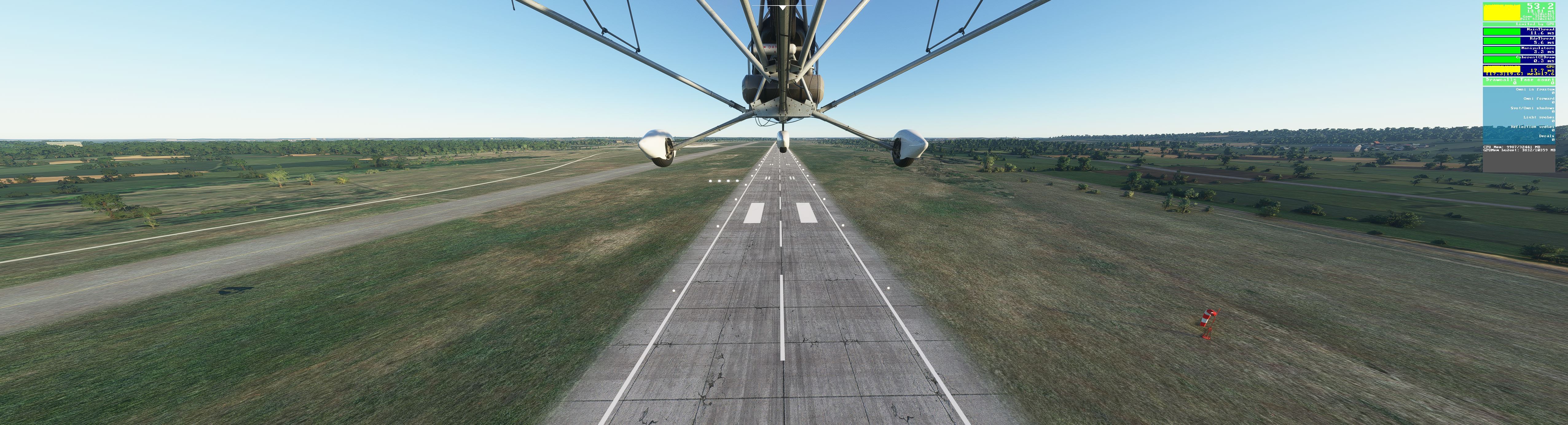
edop runway.JPG


The MS grass on the whole ground will only appear where it is clearly present in the aerial image. I will eliminate the rest
 
Last edited:
The terminal and tower have already been placed

terminal.JPG


The main apron has the corresponding original traces of use.

apron.JPG


Rain effects are also correct

edop rain.JPG


And a beautiful rainbow

Regenbogen.JPG
 
It's going pretty well. Today there is a picture of the ground and texture design. All textures are so high-resolution that you can see the inscriptions sharply even 1 m in front of them.
The ground is already completely adapted with the vegetation and as you can see in the picture below there is only grass where it belongs. All transitions are designed "smoothly". There are no hard edges between aprons, taxiways and ground.

textures.JPG
 
On the occasion of Christmas, which I hope you are spending in good health and sensibly, here are a few Christmas pictures from EDOP today.
First a daytime picture that shows that details exist everywhere.

Tag1.JPG


Now some night pictures

I am especially pleased that I have now managed to create my own taxilights, which are also displayed far enough. Unfortunately, the machine in MSFS does what it wants.

Here are the lights

Day

taxiday.JPG


Taxi Night

taxinight.JPG


And the evening shots

Picture 1

night1.JPG


Picture 2

night2.JPG


Picture 3

night3.JPG


I wish you a merry christmas

Translated with www.DeepL.com/Translator (free version)
 
Father Christmas brings the video - EDOP Schwerin MSFS

Have a good time and continue to have a Merry Christmas


The release is available between the years
 
Back
Top