• Which the release of FS2020 we see an explosition of activity on the forun and of course we are very happy to see this. But having all questions about FS2020 in one forum becomes a bit messy. So therefore we would like to ask you all to use the following guidelines when posting your questions:

    • Tag FS2020 specific questions with the MSFS2020 tag.
    • Questions about making 3D assets can be posted in the 3D asset design forum. Either post them in the subforum of the modelling tool you use or in the general forum if they are general.
    • Questions about aircraft design can be posted in the Aircraft design forum
    • Questions about airport design can be posted in the FS2020 airport design forum. Once airport development tools have been updated for FS2020 you can post tool speciifc questions in the subforums of those tools as well of course.
    • Questions about terrain design can be posted in the FS2020 terrain design forum.
    • Questions about SimConnect can be posted in the SimConnect forum.

    Any other question that is not specific to an aspect of development or tool can be posted in the General chat forum.

    By following these guidelines we make sure that the forums remain easy to read for everybody and also that the right people can find your post to answer it.

elevated bridge before the jetway

Messages
84
Country
italy
hi guys, I'm new in this forum, my name is Davide and I'm italian.
I'm using ADEX to modify the stock airport and the freeware downloaded ones to make them more realistic.
fore example in rome fiumicino (LIRF) if you look in the blue circle there is thi kind of "bridge" before the jetway.
Now the question is , is it possible to replicate this "bridge" in fsx/p3dv4?? if yes how?? (always using ADEX)
thanks.
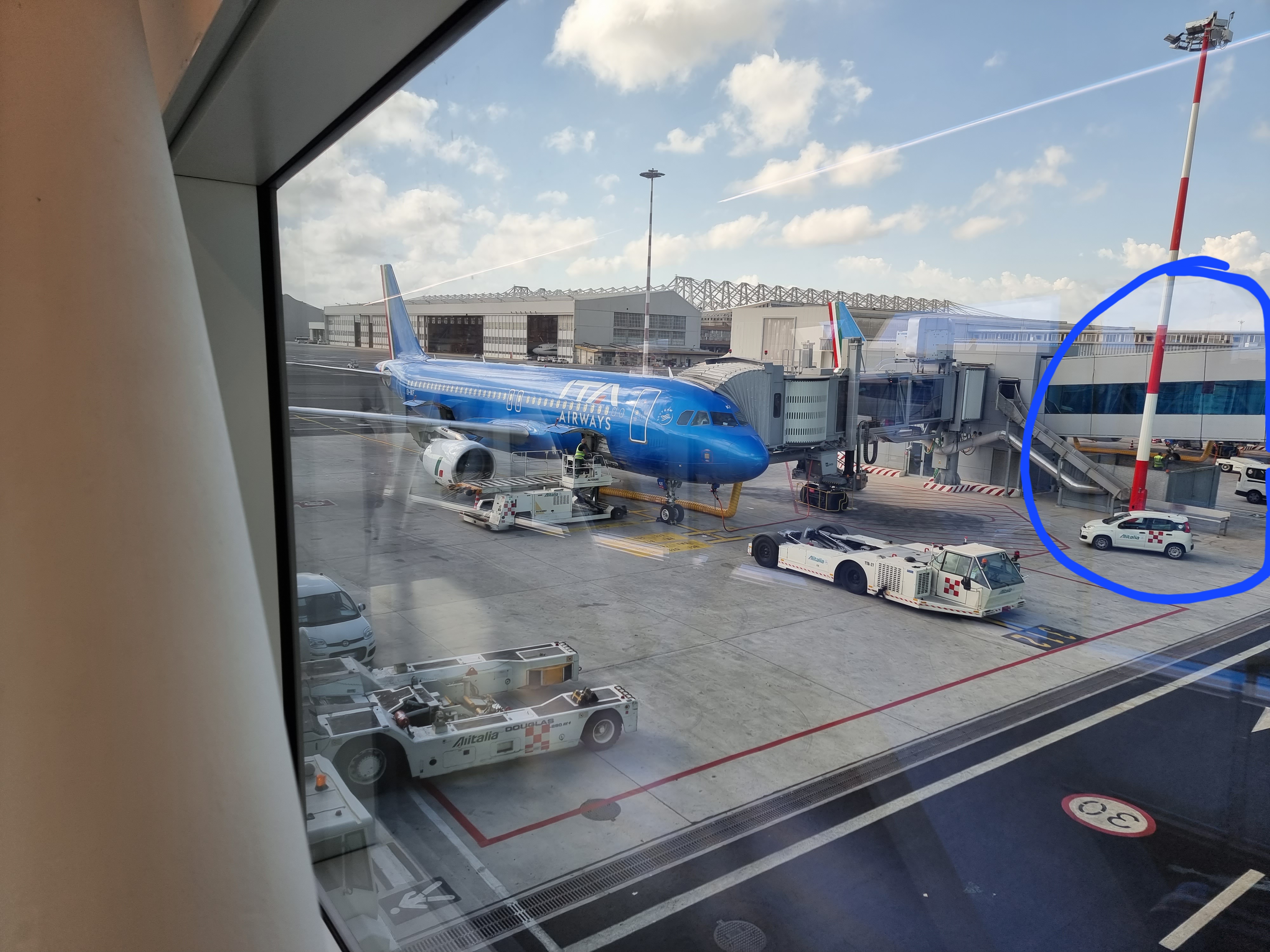
20220609_085715.jpg
 
Okay, there might be other methods to do this, but this is how I would do it.
Firstly, I am going to assume you have blender but if you don't have it you can download it here: https://www.blender.org/
  • Then, once you have installed blender create a new project.
  • Once you do this you will be greeted with this screen
  • View attachment 83036
Next hold down s and y at the same time to stretch it out.


Capture2.PNG

Hold down G and X to move the object upwards.
capture 3.PNG

Hold down R and X to rotate the object and make it look like the one in the image.
capture 4.PNG

Press TAB on your keyboard to enter edit mode.
capture 5.PNG

Hold down control and R to add a loop cut. Make sure that the number of cuts is set to 2.
capture 6.PNG


Make another loop cut by holding down control and r.
This time set the number of cuts to 3.
Capture 7.PNG

Now you have the basic out line for your model.
Now, to colour it, you need to download a colour pallet for blender.
This is where I usually get mine : https://lospec.com/palette-list.
When you are downloading, download in 32x resolution.
Then, go to the shading tab.
Capture 7.PNG

Go to add> image texture and find the palette you downloaded.
Capture 7.PNG

Connect the nodes together.
Capture 7.PNG

Go to UV editing, and go to the top right corner, and select the colour to texture. I could only use 10 images in one thread so the next section is coming up.
 

Attachments

  • Capture2.PNG
    Capture2.PNG
    307.2 KB · Views: 246
Last edited:
Capture 7.PNG

Then, scale down the blue parts of the model in the UV editor.
Capture 7.PNG

Do the same for the rest of the model.
capture 6.PNG

This is more or less finished. If you have any more questions just ask me and I will be more than happy to answer them.
Hope your project goes well!
 
View attachment 83056
Then, scale down the blue parts of the model in the UV editor. View attachment 83057
Do the same for the rest of the model.
View attachment 83058
This is more or less finished. If you have any more questions just ask me and I will be more than happy to answer them.
Hope your project goes well!
thank you so much, I get lost in uv editor, i dont uderstand how to select colors, and then how to save and in wich format to be imported in the library to be used in p3d and ADEX
 
You will need model converter x, which you can download here:https://www.scenerydesign.org/modelconverterx/
Once you have done this, export the .blend file as an obj and import in to model converter x, and convert to an MDL file. Then create a library bgl file and put the textures into the textures folder and put information about the object in the library object manager and place the object in the ADE display. And put the textures into your textures folder and put the library bgl you created into addon scenery\scenery and textures into addon scenery\texture. Hope this helps.
 
not able to do this, maybe I'm stupid or I miss something, in model converter it load a white 3d model with no texture, and when I try to export ad an mdl i get this error:
in the image number 1 you can see the white poligon with no texture and in the second image the error.
 

Attachments

  • 2.jpg
    2.jpg
    59.6 KB · Views: 203
  • 1.jpg
    1.jpg
    245.9 KB · Views: 200
Hi again:

If a 3D model is exported as a OBJ, include within the same folder as the OBJ+MTL files, all texture Materials mapped onto it.

MCX should then be able to find the mapped texture Materials, and load them onto the 3D model preview with no errors.

GaryGB
 
Last edited:
The first problem you need to figure out is - where are the textures? If the model was created in Blender then to make the textures you need to UV unwrap and then either paint or create textures using the UV map. That is what MCX is notifying you of? "where are the textures?" The 2nd error is that XToMdl.exe is wanting the Period separation and not the apostrophe. Set region settings to the United States language.

As suggested, OBJ formatted files exported from Blender do not have 2 files - They will only contain the model. (doesn't haven't textures either). The suggestion that the OBJ is experimental is also incorrect. These OBJ format types are not FS or P3D sim compatible in any way.
 
The first problem you need to figure out is - where are the textures? If the model was created in Blender then to make the textures you need to UV unwrap and then either paint or create textures using the UV map. That is what MCX is notifying you of? "where are the textures?" The 2nd error is that XToMdl.exe is wanting the Period separation and not the apostrophe. Set region settings to the United States language.

As suggested, OBJ formatted files exported from Blender do not have 2 files - They will only contain the model. (doesn't haven't textures either). The suggestion that the OBJ is experimental is also incorrect. These OBJ format types are not FS or P3D sim compatible in any way.

AFAIK, one must check a "Write Materials" check-box to export "Materials" during Blender OBJ export ...to output a *.MTL file.

OBJSettings.png


IIUC, one must still manually copy mapped texture Material files to the output folder where Blender outputs OBJ and MTL files.


Perhaps this Blender tutorial and 3.2 Manual page explains this export option in a "industry standard" OBJ exporter dialog box ?

https://cgcookie.com/posts/importing-and-exporting-game-assets

https://docs.blender.org/manual/en/latest/files/import_export/obj.html


While it seems likely the OP may already have his decimal symbol set to the North American software standard of "period", in his Italian language copy of Windows with working English installs of MCX / Blender, perhaps this explanation merits another post:

1.) In Windows Control Panel, click Region and Language applet (Region and Language dialog box opens)

2.) In the Region and Language dialog box, click {Formats} tab

3.) On {Formats} tab > click [Additional Settings] button (Customize Formats dialog box opens)

4.) In Customize Formats dialog box > {Numbers} tab > Decimal Symbol:
a.) Set the Decimal symbol to a period (.) instead of another character such as a comma (,)

b.) Click [OK] button

c.) Back on the Region and Language dialog box {Formats} tab, click [OK] button

d.) Exit Control Panel


5.) Restart Windows

GaryGB
 
Last edited:
I miss something, I don't know why in blender I see the texture and in model converter x I see a white rectangle. I'm abandoning the idea of making my own model it's too difficult...
 

Attachments

  • 1.jpg
    1.jpg
    225.2 KB · Views: 193
  • 2.jpg
    2.jpg
    259.8 KB · Views: 190
  • 3.jpg
    3.jpg
    285.6 KB · Views: 208
Back
Top