• Which the release of FS2020 we see an explosition of activity on the forun and of course we are very happy to see this. But having all questions about FS2020 in one forum becomes a bit messy. So therefore we would like to ask you all to use the following guidelines when posting your questions:

    • Tag FS2020 specific questions with the MSFS2020 tag.
    • Questions about making 3D assets can be posted in the 3D asset design forum. Either post them in the subforum of the modelling tool you use or in the general forum if they are general.
    • Questions about aircraft design can be posted in the Aircraft design forum
    • Questions about airport design can be posted in the FS2020 airport design forum. Once airport development tools have been updated for FS2020 you can post tool speciifc questions in the subforums of those tools as well of course.
    • Questions about terrain design can be posted in the FS2020 terrain design forum.
    • Questions about SimConnect can be posted in the SimConnect forum.

    Any other question that is not specific to an aspect of development or tool can be posted in the General chat forum.

    By following these guidelines we make sure that the forums remain easy to read for everybody and also that the right people can find your post to answer it.

fs9 sdk problem

Messages
15
Hi ..

I am a new member of this Community ...

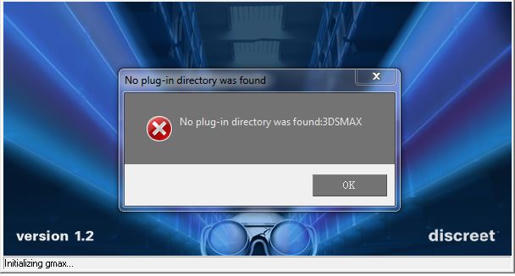
I have a problem with fs9 sdk As in the picture :

a08c9a8931f9817ac9e8e51c35b01d04cffc505e661815d8152a9df09af251c54g.jpg


can you help me How to Get rid this Message ?:confused:

noting :
the gmax can be Successfully to run , but the sdk Unable to run​
 
Last edited:
Did you copy/paste the entire ..\FSX_GmaxGamePack folder from the SDK to your ..\gmax\gamepacks folder?

C:\gmax\gamepacks\FSX_GmaxGamePack

Did you copy/paste the desktop icon file to your Desktop so you can launch GMax into the FSX design environment?
 
Thank you very much .......... ihav spent thes problem

and can runing them... but ihave a new problem :

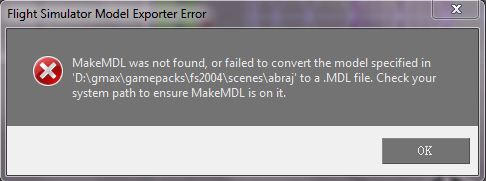
wen I have exporting the scenery files .... it was Appearing this Message :
6b284ec5f2f42fb40650384e6726859529cc30a4c1e9316762b6d6c30f9881d24g.jpg
can you help me to Get rid this Message :o​
​
 
Oh poo! I wasn't paying enough attention to your question. Forget what I wrote earlier since it was for FSX...

For FS9, it's best to set up a folder specifically for FS9 Scenery:

C:\gmax\gamepacks\fs2004_scenery\plugins

In that folder you should have:

Directory of C:\gmax\gamepacks\fs2004_scenery\plugins

Code:
11/24/2003  08:29 AM           167,984 FSModelExp.dle
01/06/2008  06:30 PM               291 MakeMDL.cfg
05/10/2004  03:19 PM         1,024,000 MakeMDL.exe

Your MakeMDL.cfg file should be:
Code:
[Settings]
LastDir=

[Options]
Debug=1
ViewLog=1
KeepErrorLog=1
Keep=1
I8=1
I=0
FullMat=1
Deffallback=1
WeldPoints=1
Optimize=0
Flatten=0
NoAnimate=0
HasReflectMap=0
HasNightMap=1
HasLightMap=0
HasDamageMap=0
NegateZ=1
NoLeftToRight=0
SwapBH=0
Vis=0
Crash=0
XML=1

You need a desktop icon to launch GMax-FS9 Scenery with this path:
Code:
C:\gmax\gmax.exe -q -i gamepacks\FS2004\gmax.ini -p gamepacks\fs2004_scenery\plugin.ini

Your plugin.ini file should have this in it:
Code:
[Directories]
Standard gmax plug-ins=StdPlugs\
Additional gmax plug-ins=plugins\
FS2004=gamepacks\FS2004_scenery\plugins\
[Help]
 
Back
Top