

FSX_KML Choose Folder problem - SOLVED
Completely new to this area - and have stumbled at first obstacle!!
Downloaded and installed FSX_KML to find that my main FSX folder is not where FSX_KML thinks it is (or should be?). I have Windows 7 and have FSX (Accel) installed on D:\... not C:\... Also, my file structure is ...\Program Files (x86)\... not ...\Program Files\...
So, I try to Choose Folder - i.e. navigate to my main FSX folder and get this:
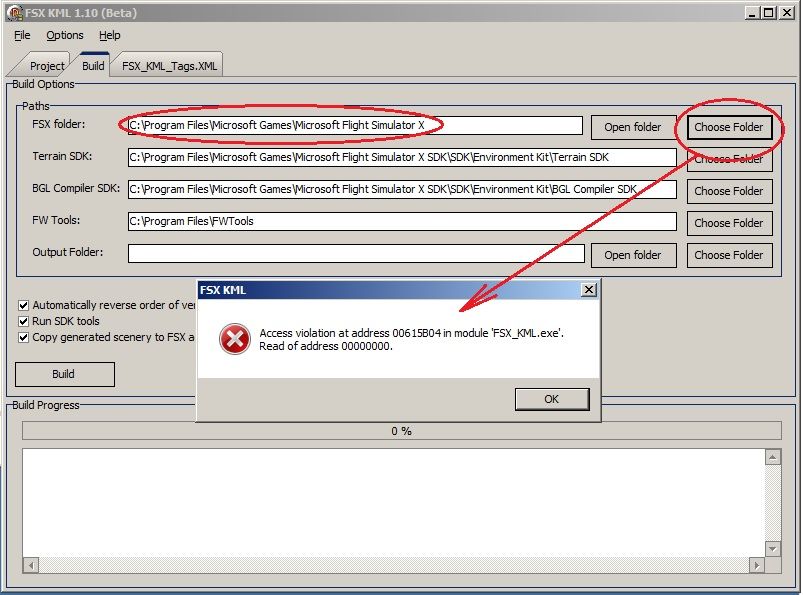
Have I missed something in installing FSX_KML? The installation went very smoothly. I can access KML files, edit and save them O.K. as far as I know, but can't proceed with any Build as the Folder pointer for FSX is wrong.
Many thanks for any suggestions - or even a pointer to other posts which I've missed.
Cheers - Dai.
EDIT... Problem Solved when I searched for "FSX_KML Windows 7 Problem" - this post has the answer:
http://www.fsdeveloper.com/forum/showthread.php?t=22739
Apologies for not searching enough!
Completely new to this area - and have stumbled at first obstacle!!
Downloaded and installed FSX_KML to find that my main FSX folder is not where FSX_KML thinks it is (or should be?). I have Windows 7 and have FSX (Accel) installed on D:\... not C:\... Also, my file structure is ...\Program Files (x86)\... not ...\Program Files\...
So, I try to Choose Folder - i.e. navigate to my main FSX folder and get this:
Have I missed something in installing FSX_KML? The installation went very smoothly. I can access KML files, edit and save them O.K. as far as I know, but can't proceed with any Build as the Folder pointer for FSX is wrong.
Many thanks for any suggestions - or even a pointer to other posts which I've missed.
Cheers - Dai.
EDIT... Problem Solved when I searched for "FSX_KML Windows 7 Problem" - this post has the answer:
http://www.fsdeveloper.com/forum/showthread.php?t=22739
Apologies for not searching enough!
Last edited:


