- Messages
- 223
- Country

Hello Arno
Any thoughts on this one?
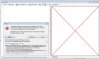
I had FXEditor working very well up until recently. Now it's suddenly started coming up with exception errors on start-up that look as though they're connected with the graphics display pane. This ends up displaying a red square with white backgound red diagonal cross and no images display.
Text details of the effects show up fine.
The exception detail I've captured is shown below:
************** Exception Text **************
System.AccessViolationException: Attempted to read or write protected memory. This is often an indication that other memory is corrupt.
at CSGL12.GL.GDI32_ChoosePixelFormat(IntPtr hdc, PIXELFORMATDESCRIPTOR& pfd)
at CSGL12.GL.InitializeOpenGL(IntPtr hwnd, IntPtr& hdc, IntPtr& hglrc)
at CSGL12.CSGL12Control.OnPaint(PaintEventArgs e)
at System.Windows.Forms.Control.PaintWithErrorHandling(PaintEventArgs e, Int16 layer, Boolean disposeEventArgs)
at System.Windows.Forms.Control.WmPaint(Message& m)
at System.Windows.Forms.Control.WndProc(Message& m)
at System.Windows.Forms.Control.ControlNativeWindow.WndProc(Message& m)
at System.Windows.Forms.NativeWindow.Callback(IntPtr hWnd, Int32 msg, IntPtr wparam, IntPtr lparam)
************** Loaded Assemblies **************
mscorlib
Assembly Version: 2.0.0.0
Win32 Version: 2.0.50727.5466 (Win7SP1GDR.050727-5400)
CodeBase: file:///C:/Windows/Microsoft.NET/Framework64/v2.0.50727/mscorlib.dll
----------------------------------------
FXEditorLaunch
Assembly Version: 1.0.0.0
Win32 Version: 1.0.0.0
CodeBase: file:///C:/Program%20Files%20(x86)/Arnos%20Utilities/Latest%20Development%20Releases/FXEditor.exe
----------------------------------------
System.Windows.Forms
Assembly Version: 2.0.0.0
Win32 Version: 2.0.50727.5468 (Win7SP1GDR.050727-5400)
CodeBase: file:///C:/Windows/assembly/GAC_MSIL/System.Windows.Forms/2.0.0.0__b77a5c561934e089/System.Windows.Forms.dll
----------------------------------------
System
Assembly Version: 2.0.0.0
Win32 Version: 2.0.50727.5467 (Win7SP1GDR.050727-5400)
CodeBase: file:///C:/Windows/assembly/GAC_MSIL/System/2.0.0.0__b77a5c561934e089/System.dll
----------------------------------------
System.Drawing
Assembly Version: 2.0.0.0
Win32 Version: 2.0.50727.5467 (Win7SP1GDR.050727-5400)
CodeBase: file:///C:/Windows/assembly/GAC_MSIL/System.Drawing/2.0.0.0__b03f5f7f11d50a3a/System.Drawing.dll
----------------------------------------
ASToFra.FXEditor
Assembly Version: 1.0.0.0
Win32 Version: 1.0.0.0
CodeBase: file:///C:/Program%20Files%20(x86)/Arnos%20Utilities/Latest%20Development%20Releases/ASToFra.FXEditor.DLL
----------------------------------------
ASToFra.Interfaces
Assembly Version: 1.0.0.0
Win32 Version: 1.4.0.0
CodeBase: file:///C:/Program%20Files%20(x86)/Arnos%20Utilities/Latest%20Development%20Releases/ASToFra.Interfaces.DLL
----------------------------------------
ASToFra.ObjectRenderer
Assembly Version: 1.0.0.0
Win32 Version: 1.4.0.0
CodeBase: file:///C:/Program%20Files%20(x86)/Arnos%20Utilities/Latest%20Development%20Releases/ASToFra.ObjectRenderer.DLL
----------------------------------------
DigitalRune.Windows.TextEditor
Assembly Version: 1.3.0.0
Win32 Version: 1.3.0.0
CodeBase: file:///C:/Program%20Files%20(x86)/Arnos%20Utilities/Latest%20Development%20Releases/DigitalRune.Windows.TextEditor.DLL
----------------------------------------
ASToFra.ObjectModel3D
Assembly Version: 1.0.0.0
Win32 Version: 1.4.0.0
CodeBase: file:///C:/Program%20Files%20(x86)/Arnos%20Utilities/Latest%20Development%20Releases/ASToFra.ObjectModel3D.DLL
----------------------------------------
System.Xml
Assembly Version: 2.0.0.0
Win32 Version: 2.0.50727.5420 (Win7SP1.050727-5400)
CodeBase: file:///C:/Windows/assembly/GAC_MSIL/System.Xml/2.0.0.0__b77a5c561934e089/System.Xml.dll
----------------------------------------
CSGL12DLL
Assembly Version: 12.0.0.0
Win32 Version: 1.0.0.0
CodeBase: file:///C:/Program%20Files%20(x86)/Arnos%20Utilities/Latest%20Development%20Releases/CSGL12DLL.DLL
----------------------------------------
ASToFra.ParticleEffects
Assembly Version: 1.0.0.0
Win32 Version: 1.4.0.0
CodeBase: file:///C:/Program%20Files%20(x86)/Arnos%20Utilities/Latest%20Development%20Releases/ASToFra.ParticleEffects.DLL
----------------------------------------
System.Configuration
Assembly Version: 2.0.0.0
Win32 Version: 2.0.50727.5420 (Win7SP1.050727-5400)
CodeBase: file:///C:/Windows/assembly/GAC_MSIL/System.Configuration/2.0.0.0__b03f5f7f11d50a3a/System.Configuration.dll
----------------------------------------
ASToFra.Utils
Assembly Version: 1.0.0.0
Win32 Version: 1.4.0.0
CodeBase: file:///C:/Program%20Files%20(x86)/Arnos%20Utilities/Latest%20Development%20Releases/ASToFra.Utils.DLL
----------------------------------------
Thanks, ian.
Any thoughts on this one?
I had FXEditor working very well up until recently. Now it's suddenly started coming up with exception errors on start-up that look as though they're connected with the graphics display pane. This ends up displaying a red square with white backgound red diagonal cross and no images display.
Text details of the effects show up fine.
The exception detail I've captured is shown below:
************** Exception Text **************
System.AccessViolationException: Attempted to read or write protected memory. This is often an indication that other memory is corrupt.
at CSGL12.GL.GDI32_ChoosePixelFormat(IntPtr hdc, PIXELFORMATDESCRIPTOR& pfd)
at CSGL12.GL.InitializeOpenGL(IntPtr hwnd, IntPtr& hdc, IntPtr& hglrc)
at CSGL12.CSGL12Control.OnPaint(PaintEventArgs e)
at System.Windows.Forms.Control.PaintWithErrorHandling(PaintEventArgs e, Int16 layer, Boolean disposeEventArgs)
at System.Windows.Forms.Control.WmPaint(Message& m)
at System.Windows.Forms.Control.WndProc(Message& m)
at System.Windows.Forms.Control.ControlNativeWindow.WndProc(Message& m)
at System.Windows.Forms.NativeWindow.Callback(IntPtr hWnd, Int32 msg, IntPtr wparam, IntPtr lparam)
************** Loaded Assemblies **************
mscorlib
Assembly Version: 2.0.0.0
Win32 Version: 2.0.50727.5466 (Win7SP1GDR.050727-5400)
CodeBase: file:///C:/Windows/Microsoft.NET/Framework64/v2.0.50727/mscorlib.dll
----------------------------------------
FXEditorLaunch
Assembly Version: 1.0.0.0
Win32 Version: 1.0.0.0
CodeBase: file:///C:/Program%20Files%20(x86)/Arnos%20Utilities/Latest%20Development%20Releases/FXEditor.exe
----------------------------------------
System.Windows.Forms
Assembly Version: 2.0.0.0
Win32 Version: 2.0.50727.5468 (Win7SP1GDR.050727-5400)
CodeBase: file:///C:/Windows/assembly/GAC_MSIL/System.Windows.Forms/2.0.0.0__b77a5c561934e089/System.Windows.Forms.dll
----------------------------------------
System
Assembly Version: 2.0.0.0
Win32 Version: 2.0.50727.5467 (Win7SP1GDR.050727-5400)
CodeBase: file:///C:/Windows/assembly/GAC_MSIL/System/2.0.0.0__b77a5c561934e089/System.dll
----------------------------------------
System.Drawing
Assembly Version: 2.0.0.0
Win32 Version: 2.0.50727.5467 (Win7SP1GDR.050727-5400)
CodeBase: file:///C:/Windows/assembly/GAC_MSIL/System.Drawing/2.0.0.0__b03f5f7f11d50a3a/System.Drawing.dll
----------------------------------------
ASToFra.FXEditor
Assembly Version: 1.0.0.0
Win32 Version: 1.0.0.0
CodeBase: file:///C:/Program%20Files%20(x86)/Arnos%20Utilities/Latest%20Development%20Releases/ASToFra.FXEditor.DLL
----------------------------------------
ASToFra.Interfaces
Assembly Version: 1.0.0.0
Win32 Version: 1.4.0.0
CodeBase: file:///C:/Program%20Files%20(x86)/Arnos%20Utilities/Latest%20Development%20Releases/ASToFra.Interfaces.DLL
----------------------------------------
ASToFra.ObjectRenderer
Assembly Version: 1.0.0.0
Win32 Version: 1.4.0.0
CodeBase: file:///C:/Program%20Files%20(x86)/Arnos%20Utilities/Latest%20Development%20Releases/ASToFra.ObjectRenderer.DLL
----------------------------------------
DigitalRune.Windows.TextEditor
Assembly Version: 1.3.0.0
Win32 Version: 1.3.0.0
CodeBase: file:///C:/Program%20Files%20(x86)/Arnos%20Utilities/Latest%20Development%20Releases/DigitalRune.Windows.TextEditor.DLL
----------------------------------------
ASToFra.ObjectModel3D
Assembly Version: 1.0.0.0
Win32 Version: 1.4.0.0
CodeBase: file:///C:/Program%20Files%20(x86)/Arnos%20Utilities/Latest%20Development%20Releases/ASToFra.ObjectModel3D.DLL
----------------------------------------
System.Xml
Assembly Version: 2.0.0.0
Win32 Version: 2.0.50727.5420 (Win7SP1.050727-5400)
CodeBase: file:///C:/Windows/assembly/GAC_MSIL/System.Xml/2.0.0.0__b77a5c561934e089/System.Xml.dll
----------------------------------------
CSGL12DLL
Assembly Version: 12.0.0.0
Win32 Version: 1.0.0.0
CodeBase: file:///C:/Program%20Files%20(x86)/Arnos%20Utilities/Latest%20Development%20Releases/CSGL12DLL.DLL
----------------------------------------
ASToFra.ParticleEffects
Assembly Version: 1.0.0.0
Win32 Version: 1.4.0.0
CodeBase: file:///C:/Program%20Files%20(x86)/Arnos%20Utilities/Latest%20Development%20Releases/ASToFra.ParticleEffects.DLL
----------------------------------------
System.Configuration
Assembly Version: 2.0.0.0
Win32 Version: 2.0.50727.5420 (Win7SP1.050727-5400)
CodeBase: file:///C:/Windows/assembly/GAC_MSIL/System.Configuration/2.0.0.0__b03f5f7f11d50a3a/System.Configuration.dll
----------------------------------------
ASToFra.Utils
Assembly Version: 1.0.0.0
Win32 Version: 1.4.0.0
CodeBase: file:///C:/Program%20Files%20(x86)/Arnos%20Utilities/Latest%20Development%20Releases/ASToFra.Utils.DLL
----------------------------------------
Thanks, ian.