• Which the release of FS2020 we see an explosition of activity on the forun and of course we are very happy to see this. But having all questions about FS2020 in one forum becomes a bit messy. So therefore we would like to ask you all to use the following guidelines when posting your questions:

    • Tag FS2020 specific questions with the MSFS2020 tag.
    • Questions about making 3D assets can be posted in the 3D asset design forum. Either post them in the subforum of the modelling tool you use or in the general forum if they are general.
    • Questions about aircraft design can be posted in the Aircraft design forum
    • Questions about airport design can be posted in the FS2020 airport design forum. Once airport development tools have been updated for FS2020 you can post tool speciifc questions in the subforums of those tools as well of course.
    • Questions about terrain design can be posted in the FS2020 terrain design forum.
    • Questions about SimConnect can be posted in the SimConnect forum.

    Any other question that is not specific to an aspect of development or tool can be posted in the General chat forum.

    By following these guidelines we make sure that the forums remain easy to read for everybody and also that the right people can find your post to answer it.

MSFS20 Generate randomly truck trailers and truck itself on big parking (logistic)

Messages
43
Country
france
Hi all,
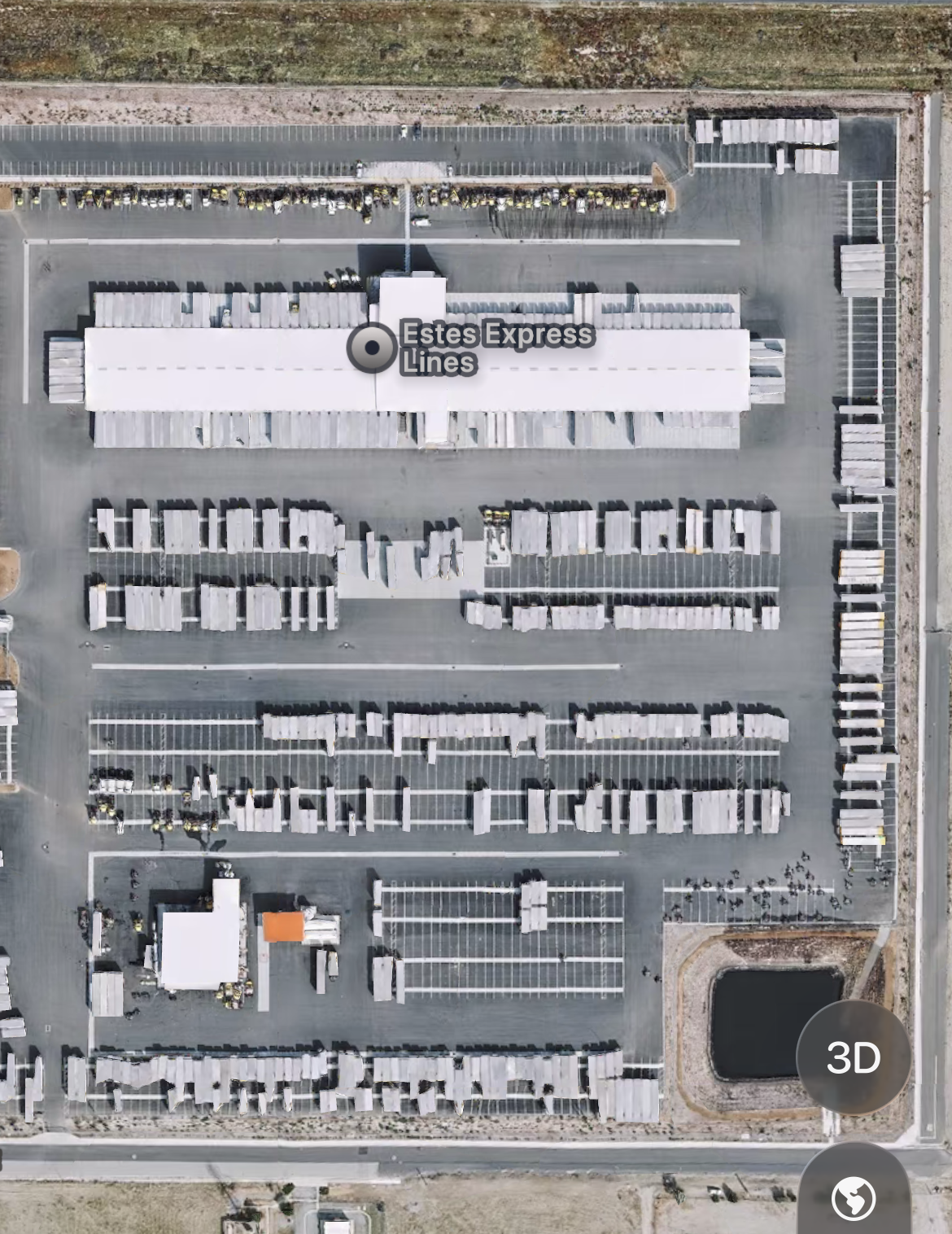
I want to populate a logistic warehouse parking with trailers and trucks. Estes Express Lines, just close to Banning, CA (KBGN). First, it could be filled with trafic object but I don't know how to enhance the vector placement feature to permit multiple object (randomly selected) and a slight variation in x,y instead of just the size. What is the best solution if there's any ? ;)

20251217-152843448-i-OS.png

20251217_152752058_iOS.png
 
I would place them manually with the existing trucks in the sim.
Vector placement is a good idea as well but Im not sure how the offset works there.
 
Placing manually is exactly what I want to avoid ;) but thanks ;)
As far as I know Vector Placement has zero parameter to vary (ultimately randomly) the position + angle, and the object (ultimately among 2 or 3).
There're object ready to use for cars (7, 16, packed, rental) but nothing for this specific usage... as far as I know.
 
MSFS VectorPlacement currently has only a parameter to randomly scale model size that may be configured.

https://docs.flightsimulator.com/ms...ry_Editor/Objects/VectorPlacement_Objects.htm


Unless you use AI Traffic or Living World 3D models for animation of a few Tractor-Trailer 3D models, you could use a FS2Kx FS utility called FenceBuilder Pro to randomly orient / position / scale the 3D model placement, and convert the FS2Kx XML into MSFS airport XML code.


Interesting challenge; too many individual 3D models that close to a RWY may still impact run time performance. ;)


One can also make all 3D models as (1) static object by extruding Rectangular Faces traced onto aerial imagery in Sketchup.


Otherwise, Sketchup Array feature can place Grouped / Component objects at intervals, and then manually adjust them.


Estes seems to have 2 sizes of trailers and tractor cabs, so IMHO, it may be easier to place default objects manually via MSFS SDK GUI.


GaryGB
 
Last edited:
Back
Top