• Which the release of FS2020 we see an explosition of activity on the forun and of course we are very happy to see this. But having all questions about FS2020 in one forum becomes a bit messy. So therefore we would like to ask you all to use the following guidelines when posting your questions:

    • Tag FS2020 specific questions with the MSFS2020 tag.
    • Questions about making 3D assets can be posted in the 3D asset design forum. Either post them in the subforum of the modelling tool you use or in the general forum if they are general.
    • Questions about aircraft design can be posted in the Aircraft design forum
    • Questions about airport design can be posted in the FS2020 airport design forum. Once airport development tools have been updated for FS2020 you can post tool speciifc questions in the subforums of those tools as well of course.
    • Questions about terrain design can be posted in the FS2020 terrain design forum.
    • Questions about SimConnect can be posted in the SimConnect forum.

    Any other question that is not specific to an aspect of development or tool can be posted in the General chat forum.

    By following these guidelines we make sure that the forums remain easy to read for everybody and also that the right people can find your post to answer it.

Ground Poly using Sketchup

Messages
22
Country
philippines
Hi

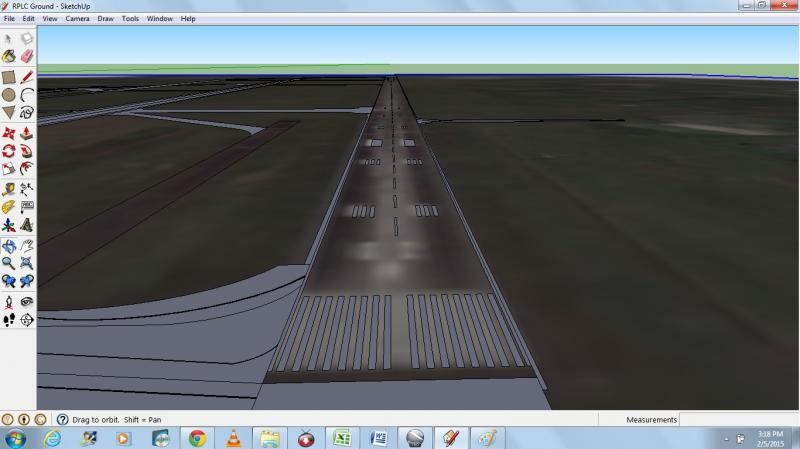
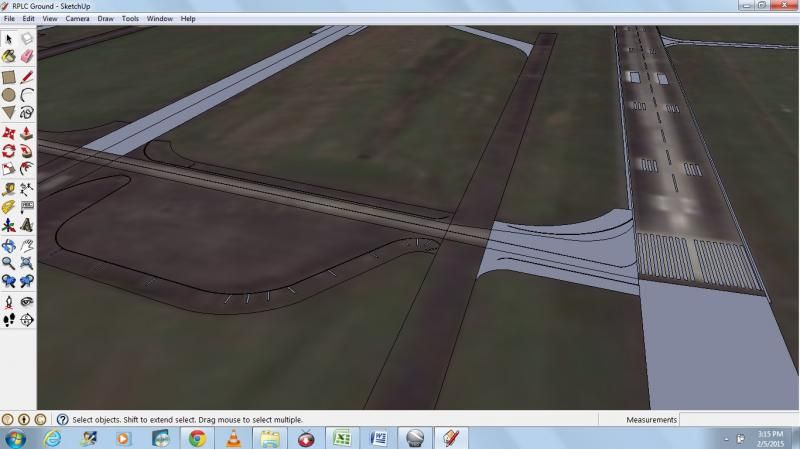
I am now working on Clark International Airport (RPLC) and Laguindingan Airport (RPMY) using Sketchup for the taxiway, ruwnay, taxiway markings, apron markings and runway markings. Then I will convert and import to gmax for adding textures..

Any advice as this is my first attempt to create a ground poly using sketchup? On my previous airports I made, RPMY/Laguindingan Airport Version 1 and RPMO/Ozamiz Airport, I use sketchup for creating buildings and terminals and the rest(runway,taxiway) using ADE

Here is my sample of my initial work of Clark Airport


Laguindingan Airport Version 2
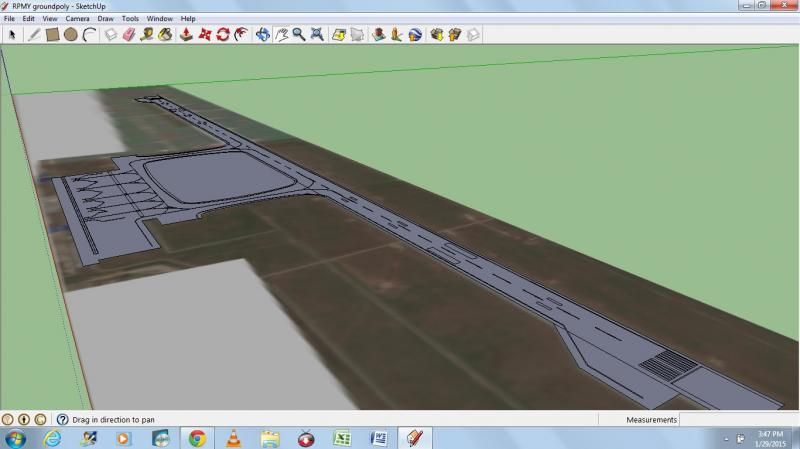
 
Here is the latest work I have done so far


I hope this is a hitting 2 birds with one stone. What I'm planning to do once it is done is to have it separated - 1 ground and the other the markings of the taxiway, apron and runway. I will convert them from .dae to .3ds to use for gmax in adding textures. The purpose of this is the layering order.
 
I will convert them from .dae to .3ds to use for gmax in adding textures. The purpose of this is the layering order.
Just can you clarify me as I think I'm dumb in this..
How come you are hitting 2 birds with the same stone at a time if you are using 2 editors already ? Why not to assign textures in one you are working with ?
Another thing that I didn't get is your purpose of layering order with Gmax. Did I miss something working with Sketchup and MAX ?
 
Just can you clarify me as I think I'm dumb in this..
How come you are hitting 2 birds with the same stone at a time if you are using 2 editors already ? Why not to assign textures in one you are working with ?
Another thing that I didn't get is your purpose of layering order with Gmax. Did I miss something working with Sketchup and MAX ?

ah..

I am making the ground poly and runway/taxiway/apron markings. Once I'm done, I will save 2 separate files one for the ground poly and the other for the markings. The ground poly file, I will remove all the markings. What is left will be the ground poly itself to place asphalt and concrete textures using gmax. While the second file, markings, i will remove the ground poly. What will be remaining is just the markings only then using gmax, i will place textures like white, yellow etc.

I'm following a similar idea from iblueyonder.com.(http://iblueyonder.com/wp-content/uploads/iby_ground_poly_tutorial.pdf) by bill womack.

To be able to use my objects from sketchup to gmax, I use ModelconverterX. Converting .dae file to .3ds then import it in gmax.
 
Yes, I know Bill's Tutorial, this is exactly that what im doing now. I'm trying to understand why you need such a complicated separation and conversion if this everything is possible to do in one and as you said catch 2 rabbits at the same time.. I just cannot imagine what I would do in your case as I have more than 15 layers due to everlasting works in real life, hundreds of surface colours, new and old surfacing..
But thanks for sharing your workflow, at least I know how other people are doing this..
Life is interesting thing.. :)
 
Yes, I know Bill's Tutorial, this is exactly that what im doing now. I'm trying to understand why you need such a complicated separation and conversion if this everything is possible to do in one and as you said catch 2 rabbits at the same time.. I just cannot imagine what I would do in your case as I have more than 15 layers due to everlasting works in real life, hundreds of surface colours, new and old surfacing..
But thanks for sharing your workflow, at least I know how other people are doing this..
Life is interesting thing.. :)

thanks for your input :)

yes it is crazy to do if its 15 layers but mine will be just 2. :)
 
Back
Top