• Which the release of FS2020 we see an explosition of activity on the forun and of course we are very happy to see this. But having all questions about FS2020 in one forum becomes a bit messy. So therefore we would like to ask you all to use the following guidelines when posting your questions:

    • Tag FS2020 specific questions with the MSFS2020 tag.
    • Questions about making 3D assets can be posted in the 3D asset design forum. Either post them in the subforum of the modelling tool you use or in the general forum if they are general.
    • Questions about aircraft design can be posted in the Aircraft design forum
    • Questions about airport design can be posted in the FS2020 airport design forum. Once airport development tools have been updated for FS2020 you can post tool speciifc questions in the subforums of those tools as well of course.
    • Questions about terrain design can be posted in the FS2020 terrain design forum.
    • Questions about SimConnect can be posted in the SimConnect forum.

    Any other question that is not specific to an aspect of development or tool can be posted in the General chat forum.

    By following these guidelines we make sure that the forums remain easy to read for everybody and also that the right people can find your post to answer it.

GUID selection context menu

arno

Administrator
Staff member
FSDevConf team
Resource contributor
Messages
34,548
Country
netherlands
In scenProc the code completion will help you to select the right GUIDs for your vegetation or buidlings. But if you are not sure what the name of the class is or if you want to add multiple guids for random placement, that’s not always the easiest way.

So I have now added a context menu to these GUID attributes and selecting it will give you a GUI like shown below where you can easily select the GUID you want from the list. Just check the checkbox and the GUID will be added to your script.
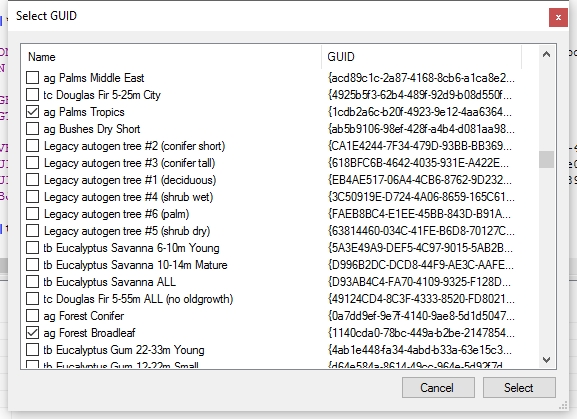
Image2016-10-15-2200.33.990.jpg


Continue reading...
 
Arno
I may have done this wrong again but the latest version download I have does not appear to be different and apparently I can't get a context menu for GUID by right click (it's still coming up with r74b5f9c dated 10/6).

Also as before, the version I ran prior to installing the latest did not alert that there's a new version when loading.

ian
 
Hi Ian,

No, it was not you. For some reason the nightly build didn't run (again). This time the repository with the code could not be reached. So maybe my internet was down over the night or so. I have triggered it now.
 
Thank you, Arno! I am still having this weird phenomenon of the application not detecting a new version available when launching. Any thoughts?
ian
 
Hi Ian,

Did you double check in the options that the option to check for updates is not disabled? I got a notification recently on my own PC (which is rare, since I usually have the latest version), so I'm sure it should work. I also just checked the server side file and it mentions the right date for the last release.
 
I do seem to have the option checked, Arno, so I'm not exactly sure what's going on. I've attached a screengrab showing options dialog after running past version.
ian
 

Attachments

  • scenProc Options.JPG
    scenProc Options.JPG
    87.6 KB · Views: 434
Update - this looks like a Windows 10 issue related to how notifications are managed by the OS. On another machine the update notice works fine and comes up as a notification as controlled by the OS System Notifications and Actions settings (Notifications from Apps setting). In Windows 10, when turned on the notification appears bottom right of the screen.
I've added a screengrab...
Hope that helps. I knew I was doing something wrong somewhere!! :rotfl:
ian
 

Attachments

  • Notifications Settings.JPG
    Notifications Settings.JPG
    100.8 KB · Views: 353
Ah, good to know there is an option in Windows 10 to hide these things.
 
Back
Top