

- Messages
- 4
- Country

Hello FSDeveloper community,
I hope you are all doing well. I am currently trying to customize my Drzewiecki Design's Tallinn Airport scenery. I'm having some difficulty changing the glass transparency and color for the airport's buildings, and I was wondering if anyone here could provide me with some guidance or tips on how to achieve this.
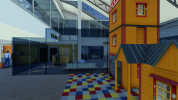
I've tried to change the glass texture color in Photoshop but haven't been able to achieve the desired results (I think it's because the MSFS glass is not texture, but number values). The default glass at Tallinn Airport appears to be too blue and not very transparent, and I would like to make it more realistic by adjusting its transparency and possibly its color.
If anyone has experience with modifying scenery in this way or knows of any resources, tutorials, or tools that could help me with this task, I would greatly appreciate your input. Your expertise would be invaluable in helping me enhance my simulator experience.
Thank you in advance for your assistance. I look forward to hearing from the experienced members of this community.
Best regards,
P_L_A_Y


I hope you are all doing well. I am currently trying to customize my Drzewiecki Design's Tallinn Airport scenery. I'm having some difficulty changing the glass transparency and color for the airport's buildings, and I was wondering if anyone here could provide me with some guidance or tips on how to achieve this.
I've tried to change the glass texture color in Photoshop but haven't been able to achieve the desired results (I think it's because the MSFS glass is not texture, but number values). The default glass at Tallinn Airport appears to be too blue and not very transparent, and I would like to make it more realistic by adjusting its transparency and possibly its color.
If anyone has experience with modifying scenery in this way or knows of any resources, tutorials, or tools that could help me with this task, I would greatly appreciate your input. Your expertise would be invaluable in helping me enhance my simulator experience.
Thank you in advance for your assistance. I look forward to hearing from the experienced members of this community.
Best regards,
P_L_A_Y


