• Which the release of FS2020 we see an explosition of activity on the forun and of course we are very happy to see this. But having all questions about FS2020 in one forum becomes a bit messy. So therefore we would like to ask you all to use the following guidelines when posting your questions:

    • Tag FS2020 specific questions with the MSFS2020 tag.
    • Questions about making 3D assets can be posted in the 3D asset design forum. Either post them in the subforum of the modelling tool you use or in the general forum if they are general.
    • Questions about aircraft design can be posted in the Aircraft design forum
    • Questions about airport design can be posted in the FS2020 airport design forum. Once airport development tools have been updated for FS2020 you can post tool speciifc questions in the subforums of those tools as well of course.
    • Questions about terrain design can be posted in the FS2020 terrain design forum.
    • Questions about SimConnect can be posted in the SimConnect forum.

    Any other question that is not specific to an aspect of development or tool can be posted in the General chat forum.

    By following these guidelines we make sure that the forums remain easy to read for everybody and also that the right people can find your post to answer it.

MSFS20 How is everyone creating NORMAL type textures?

Messages
1,040
Country
ca-ontario
Hi everyone!

I was wondering how is everyone creating NORMAL type textures... as in, converting them from grayscale heightmap to the correct format for MSFS.

Currently, I am using an NVidia plug-in which works only on a 10 or so year old PhotoShop, and not on newer versions of PhotoShop. That's the only reason I still keep that version, and it is on my "backup" computer, which is kind of annoying, because every time I need to work on normal textures, I have to switch to another computer.
 
I think Materialize is a freeware solution for PBR and texture conversion. There's some forum activity here about it.
 
Since you're using Max, why don't you use it's build in render to texture or bake to texture functionality? I mean, if you have a height map allready it's easy to drop it into the bump map slot of a physics material for instance and do the r2t thingy.
Just make sure to dissable gamma correction for your render output.
 
Hi everyone!

I was wondering how is everyone creating NORMAL type textures... as in, converting them from grayscale heightmap to the correct format for MSFS.

Currently, I am using an NVidia plug-in which works only on a 10 or so year old PhotoShop, and not on newer versions of PhotoShop. That's the only reason I still keep that version, and it is on my "backup" computer, which is kind of annoying, because every time I need to work on normal textures, I have to switch to another computer.
Hi Misho.
I know the Nvidia plugin, I used it before, but you don't need it anymore. Photoshop has its own plugin:
photoshop_normalmap_menu.jpg


photoshop_normalmap.jpg


Otherwise, as Dick mentioned, Materialize is a free alternative. But remember to reverse the height if necessary so that it becomes a DirectX compliant normal map. I know that you can create a normal map in 3D Studio Max. But nobody has shown how to do it exactly.
 
Since you're using Max, why don't you use it's build in render to texture or bake to texture functionality? I mean, if you have a height map allready it's easy to drop it into the bump map slot of a physics material for instance and do the r2t thingy.
Just make sure to dissable gamma correction for your render output.
Thanks, ah yes, but I don't need normals from 3D models, but for repeating tile materials, like metal, wood, bricks, things like that.
 
Hi Misho.
I know the Nvidia plugin, I used it before, but you don't need it anymore. Photoshop has its own plugin:View attachment 93810

View attachment 93809

Otherwise, as Dick mentioned, Materialize is a free alternative. But remember to reverse the height if necessary so that it becomes a DirectX compliant normal map. I know that you can create a normal map in 3D Studio Max. But nobody has shown how to do it exactly.
Oh wow, how did I miss that! I looked over it briefly and it seems it does everything I need! Thanks!! One question - was that normal map created from the Albedo one (your first screenshot)? Or, was it rendered from a 3D model?
 
Oh wow, how did I miss that! I looked over it briefly and it seems it does everything I need! Thanks!! One question - was that normal map created from the Albedo one (your first screenshot)? Or, was it rendered from a 3D model?
Yes, that's the albedo texture, you can see it in the first picture. Just apply the filter and boom, the normal map is ready. But I would still like to know how to create a normal map in 3dsm, that would save you a step.
 
You have also a simple software named "NormalMap Generator" which can create your NORMAL map using a simple diffuse or albedo texture.
This software is freeware & open-source (Windows + Linux) and you have enought parameters (as a batch mode) to create a DirectX NORMAL or a inverted NORMAL for others games.
No installation needed, just an executable to store on your disk.

The link: https://github.com/Theverat/NormalmapGenerator

tabs_combined.jpg


In the "Assets" section of this link (https://github.com/Theverat/NormalmapGenerator/releases) you have a modified version which has a real-time 3D viewer (pre-released).

PS : Thank you, I just realize that my version is not up-to-date !
 
Last edited:
...But I would still like to know how to create a normal map in 3dsm, that would save you a step.
That's fairly easy.
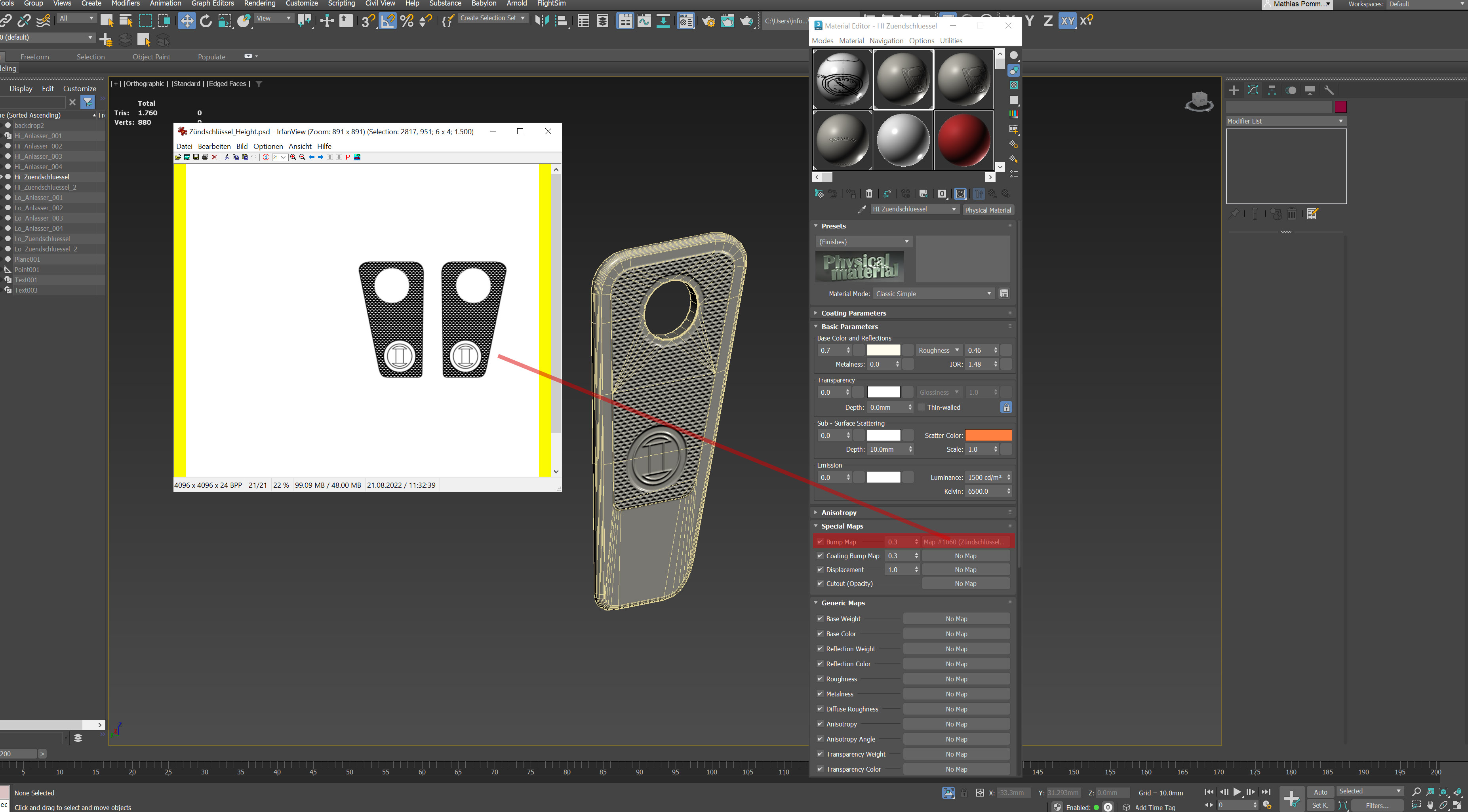
Here you see a readily prepared and unwrapped object with a black/white height map dropped into the bump map slot:

r2t_self_1.jpg


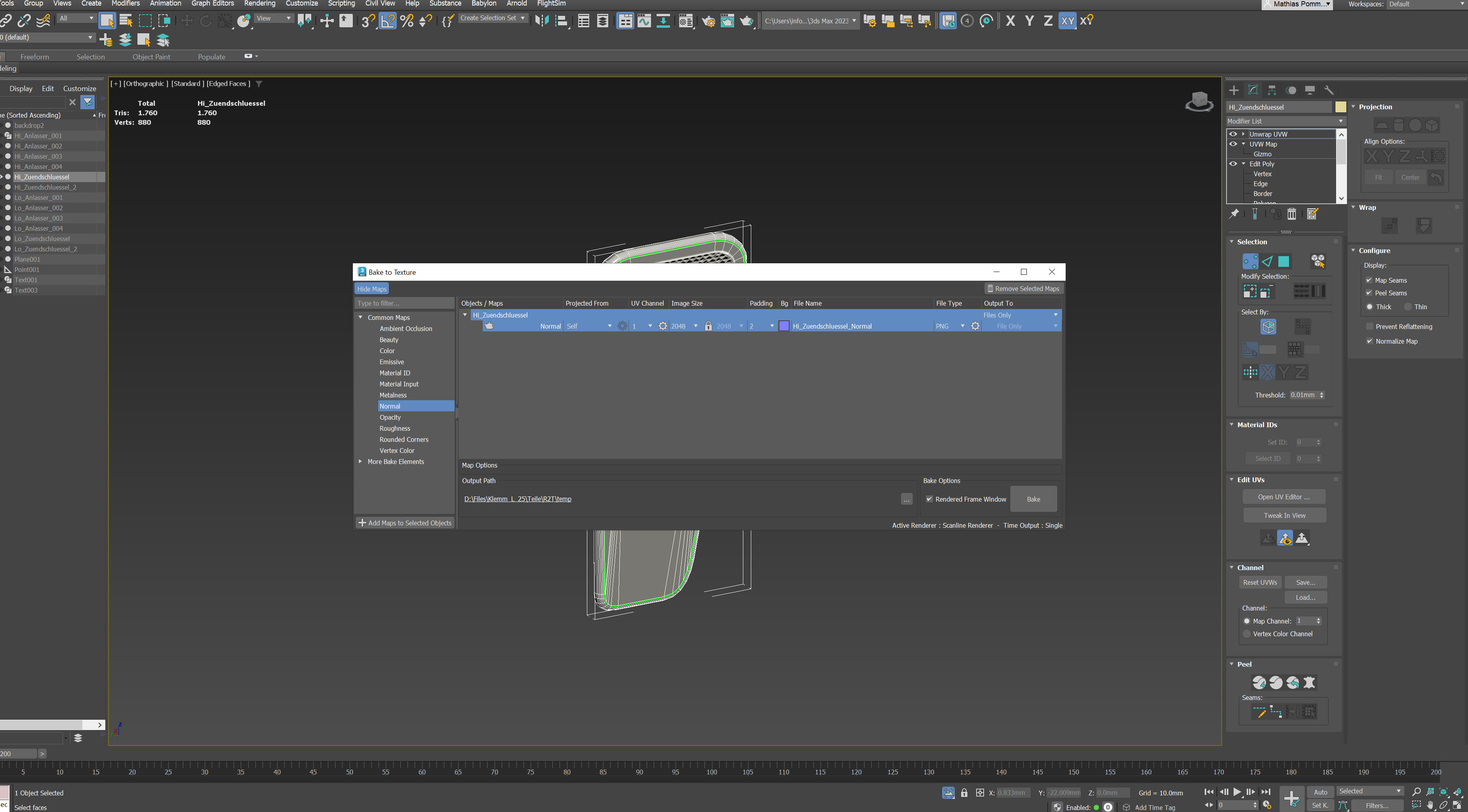
With the object selected go to "Rendering/Bake To Texture" and make your settings, ie drop the normal map from the left to the right window, keep "projected from" to "self", select resolution, place to store etc pp and click "Bake". That's it.

r2t_self_2.jpg
 
Last edited:
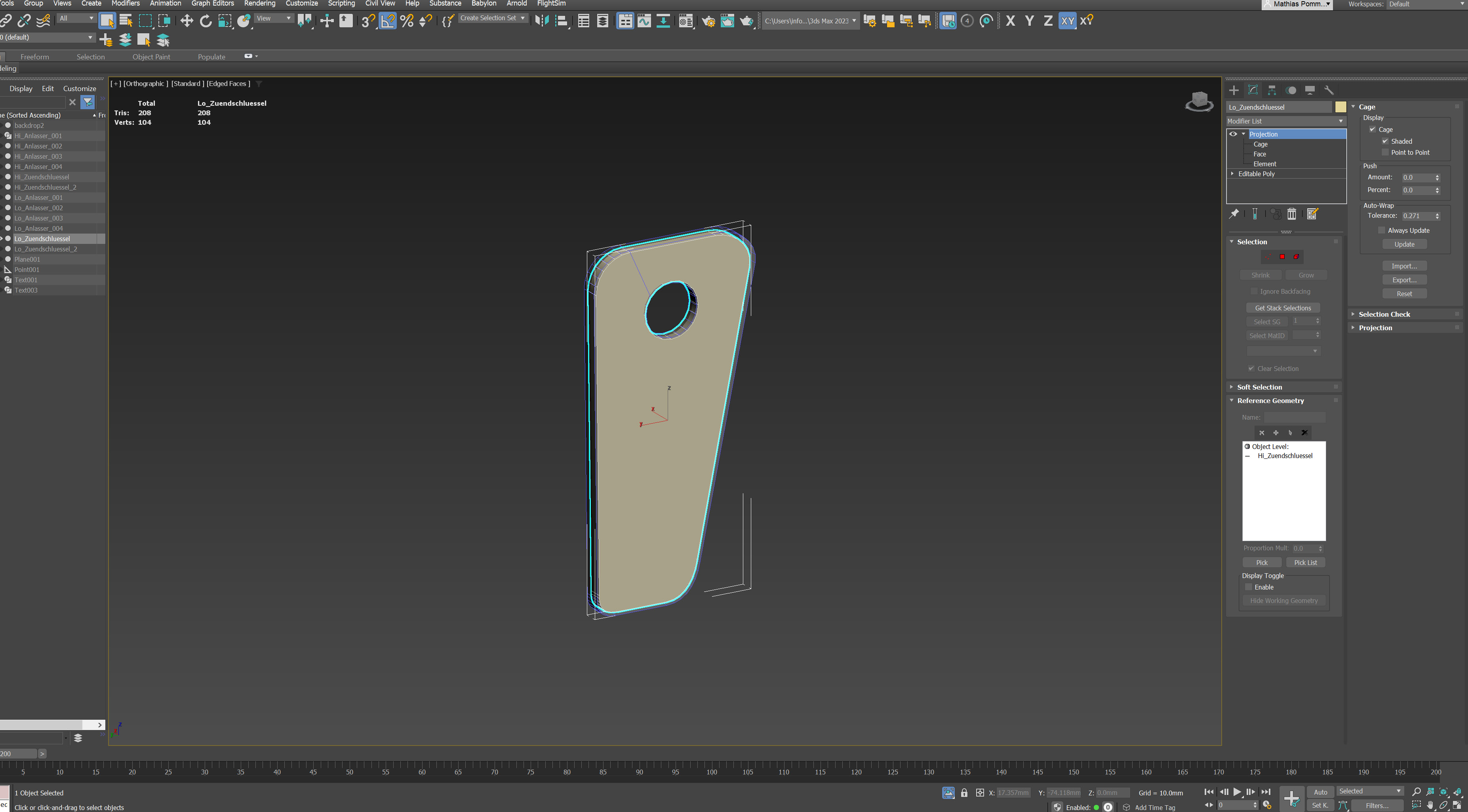
Now we would usually want to project the whole shadderack not onto itself but on a low poly mesh:

r2t_hi_lo_1.jpg
Hi and low poly mesh need to share the same space obviously.
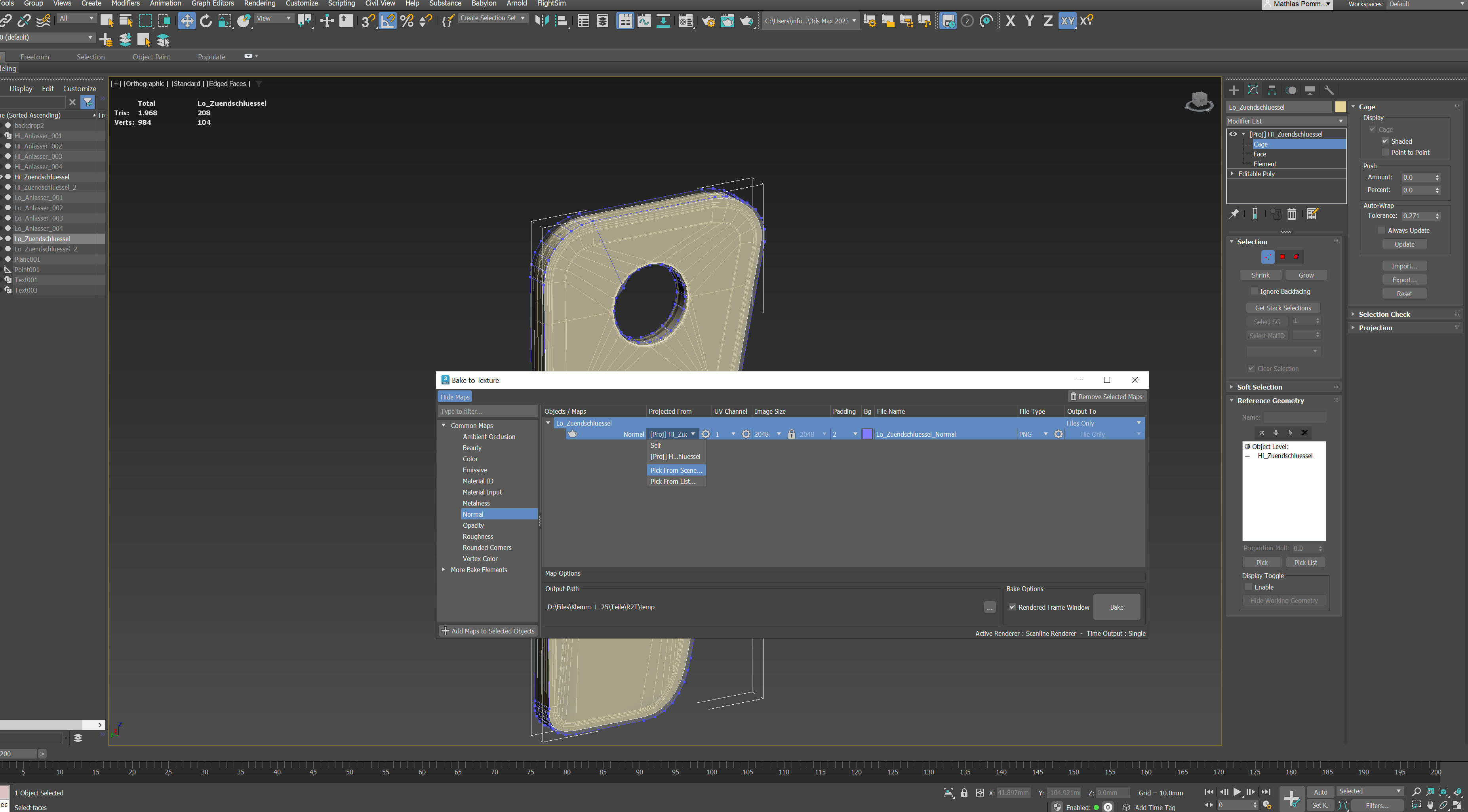
Select the low poly mesh. go to the bake to texture screen again, this time in "projected from" select the high poly mesh. A projection modifier is applied which most of the time works without tweaking, sometimes needs some adjustments.
Make your settings again and hit the Bake button.

r2t_hi_lo_2.jpg
 
Last edited:
The Photoshop native plugin (and the 3D options) have not been available since the 2022 version. Adobe are pushing everyone to Substance Painter for that. If you have a Creative Cloud subscription then you can download it under 'Install Previous Versions'. The Nvidia plugin (https://developer.nvidia.com/texture-tools-exporter) does work with Photoshop 2025.5 (the current version) and so does the Intel one (https://gametechdev.github.io/Intel-Texture-Works-Plugin/). 1.0.4 is the latest version.

And I've just discovered that my copy of Materialize has gone skipping over the hills with the leprechauns because it's been that long since I used it.
 
Back
Top