• Which the release of FS2020 we see an explosition of activity on the forun and of course we are very happy to see this. But having all questions about FS2020 in one forum becomes a bit messy. So therefore we would like to ask you all to use the following guidelines when posting your questions:

    • Tag FS2020 specific questions with the MSFS2020 tag.
    • Questions about making 3D assets can be posted in the 3D asset design forum. Either post them in the subforum of the modelling tool you use or in the general forum if they are general.
    • Questions about aircraft design can be posted in the Aircraft design forum
    • Questions about airport design can be posted in the FS2020 airport design forum. Once airport development tools have been updated for FS2020 you can post tool speciifc questions in the subforums of those tools as well of course.
    • Questions about terrain design can be posted in the FS2020 terrain design forum.
    • Questions about SimConnect can be posted in the SimConnect forum.

    Any other question that is not specific to an aspect of development or tool can be posted in the General chat forum.

    By following these guidelines we make sure that the forums remain easy to read for everybody and also that the right people can find your post to answer it.

FS2004 How to create an underpass?

Messages
22
Country
italy
Hi everybody, I have a problem with my airport scenery I'm working to.
I would like to create, as in real thing, a road with side walls and an underpass which goes under a taxiway connecting two separate airport areas.
I have no idea about creation of such a sort of slope in the terrain, which is covered by the flatten file.
But I guess that even editing the terrain mesh i could not obtain such a well defined slope simulating an underpass.
I tried a trick banking the side walls longitudinally as they get close to the taxiway to cross, so that they sink in the terrain and it looks as if the road was downhill and going under the taxi, but it only works from great distance, not when you are on runway threshold.

Any suggestion about that?
 
The first one was my thread.
It is difficult but you can get through it.

At first you have to decide what you need beside the tunnel. If you don't want to make animation (traffic, cars) go to plan A. If you want to make animation, go to plan B.

Plan A:
I think you are making under pass (under the ground). You need to make flatten first to the level that you want. Such as -3 meters to the flatten that you have for your airport. Flatten you did must be small enough that does not make a big hole in the terrain. Then you make your hill, tunnel and terrain in gmax. You need to include all the tunnel, hill and the terrain you just made in ground poly of satellite photo. Export them together as one picece and tweak asm. file as usual. You will get the tunnel under your runway and taxiway.

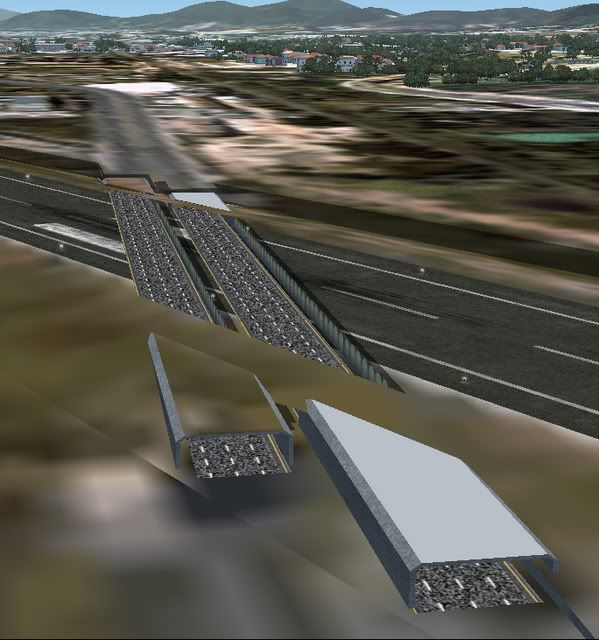
This cannot be used if you have animation under tunnel since ground poly will be seen through as this fig. The tunnel is gmax with fs2004 gamepack. So cars will been seen through as well.

tunnelproblem.jpg


Plan B:
Do the same flatten as plan A. Making Gmax tunnel and terrain but this time you have to cut the runway/taxiway which cover that part of tunnel. Make the cover bigger than the tunnel itself to help not being seen through ground poly. The layer of the runway/ taxiway can be preserve but you need to make material name for them using ZBIAS_n_(name). The bigger number will be higher. So the asphalt or concrete of the runway/taxiway will be ZBIAS_1_XXXX. The line will be ZBIAS_2_xxxx. The dirt or skid mark with DXT3 won't work so well. I had to throw them away. Then you export them with fs2004. For FSX, I haven't try that but there are ways to tweak transparency of the texture. May be skid mark and dirt can be kept. I'm not sure either ZBIAS still need to be done. May be someone can clearify this further. Actually, I have tunnel for trains too in my VTPH project. I'm not sure about convert this scenery to FSX. It might be complex and time consuming, but the result worth it.

VTPHcar01.jpg

VTPHcars.jpg

VTPHtrain.jpg
 
Last edited:
Back
Top