• Which the release of FS2020 we see an explosition of activity on the forun and of course we are very happy to see this. But having all questions about FS2020 in one forum becomes a bit messy. So therefore we would like to ask you all to use the following guidelines when posting your questions:

    • Tag FS2020 specific questions with the MSFS2020 tag.
    • Questions about making 3D assets can be posted in the 3D asset design forum. Either post them in the subforum of the modelling tool you use or in the general forum if they are general.
    • Questions about aircraft design can be posted in the Aircraft design forum
    • Questions about airport design can be posted in the FS2020 airport design forum. Once airport development tools have been updated for FS2020 you can post tool speciifc questions in the subforums of those tools as well of course.
    • Questions about terrain design can be posted in the FS2020 terrain design forum.
    • Questions about SimConnect can be posted in the SimConnect forum.

    Any other question that is not specific to an aspect of development or tool can be posted in the General chat forum.

    By following these guidelines we make sure that the forums remain easy to read for everybody and also that the right people can find your post to answer it.

How to exclude default mesh

Messages
121
Country
us-california
Gouging-Bulging_NewDEM_zps21mm6sox.jpg
Gouging-Bulging_DefaultFSX_zpslzo7grws.jpg

Gouging-Bulging_NewDEM_TMFViewer_zpsiicvyfka.jpg

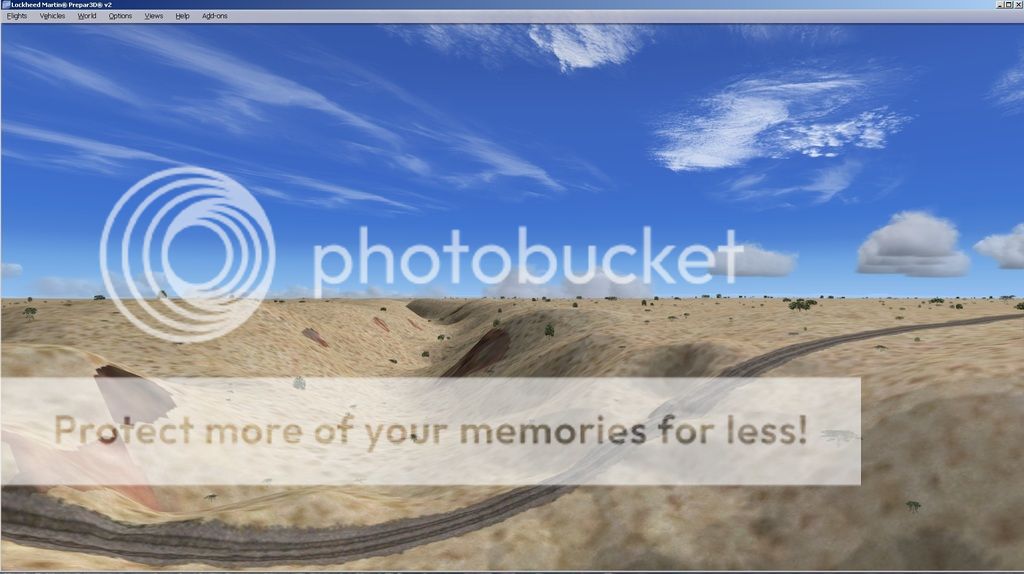
I am building a railroad bridge model across a canyon in Arizona and I wanted the mesh data to be more correct than the default low res mesh. I was able to get a Geotiff for the area (NED data) and used resample to generate a new BGL for the mesh but when I view it in FSX/P3D, I see some sort of mixing (gouging on one side and bulging on the other) of the original mesh (just underneath the bridge area) or effect from the train track texture that was there from the default. Do I need some sort of exclude polygon for the canyon area? I did look at the new mesh with TMFviewer and it doesn't show any problems in that canyon area - it is well behaved.

Thanks for any help!!

Dave
 
Last edited:
GaryGB,
WOW - thanks so much for your response. I edited my question with snapshots of the same exact view of the canyon with defaultFSX/P3D terrain versus the new DEM mesh which I have checked several ways to make sure that it sure that it is smooth in that area - see the TMF viewer (I actually looked at the raw data with MicroDEM - which generated the GeoTiff from NED data).
Hope I can return it to smooth.

Thanks again
Dave
 
GaryGB,
I tried an Exclude_All_Railways polygon in SBX and it seemed to solve the problem. I thought that railways were simply textures laid on top of the underlying Land Class - apparently not so.

Thanks again

Dave
 
Hi Dave:

Glad to see you found a work-around. :)

Indeed, it seems that on your installation, Railroads may indent the terrain mesh even on a sloped terrain surface... rather curious behavior if that object type was actually intended to impart an "offset" (via the same mechanism as ONLY used with roads in the default FSX Terrain.Cfg file ? :confused:):

https://msdn.microsoft.com/en-us/library/cc526967.aspx#texture.n

NOTE: In the original default FSX Terrain.Cfg file, "flattenoffsetmeters" is ONLY seen in association with "Stream" CVX vector textured polygon objects


//------------------------------------------------------------------------
// Vector Textures
//
// Name=human readable name
// Color=AARRGGBB (Microsoft internal use only)
// guid={xxxxxxxx-xxxx-xxxx-xxxx-xxxxxxxxxxxx} unique identifier of vector type
// LegacyId=FS9 vector identifier (optional, for backwards compatibility)
// Textures=name or names of textures to apply to this type of vector feature (see order notes below)
// Layout=TILED (for polygons)
// Layout=3_PLUS_1 or 3_PLUS_4 or 7_PLUS_4 (for lines)
// StripWidthMeters=width of line strip in meters
// Size=size of line pixels in meters (for FS9 backwards compatibility only)
// FlattenMode=none or flat or offset or slope
// FlattenOffsetMeters=used when FlattenMode=offset

{remainder omitted from this example}

//------------------------------------------------------------------------


// Stream Lines - stream lines / unknown / perennial
[Texture.0]
Name=Stream_Lines_Perennial
Color=FF01A2FF
guid={2D3FC985-A72B-473D-B23B-D78E72E63B53}
LegacyId=1024
Textures=RiverSU.bmp
Layout=3_PLUS_1
StripWidthMeters=64
Size=4
FlattenMode=offset
FlattenOffsetMeters=-1
FlattenPriority=11000
LandClassRemapType=none
ExcludeAutogen=Yes
RenderToTexture=Yes
RenderPriority=51000
Water=No

// Stream Lines - stream lines / unknown / non-perennial
[Texture.1]
Name=Stream_Lines_Non_Perennial
Color=FF01A2FF
LegacyId=1025
Textures=RiverSU.bmp
Layout=3_PLUS_1
Size=4
FlattenMode=offset
FlattenOffsetMeters=-1

FlattenPriority=10000
LandClassRemapType=natural
ExcludeAutogen=Yes
RenderToTexture=Yes
RenderPriority=50000
Water=No

Are you using FTX Global or other 3rd party add-ons which edit- or install a substitute for- ...the default FSX Terrain.Cfg file ? :scratchch

GaryGB
 
@GaryGB
No, I am not using any addons like FTX Global - just the Default plus a few homemade scenery addons.

Thanks again for thinking about this. The reference link you point to shows how much thought had to go in to the design for a synthetic world - amazing!

I have decided that MicroDEM is a pretty good tool to edit DEM and quickly make a new mesh - I can overlay contours and see changes that I make to interface with 3D models like the bridge pillars at the bottom. I could wish that a tool like Instant Scenery could do it as well. I have to go through a lot of iterations to get it just right. I still use SbuilderX to make the flatten areas for the tracks on either side of the canyon.

Dave
 
Hi Dave:

Could you attach your [FSX install path]\Terrain.Cfg file here so we can see if it has the 'edits' cited above in the listings for 'Railroad' objects ?

I'm curious exactly how the terrain anomalies occurred, and would like to better understand this (IIRC, I've not personally seen this scenario before in my own projects, but Holger once encountered something similar with his FS9 Columbia River Gorge or another PNW freeware project ...I don't recall seeing an explanation of what the cause was).

Thanks, :)

GaryGB
 
Last edited:
Hi Gary,

actually, the default railroad vectors do have an active mesh flattening effect via the FlattenMode=flat parameter. The 'offset' setting is only used if the terrain below the vector is also meant to be raised or lowered in addition to the flattening effect. In other words, Dave's screenshots show the correct and expected behavior for railroads.

// Misc vector types - railroad
[Texture.200]
Name=Railroad
Color=FF404000
guid={DDE116BF-0E97-4EB6-A9EC-7EF93D9F2D0E}
LegacyId=1210
Textures=railroadsu.bmp
Layout=3_PLUS_4
StripWidthMeters=18.3
Size=4
FlattenMode=flat
FlattenPriority=31000
LandClassRemapType=none
VectorAutogen={B4011B59-8B6B-C446-B79D-A9DA97AC3C05} (Small road with telephone poles only)
ExcludeAutogen=Yes
RenderToTexture=Yes
RenderPriority=102000
Water=No

Cheers, Holger
 
Thanks for that clarification, Holger ! :)

BTW: Do you by any chance recall the terrain anomaly I cited above which, IIRC, was shown in a screenie of one of your FS9 projects in a simFlight forum thread years ago, which had a bridge crossing a valley (somewhat similar to what the OP shows us above in this thread) ?

I was wondering if the solution that the OP used in this FSX project ...was similar to how you solved that same issue for FS9 ? :scratchch

Thanks in advance for sharing your insight on how to troubleshoot this type of scenario in both versions of MSFS. :teacher:

GaryGB
 
Quite understandable considering the vast amount of ground you have covered (literally !) since 2007. ;)


FYI: The FS9 scenario cited above showed in the accompanying screenie, rather similar terrain anomalies of irregular indentation where the bridge abutted the sloped terrain edges of the underlying valley.

The part I found intriguing was that the legacy vector textured polygon or "specified polyline width" object 'flatten offset' value (IIRC, originally the 'only' such flatten / offset type parameter variable available to us in pre-FSX scenery SDKs as "offset=flat or integer") ...would have an impact on sloped terrain as well as relatively level terrain.

And unlike the relatively "smooth" impact FlattenMode=flat 'offsets' have over comparatively "level" terrain), when superimposed on sloped terrain, FlattenMode=flat 'offsets' appear to cause variable "gouging and bulging" which exaggerates (via both positive / negative 'Z'-values within-) the terrain mesh displayed in FS at run time

...as Dave showed us in his screenies above (note the labeled "gouging and bulging").


IIUC, this suggests the "size" of the vector textured Railroad object is unable to be properly resolved on the insufficient available number of terrain vertices, which IMHO, otherwise increases risk for terrain shape anomalies when the QMID grid user Terrain Maximum Vertex Level (aka "TMVL") setting does not allow display of sufficiently small Area Points (aka "mini-quads") ...to resolve the 'requested' sloped flatten shape within the terrain mesh at run time in FS. :scratchch


But if a solution to this scenario in FS9 is likely to simply involve an exclude applied to the "valley" portion of a ex: legacy format Railroad textured vector object (just as one does in FSX), then I suppose that may best be confirmed via further testing on my part. :coffee:

Thanks again for the kind consideration of your reply. :)

GaryGB
 
Last edited:
Hi Folks

Gary -
The op's first screenie
appears to exclude the 'flattening' railroad texture ,
but still displays "gouging and bulging" in the mesh.
(bridge deck appears to display '3d modeled' railtracks, i.e. not fsx default track textures).

Guessing in creating the original mesh
someone subtracted any bridge deck elevations, (possibly programatically),
from the 'valley' intersection with the 'bridge'.

The remaining "gouging and bulging" present in the original mesh,
was possibly resulting from oblique capture shadowing of the bridge's buttresses and trusswork.
At the mesh resolution, it'd only take a couple of capture points to cause the effect.

Are the bridge model's buttresses and pillars exactly located as per IRL ?

Anyway,
WRT the OP's requirement,
a couple of sloped polys from ADE
should quickly clean up the "gouging and bulging".


re: roads, railroads, and streams
The flattening, averaged gradient, effects are present worldwide,
and especially noticeable in the third world,
e.g. Nepal.
Where GIS 'lines of communication' between mountain villages,
which IRL, are single person footpaths, involving scrambling over rocky buttresses,
have been converted into dual lane tarmac, passing through 'cuttings' in same.

Similarly in MS Flight's 'Alaska' package,
where, what was once a single line railway, (Million Dollar Bridge, Copper River),
and now since the track's been removed,
a single-lane dirt track with passing places,
is displayed as a barrier separated 4 lane tarmac'd highway.


HTH
ATB
Paul
 
Last edited:
Hi Paul:

Indeed, the OP's first screenie showing the 3D custom model of the bridge may actually have the "Railroad texture" draped over it on top as a vector textured polygon, but the screenie's angle of view does not show it.

Certainly the "Railroad texture" appears "missing" from the valley below; possibly the OP used a "hardened concrete" platform bridge deck surface to effectively prevent the otherwise terrain mesh-clinging Railroad texture from 'draping through' ...onto the valley floor below ? :scratchch

GaryGB
 
Hi guys,

looks to me as if in the screenshot with the bridge the ground textures are from a photoreal bgl making the underlying railroad vector invisible. The second screenshot shows generic landclass textures instead plus the vector.

Cheers, Holger
 
Ah, yes... that might explain it. :idea:

So, IIUC, even though the custom photo-real textures made via FSX SDK Resample are on top (and IIRC such 'PR' textures typically exclude other default cvx vector scenery content), the PR layer by itself 'alone', is still unable to fully exclude the underlying (default ?) Railroad textured vector polygon flatten 'offset' (...kinda' like the FSX version of excluding the textured VTP poly, but still needing to remove the underlying 'flatten' in a LWM file in FS8 / FS9) ? :scratchch

Thanks again for your clarification, Holger ! :)

GaryGB
 
Last edited:
Hi Gary,

photoreal layers don't technically exclude anything they just take precedence visually (sort of like using a RenderPriority= parameter value of >200,000 in the terrain.cfg, which would visually override all other vectors and polys). Thus, any underlying mesh changes imposed by local vectors or flattened polys will remain intact.

In any case the "cleanest" solution to the problem at hand, and the one the OP appears to have implemented already, is to exclude the railroad vector and then re-draw the approaches to the bridge as needed.

Cheers, Holger
 
Gary and Holger,
Thanks for the interest in the Canyon! I just got "lucky" on the exclude_railroad polygon - didn't know there was such a thing. Sbuilder is great in showing the options. Now I am using the MicroDEM tool to lift up the terrain from NED to cover the bottoms of the pillars (I might also use SBX polys)- other than that and the difficulty in aligning the track pieces with Instant Scenery 3, I am almost there. I did have to use the Model Converter X LOD generator to reduce the vertices of the bridge and the track models to get below the 65K limit. That is why the realignment of the two track sections and the bridge, and the slope of the underlying terrain make this a challenge. BTW, I'm not sure exactly where the pillars go - it is just a best fit for the whole thing. Also, that screenie at the OP area above - second one down - was just the Default - no new BGLs.
InstantScenery3_FinetuneMove_zpspyxgot8l.jpg

Canyon_070415_zpsiwm1zaij.jpg
 
Last edited:
Hi Dave:

You have mentioned your edits to IIUC, DEM source data used to make custom terrain mesh in the project area displayed in the screenies of your OP.

When the resulting terrain mesh BGL is viewed in FSX SDK TMFViewer:

* What LODs are listed in TMFViewer Menu > View > Level of Detail ?


Assuming that resulting terrain mesh was 'actively' loaded and displayed by FSX when making the screenies used in your OP above:

* what resolution in Meters between elevation data points in the source DEM were submitted to FSX SDK Resample to make the MSFS terrain mesh ?

* what resolution in Meters was set in the FSX GUI slider for terrain mesh ?

* what resolution in Meters was set in the FSX GUI slider for terrain complexity ?


In the "active" FSX.Cfg file at ex: (Windows-7)

C:\Users\[user profile name]\AppData\Roaming\Microsoft\FSX\FSX.CFG

...what was the parameter values for the following:

[TERRAIN]
LOD_RADIUS= ?
MESH_COMPLEXITY= ?
MESH_RESOLUTION= ?


Regarding your (rather nicely detailed ! ;)) custom 3D model of the railway bridge, within the MDL:

* did you attach to the texture used for the top rail-bed / deck surface, a "Platform" ...with a "Hardened / Concrete" attribute ?


Thanks in advance for your reply to these questions. :)

GaryGB
 
Last edited:
GaryGB,
Hope these answers are what you are looking for. Let me know if you need more - I appreciate your interest!
Dave
-------------------------------------------------------------------------------------------------------------------------------------------------

* What LODs are listed in TMFViewer Menu > View > Level of Detail ? Answer: LOD12 down to LOD5
* what resolution in Meters between elevation data points in the source DEM were submitted to FSX SDK Resample to make the MSFS terrain mesh ?
Answer: This is NED 1/3 Arc second data in the GeoTiff that I submitted to resample - Supposedly approx 8x10 meters at the location
Raster Download Information

Number of columns: 225
Number of rows: 182
Resolution in x direction: 9.25925926011612E-05 Degree
Resolution in y direction: 9.25925926011928E-05 Degree
Coordinate system ID Native: 4269
Top edge Native: 35.1750925913837 Degree
Bottom edge Native: 35.1582407395303 Degree
Left edge Native: -111.133333332498 Degree
Right edge Native: -111.112499999162 Degree

Coordinate system ID WGS84: 4326
Top edge WGS84: 35.1750925913837 Degree
Bottom edge WGS84: 35.1582407395303 Degree
Left edge WGS84: -111.133333332498 Degree
Right edge WGS84: -111.112499999162 Degree

* what resolution in Meters was set in the FSX GUI slider for terrain mesh ? Answer: 1 m but I tried 2, 5 and 10

* what resolution in Meters was set in the FSX GUI slider for terrain complexity ? I'm using Tesselation Factor: Ultra but I also tried disabling tessellation with highest complexity

[TERRAIN]
LOD_RADIUS= ?
MESH_COMPLEXITY= ?
MESH_RESOLUTION= ?

LOD_RADIUS=3.500000
TESSELLATION_FACTOR=90
MESH_RESOLUTION=25

* did you attach to the texture used for the top rail-bed / deck surface, a "Platform" ...with a "Hardened / Concrete" attribute ? The track is actually a 3D model with its own railbed texture - I have to use a Flatten attribute poly underneath on either side of the canyon to keep the terrain flat enough.
 
Hi Dave:

It seems that your project is for LM's Prepar3D 2.x; I have not yet begun working with that version of MSFS, so my experience with some newer aspects of the P3D.Cfg file parameters and the run time behavior of the rendering engine will of course be limited to what I've read. ;)

I will research the "Tessellation" feature to see if I can better interpret what it implements that may be different from default FSX / P3D 1.4x ...with regard to terrain flattened by "Railroad" vector textured polygons (...if anything). :scratchch


Apparently, you may not have attached a "Platform" ...with a "Hardened / Concrete" attribute to the texture used for the top rail-bed / deck surface of your custom Railroad bridge MDL.

FYI: These are implemented in some scenery to prevent AI / Ground vehicles, highway traffic etc. from "falling through" the surface of ex: a bridge.


PS: There are some freely-downloadable and more detailed elevation data sources for your project area and several famous locations in the vicinity of same, which would make some even more nicely detailed terrain mesh to fly over; feel free to let me know if you would like to find out more about this. :idea:


Thanks for your reply ! :)

GaryGB
 
Last edited:
Back
Top