• Which the release of FS2020 we see an explosition of activity on the forun and of course we are very happy to see this. But having all questions about FS2020 in one forum becomes a bit messy. So therefore we would like to ask you all to use the following guidelines when posting your questions:

    • Tag FS2020 specific questions with the MSFS2020 tag.
    • Questions about making 3D assets can be posted in the 3D asset design forum. Either post them in the subforum of the modelling tool you use or in the general forum if they are general.
    • Questions about aircraft design can be posted in the Aircraft design forum
    • Questions about airport design can be posted in the FS2020 airport design forum. Once airport development tools have been updated for FS2020 you can post tool speciifc questions in the subforums of those tools as well of course.
    • Questions about terrain design can be posted in the FS2020 terrain design forum.
    • Questions about SimConnect can be posted in the SimConnect forum.

    Any other question that is not specific to an aspect of development or tool can be posted in the General chat forum.

    By following these guidelines we make sure that the forums remain easy to read for everybody and also that the right people can find your post to answer it.

P3D v3 Identifying Buttons for LUA Scripts

Messages
502
Country
unitedstates
Hi Folks,

I am trying to create some custom LUA scripts to control various buttons on custom autopilots - what's the trick to actually identify the button to be used in the script? I am not the developer of the autopilot – just the end-user.

Regards,
Scott
 
L:Variables (local variables) The L:Vars used in the code for a given aircraft can be obtained using FSUIPC4 and the "List local panel variables" control. This will dump all the L:Vars used to the FSUIPC4.log file.

You can also use a debug feature of FSUIPC4 to display L:Vars when they are actually used when operating a control.

Then in the Lua script you use "ipc.readLvar("name") and ipc.writeLvar("Name", n) to read and write that variable.

See the FSUIPC4 documents "FSUIPC Lua Library.pdf" and "FSUIPC4 for Advanced Users.pdf" in the Modules\FSUIPC Documents folder. I believe the path is the same in P3D as it is in FSX.

Paul
 
Hi Paul,

Thanks so much for the response... Let me see if I can get this to work... Yeah - someone made a superb set of LUA scripts for the Flysimware Lear 35A - I've linked them to buttons in FSUIPC - and even went a step further and used Voice Attack to assign verbal triggers to activate them... It certainly makes flying complex aircraft certified for two pilot operation much more manageable for a single pilot and far easier than using the mouse to (tune knobs)/(press buttons)... There are other aircraft in my hangar that I'd like to do similar for...

Now I have place to start...

Regards,
Scott


Sent from my iPad using Tapatalk
 
Getting intimate with FSUIPC4 and Lua scripts will unlock a world of possibilities relating to control assignments.

I have dual Saitek throttle quads, 6 double throw switches, but I have them assigned using 'conditional' coding such
that each of my switches has up to 10 different controls assigned to each switch.

I use on pair of switches to change 'modes'. The INC and DEC the contents of one of the user-defined offsets.
The value in that offset determines which of the multiple assignments will be active on the other 5 switch pairs.

I have several complex A2A aircraft set up such that I can go from cold & dark to airborne without the need to use
the mouse, simply by selecting the correct 'mode' an manipulating the switches for that phase of operations.

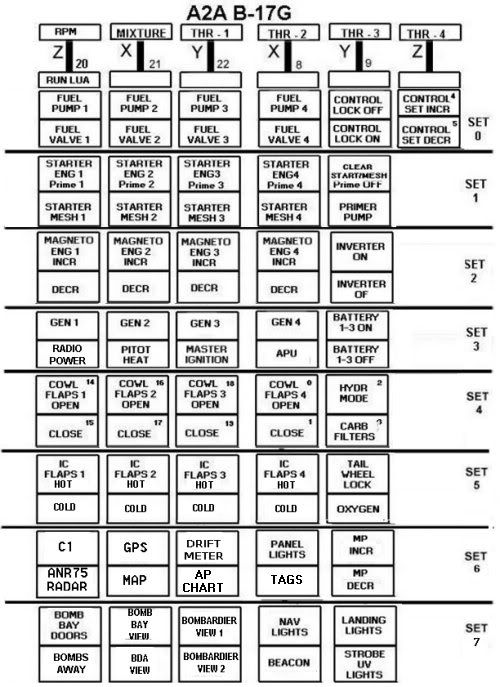
Here is a 'map' showing the 8 'modes' I have set up for the A2A B-17G:

A2A_B-17G_MAP.jpg


Using this approach one can have as many 'modes' or 'control sets' as you wish. And to
'remind me' what assignments are for a given mode, each time I select a new mode
a lua script runs and displays the current 10 assignments for that mode. I have that message
set to display for 10 seconds (can be set to any duration in the code) and I also have it
set to display if I just hit 'F10'. The Lua display is relatively small and can be positioned wherever you wish
on the screen.

I have recently started to further expand this on a new aircraft where by for each mode I can
have 10 assignments with the pinky switch on my X-45 stick 'not pressed' and another 10 assignments
for that same mode setting when I activate the pinky switch. The Lua display shows all twenty assignments
in 4 lines. I found this to make starting this particular aircraft musch easier since one must first activate
an inertia starter for the desired engine, then after several seconds select the 'mesh' or start function. Count
'6 blades' then through the mags to 'both'. When the engine catches, throw the mixture from cut-off
to rich. All done using a switch pair for the starter/mesh/mags/mixture and a single switch for the primer.

These sorts of multiple assignments can make life easier for those with just a single controller or HOTAS.

So, dig into those FSUIPC4 documents and enjoy your flying time! :)

Paul

 
Hi Paul,

Plenty to digest - thanks again for taking the time...

I've been a CH guy since the early days of "game ports" - one neat feature with their product is they have a "mode control" button which cycles through three modes of operation - basically - it creates three different virtual joystick devices for each control which allows for three different assignment to each respective button or switch...

While I've been using Flight Sim since monochrome - I just started with this Voice control thing - it's the best thing since sliced bread on complex aircraft... The program is called Voice Attack - it has a powerful yet intuitive and simple to use interface - and it's $10.00... It is rapidly turning into the best $10.00 I've spent on FS... It seems extremely accurate and seldom misses a command... I'm using it to control many copilot functions - my TrackIR - and even RC4... The program uses the MS Speech engine to "speak" to you to acknowledge orders or even read check lists... It's really changing the way a fly... If interested - I'd suggest taking a look...

Just an example of a profile I am working on - the words spoken in the left column activate the associated commands...

Disclaimer: Not related to the company in any way, shape, or form - other than being a happy customer...


Capture_zpsps8ws6k0.jpg


Regards,
Scott


Sent from my iPad using Tapatalk
 
Last edited:
A couple of the guys I fly online with in the 91st Bombardment Group use that voice activated system or one that is similar. I've not tried it as of yet but may do so in the future.

I muse to use Thrustmaster controllers back in the 90's but switched to Saitek at some point for some long forgotten reason. The Saiteck HOTAS has a 3-position 'mode' switch the same as the CH gear but I don't use it, preferring to do most everything via FSUIPC4. I do have some items such as gear and flaps set in my X-45 'profile' but that is about it.

The reason I use FSUIPC4 is the ability to have more than 3 modes....many more :) The user-defined offset that I use to hold the mode number is an 8 bit unsigned byte so theoretically I can have up to 256 modes :) So far, ten has been the max I have needed.

Thanks for the Voice Attack info. I'll have to take a look at it.

Paul
 
Back
Top