• Which the release of FS2020 we see an explosition of activity on the forun and of course we are very happy to see this. But having all questions about FS2020 in one forum becomes a bit messy. So therefore we would like to ask you all to use the following guidelines when posting your questions:

    • Tag FS2020 specific questions with the MSFS2020 tag.
    • Questions about making 3D assets can be posted in the 3D asset design forum. Either post them in the subforum of the modelling tool you use or in the general forum if they are general.
    • Questions about aircraft design can be posted in the Aircraft design forum
    • Questions about airport design can be posted in the FS2020 airport design forum. Once airport development tools have been updated for FS2020 you can post tool speciifc questions in the subforums of those tools as well of course.
    • Questions about terrain design can be posted in the FS2020 terrain design forum.
    • Questions about SimConnect can be posted in the SimConnect forum.

    Any other question that is not specific to an aspect of development or tool can be posted in the General chat forum.

    By following these guidelines we make sure that the forums remain easy to read for everybody and also that the right people can find your post to answer it.

MSFS20 Imported projected mesh is misaligned and not showing the whole object

Messages
393
Country
norway
Hello. I am having an issue with placing projected mesh into my scenery. The intent is to create detailed textured faces which is imported into the sim as a ground texture. I've partially managed to do this, but I am not entirely successful.

The current issue is that the object used as mesh is misaligned from what is set as its center axis point. I also see that the white box supposed to cover the textured area is a lot smaller than the texture itself.

The second issue is that projected mesh works in one place, but not in another. From the images below it adjust to the elevation of the ground in the left side of the image, by the fuel tank. But on the right side it disappears after passing an invisible line.

  1. Am I using projected mesh wrong?
  2. Is there a better way to represent the wanted result?

This image shows the whole projected mesh at is is supposed to be. The center axis is misaligned though.
Screenshot 2026-03-20 121503.png


This image shows the cutting effect in the right side of the image. It also shows the misaligned box.
Screenshot 2026-03-20 121540.png
 
Projected Mesh is a type of MSFS (flat) 3D Ground Polygon (aka "G-Poly") that IIUC, uses Z-Bias Material Functionality.

That may require the underlying terrain be flattened under the full extent of the G-Poly.

Did you apply a terrain flatten under the full extent of the G-Poly ?

GaryGB
 
Last edited:
Projected Mesh is a type of MSFS 3D Ground Polygon (aka "G-Poly") that IIUC, uses Z-Bias Material Functionality.

That may require the underlying terrain be flattened under the full extent of the G-Poly.

Did you apply a terrain flatten under the full extent of the G-Poly ?

GaryGB
Thanks for your input. I tried both with a flatten, and adjusting the terrain otherwise. Nothing worked.

However, I adjusted the height of the original textured face a bit up, and now it shows fine👍
 
Thanks for your input. I tried both with a flatten, and adjusting the terrain otherwise. Nothing worked.

However, I adjusted the height of the original textured face a bit up, and now it shows fine👍

[EDITED]

Scenery object placement positioning elevation sometimes eliminates display and Z-Buffer fighting Moire issues. ;)

But one must inspect the scenery in question at multiple altitudes AGL- and tangent angles of view- to verify a fix.


IIRC, Arno used (+) increments of that in MCX G-Poly Wizard as FSX had no true Z-Bias (VTP Layer-type) draw order.


One might wonder if MSFS rendering engine still can use that when displaying true FSX scenery BGLs at run time. :scratchch


NOTE: Prepar3D SDK had implemented 'Z-Bias Level' with (-) numeric values for layer offset from user camera

https://www.prepar3d.com/SDKv5/sdk/modeling/3ds_max/modeling/modeling_materials.html#ZBiasLevel


AFAIK, L-M intended that terminology to describe the "level" at which Materials were displayed in a stack of layers.

L-M also refers to that as a "Material Functionality" feature.


I need to update my knowledge, as to how Asobo implemented Z-Bias in MSFS for G-Polys / Projected Mesh.


Reportedly, Projected Mesh is supposed to 'merge' texture Material of a flat 3D G-Poly with MSFS Polygon layers.

I am not certain yet if Asobo has changed something with terrain texturing, so imported G-Polys do not "drape".


This is what MSFS SDK Docs say:

https://docs.flightsimulator.com/ht...nery_Editor/Objects/ProjectedMesh_Objects.htm


This is what Google says about it:

https://www.google.com/search?q=MSFS+Z-Bias+for+G-Polys+/+Projected+Mesh&client=firefox-b-1-d&hs=a7D&sca_esv=498a0b3614a20001&ei=PjK-abDID9e9p84PqazsgAc&biw=1200&bih=586&ved=2ahUKEwiw35nRprCTAxXX3skDHSkWG3AQ4dUDegQIBRAN&oq=MSFS+Z-Bias+for+G-Polys+/+Projected+Mesh&gs_lp=Egxnd3Mtd2l6LXNlcnAiKE1TRlMgWi1CaWFzIGZvciBHLVBvbHlzIC8gUHJvamVjdGVkIE1lc2gyBRAhGKABMgUQIRigATIFECEYoAEyBRAhGKABSL1eUMAJWMg7cAJ4AJABAJgBaaAB6AOqAQM1LjG4AQzIAQD4AQH4AQKYAgigAp8EqAIUwgIREAAYgAQYsAMYsQMYgwEYigXCAg4QABiABBiwAxixAxiDAcICFBAAGIAEGLADGLEDGIMBGIoFGI0GwgILEAAYgAQYsAMYsQPCAggQABiABBiwA8ICHBAuGIAEGNEDGEMYtAIY5wYYxwEYigUY6gLYAQHCAhYQABiABBhDGLQCGOcGGIoFGOoC2AEBwgIWEC4YgAQYQxi0AhjnBhiKBRjqAtgBAcICEBAAGAMYtAIY6gIYjwHYAQLCAhAQLhgDGLQCGOoCGI8B2AECwgIOEAAYgAQYsQMYgwEYigXCAhAQABiABBixAxhDGIMBGIoFwgILEAAYgAQYsQMYgwHCAg4QLhiABBixAxjRAxjHAcICCxAuGIAEGNEDGMcBwgIFEC4YgATCAg0QABiABBixAxhDGIoFwgITEC4YgAQYsQMY0QMYQxjHARiKBcICChAAGIAEGEMYigXCAhEQLhiABBixAxjRAxiDARjHAcICCxAuGIAEGLEDGIMBwgINEC4YgAQYsQMYQxiKBcICBRAAGIAEwgIIEC4YgAQYsQPCAgQQABgDwgIXEC4YgAQYsQMYlwUY3AQY3gQY4ATYAQLCAhwQLhiABBixAxhDGIoFGJcFGNwEGN4EGOAE2AECmAML8QV30EBndvZnW4gGAZAGCboGBAgBGAe6BgYIAhABGAqSBwM3LjGgB60-sgcDNS4xuAeOBMIHBTItNy4xyAcvgAgA&sclient=gws-wiz-serp


https://www.google.com/search?q=MSF...wgcIMC41LjIxLjbIB7YBgAgA&sclient=gws-wiz-serp


This is what Microsoft DirectX 9.0 SDK Docs say about 'Depth Bias':

https://learn.microsoft.com/en-us/windows/win32/direct3d9/depth-bias#:~:text=Polygons that are coplanar in,value as the wall does.


This is what Microsoft DirectX 9.0 SDK Docs say about 'Z-Bias':

https://learn.microsoft.com/en-us/previous-versions/windows/desktop/bb324464(v=vs.85)


This is what Google says about Microsoft DirectX 10.0 'Z-Bias':

https://www.google.com/search?q=Dir...gH4wLCBwUwLjEuNMgHE4AIAA&sclient=gws-wiz-serp


This is what Google says about Microsoft DirectX 11.0 'Z-Bias':

https://www.google.com/search?q=Dir...uAfqAsIHBTAuMS40yAcRgAgA&sclient=gws-wiz-serp


This is what Google says about Microsoft DirectX 12.0 'Z-Bias':

https://www.google.com/search?q=Dir...HlwvCBwYwLjExLjXIByiACAA&sclient=gws-wiz-serp


IIUC, Asobo implemented 'Z-Bias Level' via Draw Order ("Z" in FS 3D world = layer offset from user Camera):

https://docs.flightsimulator.com/html/Asset_Creation/3DS_Max_Plugin/Materials.htm

"Draw Order

This value modifies the sorting order, and the value can range from from -999 to 999. In the simulation, objects are sorted from back to front using the mesh center. By "mesh center" we mean the actual mesh bounding box center, not the pivot position itself (pivot position does not affect the draw order sort algorithm). As such, the Draw Order parameter can be used to offset the distance used to sort the rendering order, for cases where the meshes center doesn't provide the correct order. This can be used to avoid rendering artifacts such as flickering when multiple transparent or decal material types are on top of each other in the rendered output. This parameter is effective for Decal, Glass and Windshield materials. In the case of decals, the value strictly specifies the order in which decals are rendered, where a higher value will be drawn above and a lower value will be drawn below. In the case of Glass and Windshield materials, the value is added as an offset to the distance used to sort the objects for rendering."


IIUC, this is distinct from FS' scenery object placement positioning 'offset' factor implemented via Bias X,Y, or Z.

https://docs.flightsimulator.com/ms...ration/Environment/General_XML_Properties.htm


"<BiasXYZ />

This element is used to add an X, Y, Z bias in meters to the placement of an object. The acceptable range of values is unbound, but it is recommended that biases only be applied for small distances.
 
AttributeDescriptionTypeRequired
biasXBias along the longitudinal axis in meters.FloatYes
biasYAltitude bias in meters.FloatYes
biasZBias along the latitudinal axis in meters.FloatYes
 
This element is used in the following places:

<VisualModel>

<AttachedObject>

<SceneryObject>"


NOTE: This follows most of what FSX / P3D SDK implemented via SDK BGLComp:

https://learn.microsoft.com/en-us/p...osoft-esp/cc526978(v=msdn.10)#scenery-objects


Again, one may wonder if MSFS rendering engine still uses that when displaying true FSX scenery BGLs at run time.
:scratchch


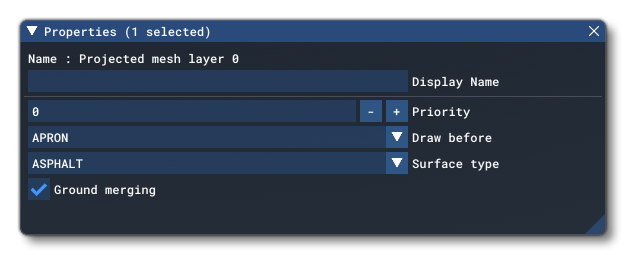
AFAIK, MSFS SDK uses Priority and Draw Before to control G-Polys intended to become Projected Mesh.

IIUC, MSFS Projected Mesh G-Polys become an 'independent' type of custom textured "Apron Polygon" that can be displayed outside a ARP Test Radius:


https://docs.flightsimulator.com/ht...nery_Editor/Objects/ProjectedMesh_Objects.htm


"Projected Mesh (Group) Properties

Projected Mesh groups have the following Properties which can be edited (regardless of whether they are within an airport or independent):

The Group Properties Window For A Projected Mesh
"

"Priority​


This option sets the render priority for the projected mesh object. The default render priority is 0, which for most cases is fine. However, if you have overlapping meshes and want one to render over another one, then you will need to change this value clicking the + or - buttons to raise or lower the priority value. Higher priority values will render over lower priorities, for example, a mesh with priority 1 will render over one with priority 0, which in turn will render over one with priority -1. Note that the engine cannot guarantee the render order for meshes with the same priority, so if you need something to always render over or under something else, you need to set this value."


"Draw Before

This option permits you to place meshes into the render hierarchy so that they are drawn under or over different elements. When you click this option, you will be shown a list of object elements which are shown in the order they are rendered. When you pick one, the projected mesh will be rendered over the previous object types, and under the subsequent types. For example, if you select MARKINGS, then the projected mesh will be rendered over Aprons, Taxiways and Runways, but under Markings, Runway Markings and Marking Text."

[END_EDIT]

GaryGB
 
Last edited:
[EDITED]

Scenery object placement positioning elevation sometimes eliminates display and Z-Buffer fighting Moire issues. ;)

But one must inspect the scenery in question at multiple altitudes AGL- and tangent angles of view- to verify a fix.


IIRC, Arno used (+) increments of that in MCX G-Poly Wizard as FSX had no true Z-Bias (VTP Layer-type) draw order.


One might wonder if MSFS rendering engine still can use that when displaying true FSX scenery BGLs at run time. :scratchch


NOTE: Prepar3D SDK had implemented 'Z-Bias Level' with (-) numeric values for layer offset from user camera

https://www.prepar3d.com/SDKv5/sdk/modeling/3ds_max/modeling/modeling_materials.html#ZBiasLevel


AFAIK, L-M intended that terminology to describe the "level" at which Materials were displayed in a stack of layers.

L-M also refers to that as a "Material Functionality" feature.


I need to update my knowledge, as to how Asobo implemented Z-Bias in MSFS for G-Polys / Projected Mesh.


Reportedly, Projected Mesh is supposed to 'merge' texture Material of a flat 3D G-Poly with MSFS Polygon layers.

I am not certain yet if Asobo has changed something with terrain texturing, so imported G-Polys do not "drape".


This is what MSFS SDK Docs say:

https://docs.flightsimulator.com/ht...nery_Editor/Objects/ProjectedMesh_Objects.htm


This is what Google says about it:

https://www.google.com/search?q=MSFS+Z-Bias+for+G-Polys+/+Projected+Mesh&client=firefox-b-1-d&hs=a7D&sca_esv=498a0b3614a20001&ei=PjK-abDID9e9p84PqazsgAc&biw=1200&bih=586&ved=2ahUKEwiw35nRprCTAxXX3skDHSkWG3AQ4dUDegQIBRAN&oq=MSFS+Z-Bias+for+G-Polys+/+Projected+Mesh&gs_lp=Egxnd3Mtd2l6LXNlcnAiKE1TRlMgWi1CaWFzIGZvciBHLVBvbHlzIC8gUHJvamVjdGVkIE1lc2gyBRAhGKABMgUQIRigATIFECEYoAEyBRAhGKABSL1eUMAJWMg7cAJ4AJABAJgBaaAB6AOqAQM1LjG4AQzIAQD4AQH4AQKYAgigAp8EqAIUwgIREAAYgAQYsAMYsQMYgwEYigXCAg4QABiABBiwAxixAxiDAcICFBAAGIAEGLADGLEDGIMBGIoFGI0GwgILEAAYgAQYsAMYsQPCAggQABiABBiwA8ICHBAuGIAEGNEDGEMYtAIY5wYYxwEYigUY6gLYAQHCAhYQABiABBhDGLQCGOcGGIoFGOoC2AEBwgIWEC4YgAQYQxi0AhjnBhiKBRjqAtgBAcICEBAAGAMYtAIY6gIYjwHYAQLCAhAQLhgDGLQCGOoCGI8B2AECwgIOEAAYgAQYsQMYgwEYigXCAhAQABiABBixAxhDGIMBGIoFwgILEAAYgAQYsQMYgwHCAg4QLhiABBixAxjRAxjHAcICCxAuGIAEGNEDGMcBwgIFEC4YgATCAg0QABiABBixAxhDGIoFwgITEC4YgAQYsQMY0QMYQxjHARiKBcICChAAGIAEGEMYigXCAhEQLhiABBixAxjRAxiDARjHAcICCxAuGIAEGLEDGIMBwgINEC4YgAQYsQMYQxiKBcICBRAAGIAEwgIIEC4YgAQYsQPCAgQQABgDwgIXEC4YgAQYsQMYlwUY3AQY3gQY4ATYAQLCAhwQLhiABBixAxhDGIoFGJcFGNwEGN4EGOAE2AECmAML8QV30EBndvZnW4gGAZAGCboGBAgBGAe6BgYIAhABGAqSBwM3LjGgB60-sgcDNS4xuAeOBMIHBTItNy4xyAcvgAgA&sclient=gws-wiz-serp


https://www.google.com/search?q=MSF...wgcIMC41LjIxLjbIB7YBgAgA&sclient=gws-wiz-serp


This is what Microsoft DirectX 9.0 SDK Docs say about 'Depth Bias':

https://learn.microsoft.com/en-us/windows/win32/direct3d9/depth-bias#:~:text=Polygons that are coplanar in,value as the wall does.


This is what Microsoft DirectX 9.0 SDK Docs say about 'Z-Bias':

https://learn.microsoft.com/en-us/previous-versions/windows/desktop/bb324464(v=vs.85)


This is what Google says about Microsoft DirectX 10.0 'Z-Bias':

https://www.google.com/search?q=Dir...gH4wLCBwUwLjEuNMgHE4AIAA&sclient=gws-wiz-serp


This is what Google says about Microsoft DirectX 11.0 'Z-Bias':

https://www.google.com/search?q=Dir...uAfqAsIHBTAuMS40yAcRgAgA&sclient=gws-wiz-serp


This is what Google says about Microsoft DirectX 12.0 'Z-Bias':

https://www.google.com/search?q=Dir...HlwvCBwYwLjExLjXIByiACAA&sclient=gws-wiz-serp


IIUC, Asobo implemented 'Z-Bias Level' via Draw Order ("Z" in FS 3D world = layer offset from user Camera):

https://docs.flightsimulator.com/html/Asset_Creation/3DS_Max_Plugin/Materials.htm

"Draw Order

This value modifies the sorting order, and the value can range from from -999 to 999. In the simulation, objects are sorted from back to front using the mesh center. By "mesh center" we mean the actual mesh bounding box center, not the pivot position itself (pivot position does not affect the draw order sort algorithm). As such, the Draw Order parameter can be used to offset the distance used to sort the rendering order, for cases where the meshes center doesn't provide the correct order. This can be used to avoid rendering artifacts such as flickering when multiple transparent or decal material types are on top of each other in the rendered output. This parameter is effective for Decal, Glass and Windshield materials. In the case of decals, the value strictly specifies the order in which decals are rendered, where a higher value will be drawn above and a lower value will be drawn below. In the case of Glass and Windshield materials, the value is added as an offset to the distance used to sort the objects for rendering."


IIUC, this is distinct from FS' scenery object placement positioning 'offset' factor implemented via Bias X,Y, or Z.

https://docs.flightsimulator.com/ms...ration/Environment/General_XML_Properties.htm


"<BiasXYZ />

This element is used to add an X, Y, Z bias in meters to the placement of an object. The acceptable range of values is unbound, but it is recommended that biases only be applied for small distances.
 
AttributeDescriptionTypeRequired
biasXBias along the longitudinal axis in meters.FloatYes
biasYAltitude bias in meters.FloatYes
biasZBias along the latitudinal axis in meters.FloatYes
 
This element is used in the following places:

<VisualModel>

<AttachedObject>

<SceneryObject>"


NOTE: This follows most of what FSX / P3D SDK implemented via SDK BGLComp:

https://learn.microsoft.com/en-us/p...osoft-esp/cc526978(v=msdn.10)#scenery-objects


Again, one may wonder if MSFS rendering engine still uses that when displaying true FSX scenery BGLs at run time.
:scratchch


AFAIK, MSFS SDK uses Priority and Draw Before to control G-Polys intended to become Projected Mesh.

IIUC, MSFS Projected Mesh G-Polys become an 'independent' type of custom textured "Apron Polygon" that can be displayed outside a ARP Test Radius:


https://docs.flightsimulator.com/ht...nery_Editor/Objects/ProjectedMesh_Objects.htm


"Projected Mesh (Group) Properties

Projected Mesh groups have the following Properties which can be edited (regardless of whether they are within an airport or independent):

The Group Properties Window For A Projected Mesh
"

"Priority​


This option sets the render priority for the projected mesh object. The default render priority is 0, which for most cases is fine. However, if you have overlapping meshes and want one to render over another one, then you will need to change this value clicking the + or - buttons to raise or lower the priority value. Higher priority values will render over lower priorities, for example, a mesh with priority 1 will render over one with priority 0, which in turn will render over one with priority -1. Note that the engine cannot guarantee the render order for meshes with the same priority, so if you need something to always render over or under something else, you need to set this value."


"Draw Before

This option permits you to place meshes into the render hierarchy so that they are drawn under or over different elements. When you click this option, you will be shown a list of object elements which are shown in the order they are rendered. When you pick one, the projected mesh will be rendered over the previous object types, and under the subsequent types. For example, if you select MARKINGS, then the projected mesh will be rendered over Aprons, Taxiways and Runways, but under Markings, Runway Markings and Marking Text."

[END_EDIT]

GaryGB

Thanks Gary for taking the time providing the information above.

I've tested this abit further and it seems the issue is solved by raising the textured face above the ground. I've had success so far by raising it 1m/3ft.
 
Thanks Gary for taking the time providing the information above.

I've tested this abit further and it seems the issue is solved by raising the textured face above the ground. I've had success so far by raising it 1m/3ft.

I am glad you have a method that works for you. :)

[EDITED]

FYI: Google Earth shows that the terrain at the point shown in your OP screenshot above, is 80 Ft. but the Helipad is 77 Ft.

Raising the placement AGL of the flat G-Poly by 3 Ft. allows the entire surface of the G-Poly to show its mapped texture Material.


My concern is that IIUC, the MSFS SDK workflow for creating Projected Mesh is not bring used / working as in SDK Docs.

My concern also is that IIUC, the MSFS SDK workflow for creating Terraformed (flat) Terrain Mesh is not working as in SDK Docs.

[END_EDIT]


Might it be a SDK transition allowing FS2Kx behavior in how flat 3D model-based G-Polys work relative to terrain ? :scratchch


If so, it may be a good thing, if it allows us to display even higher resolution mapped texture Materials / other attributes.


GaryGB
 
Last edited:
Thinking on this a bit further:

It may be the expectation that as the texture image Material is mapped to a Polygon, MSFS expects flat local terrain.

Perhaps a better method to apply aerial images over variable non-flat terrain is (you guessed it) ...aerial imagery. ;)

[EDITED]

Texture Materials map onto a single altitude (flat) Polygon in Projected Mesh.

Texture Materials map onto a variable altitude surface of local terrain in aerial imagery.


Whereas FS2Kx SDK Resample has a more complex workflow, small areas of MSFS aerial imagery are relatively easy.

It must be kept in mind that aerial imagery will "drape" onto either flat- or non-flat- terrain surfaces.

[END_EDIT]


https://docs.flightsimulator.com/ms..._Tutorials/Samples/Sceneries/SimpleAerial.htm

https://docs.flightsimulator.com/msfs2024/html/5_Content_Configuration/Environment/Terrain/CGL_Aerial_XML_Properties.htm?rhhlterm=aerial aerials


This web map viewer converts Geographic Coordinates to BING aerial imagery Tile QuadKey by zoom level: :wizard:

https://9revolution9.com/tools/geo/geocode


https://www.fsdeveloper.com/forum/t...hes-from-custom-sat-image.459867/#post-932841


One might also blend via Offset- then colorize- a default texture Material applied as a Decal (see mamu's video):

https://www.fsdeveloper.com/forum/threads/cant-fix-the-clouds-tile-pictures-msfs.458049/post-921170


...or this video by BenneyBoy444


GaryGB
 
Last edited:
It may be in the way you created the original material in Blender.
This is what I found -
1) You must have a pbr texture - simply shading something white I found will not work reliably
2) You must apply All Transforms to the mess
3) Export into msfs as a normal mesh object
you may have to play around with -above Runways etc to get it right.

Hope this helps.
 
Hi again, Vetle:


As I think on this scenario again with placement of a glTF flat 3D G-Poly for Projected Mesh:

If local terrain is flat via terraforming, a glTF placed without Ground Merging, may be "offset" in lieu of these parameters:

* Draw Before (= MSFS SDK implementation of DirectX 11 or 12 "Depth Bias")

* Priority

* Altitude AGL

* Snap To Ground

* Snap To Normal


BTW: MSFS SDK Docs do not specify this, but local terrain must be flat with glTF flat 3D G-Poly into Projected Mesh:

https://www.fsdeveloper.com/forum/threads/custom-markings-using-projected-mesh.454932/post-899831

NOTE: Dick's worked example linked above, shows an "offset" in placement parameters for his glTF used for Projected Mesh.


AFAIK, if we do not choose "Ground Merging", a glTF flat 3D G-Poly persists as a discrete 3D object not "Merged" into terrain.

IIUC, you are manually raising the flat 3D G-Polys Altitude AGL over local terrain, rather than using the "offset" option.

[EDITED]

You stated that you terraformed local terrain to be flat; if that were successful, you may not have needed to raise the G-Poly. :scratchch


Now to correlate SDK Docs info, we might test doing this glTF placement using BiasXYZ. :coffee:

https://docs.flightsimulator.com/ht...nitions.htm?rhhlterm=biasxyz&rhsearch=BiasXYZ

"
<BiasXYZ />

This element is used to add an X, Y, Z bias in meters to the placement of an object. The acceptable range of values is unbound, but it is recommended that biases only be applied for small distances.

AttributeDescriptionTypeRequired
biasXBias along the longitudinal axis in meters.FloatYes
biasYAltitude bias in meters.FloatYes
biasZBias along the latitudinal axis in meters.FloatYes


This element is used in the following places:

<VisualModel>
<AttachedObject>
<SceneryObject>"


NOTE: In FS2Kx we would use BiasZ, since SDK 3D world Axes were based on X, Y, Z being oriented as:

X = Left / Right (Relative To Horizontal Plane) = Longitude
Y = Forward / Backward (Relative To Horizontal Plane) = Latitude
Z = Up / Down Elevation (Relative To Horizontal Plane) = Altitude

...Asobo has changed MSFS' definition of 3D world Axes, and has swapped Z and Y Axis orientation, so now we use biasY: :banghead:

X = Left / Right (Relative To Horizontal Plane) = Longitude
Y = Up / Down Elevation (Relative To Horizontal Plane) = Altitude
Z = Forward / Backward (Relative To Horizontal Plane) = Latitude

https://www.fsdeveloper.com/forum/t...ects-which-can-be-compiled.452873/post-885180


AFAIK, Asobo's arbitrary change is contrary to MSFS rendering via Direct3D / DirectX, and a predominant 3D industry standard.

I suspect 'Blender-mania' may have influenced this decision. :duck:

[END_EDIT]


IIUC, a glTF flat 3D G-Poly in DevMode Scenery Editor as a discrete 3D 'Scenery Object' not "Merged" into terrain, can use BiasXYZ.


AFAIK, a glTF flat 3D G-Poly may also be compiled as one of multiple objects inside a Scenery Object Library (ModelLib).


But on a practical basis, it may be less confusing to keep such glTF flat 3D G-Polys as separate 'special purpose' objects.


That may help maintain a more congruent correlation with the way the Scenery Editor forms an asset entry for Projected Mesh:

https://docs.flightsimulator.com/ht...ry_Editor/Objects/ProjectedMesh_Objects.htm#h


"Projected Mesh Properties

Projected mesh objects have the following Properties which can be edited:

The Properties Window For A Projected Mesh


Note that projected mesh objects will be shown automatically as invisible, locked, and unable to be edited in The Scenery Contents List:


This is because, while editing the scenery, the actual object is used to create the projected mesh, but this object is not required by the final package as the mesh will be baked into the glTF file. So, you edit the projected mesh group, not the object it contains that creates the mesh."


GaryGB
 
Last edited:
It may be in the way you created the original material in Blender.
This is what I found -
1) You must have a pbr texture - simply shading something white I found will not work reliably
2) You must apply All Transforms to the mess
3) Export into msfs as a normal mesh object
you may have to play around with -above Runways etc to get it right.

Hope this helps.

Surprisingly, Asobo has not yet made MSFS SDK more accommodating to developers seeking to implement Projected Mesh. :banghead:

https://devsupport.flightsimulator.com/t/problems-with-projected-mesh/3285/14

"FlyingRaccoon

TDM_SceneryDesi_xblms

Nov 2021

Hello @TDM_SceneryDesign

Sorry for the delay in our answer. The projected meshes are not taking any additional transformation into account at the moment. You want to make sure your transformations are applied to the mesh before exporting your GLTF. In your case, the scale and rotation are stored in the GLTF object node and therefore not applied when using that object as a projected mesh. We added a warning when transformations are detected in an object used for projected mesh and the documentation will also be updated to make sure this is stated. We also are planning to implement transformation support in future updates.

Regards, Asobo / Sylvain"

GaryGB
 
Last edited:
Back
Top