• Which the release of FS2020 we see an explosition of activity on the forun and of course we are very happy to see this. But having all questions about FS2020 in one forum becomes a bit messy. So therefore we would like to ask you all to use the following guidelines when posting your questions:

    • Tag FS2020 specific questions with the MSFS2020 tag.
    • Questions about making 3D assets can be posted in the 3D asset design forum. Either post them in the subforum of the modelling tool you use or in the general forum if they are general.
    • Questions about aircraft design can be posted in the Aircraft design forum
    • Questions about airport design can be posted in the FS2020 airport design forum. Once airport development tools have been updated for FS2020 you can post tool speciifc questions in the subforums of those tools as well of course.
    • Questions about terrain design can be posted in the FS2020 terrain design forum.
    • Questions about SimConnect can be posted in the SimConnect forum.

    Any other question that is not specific to an aspect of development or tool can be posted in the General chat forum.

    By following these guidelines we make sure that the forums remain easy to read for everybody and also that the right people can find your post to answer it.

MSFS20 Importing Object From Sketchup to MSFS Missing object

Messages
27
Country
algeria
I have a problem when trying to import objects to msfs from SketchUp can someone help me please
1-I Exported the SketchUp to msfs as msfs scenery package 3d gitf.
2-i copied the files to the modellib folder inside package sources.
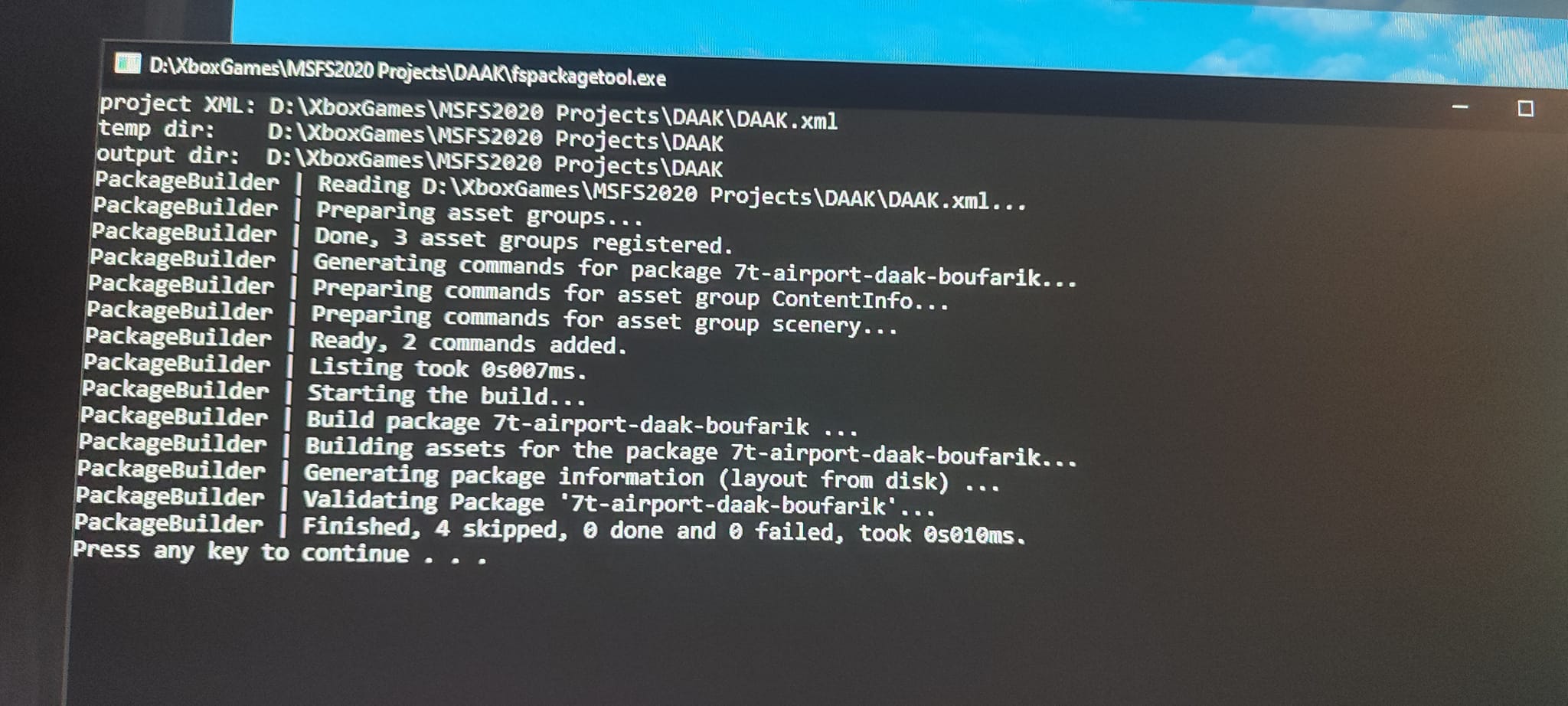
2-I built the package using fspackage tool
But when I load the project I can't find my object even if I select all objects .
457373635_1557806145173537_4433610717786220681_n.jpg
457789013_1557806228506862_5666718318345181882_n.jpg
457248600_1557806315173520_13893586109455017_n.jpg
457404540_1557806368506848_3730158650083847670_n.jpg
457498901_1557806425173509_8798660132703837987_n.jpg
457370008_1557806495173502_783256685426906866_n.jpg
457498323_1557806561840162_590087974508530504_n.jpg


I Cant find The object
457497733_1557806625173489_8606359241407634587_n.jpg
 
Your project seems quite small at this point. Why not zip all your project folder, put it in cloud storage ( Google Drive?) and give us a link. Then we can recreate your project and find the problem. I'm quite sure the problem is not from Sketchup, but either from the blender export, or a problem in your Project folder setup.
 
The link Is not public, you need to set the privacy to "anyone has the link" or whatever they translated it

Anyways, from the screeshots and fspackagetool I can't see a modellib assetgroups, thus your model is not compiled
I see, instead, 2 different packages, that is most likely not what you want

(In the meantime, texture folder should be lowercase)
 
First, your PackageDefinitions file (7t-airport-daak-boufarik.xml) needs to reference the models:

XML:
<?xml version="1.0" encoding="utf-8"?>
<AssetPackage Version="0.1.0">
    <ItemSettings>
        <ContentType>SCENERY</ContentType>
        <Title>DAAK AFB</Title>
        <Manufacturer/>
        <Creator>anis</Creator>
    </ItemSettings>
    <Flags>
        <VisibleInStore>false</VisibleInStore>
        <CanBeReferenced>false</CanBeReferenced>
    </Flags>
    <AssetGroups>
        <AssetGroup Name="ContentInfo">
            <Type>ContentInfo</Type>
            <Flags>
                <FSXCompatibility>false</FSXCompatibility>
            </Flags>
            <AssetDir>PackageDefinitions\7t-airport-daak-boufarik\ContentInfo\</AssetDir>
            <OutputDir>ContentInfo\7t-airport-daak-boufarik\</OutputDir>
        </AssetGroup>
        <AssetGroup Name="scenery">
            <Type>BGL</Type>
            <Flags>
                <FSXCompatibility>false</FSXCompatibility>
            </Flags>
            <AssetDir>PackageSources\Scenery\airport-daak-boufarik\scenery\</AssetDir>
            <OutputDir>Scenery\airport-daak-boufarik\scenery\</OutputDir>
        </AssetGroup>

        <AssetGroup Name="models">
            <Type>ModelLib</Type>
            <Flags>
                <FSXCompatibility>false</FSXCompatibility>
            </Flags>
            <AssetDir>PackageSources\ModelLib\</AssetDir>
            <OutputDir>Scenery\airport-daak-boufarik\ModelLibrary\</OutputDir>
        </AssetGroup>

    </AssetGroups>
</AssetPackage>

Without this change, the compiler has no idea you have models.
Next, your .gltf file has the wrong BIN file referenced. Near the end of the daaktower.gltf file you have "uri": "DAAK TOWER.bin", when it should be "uri": "daaktower.bin" ( the actual name of the BIN file). You can change this and save it with a text editor.

I see this model was converted with ModelConverterX. The materials could be converted to PNG using the Textures tab of the Material Editor. It will compile with the DDS textures, but the compiler expects PNG. Most modeling programs would also prefer PNG for the texture format.
 
You need to change the Package Definition file (7t-airport-daak-boufarik.xml) as shown above, or else the model will not compile.

Untitled.png
 
I Copied the text above to the main XML file
IOIO-.JPG


But When i tried to drop the xml on the fspackagetool this error appeared
IOIO.JPG


I started the sim and searched for the object withou a result
Sorry for bothering you can you please see where I'm wrong
A-DAAK AFB.zip
 
Last edited:
Question, why are you importing from Sketchup to Blender? Seems like an extra step you may not need.

Do you not use MCX?
 
Hello HADDAD:

So, IIUC, you used Sketchup exclusively, and Blender was not a part of the workflow under discussion here? :scratchch

If so, be aware that you opened this thread in the Blender forum (a common error for 3D modeling newcomers here).


If you are currently using Sketchup exclusively for a particular project, you may wish to discuss it in Sketchup forum:

https://www.fsdeveloper.com/forum/forums/sketchup.112/


Regardless, you did successfully receive some replies to your inquiry thus far. ;)


If you have not done so already, you may wish to review these threads here at FSDev, and the linked videos: :idea:

https://www.fsdeveloper.com/forum/t...models-from-google-earth-into-the-sim.448567/


https://www.fsdeveloper.com/forum/t...tten-transcription-of-risuali45-video.448507/


Note: The youtube video author commented he found a Sketchup > MCX > MSFS export path easier than via Blender:

[Tutorial]Easiest Method to Convert Google earth/Sketchup Models For Flight Simulator 2020(3minutes)


GaryGB
 
Last edited:
Thanks Garry I saw all the videos on youtube before posting in this forum
honestly I know nothing about programmation (XML . Python ...) I wish they make a software to make things simple
Its hard for peoples like me too understand those things
 
Back
Top