• Which the release of FS2020 we see an explosition of activity on the forun and of course we are very happy to see this. But having all questions about FS2020 in one forum becomes a bit messy. So therefore we would like to ask you all to use the following guidelines when posting your questions:

    • Tag FS2020 specific questions with the MSFS2020 tag.
    • Questions about making 3D assets can be posted in the 3D asset design forum. Either post them in the subforum of the modelling tool you use or in the general forum if they are general.
    • Questions about aircraft design can be posted in the Aircraft design forum
    • Questions about airport design can be posted in the FS2020 airport design forum. Once airport development tools have been updated for FS2020 you can post tool speciifc questions in the subforums of those tools as well of course.
    • Questions about terrain design can be posted in the FS2020 terrain design forum.
    • Questions about SimConnect can be posted in the SimConnect forum.

    Any other question that is not specific to an aspect of development or tool can be posted in the General chat forum.

    By following these guidelines we make sure that the forums remain easy to read for everybody and also that the right people can find your post to answer it.

FSX Install SDK without FSX?

Messages
154
Country
unitedkingdom
Hi all,

I would like to use a laptop to do some GMax design work but cannot export to an FSX mdl as the SDK is not currently installed.

Am I right in thinking that I cannot install the SDK without also first installing FSX? (I cannot check myself as currently I've not got the FSX disks with me to try to install the SDK).

If I cannot install the SDK I guess I could still copy the gamepack files to the laptop to create "FSX ready" gmax files, but would have to compile them on my desktop PC later. Would this work?

Many thanks

Phil
 
No, you cannot "install" the SDK(s) without FSX being installed on the local machine, as the SDK installer looks for the Registry entries for FSX to locate the Root Folder Setup Path...

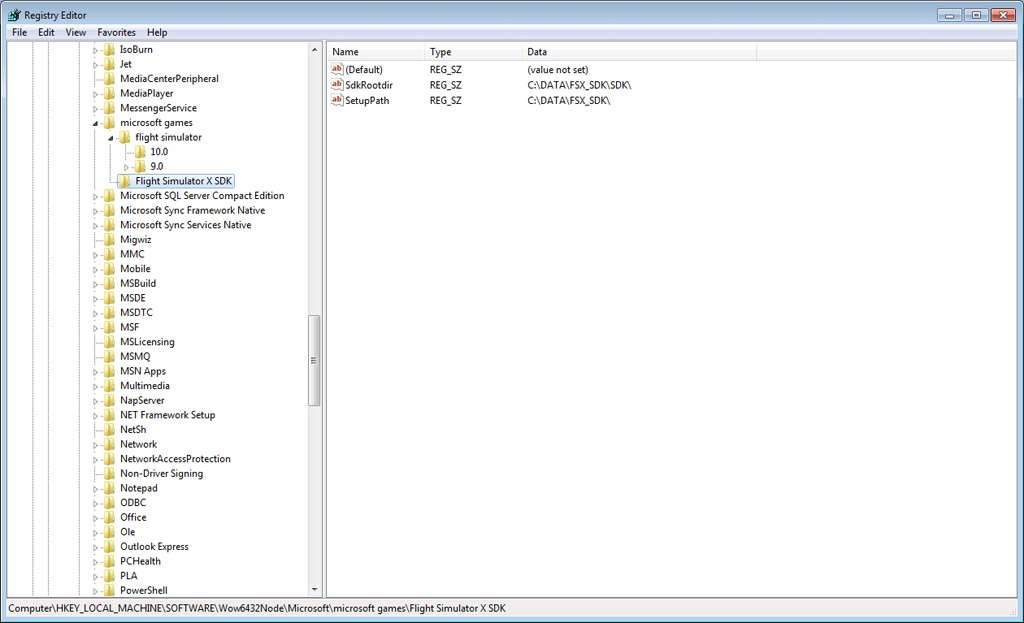
...however, you can copy the entire SDK from one machine to another, and then create the required Registry entries for the SDK manually. Fortunately it's not terribly complex, as are the entries for FSX itself!

This is necessary because the MaxScripts used in the FSX SDK look for the Registry entry values to build the pathnames when they are run.

1. Create a new Key for "microsoft games"
2. Create a new Key for "Flight Simulator X SDK" as a child of "microsoft games"
3. Create a new String Value for "SdkRootdir", and Edit the Value to point to where you've copy/pasted the FSX SDK (don't forget the final \)
4. Create a new String Value for "SetupPath", and Edit the Value to point to where you've copy/pasted the FSX SDK using the pattern shown in the screenshot (again, don't forget the final \).

esdgglobalexpress000003.jpg
 
Hi Bill,

Many thanks for the detailed reply, I'll give it a go later!

Phil

No problem. As it happens, your question was serendipitously timed, as I was actually in the process of doing precisely this at the time you asked!!!

I had forgotten to (re)create the Registry entries myself, and couldn't figure out why the Max9 FSX Tools wouldn't work properly... :rotfl:

I don't have FS9 or FSX installed on my development machine at all, even though I model and program gauges on it every day. I have another computer in the other room that is a dedicated FS machine, and everything is saved across the network to that computer.
 
Bernardo, I wrote four simple steps in very clear English, and even provided a screenshot to illustrate.

I honestly do not know how to make it even more clear... :confused:
 
Then you did something wrong. What that "something" might be I have no way of knowing, since I can't sit in front of your computer. ;)
 
Have another option i discovered that works , after having tried the other methods , regedit, folder location i decided to install from disk, just the 3 SDK exe`s in sequence , rtm from the delux disk one and Accell with 1a and sp2.


To my utter astonishment max booted up perfectly with tools and export working as expected.

Didnt need to install FSX afterall , go figure.
 
Thanks Chuck, then you are saying that just installing the Sdk could work ?, it would be great. :cool:
 
Last edited:
I tried but gmax give me an error, something about microsoft.directx.direct3dx is not found. weird thing because both computer, laptop and tower have the same software, but one W7 34 and the other which work w/ 64 bits.but I can live without this.:o
Anyway good you get that working, congratulations.will be interesting if you could work with modelconvetex and another tools as well.:confused::D
 
During the setup process i installed MSXML 4.0 Service Pack 3 , a required runtime and wasnt sure it was in the W7 os , i tried to cover all the bases having wired 2 new hp W7 computers into the network over the holiday period due to post Xmas deals too good to ignore at tiger direct. I noticed a bunch of old stuff wasn`t included with W7 and a bunch new stuff came pre loaded i wish wasnt , the 107 updates it needed was no comfort but i digress.

Re bouncing models , to some extent i contributed a chapter to the book on the subject, ( Google ) though by bouncing to 3ds files for exchanging between max and gmax , blender is another tool in the kit as is model converter x .

No tool can compare to BFF in value , had my bacon saved with that so often i should send a donation to the scripts author.
 
Last edited:
What mean "re bouncing models" ? :D
I don't know if involve myself in this issue, there are many bits here with developing to tie up, to mess up moreover.
 
Back
Top